Get Started with API
Start making API calls to WaveSpeedAI in minutes.
Step 1: Get Your API Key
- Go to API Keys
- Enter a name and click Generate
- Copy your key and save it securely
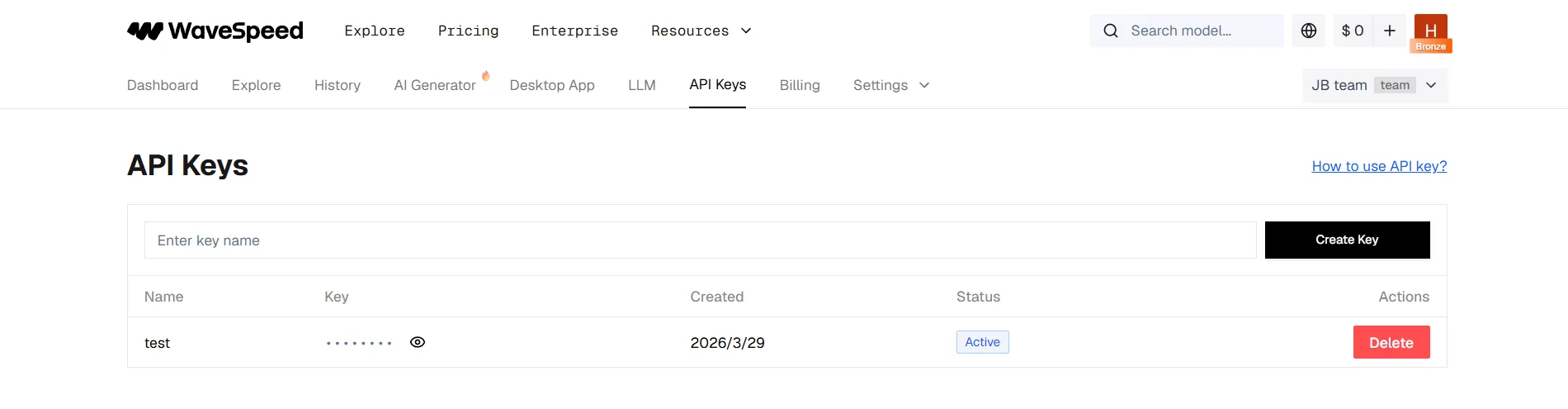
Important: API keys are active as soon as they are generated; a top-up is not required to activate them. Some models require a paid organization, and billable requests require sufficient credits.
Team permissions: Owners and Admins have full API access. Developer keys run models and read the organization’s predictions and balance, but cannot read itemized charges or usage statistics. Billing keys read balance, charges, and usage, but cannot run models. Invoices, payments, and organization billing information are dashboard-only. See API Authentication and Role Permissions.
Step 2: Submit a Task
Send a POST request to generate content. Here’s an example using the Z-Image Turbo model:
cURL
curl --fail-with-body --connect-timeout 10 --max-time 60 \
  -X POST "https://api.wavespeed.ai/api/v3/wavespeed-ai/z-image/turbo" \
  -H "Authorization: Bearer $WAVESPEED_API_KEY" \
  -H "Content-Type: application/json" \
  -d '{"prompt": "A cat wearing a space suit", "size": "1024*1024"}'
Python
import requests
import os

response = requests.post(
    "https://api.wavespeed.ai/api/v3/wavespeed-ai/z-image/turbo",
    headers={
        "Authorization": f"Bearer {os.environ['WAVESPEED_API_KEY']}",
        "Content-Type": "application/json"
    },
    json={"prompt": "A cat wearing a space suit", "size": "1024*1024"},
    timeout=(10, 60),
)
response.raise_for_status()
body = response.json()
if body.get("code") != 200:
    raise RuntimeError(body.get("message", "Task submission failed"))
print(body["data"])
JavaScript
const apiKey = process.env.WAVESPEED_API_KEY;
if (!apiKey) throw new Error("Set WAVESPEED_API_KEY");

const response = await fetch("https://api.wavespeed.ai/api/v3/wavespeed-ai/z-image/turbo", {
    method: "POST",
    headers: {
        "Authorization": `Bearer ${apiKey}`,
        "Content-Type": "application/json"
    },
    body: JSON.stringify({
        prompt: "A cat wearing a space suit",
        size: "1024*1024"
    }),
    signal: AbortSignal.timeout(60_000)
});
const text = await response.text();
let body;
try { body = JSON.parse(text); } catch { body = { message: text }; }
if (!response.ok || body.code !== 200) {
    throw new Error(body.message || `HTTP ${response.status}`);
}
console.log(body.data);
The submission examples intentionally do not retry POST automatically. If the connection drops after the server accepts a request, blindly retrying can create and bill a duplicate prediction. Safe GET result queries can be retried.
Response:
{
  "code": 200,
  "message": "success",
  "data": {
    "id": "abc123-task-id",
    "status": "created",
    "urls": {
      "get": "https://api.wavespeed.ai/api/v3/predictions/abc123-task-id/result"
    }
  }
}
Save the id — you’ll need it to retrieve your result.
Step 3: Get the Result
Poll the result URL until the task is complete:
Start with a 2-second polling interval. For long-running tasks, gradually increase it to 5–10 seconds to reduce unnecessary traffic. Return outputs on completed; stop with an error on failed, cancelled, timeout, or deleted; continue polling for every other status. Tasks can run for a long time, so the examples below have no overall time limit; each request has its own timeout, and a client-side timeout does not mean the task failed. See Errors, Retries and Timeouts.
cURL
curl --fail-with-body --connect-timeout 10 --max-time 30 \
  --retry 4 --retry-all-errors --retry-delay 1 \
  "https://api.wavespeed.ai/api/v3/predictions/abc123-task-id/result" \
  -H "Authorization: Bearer $WAVESPEED_API_KEY"
Python
import time
import os
import requests
from requests.adapters import HTTPAdapter
from urllib3.util.retry import Retry

task_id = "abc123-task-id"  # From Step 2 response
session = requests.Session()
session.mount("https://", HTTPAdapter(max_retries=Retry(
    total=5,
    backoff_factor=0.5,
    status_forcelist=(429, 500, 502, 503, 504),
    allowed_methods={"GET"},
    respect_retry_after_header=True,
)))
headers = {"Authorization": f"Bearer {os.environ['WAVESPEED_API_KEY']}"}
poll_interval = 2.0

while True:
    response = session.get(
        f"https://api.wavespeed.ai/api/v3/predictions/{task_id}/result",
        headers=headers,
        timeout=(10, 30),
    )
    response.raise_for_status()
    body = response.json()
    if body.get("code") != 200:
        raise RuntimeError(body.get("message", "Result query failed"))
    data = body["data"]

    if data["status"] == "completed":
        print("Done!", data["outputs"])
        break
    if data["status"] in {"failed", "cancelled", "timeout", "deleted"}:
        raise RuntimeError(f"Task {task_id}: {data.get('error') or data['status']}")

    time.sleep(poll_interval)
    poll_interval = min(10.0, poll_interval + 1.0)
JavaScript (Node.js 18+)
const sleep = (ms) => new Promise(resolve => setTimeout(resolve, ms));
const headers = { Authorization: `Bearer ${process.env.WAVESPEED_API_KEY}` };
const retryAfterMs = (value) => {
  if (!value) return null;
  const seconds = Number(value);
  if (Number.isFinite(seconds)) return seconds * 1_000;
  const date = Date.parse(value);
  return Number.isNaN(date) ? null : Math.max(0, date - Date.now());
};

async function getResult(taskId) {
  const url = `https://api.wavespeed.ai/api/v3/predictions/${taskId}/result`;
  let pollDelay = 2_000;
  let transientFailures = 0;

  while (true) {
    let response;
    try {
      response = await fetch(url, { headers, signal: AbortSignal.timeout(30_000) });
    } catch (error) {
      if (++transientFailures > 5) throw error;
      await sleep(Math.min(10_000, 500 * 2 ** (transientFailures - 1)) + Math.random() * 250);
      continue;
    }

    const text = await response.text();
    let body;
    try { body = JSON.parse(text); } catch { body = { message: text }; }
    if (!response.ok) {
      const transient = response.status === 429 || response.status >= 500;
      if (!transient || ++transientFailures > 5) {
        throw new Error(body.message || `HTTP ${response.status}`);
      }
      const retryAfter = retryAfterMs(response.headers.get("retry-after"));
      const delay = retryAfter ?? 500 * 2 ** (transientFailures - 1);
      await sleep(Math.max(2_000, Math.min(10_000, delay)) + Math.random() * 250);
      continue;
    }
    if (body.code !== 200) throw new Error(body.message || "Result query failed");

    transientFailures = 0;
    const data = body.data;
    if (data.status === "completed") return data.outputs;
    if (["failed", "cancelled", "timeout", "deleted"].includes(data.status)) {
      throw new Error(`Task ${taskId}: ${data.error || data.status}`);
    }

    await sleep(pollDelay);
    pollDelay = Math.min(10_000, pollDelay + 1_000);
  }
}

getResult("abc123-task-id")
  .then(console.log)
  .catch(error => { console.error(error); process.exitCode = 1; });
Response (completed):
{
  "code": 200,
  "message": "success",
  "data": {
    "id": "abc123-task-id",
    "status": "completed",
    "outputs": [
      "https://example.com/output/image-xxxxx.png"
    ]
  }
}
The outputs array contains URLs to your generated content.
API Reference
| Item | Value |
|---|---|
| Base URL | https://api.wavespeed.ai/api/v3 |
| Auth Header | Authorization: Bearer YOUR_API_KEY |
| Content Type | application/json |
Task Status Values
| Status | Description |
|---|---|
created | Task is accepted and queued |
processing | Task is running |
completed | Task finished successfully |
failed | Task failed (check error field) |
cancelled | Task was cancelled |
timeout | Task timed out on the server |
deleted | Task was deleted |
Next Steps
- API Authentication — Security best practices
- How to Submit Task — Detailed submission options
- How to Get Result — Polling and webhooks
- Model Library — Browse all available models