How to Choose the Right Model
Get the most out of WaveSpeedAI by selecting the right model for your use case.
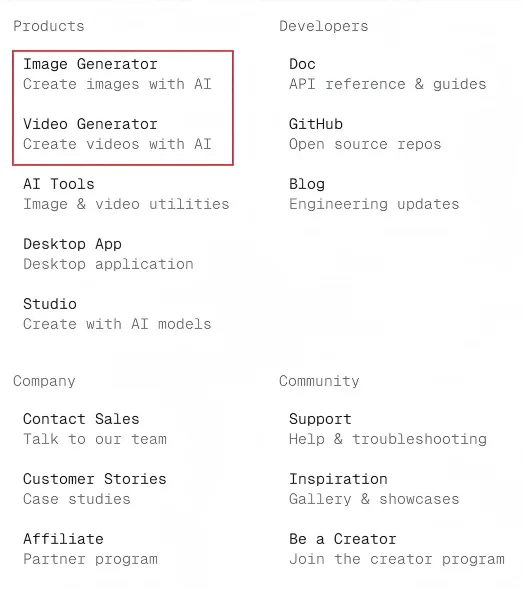
Not sure which model to pick? Try our Image Generator or Video Generator — we’ve curated the best models so you can start creating right away without choosing from hundreds. Click Resources in the top navigation bar to find them.
Start with Ultra Fast Series
New to WaveSpeedAI? Start with our Ultra Fast series:
- Fast generation speed
- Lower cost
- Great for testing and learning
For a fast text-to-image example, use wavespeed-ai/z-image/turbo.
Try Popular Models
Once you’re comfortable, explore these popular models:
| Model | Provider | Best For |
|---|---|---|
| Veo 3.1 | Image-to-video with realistic motion | |
| Nano Banana | Fast, high-quality image generation | |
| Seedream | ByteDance | Versatile image generation and editing |
| Z-Image Turbo | WaveSpeed AI | Fast photorealistic text-to-image generation |
| Kling | Kuaishou | Professional video generation |
Choose by Use Case
| What You Want | Type | Recommended Models |
|---|---|---|
| Generate images from text | T2I | Z-Image Turbo, Seedream, Nano Banana, Imagen |
| Edit or modify images | I2I | Seedream Edit, FLUX Kontext, Qwen Image Edit |
| Generate videos from text | T2V | Wan T2V, Kling T2V |
| Animate images to video | I2V | Veo 3.1, Kling I2V, Wan I2V, Hailuo |
| Generate voice/speech | TTS | Minimax Speech, ElevenLabs |
| Create digital humans | Digital Human | InfiniteTalk, MultiTalk |
| Generate 3D models | 3D | Hunyuan3D, Tripo3D |
Advanced: LoRA Models
Ready for more customization?
- Use existing LoRA models — Apply pre-trained styles from Hugging Face or Civitai
- Train your own LoRA — Create personalized models for consistent character or style
See LoRA Training & Usage for details.
Browse All Models
With 1,000+ models covering image, video, audio, 3D, and more — WaveSpeedAI is your all-in-one platform for AI generation.
Browse all models at wavespeed.ai/models.