AI Video Generator — Online Text & Image to Video Tool
Create stunning AI-generated videos with WaveSpeedAI’s Video Generator. Turn text prompts or still images into high-quality videos — no editing software or coding required.
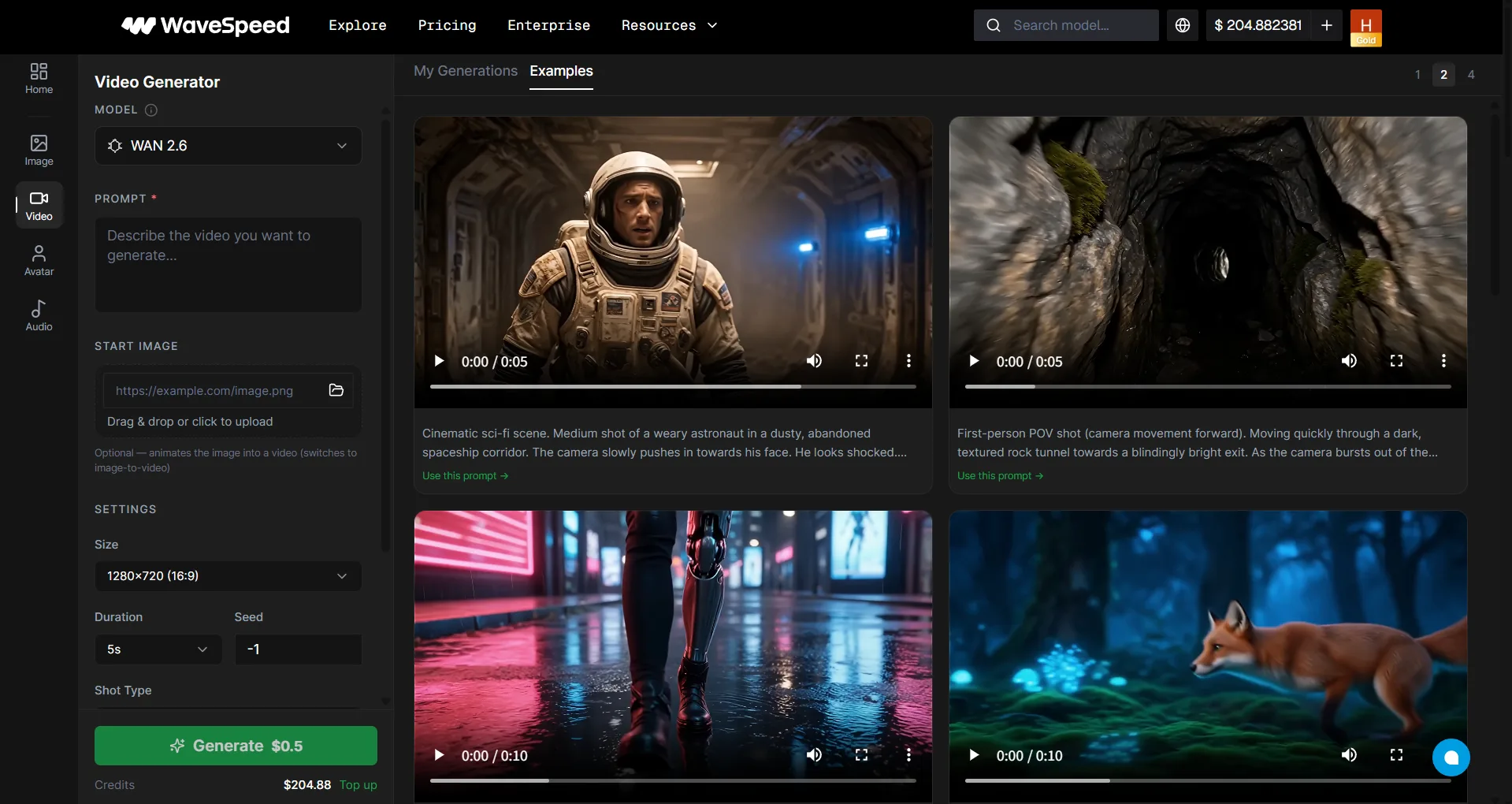
What Is WaveSpeedAI Video Generator?
WaveSpeedAI Video Generator is an online AI video creation tool that lets you generate videos from text prompts, start images, last-frame images, and other model-specific references. It provides a curated selection of the best AI video models — including Seedance, WAN, MiniMax, Kling, Veo, and more — in one simple interface. Sign up and start creating immediately; eligible new users may receive trial credit for supported models.
Why Use WaveSpeedAI Video Generator?
WaveSpeedAI’s Video Generator brings together the best AI video models in one curated experience. Instead of browsing hundreds of models, we’ve selected the top performers so you can start creating immediately.
- Free to sign up — No credit card required; eligible new users may receive trial credit for supported models
- 11+ curated models — Hand-picked from the best AI video providers
- Image to Video — Animate any still image into a video
- Audio generation — Multiple models generate synchronized audio and background music automatically
- Flexible output — Videos from 480p to 4K, lasting 1–20 seconds depending on model
Curated Models
| Model | Highlights |
|---|---|
| FLUX 3 | Video generation model for creating visual content from prompts |
| Seedance 2.5 | Cinematic video generation with strong motion stability and creative control |
| WAN 3.0 | Latest WAN generation for text-to-video, image-to-video, and video editing |
| MiniMax H3 | MiniMax video model for dynamic, high-quality motion |
| Seedance 1.5 Pro | ByteDance’s cinematic model with camera control and audio generation |
| Kling 3.0 | Latest Kling model with superior quality and control |
| Kling 2.6 | High-quality, realistic video with precise motion control |
| Veo 3.1 | Google’s latest video model with excellent coherence |
| Vidu Q3 | Fast video generation with good quality |
| Hailuo 2.3 | MiniMax’s model for dynamic video content |
| Grok Imagine | xAI’s video generation model |
Key Features
| Feature | Description |
|---|---|
| Text to Video | Describe a scene and generate a video from scratch |
| Image to Video | Animate any still image into a dynamic video |
| Audio Generation | Some models automatically generate synchronized audio and music |
| Video Extend | Seamlessly extend the duration of existing videos |
| Motion Control | Control camera movement and subject animation |
| Multiple Durations | Generate 1s to 20s videos depending on model |
Model-Specific Inputs
The Video Generator shows different controls depending on the selected model. Some models accept only a prompt, while others can use start images, last-frame images, reference images, reference videos, reference audio, or a Generate Audio option.
Reference media limits are model-specific. Read the selected model README and schema before running large jobs; for example, some reference-video workflows limit the total reference duration to a short window such as 15 seconds.
How to Generate AI Videos
- Sign up for a free WaveSpeedAI account (Google or GitHub)
- Go to WaveSpeedAI Video Generator
- Select a video model from the curated list
- Enter a text prompt or upload the required reference media
- Set parameters — duration, aspect ratio, motion intensity
- Click Run to generate your video
Tip: For best results with Image to Video, use a high-resolution source image and describe the desired motion in your prompt.
Important: Generated videos are retained for 7 days. Download any files you want to keep before they expire.
Pricing
Free credits on signup. Generation costs vary by model, resolution, and duration — starting from just a few cents per clip. No credit card required to start.
See How Pricing Works for detailed model-by-model pricing.
Use Cases
- Social Media & Short-Form Content — Create TikTok, Reels, and Shorts with AI
- Marketing & Advertising — Generate video ads and product demos
- Film & Animation — Prototype scenes, storyboards, and visual concepts
- E-Commerce — Create product showcase videos from still photos
- Education — Generate explainer videos and visual tutorials
- Music & Entertainment — Create music videos and visual accompaniments
FAQ
Is WaveSpeedAI Video Generator free to use?
It is free to start with signup credits and no credit card required. Generations consume credits based on the selected model; once the free balance is used, top up to continue.
How long does it take to generate a video?
Video generation typically takes 30 seconds to a few minutes depending on the model, resolution, and duration. This is longer than image generation due to the complexity of video processing.
Can I use the generated videos commercially?
Most models support commercial use. Model-specific conditions may apply. See the Commercial Use Policy and applicable provider terms.
What video formats are supported?
Generated videos are typically output in MP4 format.
Do all models support audio?
No. Audio generation is available on select models such as Seedance 1.5 Pro. Check the model description on the Video Generator page to see which models include audio.
How is this different from the Models page?
The Models page gives you access to 1,000+ AI models with full parameter control. The Video Generator is a simplified, curated experience with hand-picked models — perfect if you’re new or just want quick results.
Next Steps
- How to Write Better Prompts — Tips for getting the best video results
- Image Generator — Create AI-powered images
- Browse All Models — Explore 1,000+ AI models with full API access
- Get Started with API — Integrate video generation into your app