AI Image Generator — Online Text-to-Image Tool
Generate high-quality AI images from text prompts with WaveSpeedAI’s Image Generator. No coding, no downloads — just describe what you want and get stunning results in seconds.
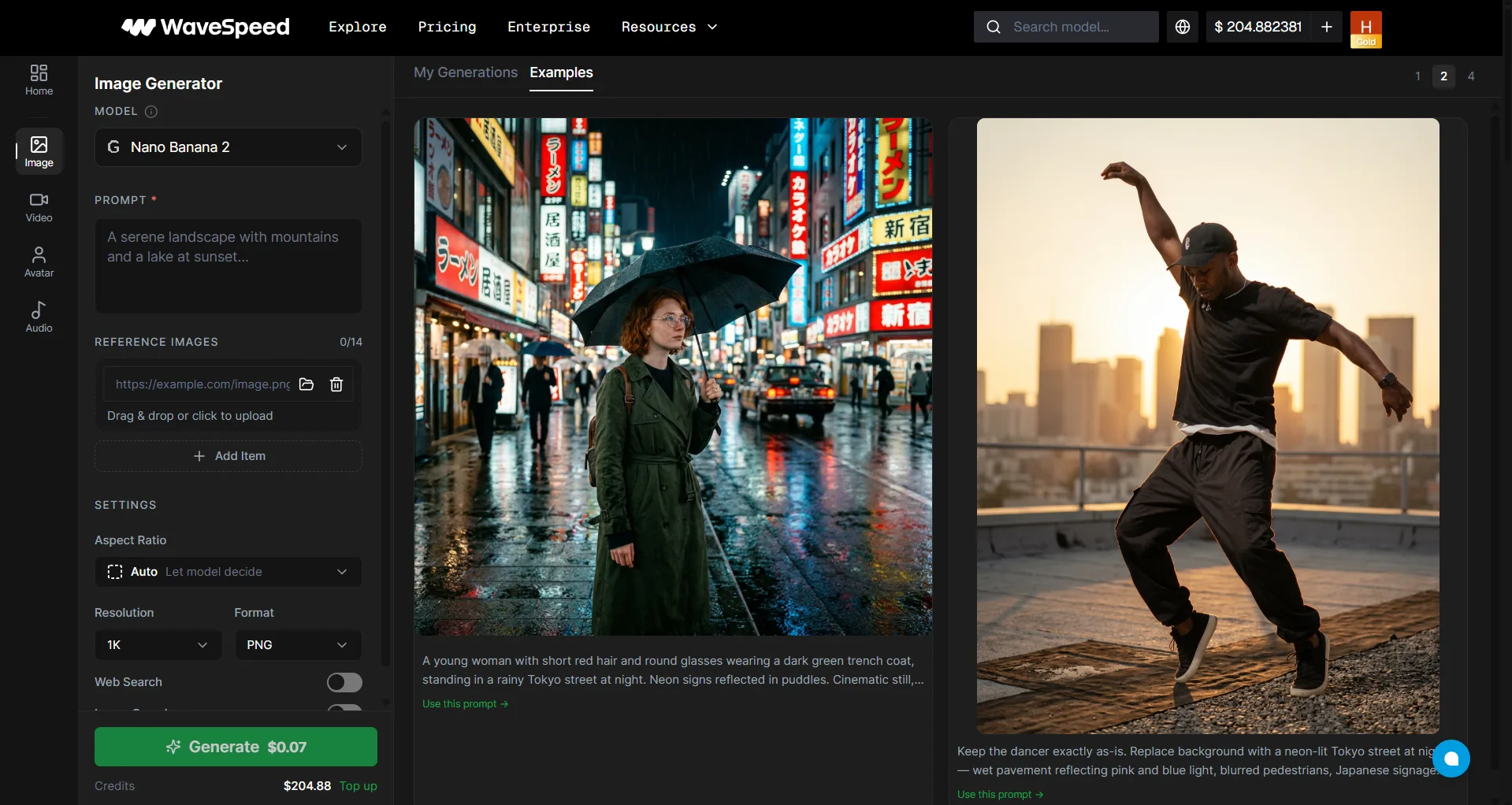
What Is WaveSpeedAI Image Generator?
WaveSpeedAI Image Generator is an online AI image creation tool that lets you generate images from text descriptions or edit uploaded images. It provides a curated selection of leading AI image models — including GPT Image, Nano Banana, Seedream, Qwen Image, WAN, and more — in one simple interface. Sign up and start generating immediately; eligible new users may receive trial credit for supported models.
Why Use WaveSpeedAI Image Generator?
WaveSpeedAI’s Image Generator is a curated experience — we’ve hand-picked the best AI image models so you don’t have to choose from hundreds. Whether you need product photos, concept art, social media graphics, or creative illustrations, just enter a prompt and generate.
- Free to sign up — No credit card required; eligible new users may receive trial credit for supported models
- Fast — Optimized models can generate images in seconds
- High resolution — Most models support up to 2048×2048 pixels
- Commercial use — Most models support commercial use; model-specific conditions may apply
Curated Models
| Model | Highlights |
|---|---|
| GPT Image 2 | Text-accurate, production-ready image generation and editing |
| Nano Banana 2 | Fast, high-quality generation with strong consistency and real-world awareness |
| Nano Banana Pro | Higher-quality Banana model for polished visual work |
| Nano Banana Lite | Lightweight option for faster iteration |
| Seedream 5.0 Pro | ByteDance image model for high-quality generation and editing |
| Seedream 5.0 Lite | Lightweight Seedream option for fast creative iteration |
| Qwen Image 3 | Advanced image generation and editing from Alibaba |
| Gemini 3 | Google image model for multimodal creative work |
| Z-Image Turbo | Turbo-speed generation |
Key Features
| Feature | Description |
|---|---|
| Text to Image | Describe any scene, object, or concept and generate it instantly |
| Image Editing | Models like Qwen Image, Nano Banana, and Seedream support image editing — upload a reference image along with your prompt to transform it |
| Prompt Enhancer | One-click prompt optimization for better results ($0.001/use) |
| Batch Generation | Generate multiple variations at once |
| Custom Sizes | Choose from standard sizes or set custom dimensions |
Available models and controls can change as new providers are added. Check the live Image Generator page for the latest curated list, and open the selected model page when you need the full schema or API examples.
How to Generate AI Images
- Sign up for a free WaveSpeedAI account (Google or GitHub)
- Go to WaveSpeedAI Image Generator
- Select an image model from the curated list
- Enter a detailed text prompt describing your desired image
- Adjust parameters — size, style, number of images
- Click Run to generate
Tip: Use the Prompt Enhancer to automatically improve your prompt for higher quality results.
Important: Generated images are retained for 7 days. Download any files you want to keep before they expire.
Pricing
Free credits on signup. Additional generation starts from $0.001 per image depending on the model. No credit card required to start.
See How Pricing Works for detailed model-by-model pricing.
Use Cases
- Marketing & Advertising — Create ad visuals, banners, and campaign imagery
- Social Media Content — Generate unique posts, stories, and thumbnails
- Product Design — Visualize concepts and create mockups
- Game & App Development — Generate assets, textures, and UI elements
- Education & Presentations — Create illustrations and diagrams
- Personal & Creative Projects — Bring any idea to life with AI
FAQ
Is WaveSpeedAI Image Generator free to use?
It is free to start with signup credits and no credit card required. Generations consume credits based on the selected model; once the free balance is used, top up to continue.
How long does it take to generate an image?
Many optimized models generate images in seconds. Actual latency varies by model, inputs, provider capacity, and current load.
Can I use the generated images commercially?
Most models support commercial use. Model-specific conditions may apply. See the Commercial Use Policy and applicable provider terms.
What image formats are supported?
Generated images are typically output in PNG or JPEG format, depending on the model.
How is this different from the Models page?
The Models page gives you access to 1,000+ AI models with full parameter control. The Image Generator is a simplified, curated experience with hand-picked models — perfect if you’re new or just want quick results.
Next Steps
- How to Write Better Prompts — Tips for getting the best results
- Video Generator — Create AI-powered videos
- Browse All Models — Explore 1,000+ AI models with full API access
- Get Started with API — Integrate image generation into your app