
Seedance 2.5 Prompt Guide for Repeatable Video Tests
Build a Seedance 2.5 prompt for repeatable video tests using clear scene direction, assigned references, controlled variables, and evaluation logs.
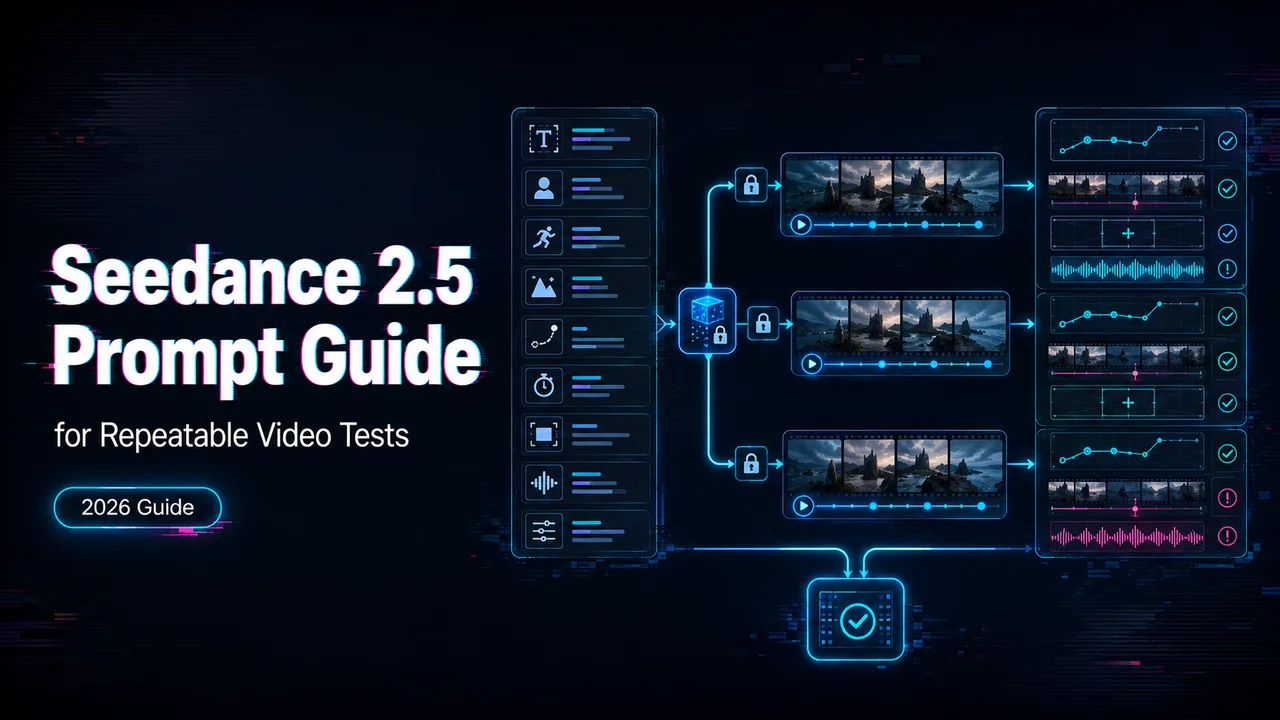
The prompt is not where a video test starts. The test starts when the team agrees what must stay stable, what can change, and what counts as failure. This Seedance 2.5 prompt guide is for that production step: turning a creative brief into a repeatable input pack, not writing a prettier cinematic paragraph.
It’s John. I checked the current public sources on August 27, 2026. ByteDance Seed’s Seedance 2.5 release note describes 30-second generation, multimodal references, timestamp-level editing, and extension. BytePlus lists dreamina-Seedance-2-5-260628 in its current video generation documentation. I did not run private generations for this article, so the examples below are reproducible templates, not claimed test wins.
Define the Test Before Writing the Prompt
Choose One Video Task and Acceptance Criteria
Pick one task first: product reveal, character action, image-to-video motion, reference-led scene, audio-led shot, or edit pass.
Then write acceptance criteria before generation. A clip is not “good” because one frame looks strong. For a repeatable test, score subject identity, motion order, camera behavior, audio timing, text accuracy, ending state, and rework effort.
This cannot be judged by feel. It needs a sample run.
Lock the Access Route and Model Version
Access route matters. The official Seedance 2.5 model page describes product-level capabilities such as 30-second storytelling, reference control, white-model control, green-screen editing, and advanced camera work. BytePlus exposes developer fields through its video generation docs, including model ID, content inputs, ratio, duration, resolution, audio, seed, and task status.
Record the route. “Seedance 2.5 in Dreamina,” “Seedance 2.5 through BytePlus,” and “Seedance 2.5 through a third-party platform” are different test conditions.
Structure a Seedance 2.5 Prompt
Subject, Action, Environment, and Visual Style
A useful Seedance 2.5 prompt reads like a shot brief:
Subject: an original silver delivery rover with a blue status light.
Action: it rolls across a wet rooftop walkway, stops beside a compact solar charger, and opens one side panel.
Environment: early morning rooftop garden, glass railing, light rain, city towers in the distance.
Visual style: realistic product film, clean reflections, soft backlight, natural materials.
The subject block protects identity. The action block defines what must happen. The environment gives physical context. The style block keeps the result from drifting into a different genre.
Camera, Timing, Audio, and Editing Instructions
A Seedance camera prompt should name one main camera plan per shot. Too many camera verbs create conflict.
For a 12-second test:
0-3s: low-angle fixed shot as the rover enters from frame left.
3-7s: slow push-in as the blue status light turns on.
7-10s: medium close-up as the side panel opens.
10-12s: hold on the open panel, soft rain and low motor sound only, no music.
If the task is editing, say what changes and what stays. If it is generation, say what must happen by the end. Do not mix those jobs unless the platform mode supports it.
Add References Without Creating Conflicts
Assign Each Image, Video, and Audio Reference a Role
ByteDance says Seedance 2.5 can use up to 30 images, 10 video clips, and 10 audio clips in one pass. The count is useful, but role assignment matters more.
A Seedance reference prompt should be explicit:
Use Image 1 for rover design.
Use Image 2 for rooftop layout.
Use Video 1 only for wheel motion and pacing.
Use Audio 1 only for motor hum and rain ambience.
Do not copy logos, people, or background signage from references.
One person can remember reference intent. A team cannot.
Separate Identity, Motion, Composition, and Style Guidance
Do not make one reference control everything. Split jobs:
- Identity: character, product, prop, wardrobe
- Motion: gesture, walk cycle, camera path
- Composition: framing and blocking
- Style: palette, lighting, texture
- Audio: voice tone, ambience, rhythm
For a Seedance multimodal prompt, reference conflicts are one failure mode worth checking. A clean role map makes the failure easier to diagnose.
Run a Controlled Prompt Test
Change One Variable per Generation
Run small first. Three generations are enough for a first pass if the setup is clean.
Test A: base prompt only.
Test B: same prompt with one image reference.
Test C: same prompt with image plus audio reference.
If you change prompt, duration, aspect ratio, reference order, and audio at the same time, you still generated a video. You did not run a test.
Record Inputs, Outputs, Failures, and Costs
Use one log row per generation.
| Field | What to Record |
|---|---|
| Test setup | Date, route, model version, mode |
| Inputs | Full prompt, references, role order |
| Parameters | Duration, ratio, resolution, audio, seed |
| Review | Accepted output, failed output, cost, rework note |
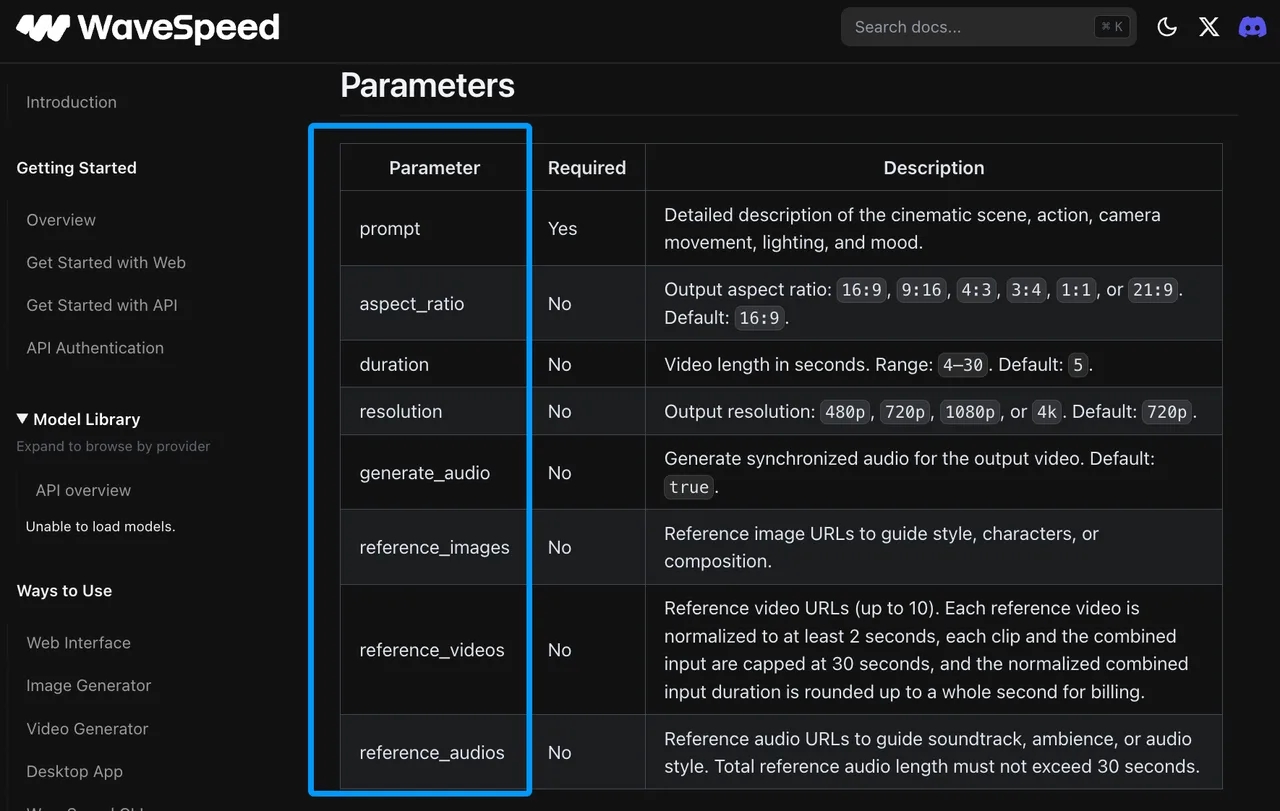
WaveSpeed’s current Seedance 2.5 text-to-video schema exposes fields such as prompt, reference_images, reference_videos, reference_audios, aspect_ratio, resolution, duration, and generate_audio. Treat that as WaveSpeed’s route, not a universal Seedance schema.
Diagnose Weak Results
Simplify Competing Instructions
When a result fails, cut the prompt down before adding detail.
Common conflicts include “static camera” plus “fast orbit,” “silent product shot” plus “dialogue and music,” or “single continuous take” plus “quick montage.” The model may still return a clip, but review will not know which instruction won.
Adjust Timing, Motion, or References Before Adding Detail
If motion misses, rewrite the timeline first. If identity drifts, reduce subject count or strengthen the identity reference. If audio lands badly, remove competing sound instructions and test one sound event.
A Seedance video prompt should become more specific only after the simple version works. The folder named final_v7_really_final usually starts with someone adding detail too early.
Reuse Prompts in Production
Convert Prompt Blocks Into Structured Job Fields
Keep the template boring:
TASK:
MODE:
MODEL_VERSION:
SUBJECT:
ACTION:
ENVIRONMENT:
STYLE:
CAMERA:
TIMELINE:
AUDIO:
REFERENCES:
PARAMETERS:
ACCEPTANCE_CRITERIA:
FAILURE_NOTES:
If your route has API fields, map only what is documented. BytePlus, WaveSpeedAI, and studio interfaces can expose different controls.
Version Templates and Preserve Evaluation Evidence
Save prompt versions with outputs. Save failed outputs too. Failed samples explain the boundary of the workflow better than the best clip does.
For broader planning, keep the separate Seedance-2-5-studio-workflow page for creative workflow, asset staging, and handoff. This page should stay narrower: prompt architecture, reference assignment, variable control, and evidence.
Limits and Trade-Offs
Longer Prompts Do Not Guarantee Better Control
Seedance 2.5 supports longer scenes, but longer text is not automatically better. A 30-second clip needs structure. It does not need every visual preference from the meeting notes.
Studio and API Controls May Interpret Instructions Differently
Studio tools may expose upload slots, edit buttons, or extension controls. APIs expose fields. The same model name can still create different operating conditions.
BytePlus keeps a separate Dreamina prompt guide, but route-specific documentation should be checked again before publishing a team template.
FAQ
Does Seedance 2.5 enforce a maximum prompt length?
I did not find a universal public Seedance 2.5 prompt-length ceiling in the checked ByteDance Seed and BytePlus LAS pages. Some platforms may set their own UI or API limits. Record whether long prompts are accepted, rejected, or truncated.
Can Seedance 2.5 prompts reference uploaded asset filenames?
Do not assume filenames work everywhere. ByteDance examples use ordered reference names. BytePlus uses structured content items with URLs, Base64 for image/audio, or asset IDs in supported workflows. WaveSpeed uses ordered tags such as @image1, @video1, and @audio1.
Which languages support spoken dialogue in Seedance 2.5 prompts?
The checked official pages show audio-video generation and spoken-line examples, but I did not find a complete public language matrix. Test target languages directly and score pronunciation, timing, lip sync, and subtitle behavior separately.
Does Seedance 2.5 preserve quoted text in generated signage?
Do not treat quoted text as deterministic signage control. ByteDance says Seedance 2.5 improves editing and reduces uncontrolled subtitle/background-music issues, but brand names, product labels, and legal copy still need post-production checking.
Can Seedance 2.5 prompt seeds reproduce earlier outputs?
Seeds help control randomness when the route exposes them, but they are not a full reproduction contract. Record seed, model version, prompt, references, duration, ratio, resolution, audio setting, and access route together.
Conclusion
A good Seedance 2.5 prompt is the one your team can rerun and diagnose. Start with one task, one mode, one reference map, and one changed variable per generation. A good single output does not mean the production workflow is ready.
Previous posts:
/filters:quality(82)/media/images/b73c2438-6bdd-4b80-a229-8d71d8f819cf.webp)
/filters:quality(82)/media/images/427fd9f2-347d-4f86-a2d5-aee110cda01d.webp)
/filters:quality(82)/media/images/1773962750383987480_n3hqzHRZ.webp)
/filters:quality(82)/media/images/43fa0e7f-a0db-48d7-9bab-921d1225db30.webp)
/filters:quality(82)/media/images/5799ff56-3a73-40ca-a666-e4965d878496.webp)
/filters:quality(82)/media/images/7a8850fc-caf6-482f-ac4d-5ddbe64ec47c.webp)