
Claude Managed Agents Quickstart Guide 2026
Step-by-step quickstart for Claude Managed Agents: beta header setup, first session, tool calls, and streaming events — with key code patterns and cost checkpoints.
First time I tried to run a Managed Agents session, I got a 400 error on the very first curl. Not on the agent creation. Not on the environment. On the stream endpoint. I copy-pasted my header from the create request — anthropic-beta: managed-agents-2026-04-01 — and the streaming API rejected it. Turns out the streaming endpoint was, at that moment in the docs, referencing a different beta header. I wasted forty minutes on that.
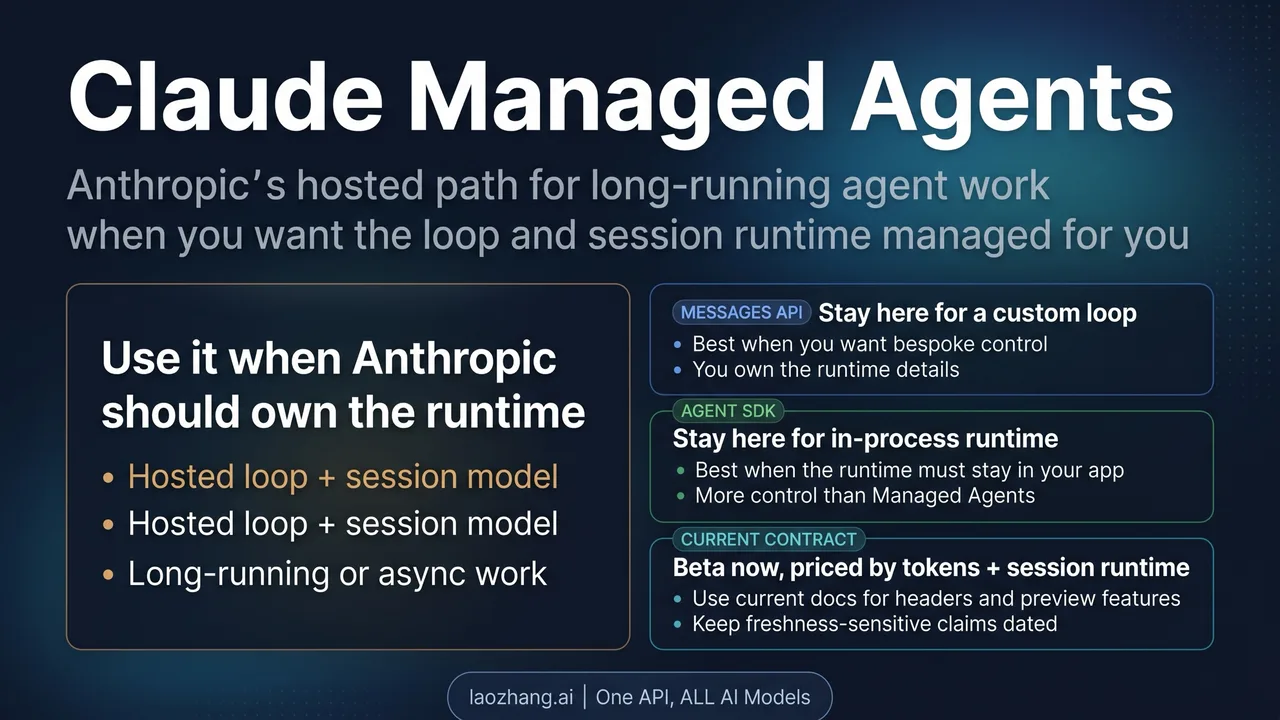
If you’re trying to get your first Managed Agents session running end-to-end today, this is the path I actually walked. Hey, it’s Dora here! Beta header first, because that’s where half the failures live. Then agent, environment, session, stream. And a cost checkpoint at the end, because session runtime keeps ticking while you debug.
Before You Start
You need an Anthropic API key with Managed Agents access. There’s no waitlist right now — any existing key works in public beta.
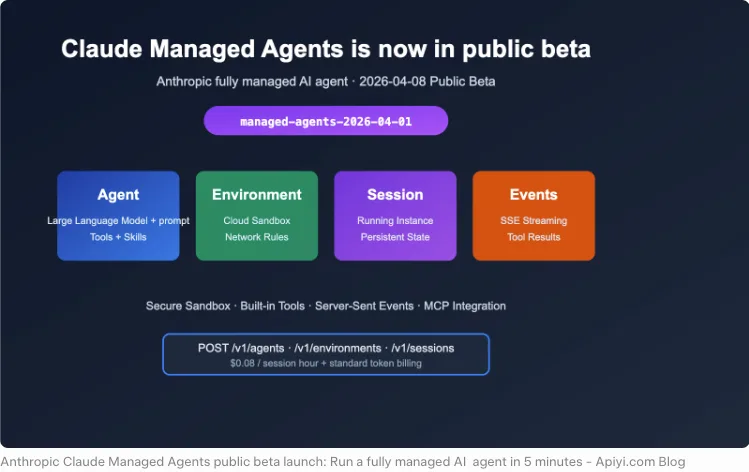
The beta header is non-negotiable. Every Managed Agents endpoint requires anthropic-beta: managed-agents-2026-04-01. According to Anthropic’s Managed Agents overview, the SDK sets this automatically. If you’re using raw curl, you add it to every request yourself. This is the single most common cause of 400 errors I’ve seen in community reports.
If you use the official SDK (anthropic for Python, @anthropic-ai/sdk for TypeScript), verify you’re on a version that ships beta agent support. Older pins won’t have client.beta.agents or client.beta.sessions.
Model choice matters here. Opus 4.7 is smarter at long-horizon agent reasoning. Sonnet 4.6 is cheaper and faster per token. For a quickstart run, Sonnet 4.6 is enough. If your real workload is debugging, planning, or long tool chains, Opus 4.7 earns its price.
Step 1 — Define Your Agent
An agent, in Managed Agents, is a configuration object, not a process. You define name, model, system prompt, and tool access once, then reuse it across sessions.
Minimum viable definition from the official quickstart:
python
agent = client.beta.agents.create(
    name="Coding Assistant",
    model="claude-opus-4-7",
    system="You are a helpful coding agent.",
    tools=[{"type": "agent_toolset_20260401"}],
)
The agent_toolset_20260401 tool type unlocks the full built-in toolset — bash, file read/write, web search, web fetch, code execution. You can scope it down later. For a first run, leave it broad so you can see what the agent actually chooses to use.
Save agent.id. Every session references it.
Step 2 — Create an Environment
An environment defines the sandboxed container. For most first runs:
python
env = client.beta.environments.create(
    name="quickstart-env",
    config={"type": "cloud", "networking": {"type": "unrestricted"}},
)
Save env.id. If your agent only touches its own filesystem, "networking": {"type": "limited"} is safer and well-documented in the SRE incident responder cookbook.
Step 3 — Start a Session
A session ties an agent to an environment. Creating a session does not start work. It just provisions. Work starts when you send a user event.
python
session = client.beta.sessions.create(
    agent=agent.id,
    environment_id=env.id,
    title="Quickstart session",
)
This pattern — create, then drive with events — is where the state-machine model from the sessions reference makes sense. The session persists. You can send more events later. The filesystem survives between turns.
Step 4 — Stream Events
Open the stream, send the user message, read events until session.status_idle:
python
with client.beta.sessions.events.stream(session.id) as stream:
    client.beta.sessions.events.send(
        session.id,
        events=[{
            "type": "user.message",
            "content": [{"type": "text",
                         "text": "Generate first 20 Fibonacci numbers, save to fib.txt"}],
        }],
    )
    for event in stream:
        match event.type:
            case "agent.message":
                for block in event.content:
                    print(block.text, end="")
            case "agent.tool_use":
                print(f"\n[tool: {event.name}]")
            case "session.status_idle":
                break
Event names follow {domain}.{action}. Full schema is in the events and streaming docs. The processed_at field matters: if it’s null, the event is queued, not yet executed. I missed this on my first run and thought tools were failing silently.
Cost Checkpoints
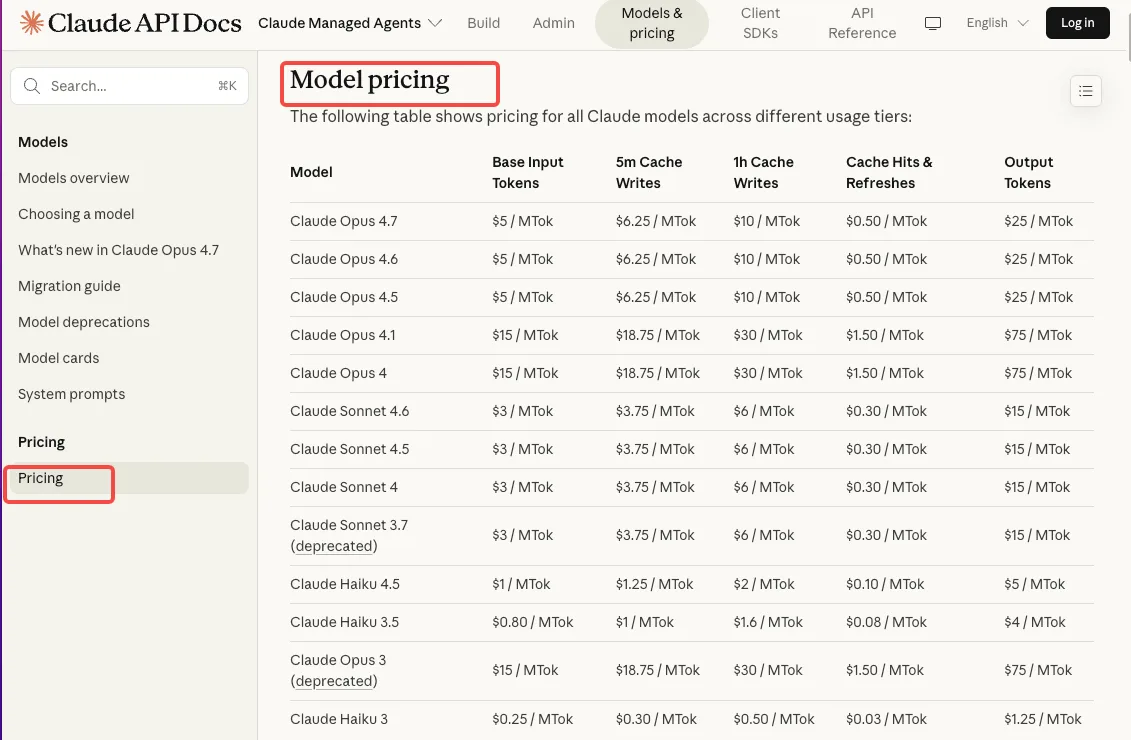 Managed Agents bills two things: standard token rates plus $0.08 per session-hour of active runtime. Per the official pricing page, runtime accrues by the millisecond — but only while status is
 running. Idle time and terminated sessions don’t charge.
What this means in practice:
- A session you forget to close while debugging: still accruing (if it’s running).
- Web search: $10 per 1,000 calls**, billed separately. Research agents hit this fast.
- Check active sessions in Console tracing before signing off for the day. Verify the current UI path yourself — the Console layout has been iterating.
Common Errors
Missing or wrong beta header. 400 error, often with a message about unsupported endpoints. Fix: confirm managed-agents-2026-04-01 on every direct HTTP call. If you’re using the SDK and still hitting this, upgrade the SDK.
Rate limits. Create endpoints cap at 60 rpm; read endpoints at 600 rpm. Organization tier limits still apply on top. 429s mean back off with jitter, not retry immediately.
Silent tool loop. Agent keeps calling tools but produces no final message. Check session traces — usually an unhandled requires_action that never got a response sent back.
FAQ
Q1: How do I enable multi-agent coordination in Managed Agents?
Multi-agent (along with memory and outcomes) is still a research preview feature. You request access separately through the Claude Console. The coordination pattern — orchestrator delegating to callable agents — is documented under multiagent sessions, but you can’t use it until the preview flag is on for your org.
Q2: Can I inspect what tools the agent called during a session?
Yes. Use client.beta.sessions.events.list(session.id) for programmatic access, or the Console’s tracing view for a chronological timeline with tokens and timestamps per event.
Q3: Where’s the official Managed Agents cookbook?
The tutorials live on the Claude Cookbook site — the iterate-fix-failing-tests notebook is the best first read. The operate-in-production notebook covers vaults, MCP, and webhooks once you’re past the hello-world stage.
Q4: Is there a way to test without incurring session runtime costs?
No dedicated Managed Agents free tier exists. Standard API free credits cover it. Keep sessions short during development and close them when you stop working. Idle sessions don’t bill, but running ones do — and “running” includes silently looping agents.
Q5: What’s the best model for long-running Managed Agents tasks?
It depends on what “long-running” means. For multi-hour reasoning with heavy tool use, Opus 4.7. For high-volume, simpler loops, Sonnet 4.6 with prompt caching cuts cost dramatically. I’m still testing Opus 4.7 on 2-hour-plus sessions. That’s where my data ends. More to come.
Still verifying how compaction behaves past the two-hour mark. Run it yourself — that’ll tell you more than I can.
Previous posts:
Related Articles
/filters:quality(82)/media/images/1791535252286714222_v4jvJT2a.webp)
ModelsLab Review 2027: One API for Media Models?
/filters:quality(82)/media/images/1791451065663755033_qNqAKS1a.webp)
Best AI Video Background Removal Tools in 2027
/filters:quality(82)/media/images/1791359984291066138_tW5eOX6f.webp)
Best Comfy Cloud Alternatives in 2027
/filters:quality(82)/media/images/1773962750383987480_n3hqzHRZ.webp)
Qwen Image 2.1 vs Qwen Image 3.0: What Changes and When to Upgrade
What's Next for Wan Video Generation, and What It Means for Creators
/filters:quality(82)/media/images/1791271002496939282_TBLU3cmv.webp)