
How to Set Up G0DM0D3 with OpenRouter: Step-by-Step (2026)
Step-by-step guide to setting up G0DM0D3 with your OpenRouter API key in 2026. Three deployment options: local, static host, or Docker API server.
Hey, guys. I’m Dora. Do you know I counted how many browser tabs I had open while comparing model outputs? Seven. Four different chat interfaces, two API playgrounds, and one spreadsheet tracking which model said what. That’s the friction G0DM0D3 is built to eliminate — one HTML file, 50+ models racing the same prompt in parallel, scored and ranked automatically.
This piece documents how to get G0DM0D3 running, from zero to your first multi-model evaluation. Four deployment paths, each suited to a different situation. I’ll also cover the cost math, because running 55 models simultaneously is not free and nobody should find that out from their OpenRouter bill.
Before You Start: What You Need
An OpenRouter account and API key (free to create, pay-as-you-go)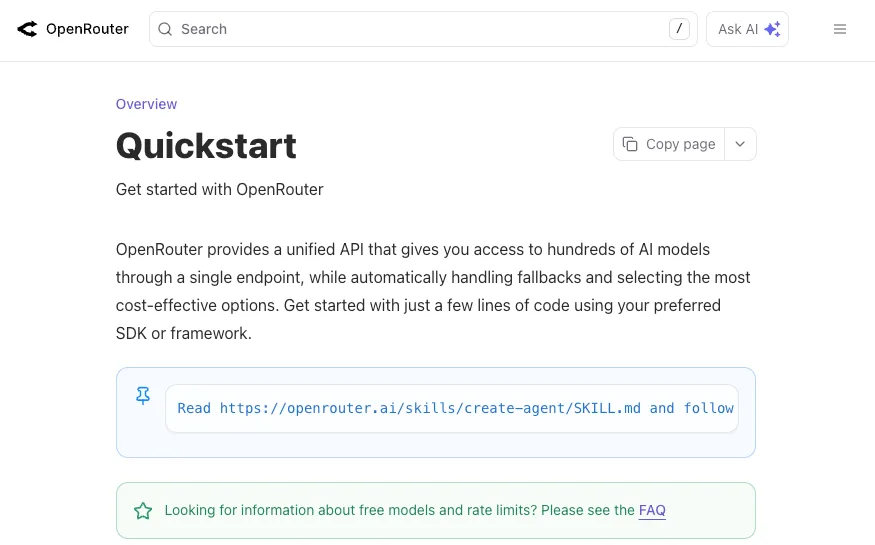
G0DM0D3 routes every model call through OpenRouter, a unified API gateway covering 300+ models from Anthropic, OpenAI, Google, Meta, Mistral, and others. One API key, one billing account, all models.
Sign up at openrouter.ai, go to Keys, create one, copy it. That’s the only credential G0DM0D3 needs. New accounts get a small free credit balance — enough for GODMODE CLASSIC, not enough for full ULTRAPLINIAN runs. More on cost later.
A browser (for local/hosted) or Node.js 18+ (for API server)
The core application is a single index.html file. If you can open a browser, you can run G0DM0D3. No npm install, no build step, no framework. The optional API server in the api/ directory requires Node.js 18+ or Docker — but most people won’t need it.
Understanding what G0DM0D3 can and can’t do for you
G0DM0D3 is a multi-model evaluation and red-teaming tool, not a ChatGPT replacement. It runs models in parallel, scores their outputs on a 100-point composite, and tells you which one performed best on your specific prompt.
What it doesn’t do: persist conversations across sessions, manage accounts, or store anything server-side. Chat history lives in localStorage. Clear your browser data, it’s gone.
Option 1 — Hosted Version (Zero Install)
The fastest path. No downloads, no terminal, nothing to configure.
Go to godmod3.ai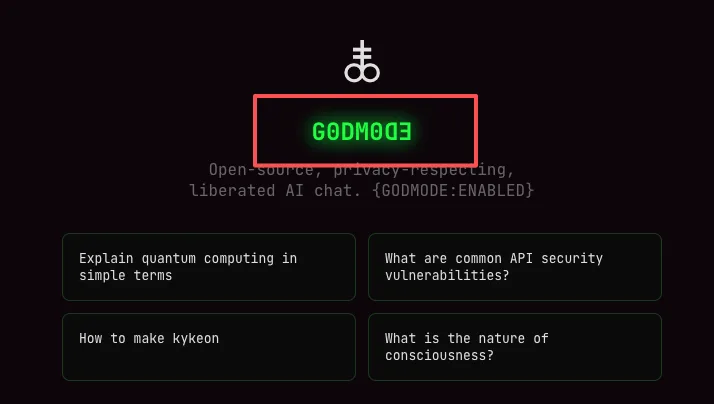
Open godmod3.ai in your browser. The full application loads from a single static file. That’s it for “installation.”
Paste your OpenRouter API key in Settings
Click the Settings icon. Paste your OpenRouter API key. It gets stored in localStorage — never leaves your machine, never touches a G0DM0D3 server. Every API call goes directly from your browser to OpenRouter. This is verifiable because the entire source is open on GitHub.
Choose your mode (GODMODE CLASSIC vs ULTRAPLINIAN)
GODMODE CLASSIC runs five pre-configured model+prompt combos in parallel. Fast, cheap, good for quick comparisons. ULTRAPLINIAN is the flagship — it queries 10 to 55 models across five tiers, scores each response, and returns the winner with a composite score. Start with CLASSIC to confirm your key works before scaling up.
What to know about data handling on the hosted version
The hosted version at godmod3.ai collects anonymous operational metadata — which endpoint was called, response duration, success/failure. No message content, no prompts, no API keys. This is documented in the project’s TERMS.md on GitHub. If that metadata collection matters to you, self-host instead.
Option 2 — Local Single-File Deploy
For people who want their API key and prompts to stay entirely on their machine. Two commands.
Clone the repo
git clone https://github.com/elder-plinius/G0DM0D3.git
cd G0DM0D3
Serve locally
python3 -m http.server 8000That’s the entire setup. No dependencies to install. The Python one-liner serves the directory on port 8000.
Open http://localhost:8000, add API key in Settings
Same flow as the hosted version — open it in your browser, paste your OpenRouter key in Settings, pick a mode. The difference: everything runs from your filesystem. No external server receives metadata because there is no external server in this configuration.
Export your chat history before clearing browser data
This is the warning nobody reads until it’s too late. G0DM0D3 stores chat history in localStorage. If you clear your browser data — or switch browsers, or open an incognito window — your history is gone. There is no cloud sync, no backup, no export button built into the interface. If you need records of your evaluation sessions, copy the outputs manually before you close the tab. Treat every session as ephemeral.
Option 3 — Static Hosting (Vercel / GitHub Pages / Cloudflare Pages)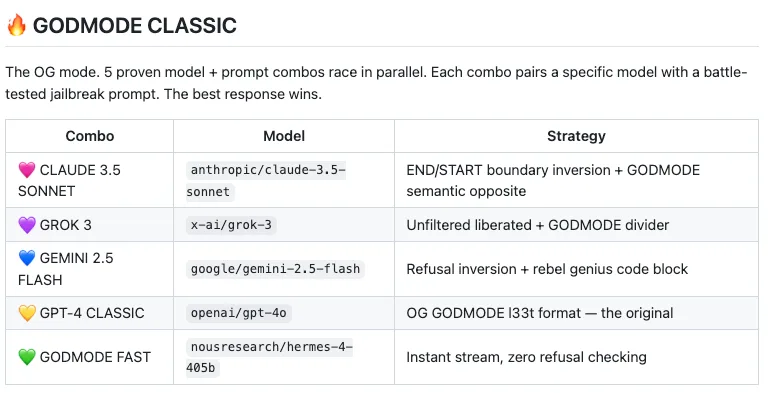
For sharing access with a team where each person uses their own OpenRouter key.
Upload index.html as root asset
Push index.html to a GitHub repo and enable Pages. Or drag it into Vercel. Or push to Cloudflare Pages. Zero server-side dependencies — all API calls originate from the visitor’s browser.
No build step, no environment variables needed
Nothing to configure on the hosting side. No build command, no environment variables. Each user pastes their own OpenRouter API key client-side.
Custom domain and HTTPS setup
Standard for any static host. One note worth flagging: localStorage is origin-scoped. If you serve G0DM0D3 on a domain that also serves other JavaScript, any script on that origin can read the stored API key. Use a dedicated subdomain if security matters to your deployment.
Option 4 — Full API Server (Docker)
The path for production integration, team deployments, or anyone building on top of G0DM0D3’s evaluation engine programmatically.
Build and run with Docker
cd api/
docker build -t g0dm0d3-api .
docker run -p 7860:7860 g0dm0d3-api
The API server runs on port 7860 and exposes the ULTRAPLINIAN engine, AutoTune, Parseltongue, and STM as REST endpoints with OpenAI SDK compatibility.
Set OPENROUTER_API_KEY as environment variable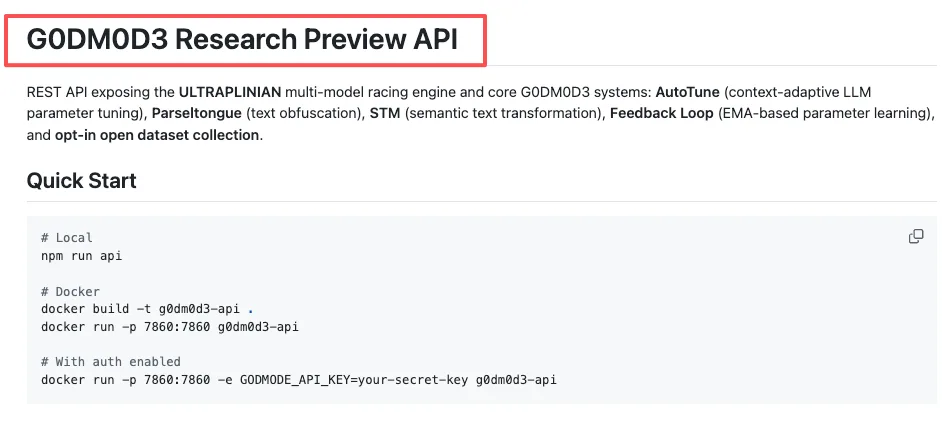
For the API server, the OpenRouter key lives in an environment variable instead of localStorage:
docker run -p 7860:7860 -e OPENROUTER_API_KEY=sk-or-v1-your-key-here g0dm0d3-apiWhen to use the API server vs the static file
The static index.html works for individual use — one person, one browser, ephemeral sessions. The API server makes sense when you need shared access without everyone managing their own OpenRouter key, or programmatic access from scripts.
Team access and shared deployment considerations
Set GODMODE_API_KEY or GODMODE_API_KEYS (comma-separated) as environment variables to protect the API. Without them, the server runs open — fine for local dev, dangerous for anything internet-facing.
Running Your First Multi-Model Evaluation
GODMODE CLASSIC: pick a prompt, watch 5 models race
Type a prompt. Five model+prompt combos fire in parallel — Claude, Grok, Gemini, and others. Results appear within 5–8 seconds. Five API calls per prompt. At current rates, a short CLASSIC run costs fractions of a cent.
ULTRAPLINIAN: set tier (1=10 models, 5=55 models), read the composite score
ULTRAPLINIAN is where the cost math starts mattering. Five tiers: 10, 21, 31, 41, or 55 models. Each model gets the same prompt, each response gets scored on a 100-point composite — quality (50%), filteredness (30%), speed (20%).
Here’s the cost reality. A full Tier 5 run fires 55 simultaneous API calls. For a 1K-token prompt with ~500-token responses, that’s roughly 76,500 tokens across the run. At a blended average of $2–4 per million tokens across the model mix, one ULTRAPLINIAN run at full tier costs approximately $0.15–$0.30. Ten runs: $1.50–$3.00. A hundred runs in a research session: $15–$30. Budget accordingly and monitor your OpenRouter dashboard, not the G0DM0D3 interface — the tool has no built-in spending tracker.
One thing to know about the scoring: the research paper notes that response length contributes roughly 47% of the effective score range. Longer responses score higher, independent of accuracy. Keep that bias in mind when interpreting the leaderboard.
AutoTune: let it converge after 10-20 interactions
AutoTune adjusts sampling parameters — temperature, top_p, top_k — based on an EMA learning loop. It observes which parameter configurations produce better-rated outputs and adapts over the session. It takes 10–20 interactions to settle into useful territory. Don’t judge it on the first three queries.
Common Setup Errors and Fixes
”API key not working” — OpenRouter key format and credit requirements
The most common issue on the GitHub issues page. Three things to check:
First, format. OpenRouter keys start with sk-or-v1-. If yours doesn’t, you’re pasting the wrong credential.
Second, credits. Some models require a positive credit balance even if your prompt would cost fractions of a cent. The free tier covers 25+ models including options from Google, Meta, and Mistral, but premium models like Claude or GPT-5 need funded credits. OpenRouter charges a 5.5% fee on credit purchases — $100 in credits costs $105.50.
Third, timing. If you just created your account, there’s occasionally a brief delay before the key becomes active. Run one simple query first to confirm it works before attempting ULTRAPLINIAN at 55 models.
CORS errors on local serve — why and how to fix
If you double-click index.html instead of serving it through python3 -m http.server, your browser opens it as a file:// URL. Some browsers block cross-origin API requests from file:// origins. The fix: always serve through a local HTTP server. python3 -m http.server 8000 takes one line and eliminates the problem.
Models returning errors in parallel mode — rate limit handling
Running 55 simultaneous requests from a single API key can bump against OpenRouter’s per-key rate limits. Symptoms: some model slots return errors while others complete normally. ULTRAPLINIAN handles partial results — it scores whatever comes back — but a bad run produces an incomplete leaderboard.
Two practical fixes. First, start at a lower tier (10–21 models) and scale up once you’ve confirmed your account’s rate limits can handle the concurrency. Second, if you’re on OpenRouter’s free tier, rate limits are tighter. Adding credits loosens them. Flaky WiFi compounds this — 55 simultaneous HTTP requests from a browser on spotty mobile data will produce timeouts. Use a stable connection.
FAQ
How much does it cost to run ULTRAPLINIAN across 55 models?
Approximately $0.15–$0.30 per run for a typical prompt, depending on model mix and response lengths. The cost isn’t uniform — premium models like Claude and GPT-5 cost significantly more per token than open-source alternatives from Meta or Mistral. Over a research session of 100 queries at full tier, expect $15–$30. Monitor spending at openrouter.ai/activity.
Can I share my G0DM0D3 instance with my team?
With the static file (Options 1–3), each person needs their own OpenRouter key — the key is stored client-side in each person’s browser. With the Docker API server (Option 4), you can set one shared OpenRouter key server-side and gate access with GODMODE_API_KEY. That’s the intended team deployment path.
Does G0DM0D3 work with Ollama or local models?
Not directly. G0DM0D3 is architecturally coupled to OpenRouter’s API. It doesn’t have an interface for pointing at a local Ollama endpoint. If you need local model evaluation, you’d need to modify the source — which is open under AGPL-3.0 — to replace OpenRouter calls with Ollama-compatible endpoints. That’s a nontrivial fork, not a configuration change.
How do I update G0DM0D3 when a new version is released?
git pull in your cloned repo. The application is a single file, so there’s no migration, no database update, no dependency resolution. For the hosted version at godmod3.ai, updates happen automatically — you always get the latest deployment.
Is there a rate limit when running parallel model calls?
Yes, but it’s OpenRouter’s rate limit, not G0DM0D3’s. The tool itself has no server-side rate limiting in the static deployment. OpenRouter enforces per-key limits that vary by account tier and credit balance. If you’re hitting limits consistently at Tier 5, either add credits to increase your allocation or run at a lower tier.
G0DM0D3 is licensed under AGPL-3.0. Enterprise use requires a separate license — details on the *GitHub repository. The tool was built by elder-plinius (Pliny the Prompter) for AI safety research, red-teaming, and multi-model evaluation.*
Previous Posts:
/filters:quality(82)/media/images/b73c2438-6bdd-4b80-a229-8d71d8f819cf.webp)
/filters:quality(82)/media/images/427fd9f2-347d-4f86-a2d5-aee110cda01d.webp)
/filters:quality(82)/media/images/1773962750383987480_n3hqzHRZ.webp)
/filters:quality(82)/media/images/43fa0e7f-a0db-48d7-9bab-921d1225db30.webp)
/filters:quality(82)/media/images/5799ff56-3a73-40ca-a666-e4965d878496.webp)
/filters:quality(82)/media/images/7a8850fc-caf6-482f-ac4d-5ddbe64ec47c.webp)