
MiniMax Voice Clone API Guide for AI Applications
MiniMax voice clone workflows use uploaded audio, a unique voice ID, preview checks, and T2A synthesis. Learn the API path and production safeguards.
The first failure point in a MiniMax voice clone feature is rarely the endpoint. It is usually the handoff: someone uploads a noisy file, someone else creates a voice ID with no owner, a product test uses the preview once, and two weeks later no one knows whether that voice was approved for customer-facing use.
That is the production problem this guide is built around. MiniMax’s official Voice Clone guide gives the core API path: upload source audio, optionally upload prompt audio, call the clone endpoint, then use the generated voice in T2A. For an AI application, that path needs controls around consent, file validation, lifecycle, billing, deletion, and review.
Prepare a Voice Clone Request
Confirm Consent and Permitted Use
Do not start by opening Postman. Start by confirming rights.
Voice cloning touches identity. Before your product lets a user or internal team clone a voice, the workflow should record who the speaker is, who approved the clone, what the voice may be used for, which surfaces can use it, and how long the approval lasts.
This is not just legal housekeeping. It changes the product design. A safe voice cloning workflow should block impersonation, fraud, undisclosed synthetic speech, unauthorized celebrity or employee voices, and attempts to bypass review.
For business use, consent should be traceable. A checkbox with no speaker record is thin. A support ticket that says “approved” but does not say approved by whom is also thin. Once generation scales, the weak approval path becomes the production incident.
This article is general information, not legal advice. Review MiniMax’s latest official policy, your local law, and your use case before release.
Record a Clean Source Sample
The recording sets the floor. The API can clone from a source file, but it cannot turn a bad production habit into a good voice system.
Use one speaker. Keep the room quiet. Avoid music, overlapping speech, heavy echo, clipped peaks, and aggressive noise filters. Ask for natural speech, not a performance that only sounds good in one demo line.
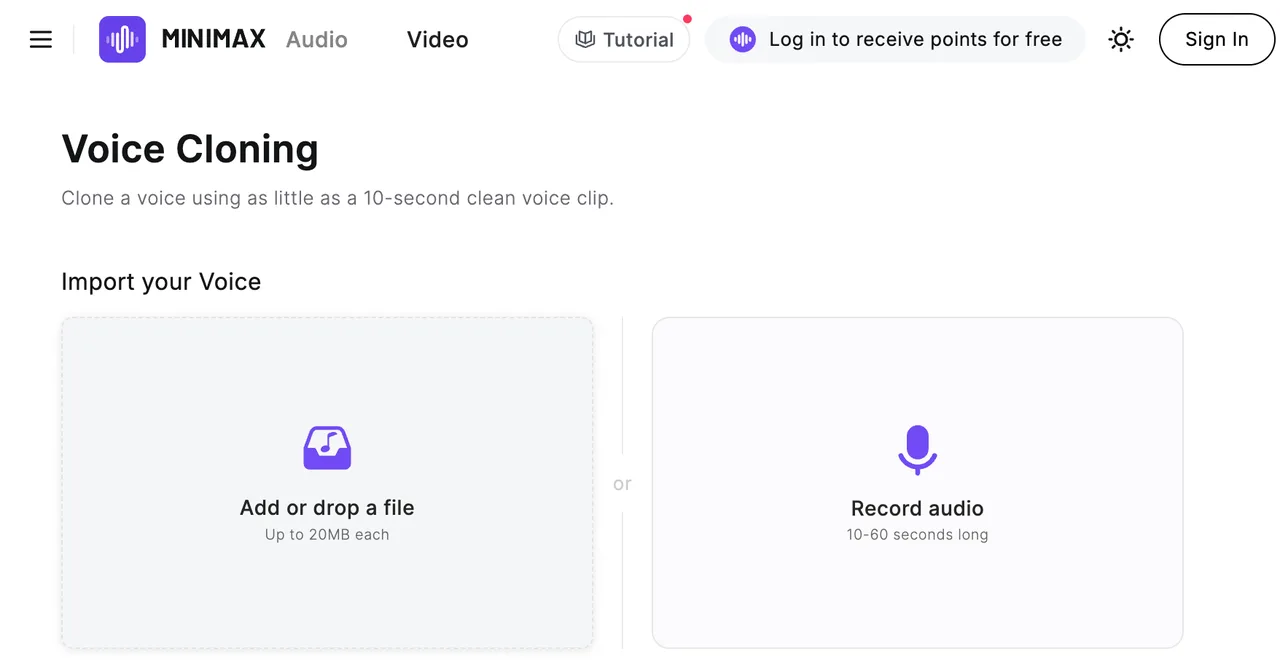
MiniMax currently lists source audio requirements as mp3, m4a, or wav, with a duration from 10 seconds to 5 minutes and a file size up to 20 MB. Those constraints should be checked before upload, not after a failed API response.
A good single sample does not mean the workflow is ready. It only means the input is clean enough to test.
Upload the Source Audio
Use the Voice-Clone Upload Purpose
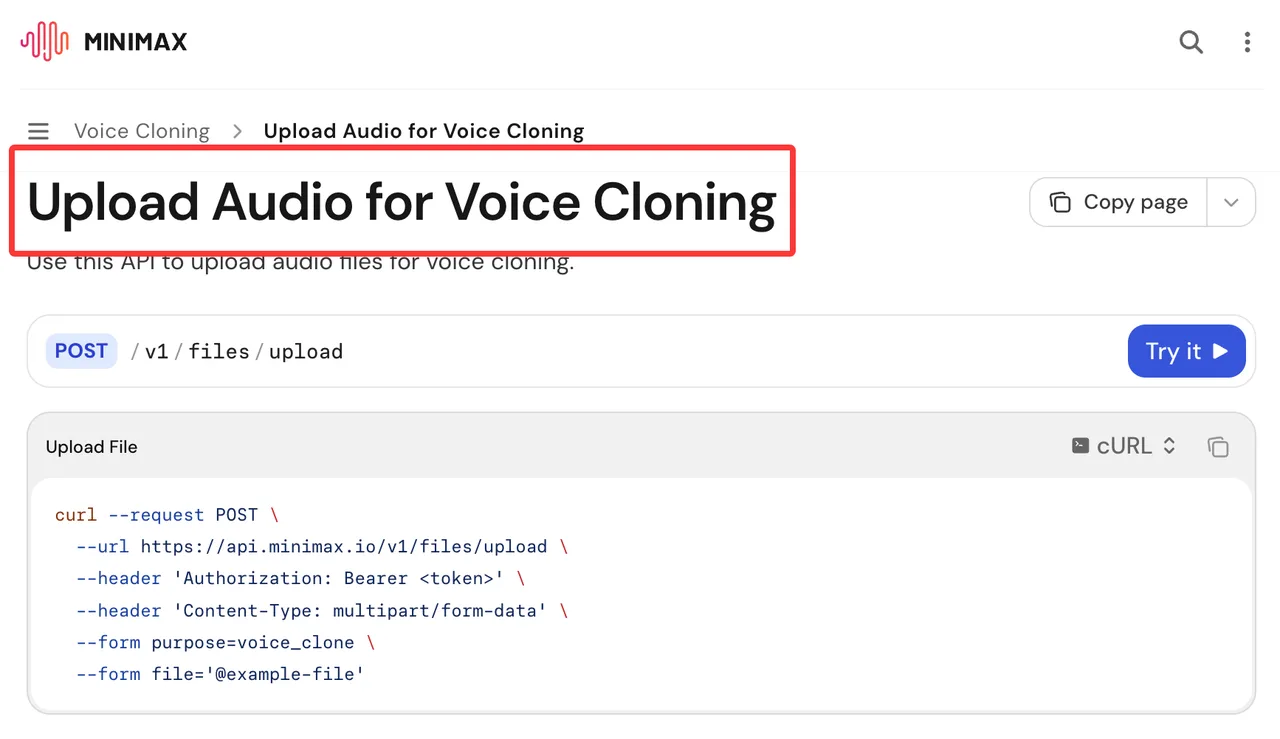
The upload step uses /v1/files/upload. According to the official Upload Audio for Voice Cloning reference, the request uses Bearer authentication, multipart/form-data, a required file, and purpose=voice_clone.
Do not show a real API key in code samples, logs, screenshots, or internal docs. Use an environment variable or secret manager. Voice features often involve product, legal, and support teams, so debug material moves across more hands than a normal backend trace.
The response returns a file_id. Store that value with the speaker consent record, project owner, source file name, upload time, intended use, and reviewer status. The file_id is a technical handle. It is not a governance record.
One person can remember context. A team cannot.
Validate Format, Duration, and File Size
Build validation before the upload call. Client-side checks help users fix mistakes faster, but server-side checks should be the control.
Reject files outside the supported formats. Reject files under 10 seconds, over 5 minutes, or larger than 20 MB. If your product accepts drag-and-drop uploads, surface the reason clearly: wrong format, too short, too long, or too large.
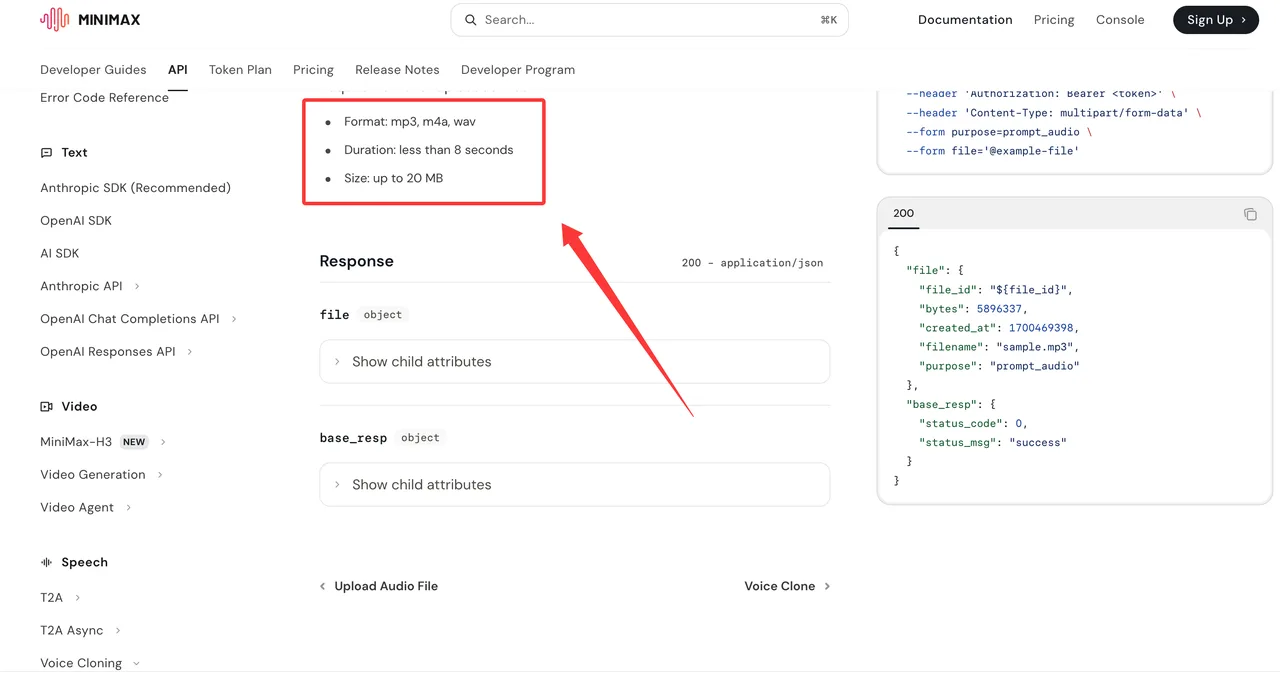
MiniMax also supports optional prompt audio. The Upload Prompt Audio reference uses the same upload path, but with purpose=prompt_audio. Prompt audio must be mp3, m4a, or wav, less than 8 seconds, and up to 20 MB.
If you use prompt audio, store its file_id separately. Mixing the source file and prompt file in one internal field is the kind of small shortcut that becomes painful during review.
Create and Activate the Cloned Voice
Call the Voice Clone API With a Unique Voice ID
The clone step calls /v1/voice_clone. The official Voice Clone API requires file_id and a custom voice_id.
The custom ID has rules: 8 to 256 characters, starts with an English letter, contains only letters, digits, hyphens, and underscores, does not end with a hyphen or underscore, and must not duplicate an existing ID.
Treat the cloned voice ID as production infrastructure. Do not use casual names like testvoice1 or personal names that expose sensitive identity. Use a stable internal pattern, for example:
brand_region_speakerrole_project_v01
That keeps it readable without turning the ID into a privacy leak. If the speaker records a new source sample later, create a new ID and update your own voice registry. Do not hide a changed voice behind an old name without review.
Generate a Preview and Check Similarity
The clone request can include optional preview text. If text is supplied, the model field is required. The reference currently lists preview model options including speech-2.8-hd, speech-2.8-turbo, speech-2.6-hd, speech-2.6-turbo, speech-02-hd, speech-02-turbo, speech-01-hd, and speech-01-turbo.
Preview text is limited to 1,000 characters. MiniMax says preview synthesis is billed by character count, aligned with T2A pricing. That means preview is not just a free cosmetic step. Track who runs it and why.
Use preview scripts that match the app. For a customer support voice, test greetings, refusal lines, product names, numbers, and pauses. For a narrator, test longer sentences, punctuation, rhythm, and breathing tags where the selected model supports them.
The clone API also exposes controls such as text_validation, accuracy, need_noise_reduction, need_volume_normalization, and aigc_watermark. I would not turn these into random toggles. Use them as part of a repeatable review flow: first validate the transcript, then test noise handling, then decide whether watermark behavior fits the product policy.
This cannot be judged by feel. It needs a sample run.
Use T2A Before the Temporary Voice Expires
MiniMax’s API overview says rapid cloned voices are temporary. To keep one permanently, you must call a T2A speech synthesis API with that voice within 168 hours, or 7 days. Preview inside the clone API does not count.
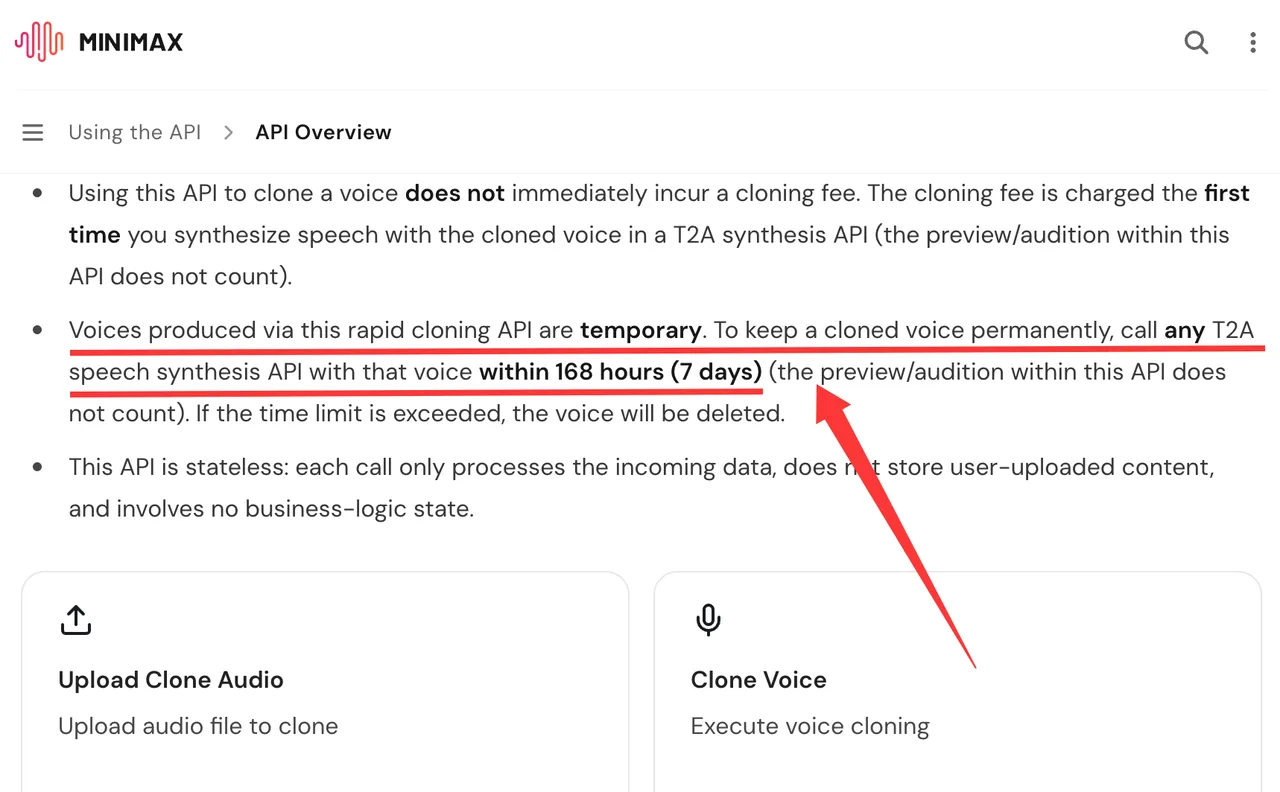
The same overview says the cloning fee is not charged immediately. The fee is charged when the cloned voice is first used in T2A synthesis, not when the clone request is created.
That changes how you should build activation. After a voice passes preview, schedule a controlled MiniMax T2A call within the retention window. Store the activation timestamp, model, text source, usage owner, and billing owner.
A small production checklist helps:
| Stage | API object | Record before moving on |
|---|---|---|
| Upload source | file_id | Consent, source quality, uploader |
| Upload prompt | prompt file_id | Transcript, language, reviewer |
| Clone voice | voice_id | Naming owner, model, request time |
| Preview | demo_audio | Similarity score, pass/fail notes |
| Activate | T2A output | Activation time, cost owner, app surface |
Demos show the ceiling. Production shows the floor.
Test the Voice in an AI Application
Compare Languages, Emotion, and Long-Form Speech
Once the voice is active, test it through the same speech API path your application will use. The MiniMax HTTP T2A API uses /v1/t2a_v2 and accepts voice_setting.voice_id, along with controls such as speed, volume, pitch, output format, streaming, and language handling.
MiniMax speech docs list 40 supported languages in the overview and expose language_boost options in the T2A reference. Do not turn that into a promise that one cloned voice will perform equally well across every language, accent, and recording condition.
Test the real workload:
Short replies.
Long narration.
Names and uncommon terms.
Numbers and addresses.
Mixed-language sentences.
Emotion or sound tags where supported.
Streaming if your product uses real-time output.
Async long-form speech if your product generates long scripts.
For long text, the overview describes asynchronous speech generation with much larger input capacity than the synchronous HTTP path. Use that only if your product needs long-form generation, and test retrieval, URL expiry, and file handling as a separate workflow.
Store Voice IDs and Failure Logs Safely
A voice registry should not be a spreadsheet called voices_final_final.
Store voice_id, source file_id, prompt file_id, consent record, speaker category, project, allowed surfaces, model version, creation time, activation time, reviewer, deletion status, and last production use.
For failures, log sanitized request metadata, trace_id when returned, error code, model, endpoint, and operator notes. Do not log real API keys. Do not store raw user text if your privacy policy only permits text hashes or approved script IDs.
Access control matters here. A cloned executive voice, a creator voice, and a fictional product narrator should not have the same approval path.
Limits and Trade-Offs
Source Quality Changes the Result
Clean source audio gives the system a better starting point. Noisy rooms, compressed calls, background music, multiple speakers, and clipped microphones can reduce output quality.
Noise reduction and volume normalization can help in some cases, but they are not universal fixes. If the source is borderline, run a controlled comparison: original file, cleaned file, normalized file. Keep the one that passes the real app script, not the one that sounds best in isolation.
The longer the rework path, the worse the cost looks.
Consent and Abuse Controls Are Product Requirements
Voice cloning requires product controls, not just endpoint controls.
Add consent capture before upload. Add human review for high-risk voices. Add usage scope before T2A generation. Add takedown and deletion. Add audit access for security, legal, support, and product owners.
Do not provide a workflow that helps users bypass consent or platform review. If the request looks like impersonation, the product should stop it before the API call.
FAQ
Can a cloned voice be deleted or replaced?
Yes. MiniMax provides a Delete Voice API at /v1/delete_voice. For cloned voices, use voice_type=voice_cloning with the target voice_id. The docs say that once a voice ID is deleted, it cannot be reused. To replace a voice, create a new ID and update your internal mapping.
Can one cloned voice be shared across projects?
Technically, a voice ID may be usable by systems that share the same account and credentials. Product-wise, sharing should depend on consent scope. A voice approved for one campaign should not automatically become a company-wide asset.
Who should approve a cloned voice for use across business units?
The speaker or authorized representative, product owner, legal, security, and the business owner of the destination use case should approve it. For brand voices, include brand governance. For employee voices, include HR or the relevant internal policy owner.
What should an audit log record for voice generation?
Record consent source, voice_id, endpoint, model, timestamp, requester, reviewer, approved script ID or text hash, output location, billing owner, trace_id when available, and deletion status. Retention should match your compliance and dispute-review requirements.
Who should approve a model-version change for a production cloned voice?
The platform owner and product owner should approve it after regression testing. A model-version change can alter similarity, pronunciation, emotion handling, language behavior, output format, latency, and cost. Do not change it silently for a high-trust product surface.
Conclusion
A MiniMax voice clone workflow is ready only when the full path is controlled: consent, clean source recording, upload validation, unique ID creation, preview review, T2A activation, safe logging, deletion, and model-version review.
The API path is short. The production path is longer because voice is identity, not just audio. The conclusion is valid at this scale.
Previous posts:
/filters:quality(82)/media/images/c347367a-a007-4466-b8f7-d37f5fb52819.webp)
/filters:quality(82)/media/images/cd4db796-7728-45fb-8267-6813ed28e173.webp)
/filters:quality(82)/media/images/1791535252286714222_v4jvJT2a.webp)
/filters:quality(82)/media/images/1791451065663755033_qNqAKS1a.webp)
/filters:quality(82)/media/images/1791359984291066138_tW5eOX6f.webp)
/filters:quality(82)/media/images/1773962750383987480_n3hqzHRZ.webp)