
Gemma 4 E2B Review for On-Device Multimodal AI
Gemma 4 E2B review for teams evaluating one on-device multimodal assistant task across usefulness, efficiency, and limits.
Hello, everyone. I’m John.
A phone-based image assistant fails in small ways first: it reads a blurry label too confidently, misses a button state, or turns a screenshot into a guess. That is the frame for this Gemma 4 E2B review. The question is narrow: can E2B support one local image-and-text assistant task without pretending to be a larger cloud model?
This is not a hardware test. I am using Google’s public documentation and model card to define what should be tested before adoption.
Verdict for On-Device Multimodal Work
Gemma 4 E2B is worth a pilot for bounded on-device multimodal work: short visual questions, local image understanding, light OCR, and private assistant flows where cloud calls are undesirable.
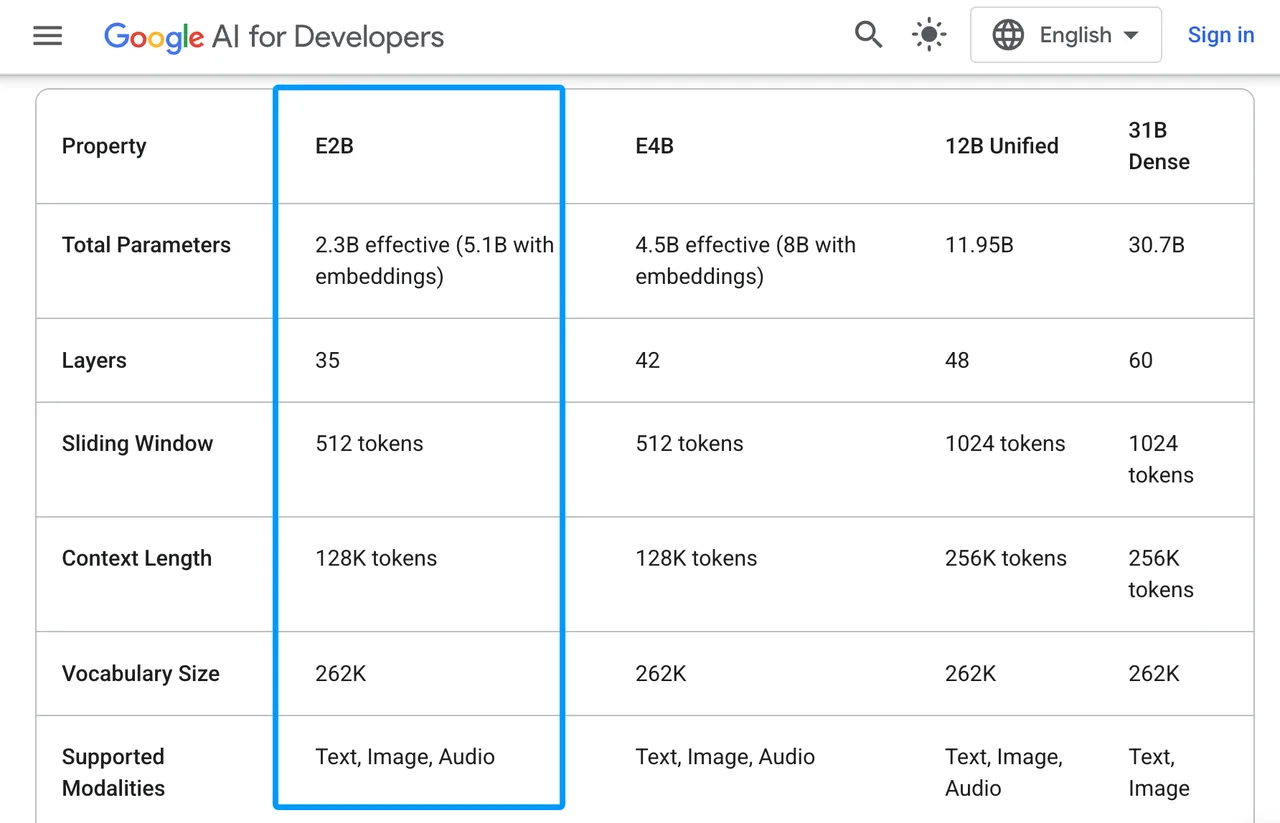
Google’s Gemma 4 launch post positions E2B and E4B for mobile and edge devices. The current Gemma 4 model card, last updated July 30, 2026, lists E2B at 2.3B effective parameters, 5.1B parameters with embeddings, 35 layers, 128K context, and text, image, and audio inputs with text output.
The boundary is clear. This is a compact open model for edge use. It should not be judged like a large hosted multimodal model.
Review One Image-and-Text Assistant Task
Define Inputs and Acceptance Rules
Use one task: a local assistant reads a product label, receipt, app screenshot, or device panel from the camera roll.
The output should stay simple:
| Field | Pass Rule |
|---|---|
| summary | Describes only visible content |
| visible_text | Extracts readable text without guessing |
| next_step | Gives one practical action |
| uncertainty | Flags blur, missing context, or low confidence |
If the model invents a serial number or explains a warning it cannot read, the task fails. A good single output does not mean the production workflow is ready.
Evaluate the Response on a Target Device
Pin the device, model package, runtime, quantization, image token budget, prompt, and thermal state. The model did not become worse because the phone was warm. The workflow became untrustworthy because nobody recorded the condition.
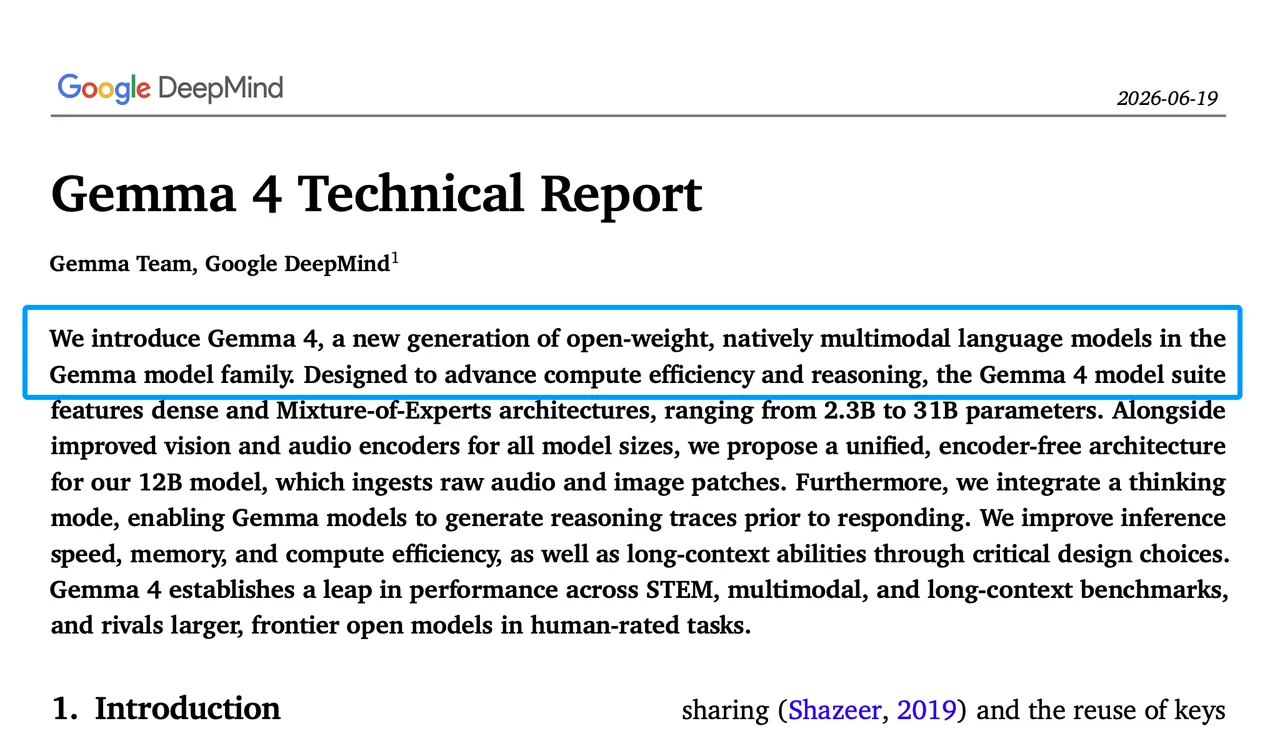
Google’s Gemma 4 technical report, revised July 24, 2026, describes Gemma 4 as open-weight and natively multimodal. Useful. Still not a substitute for your own device run.
Assess the Practical Trade-Offs
Task Usefulness and Failure Cases
E2B fits short visual assistance: “What does this label say?”, “Which option is selected?”, “What is shown on this chart?”, or “Is this form missing a visible field?”
The weak spots are predictable: small text, dense documents, messy handwriting, charts that require calculation, and images where the real answer depends on context outside the frame. This cannot be judged by feel. It needs a sample run.
Device Efficiency and Model Constraints
Google’s Gemma model overview lists approximate E2B memory needs at 11.4 GB BF16, 5.7 GB SFP8, 2.9 GB Q4_0, 1.1 GB mobile, and 0.84 GB mobile text-only. The same page warns that software overhead and KV cache are not included.
That means long context is not free. For a local multimodal assistant, start with small images and short answers. Raise the image token budget only when OCR or fine visual detail needs it.
Decide Whether E2B Fits
Strong Fits for Edge Applications
Gemma 4 E2B fits when the app needs offline behavior, lower latency, local data handling, and good-enough visual assistance. Good candidates include field-service notes, education helpers, camera-based labels, local UI support, and private first-pass triage.
WaveSpeed should only appear as a hosted route if its current model catalog confirms E2B availability. I did not find current evidence for that route, so this review treats E2B as Google’s model and an on-device deployment question.
Cases Better Served by a Larger Model
Use a larger model when the task needs high-recall OCR, long document reasoning, visual math, multi-image comparison, or regulated review.
An edge AI model is allowed to say “I can’t read this.” In production, that is better than a confident wrong answer.
FAQ
Does Gemma 4 E2B permit commercial app distribution?
Yes, Gemma 4 is released under Apache 2.0. Teams still need to follow the license, applicable notice and attribution requirements, and local law.
Which mobile platforms receive official E2B runtime support?
Android has the clearest developer path through AICore and ML Kit preview routes. Google AI Edge Gallery also supports hands-on local testing across mobile and desktop surfaces, but that is not the same as production API support.
Can developers fine-tune E2B without losing multimodal inputs?
They can fine-tune Gemma models, but they must retest image input after tuning. A text-only LoRA path does not prove the local multimodal assistant still works.
How are Gemma 4 E2B safety updates distributed?
Pinned local weights do not update themselves. Track Google model cards, runtime releases, and safety notes. Keep your own refusal tests.
Does on-device Gemma 4 E2B inference require Google account authentication?
Local inference should not require account authentication once the model and runtime are installed. Downloads through Google services may require account access or terms acceptance. Test offline before promising offline behavior.
Conclusion
The bottom line for this Gemma 4 E2B review is simple: pilot it for bounded image-and-text assistance, not broad visual reasoning.
Lock the target device, runtime, quantization, image budget, prompt, and failure rules. If the assistant stays useful without guessing, this workflow can stay.
Previous posts:
/filters:quality(82)/media/images/b73c2438-6bdd-4b80-a229-8d71d8f819cf.webp)
/filters:quality(82)/media/images/427fd9f2-347d-4f86-a2d5-aee110cda01d.webp)
/filters:quality(82)/media/images/1773962750383987480_n3hqzHRZ.webp)
/filters:quality(82)/media/images/43fa0e7f-a0db-48d7-9bab-921d1225db30.webp)
/filters:quality(82)/media/images/5799ff56-3a73-40ca-a666-e4965d878496.webp)
/filters:quality(82)/media/images/7a8850fc-caf6-482f-ac4d-5ddbe64ec47c.webp)