AI Video Generation API Pricing Comparison
AI video generation pricing comparison for builders estimating cost per usable clip, retries, queue time, and model routing.
=I counted the wrong thing the first time I compared AI video generation APIs. I compared sticker prices.
Then I ran a batch. Some clips failed. Some passed technically but were unusable. Some took long enough that the queue became the actual problem. One provider looked cheap until I counted retries. Another looked expensive until I measured accepted outputs. So this is not a “which API is cheapest” piece. That question is too thin.
This is a pricing framework for builders who need to put video generation into a real product: SaaS creative tools, ad automation, ecommerce media systems, internal content pipelines. I looked at pricing SERP pages like the CrazyRouter / AtlasCloud-style comparison format the way I would look at a quick market map. Useful for structure. Not good enough for numbers. For prices, use official pricing pages, model pages, or the provider’s pricing API/control panel on the day you publish or launch.
That is where the work starts.
Why AI Video Generation Pricing Is Hard to Compare
AI image pricing is already mildly annoying. Video is worse.
The billing unit changes by provider. One charges per generated second. One charges credits per 5-second clip. One charges by GPU runtime. One charges by model, resolution, duration, and whether audio is included. Another shows an estimate before generation, then final charge after the job runs.
This is normal now. Not ideal. Normal.
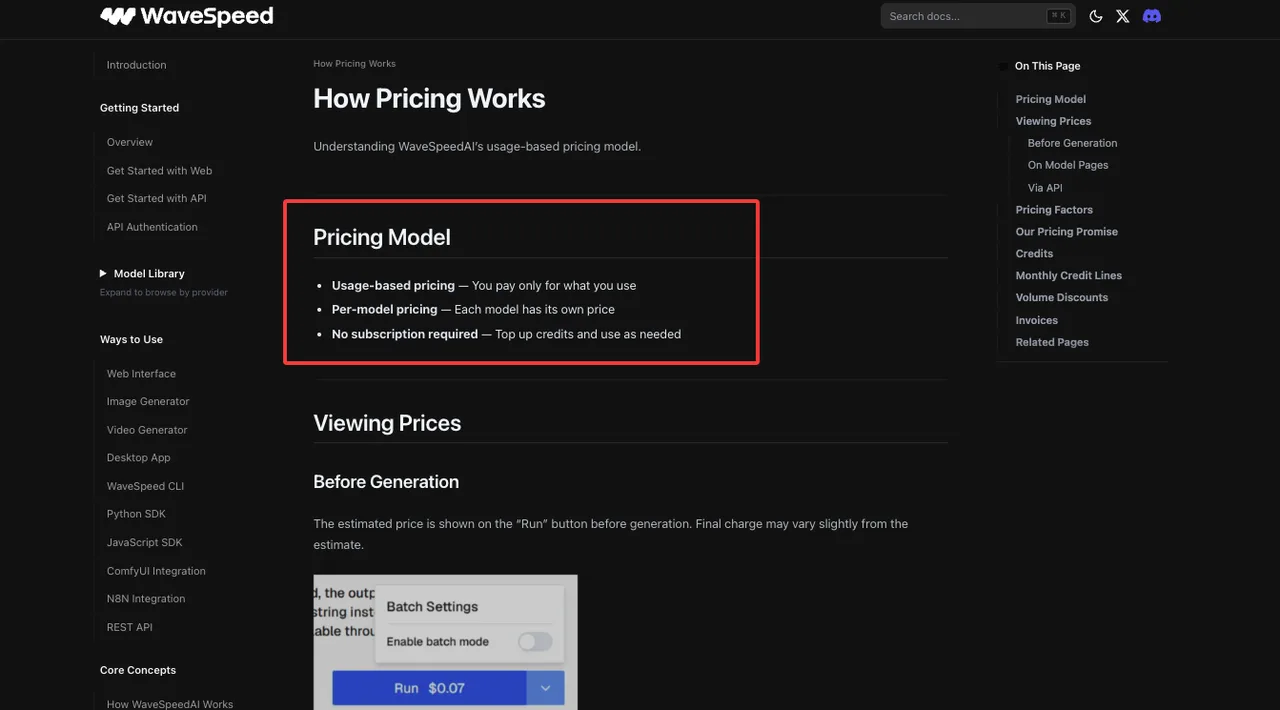
WaveSpeedAI’s own pricing documentation says prices vary by model complexity, resolution, duration, and batch size, and that cost can be checked before generation through a pricing API. That is the kind of mechanism I want in production. Not because it makes costs magically low. Because it lets the application know what it is about to spend.
Credits, seconds, resolution, duration, and retries
The problem with credits is that they look simple until you compare them across systems.
A credit on one platform is not a credit on another. A “5-second video” is not always the same product either. Resolution changes cost. Audio changes cost. Fast and standard models can share a name family but not the same billing unit. Some products price by output duration. Some price by request. Some price by hardware runtime. Some use prepaid packs that expire.
I do not normalize by “price per generation” anymore. It hides too much.
I normalize by:
- cost per output second
- cost per accepted clip
- cost per usable second
- failure-adjusted cost
- latency-adjusted cost
- retry-adjusted cost
- storage and review cost, if the workflow includes them
Replicate is a good example of why billing models differ. Its pricing page explains that some models are billed by hardware time, while others are billed by input and output. That means two “video generation API” options can have completely different economic behavior under load.
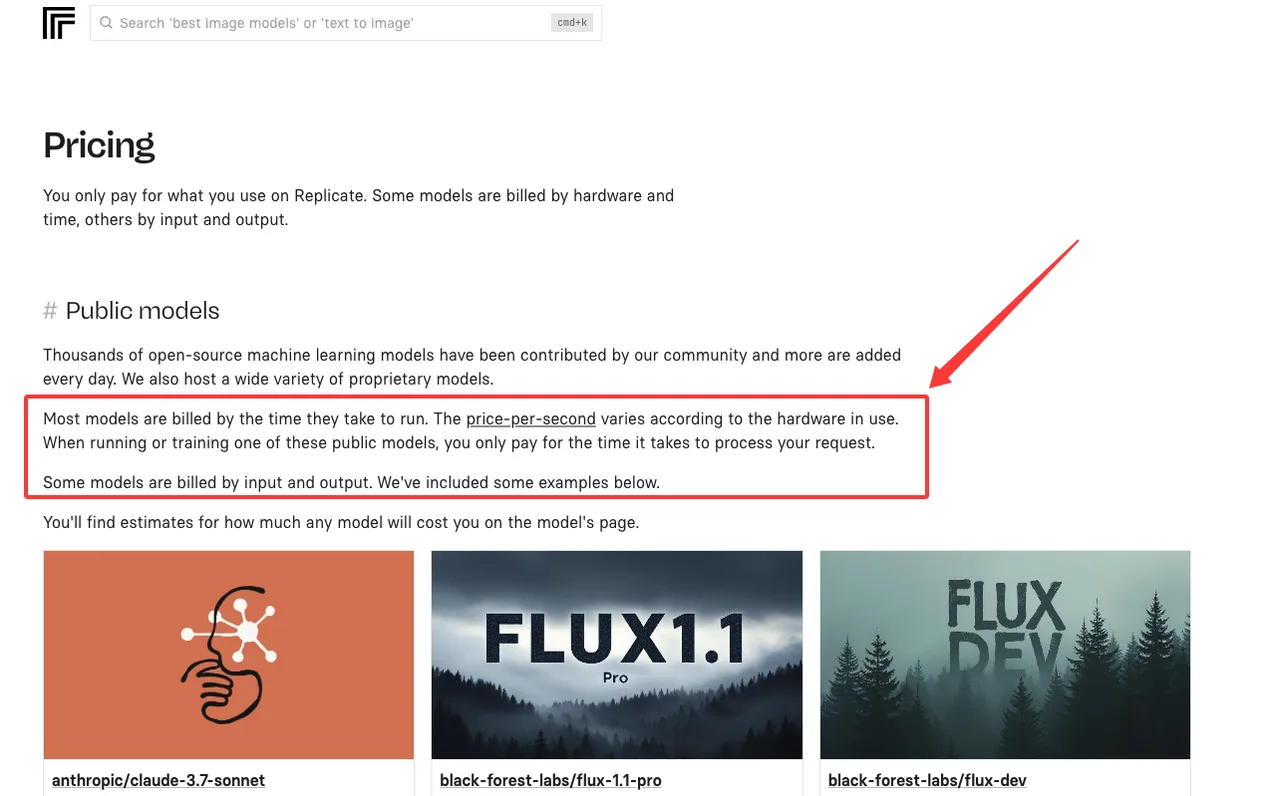
If one model takes longer to run, hardware-time billing can punish slow generations even when the output duration is the same. If another model bills by output second, runtime matters less for direct cost but still affects queue time and user experience.
So the first pricing question is not “how much is one clip?”
The first question is “what unit am I being charged for?”
Sticker price vs cost per usable clip
Sticker price is what the pricing page says. Cost per usable clip is what finance sees later. Those are not the same number.
A clip can fail outright. It can be rejected by moderation. It can ignore the prompt. It can have temporal consistency problems. It can look fine in the first frame and then melt in motion. It can be the wrong aspect ratio because your request adapter mapped a field badly. It can complete after the user has already abandoned the task.
All of those outcomes cost money or time.
For builder teams, I use this formula:
cost per usable clip = total generation spend / accepted clips
Then I add operational cost separately:
true cost per usable clip = (generation spend + retry spend + review cost + support cost + storage cost) / accepted clips
This is where the cheap model sometimes stops being cheap.
Say Model A costs less per second but needs more retries. Model B costs more per second but produces accepted clips more often. If the workflow is high-volume and human review is expensive, Model B may be the cheaper production model.
Found the pattern on the third try.
Pricing Metrics Builders Should Normalize
I would not compare providers in one raw table unless the units are already normalized. The table below is the version I use before any provider discussion. It keeps the math honest.
| Metric | What It Means | Why It Matters |
|---|---|---|
| Cost per second | Direct price divided by generated duration | Normalizes duration-based billing |
| Cost per accepted output | Spend divided by approved clips | Captures failure and quality issues |
| Failure rate | Failed or unusable jobs divided by total jobs | Shows retry pressure |
| Retry-adjusted cost | First run plus reruns | Reveals hidden spend |
| Queue time | Time before generation starts | Affects UX and throughput |
| p95 completion time | Slow-tail generation time | Determines production capacity |
| Review cost | Human QA time per accepted clip | Often larger than expected |
| Provider overhead | Integration, monitoring, support, invoices | Shows operational burden |
I know. It looks like finance homework. It is finance homework.
Cost per second, cost per accepted output, failure rate
Cost per second is the most portable metric, but it still needs context.
If a provider charges $0.10 per second for a 5-second clip, the base cost is easy. If another provider charges credits per 5-second output, convert credits to dollars, then divide by duration. If a provider charges by GPU runtime, estimate average runtime per accepted output and keep p95 separate.
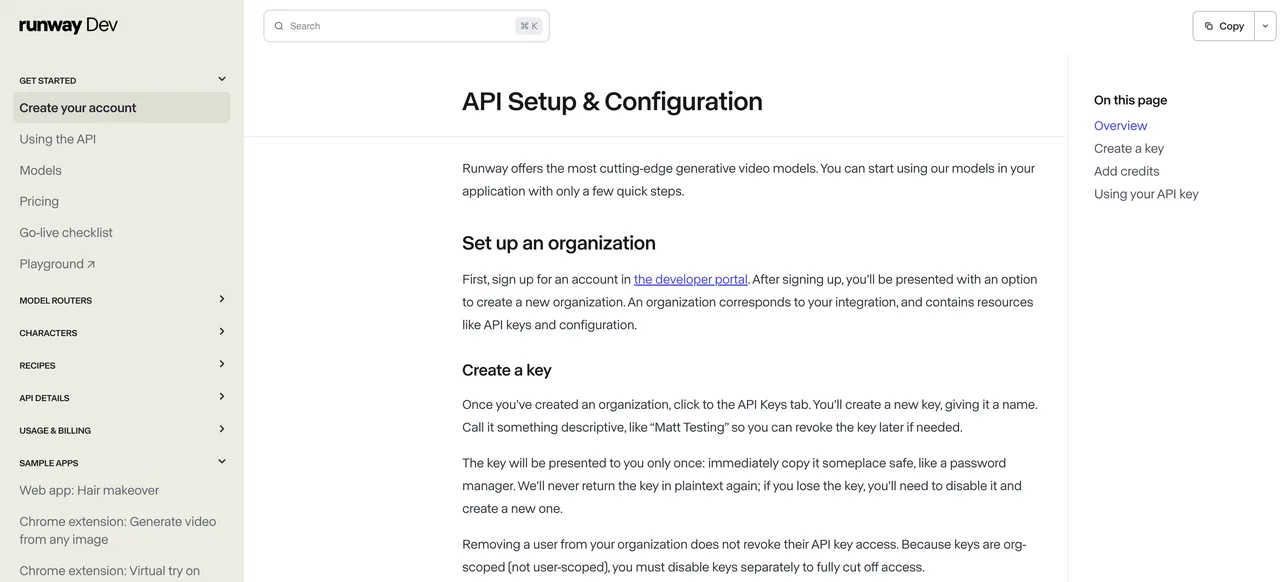
Runway is a useful example because its official API setup guide separates developer credits from normal web-app usage, while its usage tiers document concurrency and monthly spend limits that affect real video generation cost.
Failure rate is the second metric. I separate failures into:
- technical failure
- provider timeout
- policy rejection
- bad input
- prompt noncompliance
- temporal inconsistency
- artifact failure
- wrong format
- user rejected output
Do not group all failures together. A bad prompt is not the same as a provider outage. A provider timeout is not the same as a model ignoring the requested motion. They require different fixes.
Cost per accepted output is where the decision becomes clearer.
If 100 requested clips cost $100 and 70 are accepted, your cost per accepted clip is $1.43. If another provider costs $130 for 100 clips but 95 are accepted, the accepted cost is $1.37. The sticker price lied by omission.
It usually does.
Queue time, priority tiers, and hidden operational cost
Queue time is not a pricing line item. It still costs money. If a user waits too long, they retry. If they retry, you may pay twice. If they leave, support gets the complaint. If your internal team is generating campaign assets, queue delay becomes production delay.
Priority tiers matter here. Some providers sell higher concurrency, priority queues, reserved capacity, or provisioned throughput. Those are not just “enterprise features.” They change cost predictability.
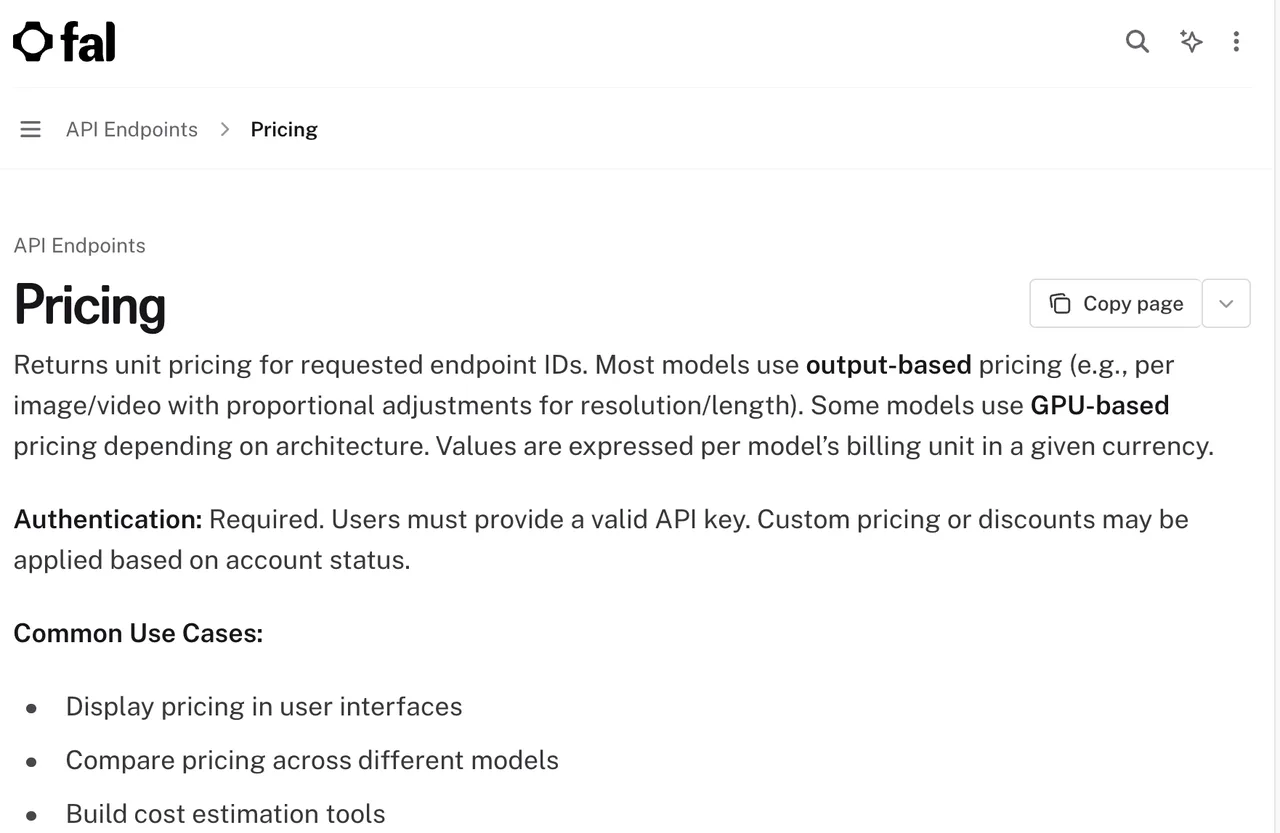
fal exposes a pricing endpoint in its official docs. The fal pricing API can return unit pricing for endpoint IDs, and the page notes that custom pricing or discounts may apply based on account status. That last part matters. Your app may not see the same effective rate as a public page if your account has custom terms.
Luma’s API docs make the capacity split more direct. The Luma Agents pricing page separates pay-as-you-go from provisioned throughput and describes shared capacity versus guaranteed capacity and latency SLA. That is the hidden pricing fork: pay less per occasional run, or pay for predictability.
I would not bury this in a procurement note.
If the product promise depends on fast generation, queue behavior is part of pricing. If the product promise is “final render later,” queue behavior matters less. Works for my frequency. Yours might differ.
The operational cost bucket should include:
- engineering time to maintain provider adapters
- retries caused by timeout or unclear errors
- extra moderation or QA review
- storage and CDN transfer
- support tickets caused by delayed or failed generation
- billing reconciliation across providers
- model switch testing
- customer credits issued after failed jobs
This is why an API pricing benchmark should not be just a price table.
It should explain how each price becomes a product cost.
Cost Control Strategy
Cost control is not one switch.
It is routing, budgeting, retry policy, prompt discipline, and observability. If you only start watching spend after launch, the numbers will already be muddy.
Draft/final model routing
I like draft/final routing because video workflows naturally have two phases.
- The first phase is exploration. Users test the idea. They change prompts. They adjust camera motion. They try aspect ratios. They discover that the product photo looked fine until motion started. This phase should be cheap and fast.
- The second phase is final output. Higher resolution. Better model. More expensive route. Maybe audio. Maybe stronger temporal consistency. Maybe priority queue.
Do not use the same model for both phases unless you have a reason.
A basic routing policy looks like this:
| Workflow Stage | Model Choice | Cost Rule | Acceptance Rule |
|---|---|---|---|
| Prompt exploration | cheap / fast model | cap spend per user session | rough motion and composition only |
| Internal preview | mid-tier model | allow limited retries | prompt adherence and usable framing |
| Customer preview | reliable model | track cost per accepted clip | acceptable artifacts and duration |
| Final render | best-fit model | require explicit confirmation | meets product quality bar |
| Batch production | routed by use case | enforce budget and queue limits | sample QA plus regression checks |
The point is not to always choose the cheapest model first. The point is to avoid spending final-render money while the user is still thinking.
For API products, I also route by prompt risk. Prompts with many constraints, character consistency needs, brand assets, or precise motion may skip the cheapest tier. Cheap failures are still failures.
Google’s Vertex AI pricing page is useful here because video price can differ by output type. The Vertex AI generative AI pricing page lists Veo pricing separately for video generation and video plus audio generation. That is exactly the kind of distinction routing needs to know before request submission.
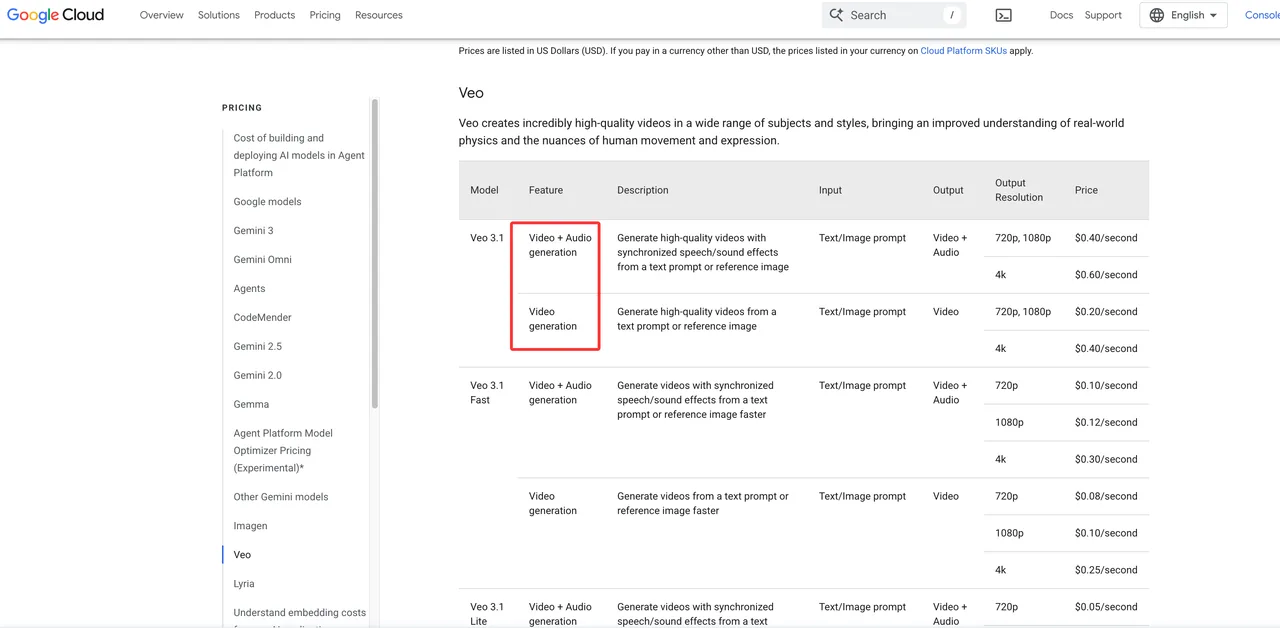
Audio is not “free detail.” It can be a different product tier. Same with resolution. Same with duration. Same with reference inputs.
Budget alerts, fallback, and usage caps
Budget alerts should fire before finance is annoyed.
I set alerts at multiple levels:
- user session
- workspace
- project
- model
- provider
- route type
- day
- month
One alert at the account level is too late. By then you know spend happened. You do not know why.
Usage caps need to match product behavior. A hard cap is useful for trial users. A soft cap is better for teams mid-campaign. Enterprise customers may need alerts, not blocks. Finance will care about predictability. Product will care about not killing workflow. Engineering gets to be in the middle. Very glamorous.
Fallback is also cost control.
If the primary model fails, do not blindly retry the same expensive route. Classify the failure. If the failure is timeout, maybe retry once. If the prompt violates policy, stop. If the model ignored motion, route to a model with better motion control. If the cost estimate is too high, ask the user to shorten duration or lower resolution.
MiniMax shows another pricing shape: packaged units and model-specific deductions. The MiniMax video packages page lists video generation packages, RPM differences, and different unit deductions depending on model, resolution, and duration. That kind of setup needs a translation layer inside your billing logic. Users should not have to understand provider units.
For production, I would store every generation with:
- provider
- model
- route
- prompt hash
- duration
- resolution
- input type
- estimated cost
- final cost
- status
- retry count
- accepted / rejected flag
- rejection reason
- user-facing job ID
- internal billing batch
This is where finance and engineering stop arguing from vibes.
Having many tools is not the problem. Having to manage your tools is.
FAQ
Who should approve pricing assumptions before launch?
The AI platform owner should own the technical assumptions. Finance should approve the cost assumptions. Product should approve how pricing affects user experience.
I would not launch an AI video generation feature with only engineering approval. Engineering knows the route. Finance knows whether the margin works. Product knows whether the workflow can survive caps, waits, and user-facing limits.
The approval packet should include the official pricing source date, normalized cost per second, expected retry rate, expected accepted-output rate, projected monthly volume, fallback policy, and customer billing assumptions.
If any number comes from a dashboard or API control panel, screenshot it. Put it in the launch archive.
Good enough. That is the most honest assessment I can give.
What price change requires customer-facing notice?
Customer-facing notice is needed when the change affects what users pay, what they can generate, or how much usage their plan includes.
That includes higher per-second rates, changed credit deductions, new duration limits, removed draft models, slower queues on existing tiers, reduced free quota, output watermark changes, or a fallback route that changes cost or quality.
Small internal routing changes may not need release notes if user cost and output behavior stay the same. But if invoices change, tell users before they discover it in billing.
I paused here because this is where teams try to be clever. Do not be clever with billing communication.
How should finance and engineering share usage evidence?
Use one shared usage table. Not a slide. Not a thread. A table that both teams trust.
Engineering should provide request-level data: model, route, duration, resolution, status, retry count, error class, estimate, final charge, latency, and accepted-output flag. Finance should map that to invoice periods, customer accounts, gross margin, credits issued, and plan limits.
The shared metric should be cost per accepted output. Not just total spend. Not just cost per second. Accepted output is where product value shows up. Monthly review is fine for stable products. Weekly review is better during launch. Daily alerts are useful for anomalies.
This is where my data ends.
Conclusion
AI video generation pricing is hard because the unit keeps moving.
Credits are not seconds. Seconds are not accepted clips. Accepted clips are not profitable clips. A provider that looks cheap in a pricing SERP can become expensive after retries, queue time, review work, and failed outputs. A provider that looks expensive can win if it produces fewer failures and fits the workflow better.
I would use public pricing comparison pages for discovery, not final numbers. For launch decisions, use official provider pricing pages, pricing APIs, and account dashboards checked on the day you make the decision.
Normalize cost per second. Then normalize cost per accepted output. Then add failure rate, retry rate, queue time, and operational overhead. Route cheap models for drafts. Route stronger models for final clips. Set budget alerts before launch. Store enough evidence that finance and engineering can reconstruct what happened.
That is the actual AI video API pricing benchmark. Run it yourself. That will tell you more than the sticker price.
Previous posts:
Related Articles

Best AI Video Platforms for Production Teams in 2027

Best Sora 2 Alternatives for Video Teams in 2027

Lanta AI Review 2027: Best Uses, Pricing, and Limits
Sora 2 Review 2027: API Quality, Cost, and Limits

Build a GPT-6 Astra 3D Workflow With Blender Assets