
AI Video Generator Prompt Adherence Comparison
AI video generator comparison focused on prompt adherence, motion consistency, failure modes, and production review workflows.
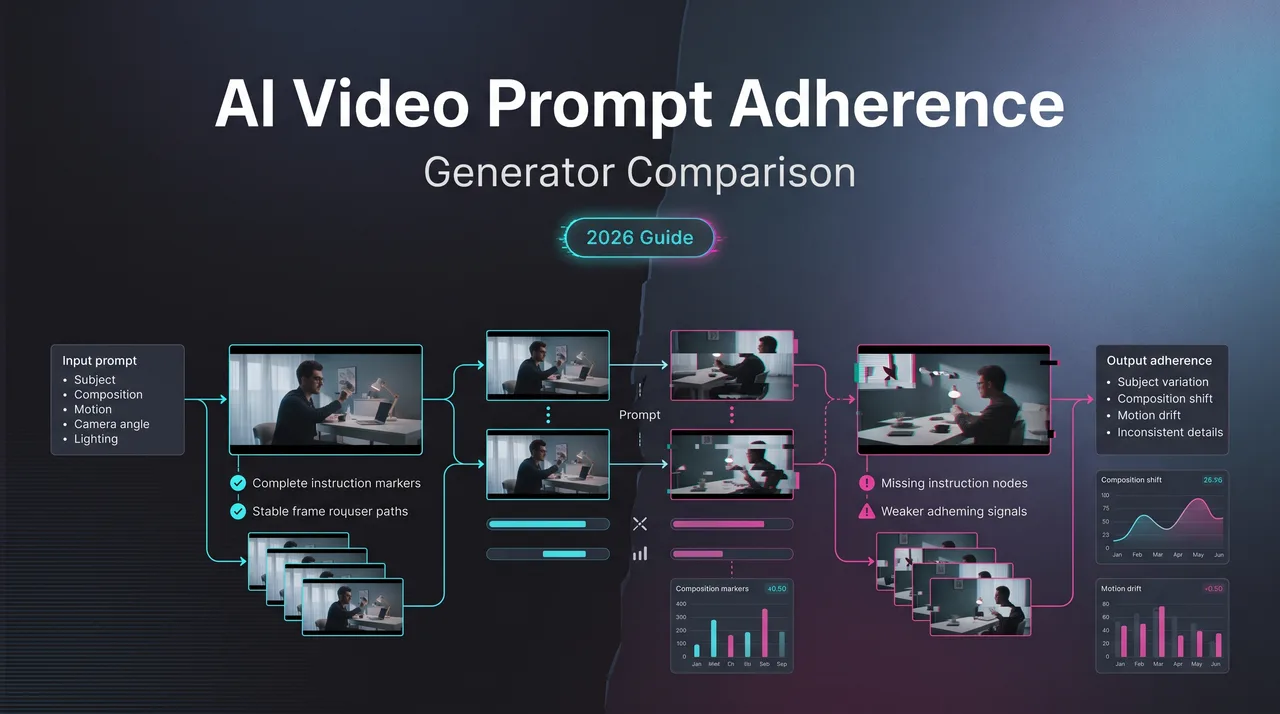
When I test an AI video generator for real work, I ignore the prettiest sample first. Pretty clips are easy to overvalue. The harder question is whether the model did what the prompt asked, kept doing it for the whole shot, and failed in a way the team can name.
This note is for teams comparing video models for campaigns, product demos, social assets, or embedded generation features. Not a “best tools” list. I looked at the ranking style only as background. The useful work is building a prompt adherence test that survives contact with production.
Why Prompt Adherence Is the Hardest Video Metric
Prompt adherence looks simple until motion enters the frame.
For still images, a prompt miss can be frozen and counted. The cup is blue or it is not. The dog is on the left or it is not. With video, the same object may appear correctly in frame one, drift in frame three, vanish in frame five, then return with a different shape. Which score is that?
I paused here.
Most teams compress that mess into “bad output.” That label is too soft. It hides whether the model missed the noun, the action, the timing, the camera move, the identity, the spatial relation, or the physical logic.
Several public benchmarks now supplement aggregate scores with multi-dimensional judgments. The VBench evaluation suite separates video generation quality into dimensions such as subject consistency, background consistency, motion smoothness, object class and multiple objects, spatial relationships, and overall consistency. I do not treat those dimensions as a production answer by themselves. I treat them as a reminder: “good video” is not one thing.

Literal instruction following vs cinematic plausibility
Literal instruction following is whether the output obeys the prompt. Cinematic plausibility is whether the shot feels visually believable.
They overlap. They also fight.
Prompt: “A red ceramic cup slides left across a wet marble counter while the camera remains locked.”
A model can make a beautiful shot where the cup slides right. That is not prompt adherence. It can also make a correct shot where the cup slides left, but the counter warps and the cup melts. That is adherence with low usability.
This is why I split evaluation into two passes.
First pass: did the model follow the written instruction?
Second pass: did the clip remain usable as video?
The order matters. If the first pass fails, the rest is decoration. A cinematic wrong answer is still wrong. Good lighting does not fix a missing object. It just makes the miss easier to show in a deck.
The reverse is also true. A clip can satisfy the prompt and still fail production. The subject might keep the right jacket but lose face structure. A logo might appear in the right place but crawl across the frame. A camera pan might happen, but the background stretches like wet paper.
So I score literal adherence separately from video generation quality. One answers “did it obey?” The other answers “can I use it?”
Common failures: missing objects, wrong motion, identity drift
The failures repeat often enough to name them.
Missing objects are the easiest to catch. The prompt asks for three glass bottles. The output shows two. Or it shows three in the first frame and two after the camera moves. For product work, that is a hard reject.
Wrong motion is trickier. The model may animate something, just not the requested thing. A person “raises their right hand” but raises the left. A skateboard “rolls backward” but moves forward. A locked camera slowly drifts. If the review sheet only says “motion quality,” the failure gets buried.
Identity drift is the one that wastes the most review time. The subject starts as a woman in a yellow raincoat, then becomes someone with a different face, a shorter coat, or a different body shape. In my tests, drift often appears alongside weak starting images, overloaded motion instructions, or cases where a model seems to trade identity consistency for movement.
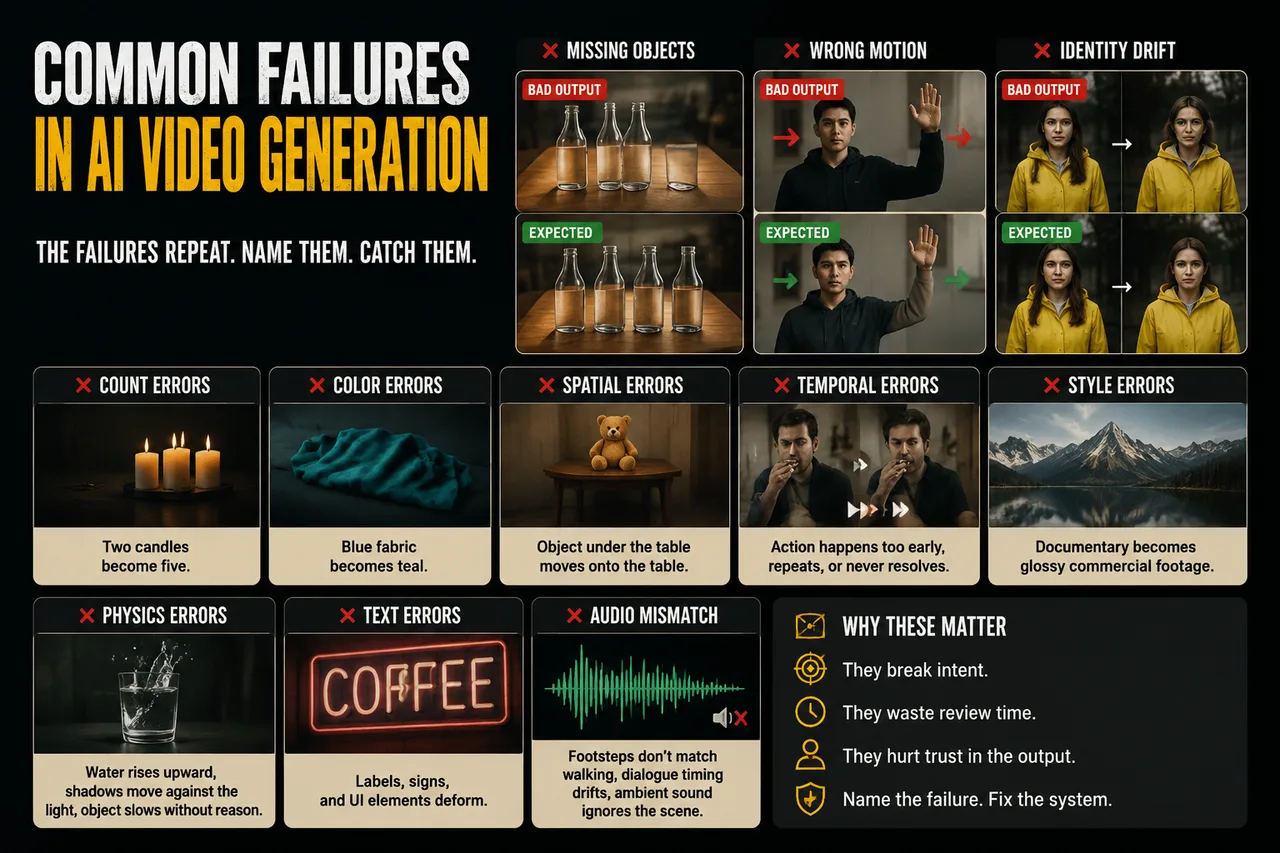
There are also quieter failures:
- Count errors: two candles become five.
- Color errors: blue fabric becomes teal or gray.
- Spatial errors: the object under the table moves onto the table.
- Temporal errors: an action happens too early, repeats, or never resolves.
- Style errors: documentary becomes glossy commercial footage.
- Physics errors: water rises upward, shadows move against the light, a falling object slows without reason.
- Text errors: labels, signs, and UI elements deform.
- Audio mismatch, when audio is generated: footsteps do not match walking, dialogue timing drifts, ambient sound ignores the scene.
The mistake is treating all of these as the same kind of failure. They are not. They imply different prompt repairs and different model choices.
Comparison Design for AI Video Generators
A comparison starts before generation. Bad test design makes every model look randomly good or randomly bad.
I treat an AI video generator benchmark as publishable only after the prompt set, generation settings, rejection labels, and sample handling rules are fixed in writing. Otherwise the comparison becomes clip shopping. Everyone says they hate clip shopping. Then launch week arrives.
Found the pattern on the third try.
Prompt categories, difficulty tiers, and expected outputs
Prompt categories need to map to real production work, not generic demo scenes.
For a content team, I usually separate prompts into six buckets:
- Product motion: object rotation, opening, pouring, folding, sliding, assembly.
- Human action: hand gestures, facial expression, walking, turning, interacting with objects.
- Camera control: locked shot, dolly, pan, tilt, orbit, handheld movement.
- Scene dynamics: smoke, water, traffic, crowds, fabric, reflections.
- Multi-object composition: count, color, placement, relative movement.
- Style and format: documentary, product macro, animation, social vertical, brand-safe lighting.
Difficulty tiers stop the prompt suite from becoming unfair.
Tier 1 prompts test one instruction. “A white sneaker rotates slowly on a gray studio floor.” If a model fails here, the issue is basic.
Tier 2 prompts combine two or three constraints. “A white sneaker rotates slowly while blue light moves across the floor. Locked camera.” This tests whether the model can keep identity while adding scene motion.
Tier 3 prompts add interaction. “A hand places the white sneaker into a clear acrylic box, closes the lid, and the camera pushes in.” This is where object permanence and action binding start to break.
Tier 4 prompts add temporal sequencing. “The sneaker rotates, stops, the lid opens, and a hand removes it without changing the camera angle.” Many models can fake the first half. The second half tells the truth.
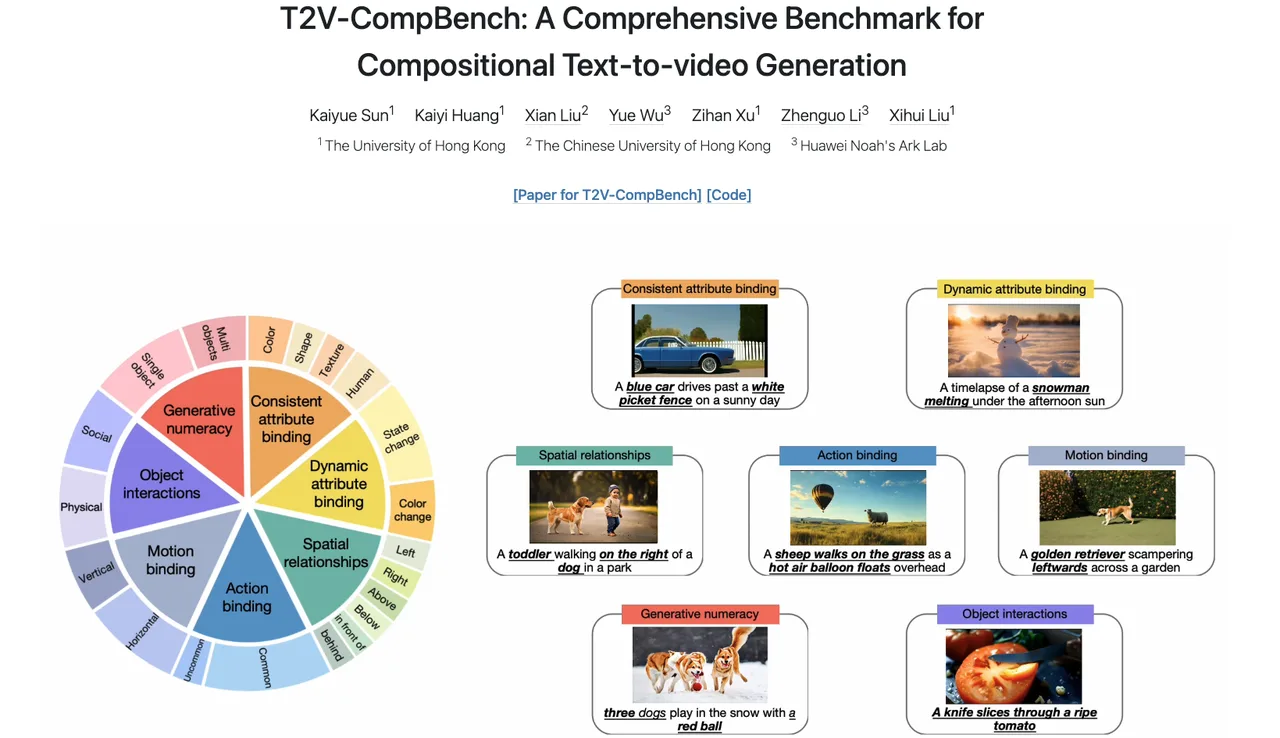
Research benchmarks can help structure this instead of inventing categories from scratch. The T2V-CompBench prompt suite focuses on compositional text-to-video generation and covers categories such as attribute binding, action binding, object interactions, spatial relationships, and motion binding. I would not copy its prompts directly into a commercial test. I would use the category logic.
Expected outputs must be written before testing.
Not “make a good video.” Too vague.
Better:
- The sneaker remains white in all frames.
- The sneaker completes one slow clockwise rotation.
- The camera stays locked.
- The gray floor remains stable.
- No extra products appear.
- The clip is rejected if the sneaker changes shape, duplicates, or leaves frame.
This sounds tedious because it is tedious. It also saves the review meeting from becoming a taste argument.
Official prompting guidance can expose model-specific friction. Runway’s Gen-4 prompting guide emphasizes simple motion-focused prompts, positive phrasing, and avoiding negative prompts. Google DeepMind’s Veo 3 prompt guide frames prompts around shot framing, motion, style, lighting, character, location, action, and dialogue. Those two approaches are not identical. That is the point. A fair comparison records which prompt form each model expects, then decides whether the test uses one universal prompt or model-adapted prompts.
I use both when the stakes justify it.
Universal prompts test raw portability.
Model-adapted prompts test best reasonable use.
Do not mix the results without labeling them.
Scoring adherence, consistency, artifacts, and usability
A score needs to tell the next person what to do.
A five-point scale is enough for most production teams. Ten points looks precise and usually is not. If reviewers cannot explain the difference between 7 and 8, the scale is pretending.
| Dimension | What I Score | Hard Reject Examples |
|---|---|---|
| Prompt adherence | Required objects, actions, counts, colors, camera instructions, timing | Missing hero product, wrong action, wrong camera state |
| Temporal consistency | Identity, object permanence, background stability, motion continuity | Face changes, product morphs, object disappears |
| Artifacts | Warping, flicker, limb distortion, texture crawling, text corruption | Visible product deformation, unreadable brand text |
| Usability | Whether the clip can enter edit, client review, or product flow | Needs full rerun, unsafe output, cannot be trimmed cleanly |
Each clip gets all four scores. The final decision is not the average.
A clip with 5/5 visual quality and 1/5 adherence fails. A clip with 4/5 adherence and 2/5 artifacts may pass for internal ideation but fail for customer-facing output. The decision label matters more than the arithmetic.
My labels are plain:
- Accept: usable without rerun.
- Accept with edit: usable after trim, crop, stabilization, cleanup, or sound replacement.
- Retry same model: prompt likely fixable.
- Retry different model: failure type matches model weakness.
- Manual production: generation is not reliable enough for this shot.
- Reject unsafe or policy: do not rerun until prompt is reviewed.
The harder part is agreement between reviewers. Eval frameworks that compare objective metrics with human studies are useful here. So the form has to force them.
A reviewer should not write “weird.” They should choose “identity drift,” “motion mismatch,” “count error,” “camera drift,” “style mismatch,” “artifact,” or “unsafe.” Free text comes after the label, not before.
Production Review Workflow
A prompt suite is only half the system. The other half is what happens after a clip fails.
Without routing, teams keep rerunning the same broken prompt. That is where budget leaks.
Human QA, rejection labels, and retry routing
Human QA is still required for subjective prompts. Automated checks can catch faces, text, objects, or simple frame-level changes. They cannot decide whether “quietly anxious office atmosphere” landed for a brand campaign. At least, I have not seen that work reliably enough to ship without human review.
The reviewer’s job is not to be a critic. The job is to protect the use case.
For each generated clip, I record:
- Model name and version, if available.
- Interface or API path.
- Prompt text.
- Input image or reference assets.
- Aspect ratio, duration, seed, motion setting, style setting, and safety setting where available.
- Number of attempts.
- Final clip URL or storage path.
- Reviewer ID.
- Decision label.
- Rejection label.
- Notes for retry.
The retry rule is mechanical.
If the failure is ambiguous prompt wording, rewrite the prompt and rerun the same model.
If the failure is missing object, count error, or wrong spatial relation across two attempts, send it to the model that scored higher on compositional prompts.
If the failure is identity drift from an image reference, reduce motion complexity first. Then rerun. If it still drifts, switch model or use a stronger reference workflow.
If the failure is camera movement, use stricter motion language. “Locked camera” tends to behave better than “no camera movement” in some systems because negative phrasing can confuse model behavior. This is not universal. It is why the prompt log exists.
If the failure is unsafe, disputed, or brand-risky, stop routing. Escalate to human owner. No automatic retries.
This sounds slow. It is faster than arguing over ten outputs with no labels.
How to compare models without cherry-picking clips
Cherry-picking is the default failure mode.
It starts innocently. Someone generates four clips and shares the best one. Another person does the same from a different model. The meeting compares two winners and calls it evidence.
That is not a comparison. That is a highlight reel.
A production comparison needs fixed sampling rules:
- Same prompt suite.
- Same number of attempts per prompt.
- Same duration and aspect ratio where possible.
- Same input asset quality.
- Same reviewer form.
- Same acceptance thresholds.
- Same storage rules.
- Same handling for failed jobs, blocked jobs, and timeouts.
- Same date range, because models change.
- Same policy for prompt rewrites.
I keep failed clips. This is non-negotiable.
The failures show whether the model is predictable. A model that produces one excellent clip and nine broken clips may still be useful for exploratory creative work. It is not the same as a model that produces seven usable clips out of ten with lower peak quality.
Production likes averages. Creative decks like peaks. Different jobs.
For blind review, strip model names from the review sheet when possible. Keep prompt ID and output ID. Reviewers score the clip before seeing the model. This does not remove bias completely. It removes some of the easy bias.
For customer-facing tests, keep a dispute packet:
- Original brief.
- Approved prompt.
- Expected-output checklist.
- Generated output.
- Rejection or acceptance notes.
- Reviewer decision.
- Any rerun history.
- Final customer response.
This packet is boring until a customer says the output is “wrong.” Then it becomes the only useful document in the room.

FAQ
Who owns final acceptance when prompts are subjective?
The owner is whoever owns the deliverable risk.
For a marketing asset, that is usually the creative lead or campaign owner. For an embedded generation feature, it is the product owner with input from design, safety, and engineering. For client work, it is the account owner plus the person responsible for the creative brief.
The model operator should not own final acceptance alone. They know the generation process. They may not know brand risk, legal context, customer promise, or campaign intent.
Subjective prompts need a pre-approved interpretation note. If the prompt says “premium,” define what counts: lighting, camera language, pacing, material detail, color range, absence of slapstick motion. Without that note, prompt adherence turns into personal taste.
How should teams handle customer disputes over “wrong” outputs?
Start with the prompt and the acceptance checklist, not the clip.
A customer dispute usually has one of three shapes. The output violated a literal requirement. The output matched the prompt but missed the customer’s unstated taste. Or the prompt itself was vague.
If a literal requirement was missed, the clip fails. No drama.
If the prompt was vague, the team needs a revision note, not a model blame note. “Make it more elegant” is not testable. “Slow dolly-in, warm side lighting, subject centered, no handheld motion” is testable.
If the output matched the written prompt but missed customer taste, save the clip as evidence and revise the creative direction. This is where AI video evaluation has to stay tied to contract language. A model cannot violate a requirement that nobody wrote down.
What release note should trigger prompt-suite retesting?
Retest when a release note mentions any change that affects interpretation or motion.
That includes new model versions, prompt understanding changes, reference-image behavior, camera control, motion control, character consistency, text rendering, duration, aspect ratio, audio generation, safety filtering, seed behavior, or default settings.
Retest if pricing or speed changes affect retry strategy. A model can stay visually similar but become less viable if the cost of three retries changes.
Retest after moderation changes too. A prompt that used to generate may become blocked. A prompt that used to pass may produce safer but less useful motion. This conclusion has an expiration date - models update fast.
Conclusion
The useful output from an ai video generator comparison is not a ranked list. It is a repeatable way to answer one question: did this model follow the prompt well enough for this job?
Prompt adherence needs its own score. Temporal consistency needs its own score. Artifacts need their own score. Usability needs a decision label, not just a number.
Save the prompts. Save the failures. Save the reviewer labels. Compare averages and failure patterns, not only the best clips.
Previous posts:
Related Articles
/filters:quality(82)/media/images/1773962750383987480_n3hqzHRZ.webp)
Seedance 3.0 Rumors: Native Audio-Video Sync, Multi-Shot Storytelling, and What to Expect
GPT Image 2.6: What Is Confirmed, What Is Rumor, and What to Build On Today
Pika H3 Flex Explained: What It Is and How to Try the H3 Family via API
Seedream 5.5: What to Expect, and How to Get Ready
AI Lip Sync Dialogue Scenes with Seedance 2.5: Prompts and Settings