Hyper3D Rodin v2.5 Text to 3D is a fast AI 3D asset generation model that creates production-ready 3D assets from text prompts with clean meshes, UVs, and textures. Ready-to-use REST inference API for game assets, e-commerce 3D models, product visualization, AR/VR content, digital twins, creative design, and professional text-to-3D workflows with simple integration, no coldstarts, and affordable pricing.
待機中

$0.481回あたり·~20 / $10
サンプルすべて表示

An elegant Art Deco automaton, polished brass body, ivory enamel panels, geometric gold patterns, slender mechanical limbs, glowing amber eyes, symmetrical ornamental design, luxury 1920s machine aesthetic, premium collectible 3D model, centered, isolated, no background.

Create a cute 3D robot assistant character, small rounded body, expressive digital eyes, short arms, floating head, white and light blue plastic materials, soft bevels, friendly proportions, clean topology, stylized but polished, suitable for animation and game use
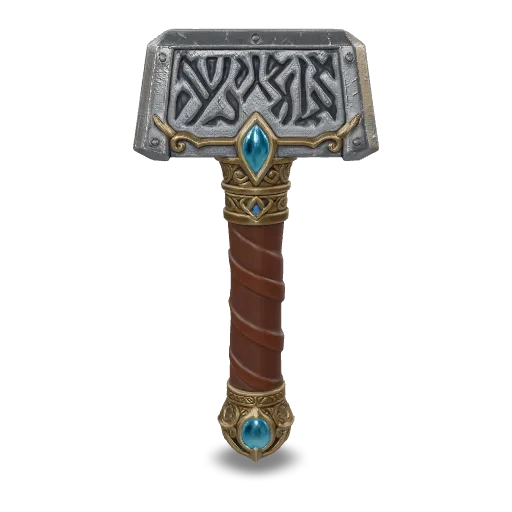
An ornate fantasy war hammer with a runic engraved steel head, gold filigree, wrapped leather grip and a glowing blue gem in the pommel, high-detail game asset
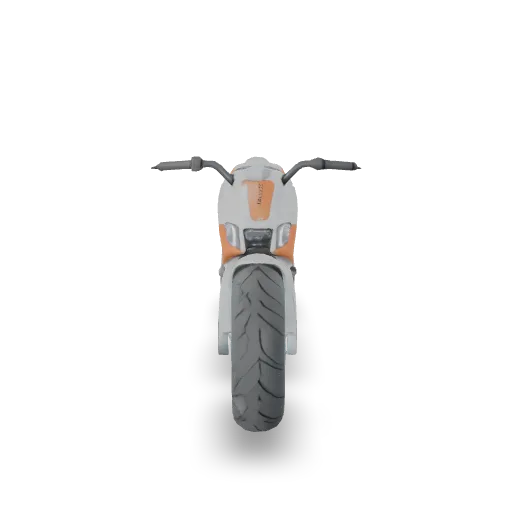
A sleek sci-fi hover bike with glowing cyan thrusters, matte white and orange body panels, exposed mechanical details, high-detail hard-surface model

A cute giant sea turtle carrying a tiny garden on its shell with a small cottage, flowers and a tree, stylized fantasy 3D model
関連モデル
/filters:quality(82)/media/images/1789120746143744570_VtCMW5en.webp)
/filters:quality(82)/media/images/1790055357630118327_7rW5fpyH.webp)
/filters:quality(82)/media/images/1790055359461222633_sVA5nxPe.webp)
/filters:quality(82)/media/images/1789118312974471104_PeBKU3ck.webp)
/filters:quality(82)/media/images/1789119184005756217_r4sCMU3d.webp)
/filters:quality(82)/media/images/1789119708524405601_mQHR09is.webp)
README
Hyper3D Rodin V2.5 Text-to-3D
Hyper3D Rodin V2.5 Text-to-3D generates 3D assets from natural-language prompts with flexible controls for mesh density, texture output, geometry behavior, pose, and export format. It is suitable for product concepts, game assets, stylized objects, character prototyping, and other text-to-3D workflows where you want direct control over geometry and material output.
Why Choose This?
-
Prompt-based 3D generation
Turn a text description into a 3D asset with minimal setup. -
Flexible mesh and quality options
Choose between quad and triangle outputs across multiple density levels. -
Material and texture control
Generate PBR, shaded, full material sets, or geometry-only output depending on your workflow. -
Geometry behavior settings
Usegeometry_instruct_modeand micro-detail settings to shape how the asset is built. -
Multiple export formats
Export asglb,usdz,fbx,obj, orstl. -
Production-ready workflow
Useful for concept art, product prototyping, game asset generation, and 3D content pipelines.
Parameters
| Parameter | Required | Description |
|---|---|---|
| prompt | Yes | A text prompt describing the 3D asset to generate. |
| tier | No | Generation tier. Supported values: Gen-2.5-Extreme-Low, Gen-2.5-Low, Gen-2.5-Medium, Gen-2.5-High, Gen-2.5-Extreme-High. Default: Gen-2.5-Medium. |
| geometry_file_format | No | Output geometry file format. Supported values: glb, usdz, fbx, obj, stl. Default: glb. |
| material | No | Material output type. Supported values: PBR, Shaded, All, None. Default: All. |
| quality_and_mesh | No | Combined quality and mesh type selection. Supported values: 4K Quad, 8K Quad, 18K Quad, 50K Quad, 2K Triangle, 20K Triangle, 150K Triangle, 500K Triangle. Default: 18K Quad. |
| texture_mode | No | Texture generation quality. Supported values: legacy, extreme-low, low, medium, high. Leave empty to use the model default. |
| geometry_instruct_mode | No | Geometry instruction mode. Supported values: faithful, creative. Default: faithful. |
| hd_texture | No | Enable enhanced texture post-processing. Default: false. |
| texture_delight | No | Remove baked lighting and highlights from generated textures. Default: false. |
| is_micro | No | Generate finer micro-scale geometric detail. Only effective with Gen-2.5-Extreme-High. Default: false. |
| ta_pose | No | Generate characters in T-pose or A-pose format. Default: false. |
| addons | No | Optional add-on. Supported value: HighPack. Enables 4K textures and higher-poly geometry. |
How to Use
- Write your prompt — describe the object, character, prop, or scene element you want to generate.
- Choose a tier — use the default tier for general work, or select
Gen-2.5-Extreme-Highwhen you need the highest-quality generation. - Choose mesh and format settings — set
quality_and_mesh,geometry_file_format, andmaterialbased on your downstream use. - Adjust geometry and texture controls (optional) — fine-tune
texture_mode,geometry_instruct_mode,hd_texture, and related settings. - Add HighPack (optional) — enable
addons = HighPackif you need higher-end texture and geometry output. - Submit — run the model and download the generated 3D asset.
Example Prompt
A premium sci-fi helmet with matte black shell, subtle red light accents, clean hard-surface paneling, realistic materials, game-ready design
Pricing
Pricing is charged per generation.
| Configuration | Cost |
|---|---|
| Standard tier | $0.48 |
| Gen-2.5-Extreme-High | $0.96 |
| Standard tier + HighPack | $1.44 |
| Gen-2.5-Extreme-High + HighPack | $1.92 |
Billing Rules
- Base price is $0.48 per generation
Gen-2.5-Extreme-Highcosts 2× the base priceHighPackadds an additional $0.96 per generationHighPackandGen-2.5-Extreme-Highstack together- Other parameters do not affect pricing
Best Use Cases
- Game asset prototyping — Generate early 3D assets for weapons, props, characters, and environment objects.
- Product concept modeling — Explore 3D product forms from text descriptions.
- Character base generation — Create initial meshes for stylized or realistic character workflows.
- AR/VR content preparation — Build assets for immersive applications and previews.
- Creative 3D ideation — Rapidly test multiple directions before manual refinement.
Pro Tips
- Keep prompts visually specific about shape, material, and intended style.
- Use
faithfulgeometry mode when prompt accuracy matters more than creative interpretation. - Use
creativewhen you want the model to take more design liberties. - Choose quad output when downstream retopology or sculpting workflows matter.
- Use
texture_delightif you want cleaner textures with less baked lighting. - Only enable
is_microwhen usingGen-2.5-Extreme-High, since it has no effect otherwise. - Add
HighPackonly when you need the extra texture and geometry quality, since it increases cost significantly.
Notes
promptis required.Gen-2.5-Extreme-Highdoubles the base generation cost.HighPackadds an extra fixed charge on top of the selected tier.is_microis only effective withGen-2.5-Extreme-High.geometry_file_formatdefaults toglb.materialdefaults toAll.quality_and_meshdefaults to18K Quad.
Related Models
- Other Hyper3D Rodin workflows — Useful when you need image-to-3D or different 3D generation paths.
- 3D asset generation pipelines — Useful when text-to-3D is only one part of a broader modeling workflow.
- High-detail asset workflows — Useful when downstream rendering, real-time engines, or modeling tools need more specific export formats or mesh structures.
Rodin v2.5 Text To 3d API — Quick start
Grab a WaveSpeedAI API key, then call POST https://api.wavespeed.ai/api/v3/hyper3d/rodin-v2.5/text-to-3d with your input as JSON. The endpoint returns a prediction id. Start polling the result endpoint around every 2 seconds, increase the interval for long-running tasks, and stop on any terminal status. On completed, read output values from data.outputs. Examples for Rodin v2.5 Text To 3d below.
HTTP example
set -euo pipefail

: "${WAVESPEED_API_KEY:?Set WAVESPEED_API_KEY}"

REQUEST_BODY=$(cat <<'JSON'
{
    "prompt": "A cinematic shot of a city at sunset, soft golden light",
    "tier": "Gen-2.5-Medium",
    "geometry_file_format": "glb",
    "material": "All",
    "quality_and_mesh": "18K Quad",
    "texture_mode": "legacy",
    "geometry_instruct_mode": "faithful",
    "hd_texture": false,
    "texture_delight": false,
    "is_micro": false,
    "ta_pose": false,
    "addons": "HighPack"
}
JSON
)

# 1. Submit the prediction.
SUBMIT_RESPONSE=$(curl --silent --show-error --fail-with-body \
  -X POST "https://api.wavespeed.ai/api/v3/hyper3d/rodin-v2.5/text-to-3d" \
  -H "Content-Type: application/json" \
  -H "Authorization: Bearer $WAVESPEED_API_KEY" \
  -d "$REQUEST_BODY")

TASK=$(printf '%s' "$SUBMIT_RESPONSE" | jq 'if has("data") then .data else . end')
PREDICTION_ID=$(printf '%s' "$TASK" | jq -r '.id')
if [ -z "$PREDICTION_ID" ] || [ "$PREDICTION_ID" = "null" ]; then
  printf 'Submission response did not contain a prediction id
' >&2
  exit 1
fi
RESULT_URL="https://api.wavespeed.ai/api/v3/predictions/$PREDICTION_ID/result"

# 2. Poll until the prediction finishes.
while true; do
  RESPONSE=$(curl --silent --show-error --fail-with-body "$RESULT_URL" \
    -H "Authorization: Bearer $WAVESPEED_API_KEY")
  RESULT=$(printf '%s' "$RESPONSE" | jq 'if has("data") then .data else . end')
  STATUS=$(printf '%s' "$RESULT" | jq -r '.status')
  case "$STATUS" in
    completed) printf '%s\n' "$RESULT" | jq '.outputs'; break ;;
    failed|cancelled|timeout|deleted) printf '%s\n' "$RESULT" | jq . >&2; exit 1 ;;
    *) sleep 2 ;;
  esac
done
Node.js example
const submitUrl = "https://api.wavespeed.ai/api/v3/hyper3d/rodin-v2.5/text-to-3d";
const apiKey = process.env.WAVESPEED_API_KEY;
if (!apiKey) throw new Error('Set WAVESPEED_API_KEY');

async function requestJson(url, options = {}) {
  const response = await fetch(url, options);
  if (!response.ok) throw new Error(await response.text());
  return response.json();
}

// 1. Submit the prediction.
const body = await requestJson(submitUrl, {
  method: "POST",
  headers: {
    "Authorization": `Bearer ${apiKey}`,
    "Content-Type": "application/json",
  },
  body: JSON.stringify({
        "prompt": "A cinematic shot of a city at sunset, soft golden light",
        "tier": "Gen-2.5-Medium",
        "geometry_file_format": "glb",
        "material": "All",
        "quality_and_mesh": "18K Quad",
        "texture_mode": "legacy",
        "geometry_instruct_mode": "faithful",
        "hd_texture": false,
        "texture_delight": false,
        "is_micro": false,
        "ta_pose": false,
        "addons": "HighPack"
}),
});
const task = body.data ?? body;
if (!task.id) throw new Error("Submission response did not contain a prediction id");
const resultUrl = `https://api.wavespeed.ai/api/v3/predictions/${task.id}/result`;

// 2. Poll until the prediction finishes.
while (true) {
  const resultBody = await requestJson(resultUrl, {
    headers: { "Authorization": `Bearer ${apiKey}` },
  });
  const result = resultBody.data ?? resultBody;
  if (result.status === "completed") {
    console.log(result.outputs);
    break;
  }
  if (["failed", "cancelled", "timeout", "deleted"].includes(result.status)) throw new Error(JSON.stringify(result));
  await new Promise(resolve => setTimeout(resolve, 2000));
}
Python example
import json
import os
import time
from urllib.request import Request, urlopen

api_key = os.environ["WAVESPEED_API_KEY"]
headers = {"Authorization": f"Bearer {api_key}", "Content-Type": "application/json"}
payload = {
    "prompt": "A cinematic shot of a city at sunset, soft golden light",
    "tier": "Gen-2.5-Medium",
    "geometry_file_format": "glb",
    "material": "All",
    "quality_and_mesh": "18K Quad",
    "texture_mode": "legacy",
    "geometry_instruct_mode": "faithful",
    "hd_texture": False,
    "texture_delight": False,
    "is_micro": False,
    "ta_pose": False,
    "addons": "HighPack"
}

def request_json(url, data=None):
    request = Request(url, data=data, headers=headers, method="POST" if data else "GET")
    with urlopen(request) as response:
        return json.load(response)

# 1. Submit the prediction.
body = request_json("https://api.wavespeed.ai/api/v3/hyper3d/rodin-v2.5/text-to-3d", json.dumps(payload).encode())
task = body.get("data", body)
if not task.get("id"):
    raise RuntimeError("Submission response did not contain a prediction id")
result_url = f"https://api.wavespeed.ai/api/v3/predictions/{task['id']}/result"

# 2. Poll until the prediction finishes.
while True:
    result_body = request_json(result_url)
    result = result_body.get("data", result_body)
    status = result.get("status")
    if status == "completed":
        print(result.get("outputs", []))
        break
    if status in {"failed", "cancelled", "timeout", "deleted"}:
        raise RuntimeError(result)
    time.sleep(2)
Rodin v2.5 Text To 3d API — Frequently asked questions
What is the Rodin v2.5 Text To 3d API?
Rodin v2.5 Text To 3d is a Hyper3d model for 3D asset generation, exposed as a REST API on WaveSpeedAI. Hyper3D Rodin v2.5 Text to 3D is a fast AI 3D asset generation model that creates production-ready 3D assets from text prompts with clean meshes, UVs, and textures. Ready-to-use REST inference API for game assets, e-commerce 3D models, product visualization, AR/VR content, digital twins, creative design, and professional text-to-3D workflows with simple integration, no coldstarts, and affordable pricing. You can call it programmatically or try it from the playground above.
How do I call the Rodin v2.5 Text To 3d API?
POST your input parameters to the model's REST endpoint (shown in the API tab of this playground) with your WaveSpeedAI API key in the Authorization header. Submission returns a prediction ID. Poll the result endpoint starting around every 2 seconds, increase the interval for long-running tasks, and stop on any terminal status. The playground generates Python, JavaScript, and cURL examples for submitting requests and polling results. Full request/response shape is documented at https://wavespeed.ai/docs/docs-api/hyper3d/hyper3d-rodin-v2.5-text-to-3d.
How much does Rodin v2.5 Text To 3d cost per run?
Rodin v2.5 Text To 3d starts at $0.48 per run. That figure is the base price — the final charge scales with the parameters you set in the form (output size, length, count, references, or whatever knobs this model exposes), so a higher-quality or larger output costs more than a minimal one. The exact cost for your current input is shown live next to the Generate button before you submit, and the actual per-call charge is recorded on the prediction afterwards.
What inputs does Rodin v2.5 Text To 3d accept?
Key inputs: `prompt`, `addons`, `geometry_file_format`, `geometry_instruct_mode`, `hd_texture`, `is_micro`. The full JSON schema (types, defaults, allowed values) is rendered above the Generate button and mirrored in the API reference at https://wavespeed.ai/docs/docs-api/hyper3d/hyper3d-rodin-v2.5-text-to-3d.
How long does Rodin v2.5 Text To 3d take to generate?
Reported generation time on WaveSpeedAI is around 166 seconds per request. This is an estimate, not a latency guarantee; queue time and input settings can change the total wait. live status is visible in the prediction record.
Can I use Rodin v2.5 Text To 3d outputs commercially?
Commercial usage rights depend on the model's license, set by its provider (Hyper3d). Check the provider's applicable terms and WaveSpeedAI's Terms of Service before commercial use.
Hyper3d のその他のモデル
すべて表示その他の Text to 3D モデル
すべて表示- tripo3d/h3.1/text-to-3dText to 3D
- wavespeed-ai/hunyuan-3d-v3.1/text-to-3d-rapidText to 3D
- meshy/v6/text-to-3dText to 3D
- wavespeed-ai/hunyuan3d-v3/text-to-3dText to 3D
- hyper3d/rodin-v2/text-to-3dText to 3D
- meshy/v7.1/text-to-3dText to 3D
- tripo3d/p2/text-to-3dText to 3D
- openai/gpt-6-astra/text-to-3dText to 3D