
WaveSpeed MCP · CLI

Generate images and videos in Claude, ChatGPT, Cursor and Codex

Connect WaveSpeed to the AI agent you already use, then just ask. It finds the model, quotes the price and generates. Sign in once in your browser; there is no API key to copy.

Connect in one click

https://api.wavespeed.ai/mcp

WaveSpeed MCP

What you can make

Real results made through WaveSpeed MCP. Pick where you work, then send the request in one click or copy it.

Send from

Generate an image

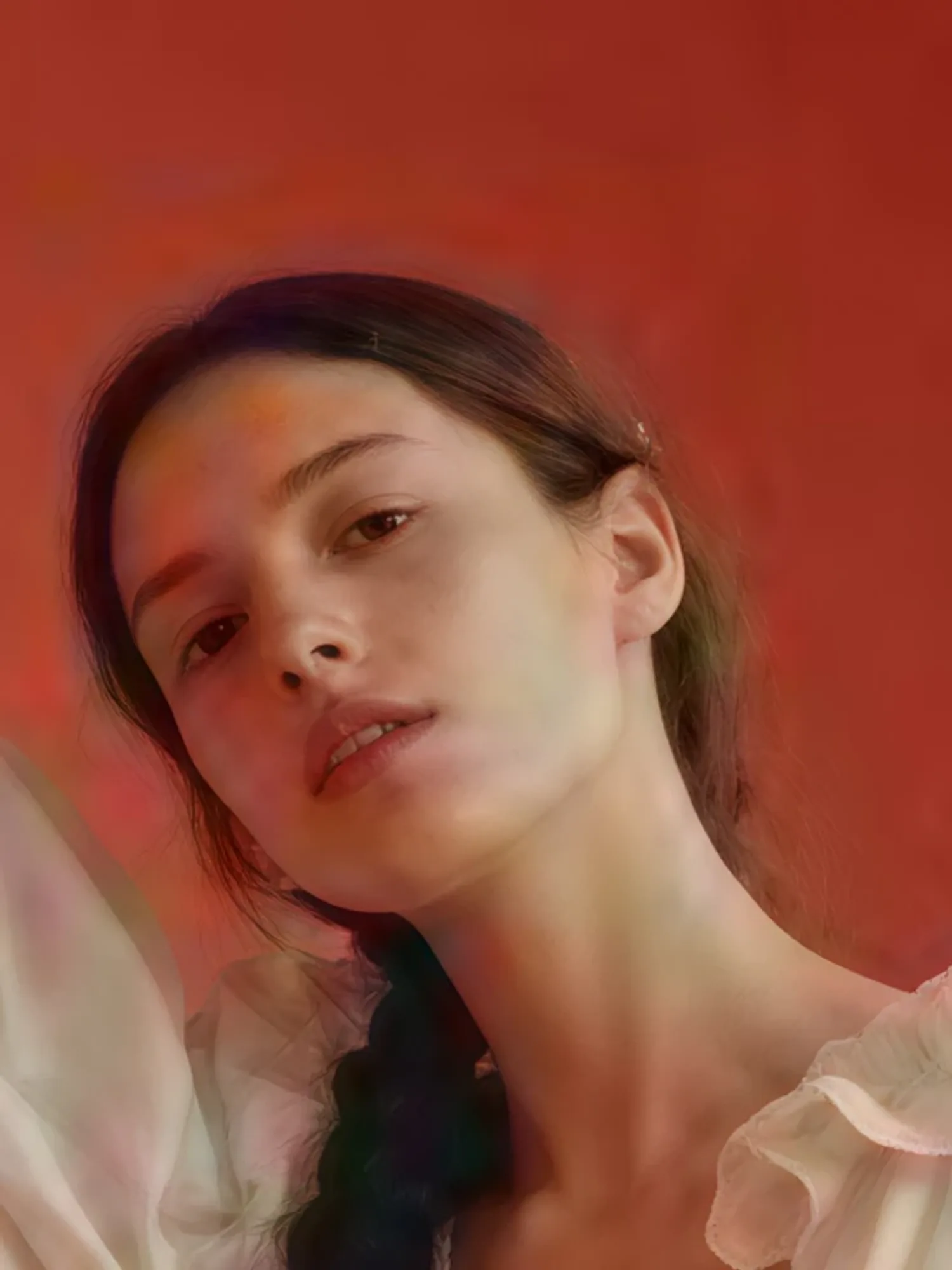
A fashion editorial photo from one description.

Create a fashion editorial photo of a young woman standing between sculptural archways painted coral and sky blue, one hand on the curved wall. She wears a voluminous ivory gown with ruffled sleeves and tiny pearl details, her long dark hair in a single thick braid with a small white flower. Soft studio light, saturated colours, the grain of 35mm film.

Try in Claude

Generate a video

A cinematic clip with sound, camera movement and all.

Make an 8-second video of a young man with curly hair in a yellow raincoat running up a stone seaside staircase in the rain, laughing. The handheld camera follows him to the top, where he catches his breath and looks out at a stormy sea as the wind blows his hood back. Sound of rain, waves and his breathing.

Try in Claude

Short drama

Your story as a scene with a consistent cast and spoken dialogue.

Turn my story into a short drama scene with a consistent cast: a gruff old lighthouse keeper finds a soaked young sailor at his door on a stormy night. First make a still of both characters, then a 10-second scene with spoken dialogue. He says: "You're lucky the light was still on." She answers: "I thought this place was empty."

Try in Claude

Product review UGC

A creator-style review of your product, from one photo.

Make a creator-style product review of my product (ask me for a photo): a friendly creator at her kitchen table holds it up to her phone and says: "Okay, I've used this bottle every day for a month. Ice lasts the whole day, and it hasn't leaked in my bag once." Vertical, handheld, natural light, about 8 seconds.

Try in Claude

Attach your own file when Claude asks for it.

Before
After

Ad recreator

Keep a reference ad's camera move, pacing and mood, with your product in it.

Recreate the reference ad I give you (ask me for the video) for my own product (ask me for a photo): keep its camera move, pacing, lighting and mood, but show my product instead. Tell me the price first.

Try in Claude

Attach your own file when Claude asks for it.

Before
After

Upscale to 4K

Turn a small, soft image into a sharp 4K one.

Upscale my image to 4K (ask me to attach it). Keep the face, colours and composition exactly as they are, just make it sharp. Use a dedicated upscaler and tell me the price first.

Try in Claude

Attach your own file when Claude asks for it.

Before
After

Aura edit

Your footage restyled with glow, speed ramps and flash transitions.

Turn my footage (ask me for the video) into an aura edit: keep the person and the camera movement, add a glowing aura outline, speed-ramped slow motion, flash-frame transitions and film grain with light leaks, cut to a pulsing electronic beat.

Try in Claude

Attach your own file when Claude asks for it.

Set up WaveSpeed in your agent

Pick your tool for the quickest setup. Every option gets the full model catalog, with prices before you spend.

Claude

One click

Works in Claude on the web and in Claude Desktop. Nothing to install.

  1. 1

    Click the button: Claude opens with WaveSpeed filled in as a custom connector. Click Add.

    Add to Claude
  2. 2

    Sign in to WaveSpeed when asked and approve the connection

Then ask: “Make a 16:9 hero image of a cyberpunk skyline and tell me the price first.”

Other ways

Or add it by hand: in Claude, open Customize → Connectors → Add custom connector and paste this address.

https://api.wavespeed.ai/mcp

Generate images and videos in ChatGPT, Claude, Codex and Claude Code

Connect WaveSpeed once, then just ask. Your agent picks the tool, makes the picture and tells you what it cost.

ChatGPT · WaveSpeed connected

Make a 16:9 hero image for my coffee shop's landing page: cozy, sunrise, room for a headline.

A cozy coffee shop at sunrise seen from the street

Here's your hero image: warm sunrise light on the storefront, framed wide for a banner. · Cost $0.045

generate_image · 16:9
generate_image
  prompt: cozy coffee shop at sunrise, warm light in the windows, room for a headline
  aspect_ratio: 16:9

Nice. Write "Open at 7" on the front window.

The same coffee shop with "Open at 7" lettered on the window

Done: "Open at 7" is hand-lettered on the window, everything else unchanged. · Cost $0.045

edit_image
edit_image
  prompt: add the words "Open at 7" in white hand lettering on the front window
  images: [hero.jpg]

Generating images and videos in your AI assistant

How do I generate images in ChatGPT with WaveSpeed?

In ChatGPT, open Plugins, choose Add custom MCP server, paste https://api.wavespeed.ai/mcp and sign in with your WaveSpeed account. Then ask for a picture in plain words, for example "make a 16:9 hero image of a coffee shop at sunrise".

Can Claude Desktop generate images and videos?

Yes, once WaveSpeed is added as a connector. In Claude (desktop or web), open Customize → Connectors → Add custom connector, paste https://api.wavespeed.ai/mcp and sign in. Claude can then create and edit images and videos for you.

How do I generate images and videos in Codex?

In Codex, open /plugins, install WaveSpeed and approve the connection in your browser. Codex can then generate images and videos while it works on your project and save them into it.

How do I generate images in Claude Code?

Add the WaveSpeed marketplace, install the plugin, then run /mcp in Claude Code and approve the connection. Ask for an image or a video and Claude Code calls WaveSpeed for you.

Can I edit an image or make a video from it in the same chat?

Yes. Ask for a change ("make the podium mint green") and the agent edits the last picture; ask for a video and it can animate a picture or write a whole clip.

How much does it cost?

You pay per generation from your WaveSpeed balance, with no subscription. The agent can show the price before it runs, and every result reports what it cost.

What your agent can do over MCP

Shortcut tools for everyday image and video work, plus the full catalog: search models, read a model's real inputs, quote the price, then run it.

generate_image

Create an image from a prompt, optionally guided by reference images

edit_image

Edit, restyle or combine existing images

generate_video

Make a video from a prompt, a first frame or references

edit_video

Change what happens in an existing video

extend_video

Continue a video with new footage

list_models

Search the live catalog by text or type

get_model_schema

A model's real inputs, required fields and defaults

run_model

Run any model; local @file inputs upload automatically

get_price

Quote the cost before you spend

get_balance

Check your credit balance

upload_file

Turn a local file into a hosted URL

get_prediction

Pick up a long-running generation by its id

list_predictions

Browse your run history

list_billings

See itemized charges and refunds

get_usage

Check spend and usage by day and model

delete_predictions

Delete finished runs from your history (asks you first)

upload_file is only in the local server. The remote server can't read your files: pass public URLs, use create_upload from a tool that can send HTTP requests, or, in ChatGPT, attach the file to the chat.

Prefer the terminal? Use the CLI

The same catalog from your shell, your scripts and agents that run commands: one open-source command for every model, with JSON output to pipe.

CLI

@wavespeed/cli

Install once, run any model from your shell or scripts.

$npm install -g @wavespeed/cli

Three commands and you're shipping

  1. 1

    Install

    Node 18+ required. One global install gives you the wavespeed binary everywhere.

    $npm install -g @wavespeed/cli
  2. 2

    Sign in

    Opens the access-key page in your browser. We auto-detect a copied key and validate it live.

    $wavespeed login
  3. 3

    Run any model

    Same shape for all models. Pass the model ID and inputs — get a CDN URL back, or pipe --json to your scripts.

    $wavespeed run wavespeed-ai/z-image/turbo -p "a cat"
  • Teach your coding agent the CLI

    Installs a skill so Codex, Claude Code, Cursor and other agents know how to call it.

    $wavespeed skill install
  • No Node.js?

    On macOS and Linux, install a standalone executable instead. On Windows, download it from GitHub Releases.

    $curl -fsSL https://raw.githubusercontent.com/WaveSpeedAI/wavespeed-cli/main/install.sh | bash
  • Stay up to date

    Upgrade to the latest version with one command.

    $wavespeed upgrade
  • Use WaveSpeed models in your coding agent

    Configure Claude Code, Codex, OpenCode and more to use the WaveSpeed LLM API. Undo any time.

    $wavespeed setup

Built for humans and agents

Dynamic per-model help

Run wavespeed run <model> -h and the CLI fetches that model's input schema live and prints the exact flags it accepts — no guessing.

Aliases that ship with your repo

Define named shortcuts in wavespeed.json that bundle a model + default inputs. Teams pull the file, type wavespeed run hero, get on-brand output.

Agent-native by design

Every command supports --json on stdout and progress on stderr. Drop a SKILL.md so Codex, Claude Code, Claude Cowork, and Cursor know how to call it.

No magic, no daemon

The CLI never mutates your prompt and never opens a background process. It calls api.wavespeed.ai directly. Open source, MIT licensed.

What a real session looks like

From catalog browse to JSON output — three commands.

~/projects/marketing
# 1. browse the catalog
$ wavespeed models --type text-to-image --popular

# 2. inspect a model's inputs — schema fetched live
$ wavespeed run wavespeed-ai/z-image/turbo -h
  * prompt          string
    size            string   default: "1024*1024"
    strength        number   default: 0.6   range: 0..1
    output_format   string   default: "jpeg"   enum: jpeg | png | webp

# 3. run — JSON out so you can pipe it
$ wavespeed run wavespeed-ai/z-image/turbo \
    -p "a cyberpunk skyline at golden hour" --json
{
  "model": "wavespeed-ai/z-image/turbo",
  "outputs": ["https://example.com/output/skyline.jpeg"],
  "elapsed_ms": 4718
}

Open source. Ready today.

MIT licensed, scoped under @wavespeed on npm, hosted on GitHub. Issues and PRs welcome.

Prefer a graphical app? Try WaveSpeed DesktopSee every way to connect WaveSpeed