Meshy T2.5 Text-to-3D converts text descriptions into lightweight low-poly 3D meshes for game assets, rapid prototyping, stylized 3D content, and production workflows. Ready-to-use REST inference API, best performance, no coldstarts, affordable pricing.
Idle
$0.6per run·~16 / $10
ExamplesView all
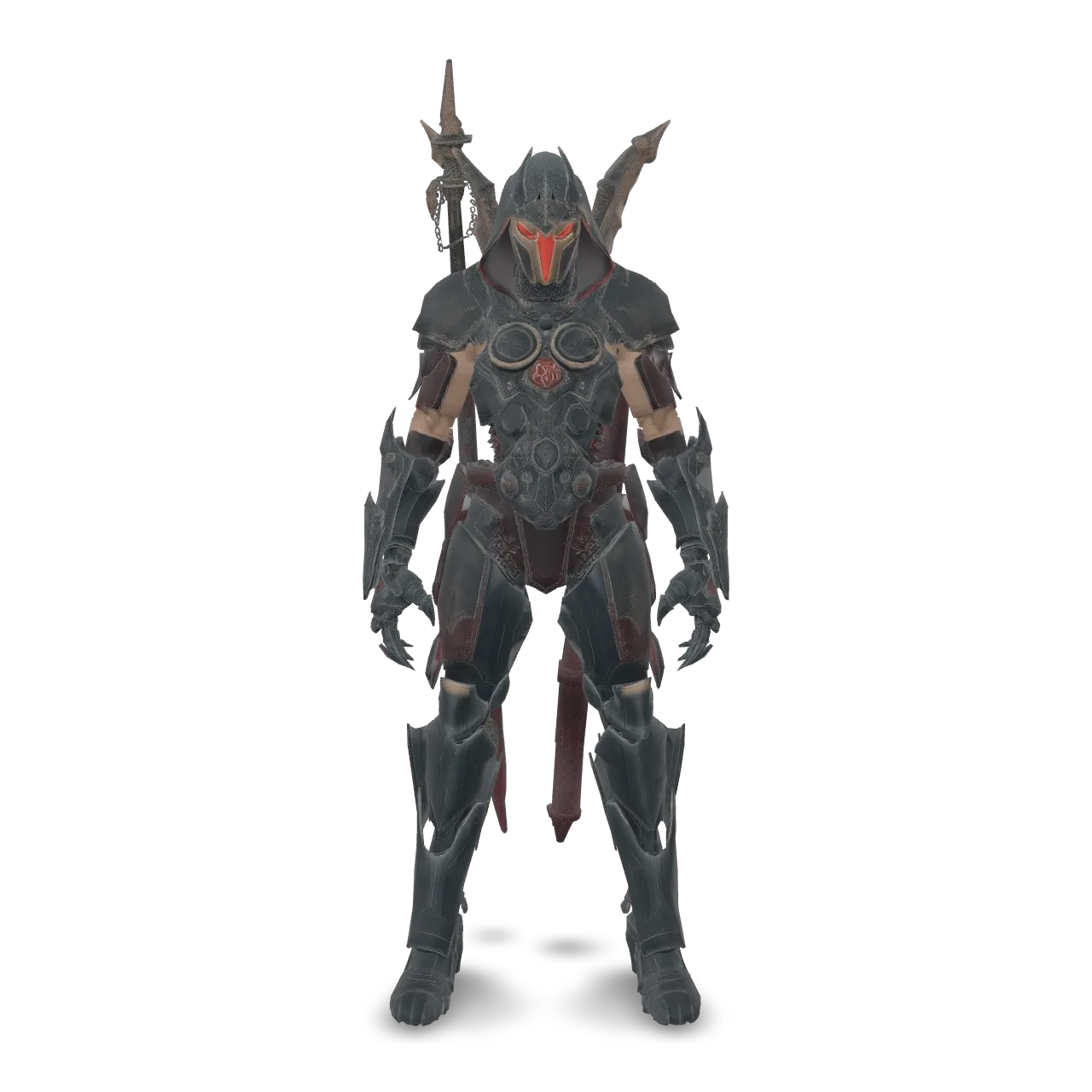
A full-body occult mech executioner with heavy ritual armor, a hood-like helmet, narrow red glowing visor, layered black steel chest plates, clawed gauntlets, armored waist panels, and an exposed mechanical spine. Dark bronze, worn silver, matte black metal, engraved red sigils, chains, seals, pistons, cables, and subtle weathering. Large ceremonial weapon on the back. Strong silhouette, premium dark fantasy sci-fi collectible, centered, isolated, no background, no text.

a low-poly stylized dragon figurine, teal body with golden horns and wings, standing pose
Related Models






README
Meshy T2.5 Text-to-3D
Meshy T2.5 Text-to-3D turns a text description into a low-poly, triangle-mesh 3D model. Choose geometry-only or textured output, set a target triangle count, and optionally add rigging or an animation to a humanoid character.
Why Choose This?
- Clean low-poly meshes — Native triangle topology with a target face count up to 30,000.
- Flexible output — Generate geometry alone or add textures.
- Texture options — Guide texturing with a description or reference image.
- Optional character animation — Add rigging and one animation action to a suitable humanoid model.
Parameters
| Parameter | Required | Description |
|---|---|---|
| prompt | Yes | Describe the object to generate. Up to 600 characters. |
| mode | No | preview generates an untextured mesh; full also generates textures. Default: full. |
| negative_prompt | No | Optional negative prompt. |
| seed | No | Optional seed value. |
| texture_prompt | No | Optional text description to guide the texture. |
| texture_image | No | Optional image to guide the texture. If both texture references are supplied, texture_prompt takes priority. |
| enable_pbr | No | Request metallic, roughness and normal maps when generating textures. Default: false. |
| texture_resolution | No | Texture size: 2k, 4k or 8k. Default: 2k. |
| target_polycount | No | Target triangle count: 100-30000. Default: 30000. |
| pose_mode | No | Optional character pose: a-pose or t-pose. |
| auto_size | No | Estimate the object's real-world size and scale it accordingly. Default: false. |
| enable_rigging | No | Add a skeleton to a textured humanoid character. Default: false. |
| rigging_height_meters | No | Approximate character height in meters for rigging. Default: 1.7. |
| enable_animation | No | Rig the character and apply one action selected by animation_action_id. Default: false. |
| animation_action_id | No | Animation action ID to apply when animation is enabled. Default: 92. |
How to Use
- Describe the object you want to create.
- Choose geometry-only or textured output and set the target triangle count.
- For a humanoid character, optionally enable rigging or animation.
- Submit the request and download the generated 3D files.
Pricing
| Generation option | Price per request |
|---|---|
Geometry only (mode=preview) | $0.20 |
| With 2k or 4k textures | $0.60 |
| With 8k textures | $0.80 |
| Optional addition | Extra charge |
|---|---|
| Rigging | $0.20 |
| One animation action, excluding rigging | $0.12 |
Enabling animation also includes rigging, for a total extra charge of $0.32. The total is the generation price plus the selected additions.
Notes
- The mesh always uses triangle faces; the generated face count may differ from
target_polycount. - Use either
texture_promptortexture_imageto guide texturing. If both are provided, the text prompt takes priority. - Rigging and animation are intended for textured humanoid characters with clearly defined limbs. They are not suitable for untextured meshes or non-humanoid objects.
T2.5 Text To 3d API — Quick start
Grab a WaveSpeedAI API key, then call POST https://api.wavespeed.ai/api/v3/meshy/t2.5/text-to-3d with your input as JSON. The endpoint returns a prediction id. Start polling the result endpoint around every 2 seconds, increase the interval for long-running tasks, and stop on any terminal status. On completed, read output values from data.outputs. Examples for T2.5 Text To 3d below.
HTTP example
set -euo pipefail

: "${WAVESPEED_API_KEY:?Set WAVESPEED_API_KEY}"

REQUEST_BODY=$(cat <<'JSON'
{
    "prompt": "A cinematic shot of a city at sunset, soft golden light",
    "mode": "full",
    "enable_pbr": false,
    "texture_resolution": "2k",
    "target_polycount": 30000,
    "pose_mode": "a-pose",
    "auto_size": false,
    "enable_rigging": false,
    "rigging_height_meters": 1.7,
    "enable_animation": false,
    "animation_action_id": 92
}
JSON
)

# 1. Submit the prediction.
SUBMIT_RESPONSE=$(curl --silent --show-error --fail-with-body \
  -X POST "https://api.wavespeed.ai/api/v3/meshy/t2.5/text-to-3d" \
  -H "Content-Type: application/json" \
  -H "Authorization: Bearer $WAVESPEED_API_KEY" \
  -d "$REQUEST_BODY")

TASK=$(printf '%s' "$SUBMIT_RESPONSE" | jq 'if has("data") then .data else . end')
PREDICTION_ID=$(printf '%s' "$TASK" | jq -r '.id')
if [ -z "$PREDICTION_ID" ] || [ "$PREDICTION_ID" = "null" ]; then
  printf 'Submission response did not contain a prediction id
' >&2
  exit 1
fi
RESULT_URL="https://api.wavespeed.ai/api/v3/predictions/$PREDICTION_ID/result"

# 2. Poll until the prediction finishes.
while true; do
  RESPONSE=$(curl --silent --show-error --fail-with-body "$RESULT_URL" \
    -H "Authorization: Bearer $WAVESPEED_API_KEY")
  RESULT=$(printf '%s' "$RESPONSE" | jq 'if has("data") then .data else . end')
  STATUS=$(printf '%s' "$RESULT" | jq -r '.status')
  case "$STATUS" in
    completed) printf '%s\n' "$RESULT" | jq '.outputs'; break ;;
    failed|cancelled|timeout|deleted) printf '%s\n' "$RESULT" | jq . >&2; exit 1 ;;
    *) sleep 2 ;;
  esac
done
Node.js example
const submitUrl = "https://api.wavespeed.ai/api/v3/meshy/t2.5/text-to-3d";
const apiKey = process.env.WAVESPEED_API_KEY;
if (!apiKey) throw new Error('Set WAVESPEED_API_KEY');

async function requestJson(url, options = {}) {
  const response = await fetch(url, options);
  if (!response.ok) throw new Error(await response.text());
  return response.json();
}

// 1. Submit the prediction.
const body = await requestJson(submitUrl, {
  method: "POST",
  headers: {
    "Authorization": `Bearer ${apiKey}`,
    "Content-Type": "application/json",
  },
  body: JSON.stringify({
        "prompt": "A cinematic shot of a city at sunset, soft golden light",
        "mode": "full",
        "enable_pbr": false,
        "texture_resolution": "2k",
        "target_polycount": 30000,
        "pose_mode": "a-pose",
        "auto_size": false,
        "enable_rigging": false,
        "rigging_height_meters": 1.7,
        "enable_animation": false,
        "animation_action_id": 92
}),
});
const task = body.data ?? body;
if (!task.id) throw new Error("Submission response did not contain a prediction id");
const resultUrl = `https://api.wavespeed.ai/api/v3/predictions/${task.id}/result`;

// 2. Poll until the prediction finishes.
while (true) {
  const resultBody = await requestJson(resultUrl, {
    headers: { "Authorization": `Bearer ${apiKey}` },
  });
  const result = resultBody.data ?? resultBody;
  if (result.status === "completed") {
    console.log(result.outputs);
    break;
  }
  if (["failed", "cancelled", "timeout", "deleted"].includes(result.status)) throw new Error(JSON.stringify(result));
  await new Promise(resolve => setTimeout(resolve, 2000));
}
Python example
import json
import os
import time
from urllib.request import Request, urlopen

api_key = os.environ["WAVESPEED_API_KEY"]
headers = {"Authorization": f"Bearer {api_key}", "Content-Type": "application/json"}
payload = {
    "prompt": "A cinematic shot of a city at sunset, soft golden light",
    "mode": "full",
    "enable_pbr": False,
    "texture_resolution": "2k",
    "target_polycount": 30000,
    "pose_mode": "a-pose",
    "auto_size": False,
    "enable_rigging": False,
    "rigging_height_meters": 1.7,
    "enable_animation": False,
    "animation_action_id": 92
}

def request_json(url, data=None):
    request = Request(url, data=data, headers=headers, method="POST" if data else "GET")
    with urlopen(request) as response:
        return json.load(response)

# 1. Submit the prediction.
body = request_json("https://api.wavespeed.ai/api/v3/meshy/t2.5/text-to-3d", json.dumps(payload).encode())
task = body.get("data", body)
if not task.get("id"):
    raise RuntimeError("Submission response did not contain a prediction id")
result_url = f"https://api.wavespeed.ai/api/v3/predictions/{task['id']}/result"

# 2. Poll until the prediction finishes.
while True:
    result_body = request_json(result_url)
    result = result_body.get("data", result_body)
    status = result.get("status")
    if status == "completed":
        print(result.get("outputs", []))
        break
    if status in {"failed", "cancelled", "timeout", "deleted"}:
        raise RuntimeError(result)
    time.sleep(2)
T2.5 Text To 3d API — Frequently asked questions
What is the T2.5 Text To 3d API?
T2.5 Text To 3d is a Meshy model for 3D asset generation, exposed as a REST API on WaveSpeedAI. Meshy T2.5 Text-to-3D converts text descriptions into lightweight low-poly 3D meshes for game assets, rapid prototyping, stylized 3D content, and production workflows. Ready-to-use REST inference API, best performance, no coldstarts, affordable pricing. You can call it programmatically or try it from the playground above.
How do I call the T2.5 Text To 3d API?
POST your input parameters to the model's REST endpoint (shown in the API tab of this playground) with your WaveSpeedAI API key in the Authorization header. Submission returns a prediction ID. Poll the result endpoint starting around every 2 seconds, increase the interval for long-running tasks, and stop on any terminal status. The playground generates Python, JavaScript, and cURL examples for submitting requests and polling results. Full request/response shape is documented at https://wavespeed.ai/docs/docs-api/meshy/meshy-t2.5-text-to-3d.
How much does T2.5 Text To 3d cost per run or per second?
T2.5 Text To 3d starts at $0.6 per run or per second. That figure is the base price — the final charge scales with the parameters you set in the form (output size, length, count, references, or whatever knobs this model exposes), so a higher-quality or larger output costs more than a minimal one. The exact cost for your current input is shown live next to the Generate button before you submit, and the actual per-call charge is recorded on the prediction afterwards.
What inputs does T2.5 Text To 3d accept?
Key inputs: `prompt`, `seed`, `negative_prompt`, `animation_action_id`, `auto_size`, `enable_animation`. The full JSON schema (types, defaults, allowed values) is rendered above the Generate button and mirrored in the API reference at https://wavespeed.ai/docs/docs-api/meshy/meshy-t2.5-text-to-3d.
How long does T2.5 Text To 3d take to generate?
Reported generation time on WaveSpeedAI is around 88 seconds per request. This is an estimate, not a latency guarantee; queue time and input settings can change the total wait. live status is visible in the prediction record.
Can I use T2.5 Text To 3d outputs commercially?
Commercial usage rights depend on the model's license, set by its provider (Meshy). Check the provider's applicable terms and WaveSpeedAI's Terms of Service before commercial use.
More from Meshy
View allMore Text to 3D models
View all- tripo3d/h3.1/text-to-3dText to 3D
- wavespeed-ai/hunyuan3d-v3/text-to-3dText to 3D
- tripo3d/h3.0/text-to-3dText to 3D
- meshy/v6-lite/text-to-3dText to 3D
- hyper3d/rodin-v2.5/text-to-3dText to 3D
- wavespeed-ai/hunyuan-3d-v3.1/text-to-3d-rapidText to 3D
- meshy/t2/text-to-3dText to 3D
- tripo3d/p1/text-to-3dText to 3D