MiniMax H3 Image Text-to-Image generates high-quality images from text prompts with flexible aspect ratios and built-in prompt enhancement for creative visuals, product imagery, marketing assets, and production workflows. Ready-to-use REST inference API, best performance, no coldstarts, affordable pricing.
Idle

$0.03per run·~33 / $1
ExamplesView all

A glamorous young female singer standing inside a retro-futuristic recording studio, wearing an elegant glossy black dress whose layered circular skirt resembles the grooves of a vinyl record. She holds a chrome microphone while large transparent record discs hang behind her like sculptural art. Strong full-body silhouette, sophisticated black, silver, and deep red palette, cinematic stage lighting, realistic vinyl, metal, skin, and fabric, high-fashion music editorial.
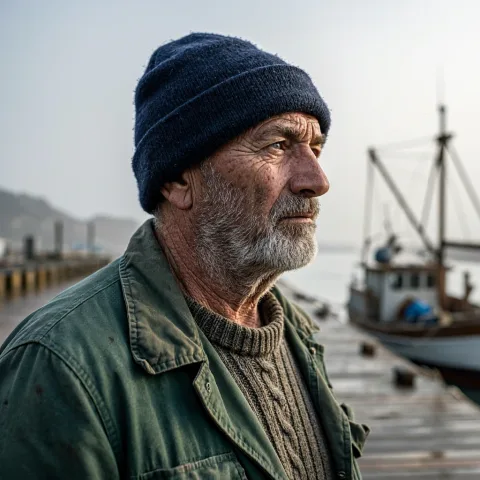
A photorealistic close-up portrait of an elderly fisherman with weathered skin, a grey beard and a dark wool cap, standing on a harbor dock on an overcast morning, soft natural light, shallow depth of field

A photorealistic flat-lay breakfast on a light wooden table: two golden croissants, a glass of orange juice, a white ceramic coffee cup, a linen napkin and a small vase with wildflowers, soft window light from the left
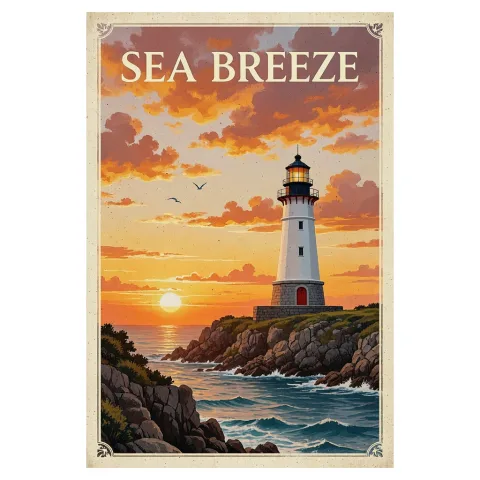
A vintage-style travel poster of a white lighthouse on a rocky coast at sunset, with the English title SEA BREEZE in bold cream letters at the top and no other text

A photorealistic wide landscape of a misty mountain lake at sunrise, a small wooden rowing boat near the shore, pine forest, soft golden light on the water

A photorealistic Scandinavian bedroom in soft morning light, a bed with white linen, a wooden bedside table with a small lamp, a large window with sheer curtains, a green plant in the corner
Related Models





README
MiniMax H3 Image Text-to-Image
MiniMax H3 Image Text-to-Image generates images from text prompts at 1k, 2k, or 4k resolution. The endpoint supports multiple aspect ratios and output formats for different image-generation workflows.
Why Choose This?
-
Up to 4K output — Choose
1k,2k, or4k. -
Flexible aspect ratios — Generate square, portrait, landscape, tall, wide, and cinematic compositions.
-
Multiple output formats — Export generated images as PNG, JPEG, or WebP.
Parameters
| Parameter | Required | Description |
|---|---|---|
| prompt | Yes | Text description of the image to generate. |
| aspect_ratio | No | Output aspect ratio: 1:1, 1:2, 2:1, 1:3, 3:1, 2:3, 3:2, 3:4, 4:3, 4:5, 5:4, 9:16, 16:9, 9:21, or 21:9. Default: 1:1. |
| resolution | No | Output resolution: 1k, 2k, or 4k. Default: 1k. |
| output_format | No | Output format: png, jpeg, or webp. Default: png. |
How to Use
- Write a prompt — Describe the subject, setting, lighting, composition, and style.
- Choose an aspect ratio — Select the framing for the output.
- Choose a resolution — Select
1k,2k, or4k. - Choose an output format optional — Select PNG, JPEG, or WebP.
- Submit — Generate and retrieve the image.
Pricing
Pricing is based on the selected resolution.
| Resolution | Price per Image |
|---|---|
| 1K | $0.03 |
| 2K | $0.03 |
| 4K | $0.09 |
1k and 2k use the same price tier.
Aspect ratio and output format do not add separate charges.
Best Use Cases
- General image generation — Create images from text descriptions.
- Advertising concepts — Generate visuals for campaign and promotional workflows.
- Product concepts — Create product-focused images and presentation concepts.
- Editorial imagery — Generate visuals for publishing and content workflows.
- High-resolution output — Use
4kwhen a larger output resolution is required.
Pro Tips
- Describe the main subject and composition clearly.
- Include lighting, environment, and style when they are important to the result.
- Use
2kwhen you want a larger output than1kat the same price. - Use
9:16for vertical layouts and16:9for widescreen layouts.
Related Models
- MiniMax H3 Image Edit — Edit existing images with up to
16reference images.
H3 Image Text To Image API — Quick start
Grab a WaveSpeedAI API key, then call POST https://api.wavespeed.ai/api/v3/minimax/h3-image/text-to-image with your input as JSON. The endpoint returns a prediction id. Start polling the result endpoint around every 2 seconds, increase the interval for long-running tasks, and stop on any terminal status. On completed, read output values from data.outputs. Examples for H3 Image Text To Image below.
HTTP example
set -euo pipefail

: "${WAVESPEED_API_KEY:?Set WAVESPEED_API_KEY}"

REQUEST_BODY=$(cat <<'JSON'
{
    "prompt": "A cinematic shot of a city at sunset, soft golden light",
    "aspect_ratio": "1:1",
    "resolution": "1k",
    "output_format": "png"
}
JSON
)

# 1. Submit the prediction.
SUBMIT_RESPONSE=$(curl --silent --show-error --fail-with-body \
  -X POST "https://api.wavespeed.ai/api/v3/minimax/h3-image/text-to-image" \
  -H "Content-Type: application/json" \
  -H "Authorization: Bearer $WAVESPEED_API_KEY" \
  -d "$REQUEST_BODY")

TASK=$(printf '%s' "$SUBMIT_RESPONSE" | jq 'if has("data") then .data else . end')
PREDICTION_ID=$(printf '%s' "$TASK" | jq -r '.id')
if [ -z "$PREDICTION_ID" ] || [ "$PREDICTION_ID" = "null" ]; then
  printf 'Submission response did not contain a prediction id
' >&2
  exit 1
fi
RESULT_URL="https://api.wavespeed.ai/api/v3/predictions/$PREDICTION_ID/result"

# 2. Poll until the prediction finishes.
while true; do
  RESPONSE=$(curl --silent --show-error --fail-with-body "$RESULT_URL" \
    -H "Authorization: Bearer $WAVESPEED_API_KEY")
  RESULT=$(printf '%s' "$RESPONSE" | jq 'if has("data") then .data else . end')
  STATUS=$(printf '%s' "$RESULT" | jq -r '.status')
  case "$STATUS" in
    completed) printf '%s\n' "$RESULT" | jq '.outputs'; break ;;
    failed|cancelled|timeout|deleted) printf '%s\n' "$RESULT" | jq . >&2; exit 1 ;;
    *) sleep 2 ;;
  esac
done
Node.js example
const submitUrl = "https://api.wavespeed.ai/api/v3/minimax/h3-image/text-to-image";
const apiKey = process.env.WAVESPEED_API_KEY;
if (!apiKey) throw new Error('Set WAVESPEED_API_KEY');

async function requestJson(url, options = {}) {
  const response = await fetch(url, options);
  if (!response.ok) throw new Error(await response.text());
  return response.json();
}

// 1. Submit the prediction.
const body = await requestJson(submitUrl, {
  method: "POST",
  headers: {
    "Authorization": `Bearer ${apiKey}`,
    "Content-Type": "application/json",
  },
  body: JSON.stringify({
        "prompt": "A cinematic shot of a city at sunset, soft golden light",
        "aspect_ratio": "1:1",
        "resolution": "1k",
        "output_format": "png"
}),
});
const task = body.data ?? body;
if (!task.id) throw new Error("Submission response did not contain a prediction id");
const resultUrl = `https://api.wavespeed.ai/api/v3/predictions/${task.id}/result`;

// 2. Poll until the prediction finishes.
while (true) {
  const resultBody = await requestJson(resultUrl, {
    headers: { "Authorization": `Bearer ${apiKey}` },
  });
  const result = resultBody.data ?? resultBody;
  if (result.status === "completed") {
    console.log(result.outputs);
    break;
  }
  if (["failed", "cancelled", "timeout", "deleted"].includes(result.status)) throw new Error(JSON.stringify(result));
  await new Promise(resolve => setTimeout(resolve, 2000));
}
Python example
import json
import os
import time
from urllib.request import Request, urlopen

api_key = os.environ["WAVESPEED_API_KEY"]
headers = {"Authorization": f"Bearer {api_key}", "Content-Type": "application/json"}
payload = {
    "prompt": "A cinematic shot of a city at sunset, soft golden light",
    "aspect_ratio": "1:1",
    "resolution": "1k",
    "output_format": "png"
}

def request_json(url, data=None):
    request = Request(url, data=data, headers=headers, method="POST" if data else "GET")
    with urlopen(request) as response:
        return json.load(response)

# 1. Submit the prediction.
body = request_json("https://api.wavespeed.ai/api/v3/minimax/h3-image/text-to-image", json.dumps(payload).encode())
task = body.get("data", body)
if not task.get("id"):
    raise RuntimeError("Submission response did not contain a prediction id")
result_url = f"https://api.wavespeed.ai/api/v3/predictions/{task['id']}/result"

# 2. Poll until the prediction finishes.
while True:
    result_body = request_json(result_url)
    result = result_body.get("data", result_body)
    status = result.get("status")
    if status == "completed":
        print(result.get("outputs", []))
        break
    if status in {"failed", "cancelled", "timeout", "deleted"}:
        raise RuntimeError(result)
    time.sleep(2)
H3 Image Text To Image API — Frequently asked questions
What is the H3 Image Text To Image API?
H3 Image Text To Image is a MiniMax model for image generation, exposed as a REST API on WaveSpeedAI. MiniMax H3 Image Text-to-Image generates high-quality images from text prompts with flexible aspect ratios and built-in prompt enhancement for creative visuals, product imagery, marketing assets, and production workflows. Ready-to-use REST inference API, best performance, no coldstarts, affordable pricing. You can call it programmatically or try it from the playground above.
How do I call the H3 Image Text To Image API?
POST your input parameters to the model's REST endpoint (shown in the API tab of this playground) with your WaveSpeedAI API key in the Authorization header. Submission returns a prediction ID. Poll the result endpoint starting around every 2 seconds, increase the interval for long-running tasks, and stop on any terminal status. The playground generates Python, JavaScript, and cURL examples for submitting requests and polling results. Full request/response shape is documented at https://wavespeed.ai/docs/docs-api/minimax/minimax-h3-image-text-to-image.
How much does H3 Image Text To Image cost per run or per second?
H3 Image Text To Image starts at $0.03 per run or per second. That figure is the base price — the final charge scales with the parameters you set in the form (output size, length, count, references, or whatever knobs this model exposes), so a higher-quality or larger output costs more than a minimal one. The exact cost for your current input is shown live next to the Generate button before you submit, and the actual per-call charge is recorded on the prediction afterwards.
What inputs does H3 Image Text To Image accept?
Key inputs: `prompt`, `aspect_ratio`, `resolution`, `output_format`. The full JSON schema (types, defaults, allowed values) is rendered above the Generate button and mirrored in the API reference at https://wavespeed.ai/docs/docs-api/minimax/minimax-h3-image-text-to-image.
How long does H3 Image Text To Image take to generate?
Reported generation time on WaveSpeedAI is around 14 seconds per request. This is an estimate, not a latency guarantee; queue time and input settings can change the total wait. live status is visible in the prediction record.
Can I use H3 Image Text To Image outputs commercially?
Commercial usage rights depend on the model's license, set by its provider (MiniMax). Check the provider's applicable terms and WaveSpeedAI's Terms of Service before commercial use.
More from MiniMax
View all- minimax/h3-highspeed/image-to-videoImage to Video
- minimax/h3-highspeed/reference-to-videoReference to Video
- minimax/h3-highspeed/text-to-videoText to Video
- minimax/h3-image/editImage Editing
- minimax/h3-lite/image-to-videoImage to Video
- minimax/h3-lite/reference-to-videoReference to Video
- minimax/h3-lite/text-to-videoText to Video
- minimax/h3/image-to-videoImage to Video
More Text to Image models
View all- bytedance/seedream-v5.0-proText to Image
- google/nano-banana-2.1/text-to-imageText to Image
- google/nano-banana-pro/text-to-imageText to Image
- openai/gpt-image-2.6-sunburst/text-to-imageText to Image
- openai/gpt-image-2.5-sunburst/text-to-imageText to Image
- wavespeed-ai/z-image/turboText to Image
- openai/gpt-image-2/text-to-imageText to Image
- bytedance/seedream-v4.5Text to Image