GPT Image 2.6 Flare Text-to-Image generates high-quality images from natural-language prompts with a focus on fast generation and rapid creative iteration, making it suitable for everyday image creation, concept development, marketing visuals, and production workflows. Ready-to-use REST inference API.
Idle
$0.07125per run·~14 / $1
ExamplesView all

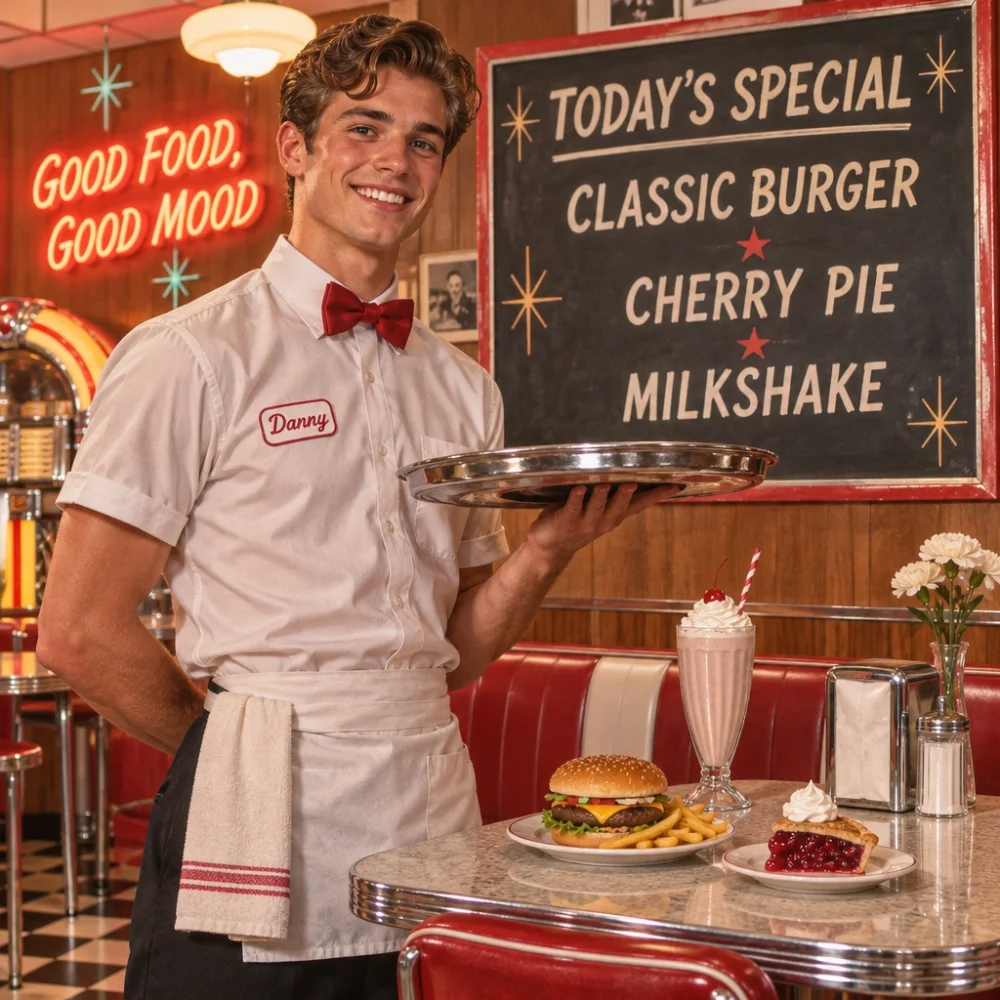
A handsome young waiter standing beside a stylish retro diner table, holding a metal serving tray. Behind him, a large vintage menu board clearly displays “TODAY’S SPECIAL” at the top, followed by “CLASSIC BURGER”, “CHERRY PIE”, and “MILKSHAKE”. A glowing wall sign reads “GOOD FOOD, GOOD MOOD”. Warm 1960s-inspired interior, clean readable typography, realistic food, chrome, fabric, and skin, cinematic commercial photography.
Related Models






README
OpenAI GPT Image 2.6 Flare Text-to-Image
OpenAI GPT Image 2.6 Flare Text-to-Image turns natural-language prompts into high-quality images. Flare is designed for everyday image generation and quick iteration.
- Need to edit an existing image instead? Try OpenAI GPT Image 2.6 Flare Edit.
- Need extra fidelity on intricate detail? Try OpenAI GPT Image 2.6 Sunburst Text-to-Image.
Why Choose This?
-
Strong prompt fidelity Generate images that closely follow detailed natural-language instructions, including scene layout, visual style, and composition.
-
Accurate text rendering Create images with clearer, more usable in-image text for posters, ads, packaging, and interface mockups.
-
Quality and complexity controls
qualitysets the rendering detail you pay for;complexitysets how much the model plans the layout before drawing, at no extra cost. -
Animated GIF and vector SVG output Set
output_formattogiffor a looping animation of 2 to 16 frames, or tosvgfor a scalable vector file — icons, logos, flat illustrations. -
Up to 4K output and flexible aspect ratios Square, portrait, landscape, and panoramic outputs at
1k,2k, or4k. -
Production-ready API Access the model through a ready-to-use REST inference API for fast integration into applications and workflows.
Parameters
| Parameter | Required | Description |
|---|---|---|
| prompt | Yes | Text description of the desired image. |
| aspect_ratio | No | Aspect ratio: 1:1, 3:2, 2:3, 3:4, 4:3, 4:5, 5:4, 9:16, 16:9, 21:9, 2:1, 1:2, 3:1, 1:3, 9:21. Defaults to 1:1. |
| resolution | No | Output resolution: 1k (default), 2k, or 4k. |
| quality | No | Quality tier: low, medium (default), high, xhigh, or max. Higher tiers allocate more rendering detail and cost more. |
| complexity | No | Planning before drawing: low, medium, or high (default). Adjust this for simple or detailed, multi-element prompts; the price is the same. |
| output_format | No | png (default), jpeg, webp, gif (animated), or svg (vector). |
| frame_count | No | GIF only: number of frames, 2 to 16 (default 9). |
| frame_duration_ms | No | GIF only: how long each frame shows, 20 to 2000 ms (default 200). |
How to Use
- Write your prompt — describe the image in detail, including subject, style, lighting, composition, and any text you want to appear.
- Pick quality and resolution (optional) —
medium/1kis the default; raisequalityfor more detail orresolutionfor larger output. - Lower complexity for simple requests (optional) —
highis the default; trylowormediumfor short, simple prompts. - Choose aspect ratio (optional) —
1:1for square,2:3or9:16for portrait,3:2or16:9for landscape, up to3:1/1:3panoramas. - Submit — run the model and download your generated image.
Pricing
Pricing varies by quality and resolution. complexity does not change the price.
| Quality | 1k | 2k | 4k |
|---|---|---|---|
| low | $0.045 | $0.075 | $0.135 |
| medium | $0.075 | $0.13 | $0.225 |
| high | $0.09 | $0.15 | $0.27 |
| xhigh | $0.16 | $0.27 | $0.48 |
| max | $0.36 | $0.60 | $1.00 |
- GIF: the image price × (1 +
frame_count/ 16) — for example $0.117188 for 9 frames at medium 1k. - SVG: the image price + $0.015.
- PNG, JPEG, and WebP: use the table price with no format surcharge.
frame_duration_msdoes not change the price.
Notes
promptis the only required field.- GIF and SVG output are available on text-to-image only.
frame_countandframe_duration_msapply only to GIF output. Playback timing is rounded to 10 ms.- Resolution is a size tier, not a fixed width and height. For GIFs, frames share the size budget, so more frames can mean smaller individual frames.
Related Models
- OpenAI GPT Image 2.6 Flare Edit — Edit one or more reference images using natural-language instructions.
- OpenAI GPT Image 2.6 Sunburst Text-to-Image — The Sunburst tier of the same model.
- OpenAI GPT Image 2.5 Flare Text-to-Image — The previous generation.
Gpt Image 2.6 Flare Text To Image API — Quick start
Grab a WaveSpeedAI API key, then call POST https://api.wavespeed.ai/api/v3/openai/gpt-image-2.6-flare/text-to-image with your input as JSON. The endpoint returns a prediction id. Start polling the result endpoint around every 2 seconds, increase the interval for long-running tasks, and stop on any terminal status. On completed, read output values from data.outputs. Examples for Gpt Image 2.6 Flare Text To Image below.
HTTP example
set -euo pipefail

: "${WAVESPEED_API_KEY:?Set WAVESPEED_API_KEY}"

REQUEST_BODY=$(cat <<'JSON'
{
    "prompt": "A cinematic shot of a city at sunset, soft golden light",
    "aspect_ratio": "1:1",
    "resolution": "1k",
    "quality": "medium",
    "complexity": "high",
    "output_format": "png",
    "frame_count": 9,
    "frame_duration_ms": 200
}
JSON
)

# 1. Submit the prediction.
SUBMIT_RESPONSE=$(curl --silent --show-error --fail-with-body \
  -X POST "https://api.wavespeed.ai/api/v3/openai/gpt-image-2.6-flare/text-to-image" \
  -H "Content-Type: application/json" \
  -H "Authorization: Bearer $WAVESPEED_API_KEY" \
  -d "$REQUEST_BODY")

TASK=$(printf '%s' "$SUBMIT_RESPONSE" | jq 'if has("data") then .data else . end')
PREDICTION_ID=$(printf '%s' "$TASK" | jq -r '.id')
if [ -z "$PREDICTION_ID" ] || [ "$PREDICTION_ID" = "null" ]; then
  printf 'Submission response did not contain a prediction id
' >&2
  exit 1
fi
RESULT_URL="https://api.wavespeed.ai/api/v3/predictions/$PREDICTION_ID/result"

# 2. Poll until the prediction finishes.
while true; do
  RESPONSE=$(curl --silent --show-error --fail-with-body "$RESULT_URL" \
    -H "Authorization: Bearer $WAVESPEED_API_KEY")
  RESULT=$(printf '%s' "$RESPONSE" | jq 'if has("data") then .data else . end')
  STATUS=$(printf '%s' "$RESULT" | jq -r '.status')
  case "$STATUS" in
    completed) printf '%s\n' "$RESULT" | jq '.outputs'; break ;;
    failed|cancelled|timeout|deleted) printf '%s\n' "$RESULT" | jq . >&2; exit 1 ;;
    *) sleep 2 ;;
  esac
done
Node.js example
const submitUrl = "https://api.wavespeed.ai/api/v3/openai/gpt-image-2.6-flare/text-to-image";
const apiKey = process.env.WAVESPEED_API_KEY;
if (!apiKey) throw new Error('Set WAVESPEED_API_KEY');

async function requestJson(url, options = {}) {
  const response = await fetch(url, options);
  if (!response.ok) throw new Error(await response.text());
  return response.json();
}

// 1. Submit the prediction.
const body = await requestJson(submitUrl, {
  method: "POST",
  headers: {
    "Authorization": `Bearer ${apiKey}`,
    "Content-Type": "application/json",
  },
  body: JSON.stringify({
        "prompt": "A cinematic shot of a city at sunset, soft golden light",
        "aspect_ratio": "1:1",
        "resolution": "1k",
        "quality": "medium",
        "complexity": "high",
        "output_format": "png",
        "frame_count": 9,
        "frame_duration_ms": 200
}),
});
const task = body.data ?? body;
if (!task.id) throw new Error("Submission response did not contain a prediction id");
const resultUrl = `https://api.wavespeed.ai/api/v3/predictions/${task.id}/result`;

// 2. Poll until the prediction finishes.
while (true) {
  const resultBody = await requestJson(resultUrl, {
    headers: { "Authorization": `Bearer ${apiKey}` },
  });
  const result = resultBody.data ?? resultBody;
  if (result.status === "completed") {
    console.log(result.outputs);
    break;
  }
  if (["failed", "cancelled", "timeout", "deleted"].includes(result.status)) throw new Error(JSON.stringify(result));
  await new Promise(resolve => setTimeout(resolve, 2000));
}
Python example
import json
import os
import time
from urllib.request import Request, urlopen

api_key = os.environ["WAVESPEED_API_KEY"]
headers = {"Authorization": f"Bearer {api_key}", "Content-Type": "application/json"}
payload = {
    "prompt": "A cinematic shot of a city at sunset, soft golden light",
    "aspect_ratio": "1:1",
    "resolution": "1k",
    "quality": "medium",
    "complexity": "high",
    "output_format": "png",
    "frame_count": 9,
    "frame_duration_ms": 200
}

def request_json(url, data=None):
    request = Request(url, data=data, headers=headers, method="POST" if data else "GET")
    with urlopen(request) as response:
        return json.load(response)

# 1. Submit the prediction.
body = request_json("https://api.wavespeed.ai/api/v3/openai/gpt-image-2.6-flare/text-to-image", json.dumps(payload).encode())
task = body.get("data", body)
if not task.get("id"):
    raise RuntimeError("Submission response did not contain a prediction id")
result_url = f"https://api.wavespeed.ai/api/v3/predictions/{task['id']}/result"

# 2. Poll until the prediction finishes.
while True:
    result_body = request_json(result_url)
    result = result_body.get("data", result_body)
    status = result.get("status")
    if status == "completed":
        print(result.get("outputs", []))
        break
    if status in {"failed", "cancelled", "timeout", "deleted"}:
        raise RuntimeError(result)
    time.sleep(2)
Gpt Image 2.6 Flare Text To Image API — Frequently asked questions
What is the Gpt Image 2.6 Flare Text To Image API?
Gpt Image 2.6 Flare Text To Image is a OpenAI model for image generation, exposed as a REST API on WaveSpeedAI. GPT Image 2.6 Flare Text-to-Image generates high-quality images from natural-language prompts with a focus on fast generation and rapid creative iteration, making it suitable for everyday image creation, concept development, marketing visuals, and production workflows. Ready-to-use REST inference API. You can call it programmatically or try it from the playground above.
How do I call the Gpt Image 2.6 Flare Text To Image API?
POST your input parameters to the model's REST endpoint (shown in the API tab of this playground) with your WaveSpeedAI API key in the Authorization header. Submission returns a prediction ID. Poll the result endpoint starting around every 2 seconds, increase the interval for long-running tasks, and stop on any terminal status. The playground generates Python, JavaScript, and cURL examples for submitting requests and polling results. Full request/response shape is documented at https://wavespeed.ai/docs/docs-api/openai/openai-gpt-image-2.6-flare-text-to-image.
How much does Gpt Image 2.6 Flare Text To Image cost per run or per second?
Gpt Image 2.6 Flare Text To Image starts at $0.07125 per run or per second. That figure is the base price — the final charge scales with the parameters you set in the form (output size, length, count, references, or whatever knobs this model exposes), so a higher-quality or larger output costs more than a minimal one. The exact cost for your current input is shown live next to the Generate button before you submit, and the actual per-call charge is recorded on the prediction afterwards.
What inputs does Gpt Image 2.6 Flare Text To Image accept?
Key inputs: `prompt`, `aspect_ratio`, `resolution`, `complexity`, `frame_count`, `frame_duration_ms`. The full JSON schema (types, defaults, allowed values) is rendered above the Generate button and mirrored in the API reference at https://wavespeed.ai/docs/docs-api/openai/openai-gpt-image-2.6-flare-text-to-image.
How do I get started with the Gpt Image 2.6 Flare Text To Image API?
Sign up for a free WaveSpeedAI account to claim starter credits, copy your API key from /accesskey, then call the endpoint shown in the API tab of the playground. The playground also auto-generates a code sample in Python, JavaScript, or cURL for the parameters you've set.
Can I use Gpt Image 2.6 Flare Text To Image outputs commercially?
Commercial usage rights depend on the model's license, set by its provider (OpenAI). Check the provider's applicable terms and WaveSpeedAI's Terms of Service before commercial use.
More from OpenAI
View all- openai/gpt-image-1.5/editImage Editing
- openai/gpt-image-1.5/text-to-imageText to Image
- openai/gpt-image-2.5-flare/editImage Editing
- openai/gpt-image-2.5-flare/text-to-imageText to Image
- openai/gpt-image-2.5-sunburst/editImage Editing
- openai/gpt-image-2.5-sunburst/text-to-imageText to Image
- openai/gpt-image-2.6-flare/editImage Editing
- openai/gpt-image-2.6-sunburst/editImage Editing
More Text to Image models
View all- bytedance/seedream-v5.0-proText to Image
- openai/gpt-image-2/text-to-imageText to Image
- google/nano-banana-pro/text-to-imageText to Image
- google/nano-banana-2/text-to-imageText to Image
- wavespeed-ai/z-image/turboText to Image
- bytedance/seedream-v4.5Text to Image
- alibaba/wan-2.7/text-to-imageText to Image
- alibaba/qwen-image-3.0/text-to-imageText to Image