
Solar Pro 4 Review: Long-Running Agent Fit
Solar Pro 4 review focused on long-running agent workloads, separating official specifications and benchmark claims from production evidence still needed.
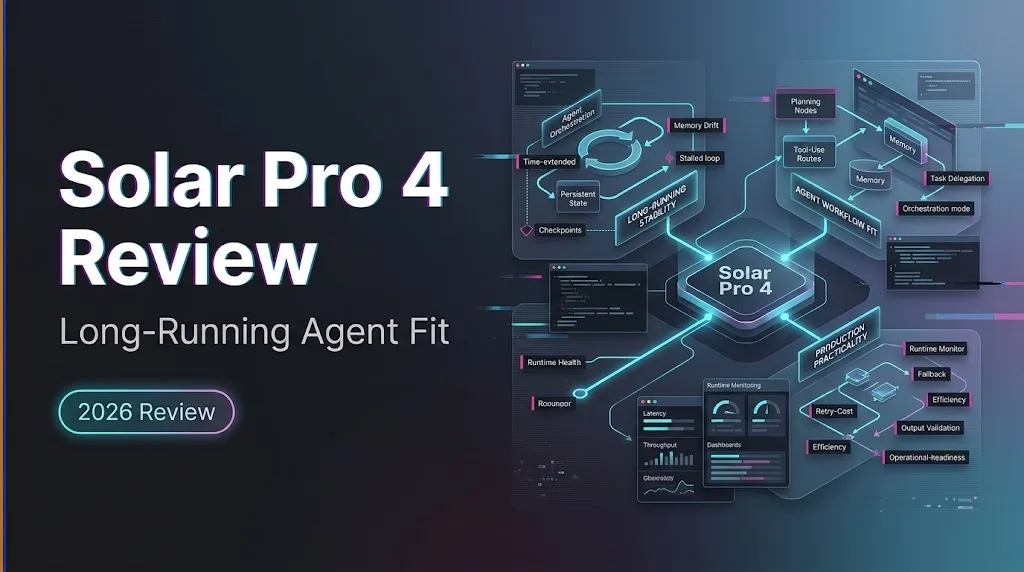
This Solar Pro 4 review starts from one workload: document-heavy, multi-step agents. Not chat. Not generic coding. Not “the benchmark score looks good, so ship it.” That jump is how teams end up re-checking every answer by hand.
Dora here. The scenario I care about is narrower: an agent reads long documents, calls tools, works across turns, and produces something another system can use. If the model loses a clause, invents a number, or stalls after tool call three, the context window stops being impressive. The invoice still has to close.
Upstage’s Solar Pro 4 release positions it for long documents, terminal tasks, and multi-turn tool use. Good fit on paper. Production reliability still needs your own run log.
Verdict for Long-Running Agent Workloads

For long-horizon agents, Solar Pro 4 is worth testing when the workload is mostly text, evidence-bound, and document-heavy. Contracts. policies. reports. filings. structured internal notes. The model’s stated design target matches that shape.
I would not treat it as proven for every agent stack. Official benchmark gains are useful signals. They are not your production incident report.
⏰ My verdict: strong candidate, not automatic default. Works for my evaluation frame. Yours might differ.
Review the Model Access and Operating Profile
API Availability, Context, Output, and Reasoning Controls
Upstage shows Solar Pro 4 as API-accessible through an OpenAI-compatible route, using model="solar-pro4" in its public launch example. The release says it supports a 512K context window and up to 128K output tokens. It also says reasoning effort can be adjusted for deeper analysis or faster interaction.
I would still test the exact route. Upstage first-party API and OpenRouter may expose different wrapper behavior, IDs, defaults, headers, and provider metadata. The Upstage developer docs are the first place I’d check before locking request fields.
I paused here. “Supports long context” is not the same as “your agent can safely fill the whole window.”
Language and Tool-Use Boundaries
Upstage states English, Korean, and Japanese support. Artificial Analysis lists Solar Pro 4 as text input and text output only. That matters.
If your agent depends on screenshots, audio, or native file inputs, this is not a direct multimodal model test. Convert documents into text first, then evaluate whether the model handles the extracted structure.
For a tool calling model, I test tool use as behavior, not as a checkbox. Does it call the right tool? Does it pass valid arguments? Does it recover from tool errors? Does it stop when the evidence runs out?
Evaluate the Agent Workload Evidence
Long Documents, Terminal Tasks, and Multi-Turn Tools
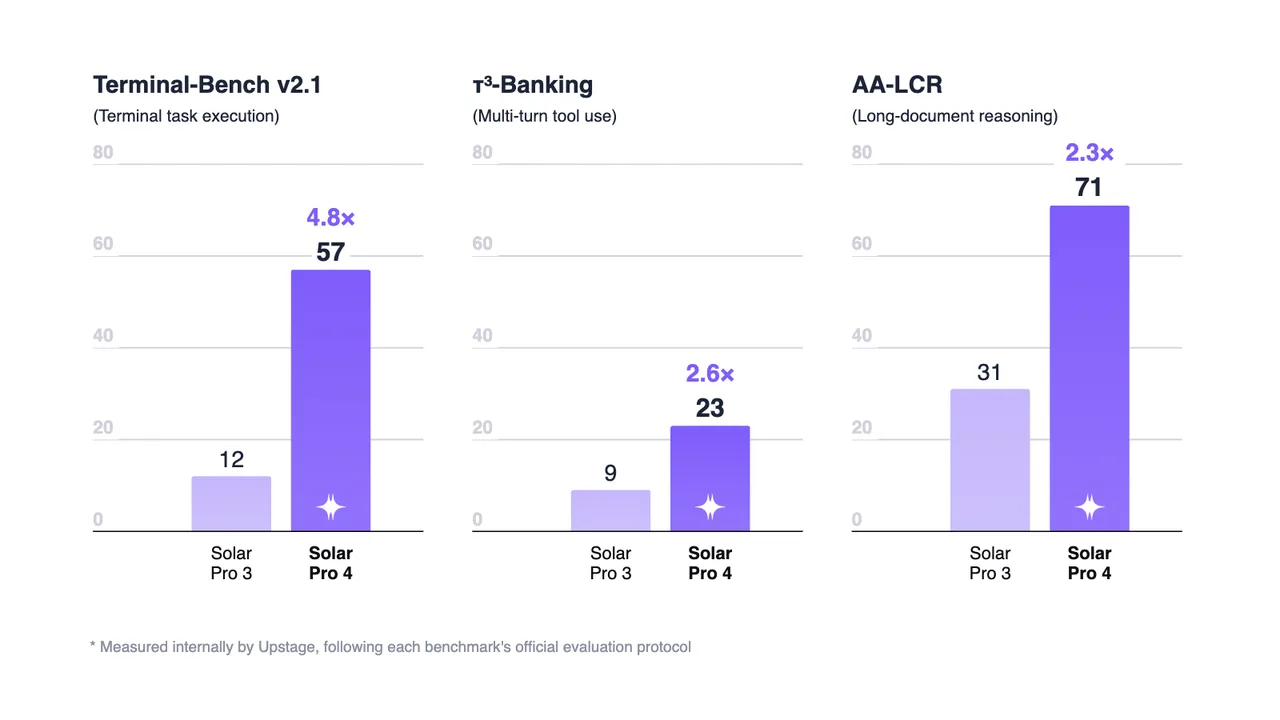
The strongest public signal is workload alignment. Upstage reports gains on Terminal-Bench v2.1, τ³-Banking, and AA-LCR. Those are closer to agent work than single-turn trivia.
The independent Artificial Analysis page reports an Intelligence Index score of 42, with Terminal-Bench v2.1 at 57, AA-LCR at 71, and τ³-Banking at 23. It also notes an 8.6-minute average task time on its Intelligence Index run.
That is useful. It says the model deserves a real test. It does not say your workflow will survive a Monday morning batch.
What Official Benchmarks Cannot Prove About Production Reliability
Benchmarks do not show your retrieval layer, tool schema, retry rules, user files, timeout limits, or approval process. They also do not show how often a correct first answer becomes a wrong downstream artifact.
For agent reliability, I log this:
| Check | Pass Condition |
|---|---|
| Evidence use | Cites or names the source section |
| Tool call | Valid JSON, correct tool, recoverable error path |
| Long context | Retrieves early and late document details |
| Multi-turn memory | Keeps constraints across turns |
| Final output | Can be handed to the next system |
Found the pattern on the third try: the failure usually hides between steps, not inside one answer.
Decide Whether Solar Pro 4 Fits the Stack
Strong Fits for Document-Heavy Agent Tasks
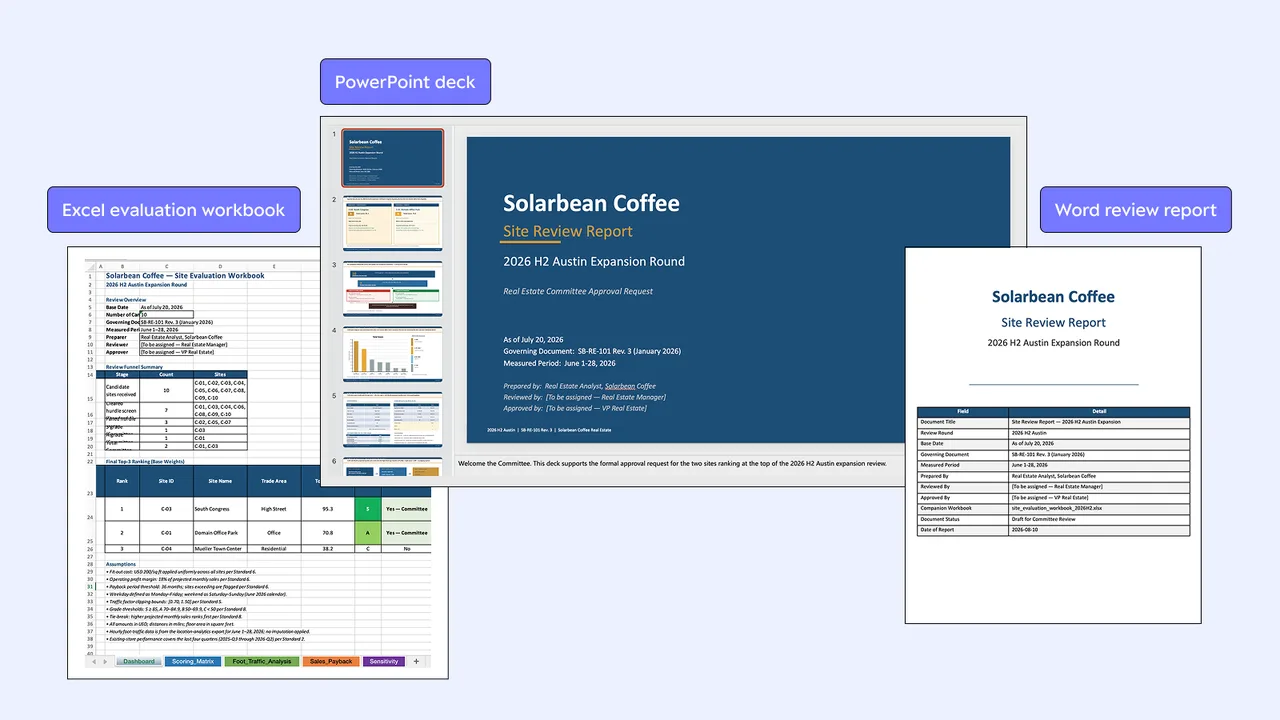
Upstage Solar Pro 4 fits when the agent task is long, text-heavy, and needs explicit evidence handling. The model’s launch examples focus on document review, spreadsheet-style work, reports, and slide-style deliverables. That is the right neighborhood.
I would test it with three internal jobs: one contract review, one policy extraction, and one tool-heavy terminal task. Keep the prompt, files, tool schema, reasoning setting, and output budget fixed. Change one thing at a time. Annoying. Necessary.
Cases That Need Independent Testing or Another Model
I would not pick Solar Pro 4 blindly for low-latency chat, multimodal input, tiny prompts, or workloads where output cost dominates. Long context model economics are not only about the input window.
The Upstage pricing page lists Solar Pro 4 at $0.30 per 1M input tokens, $0.06 per 1M cached input tokens, and $1.20 per 1M output tokens. Promotions may change the live invoice. Budget on list pricing unless finance likes surprises.
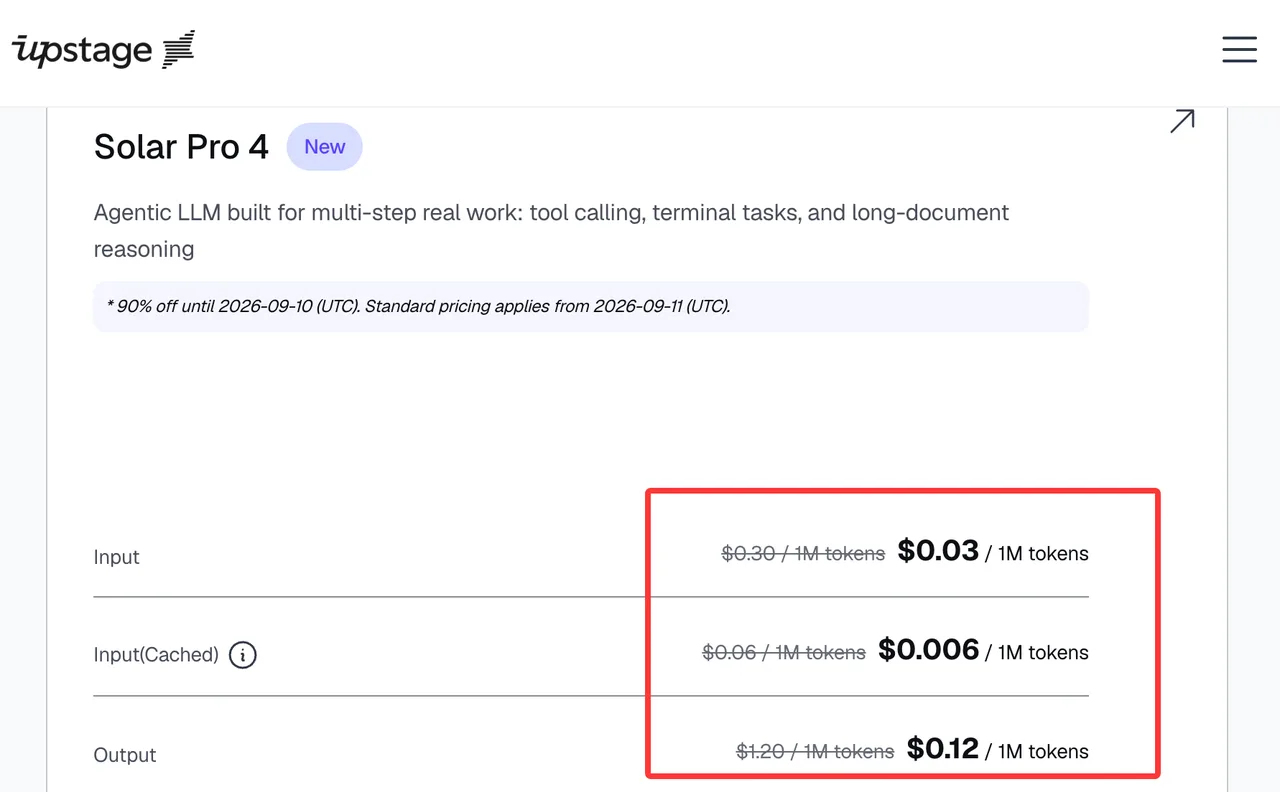
The cost model needs failed runs, retries, reasoning tokens, cached-token hit rate, and human review. One successful demo is not a cost estimate.
FAQ
Does Solar Pro 4 offer data residency outside its default region?
Public Upstage materials mention dedicated and on-premises deployment for organizations that need data kept inside their own network. I did not find a self-serve region matrix for Solar Pro 4 API usage. For OpenRouter, the provider logging docs mention enterprise in-region routing, but model availability must be checked per account.
Can Solar Pro 4 usage be isolated across separate billing projects?
I did not find a public Upstage guarantee that Solar Pro 4 API usage can be isolated across separate billing projects in the way some cloud platforms scope projects. The pricing page describes account-level credits, commitment tiers, and rate-limit benefits. Verify project-level billing separation in Console or contract.
Can enterprise customers request dedicated capacity for Solar Pro 4?
Upstage’s release says dedicated and on-premises deployment are available for organizations by contacting the company. I would treat dedicated capacity as a contract discussion, not a default API feature.
How does Upstage handle prompts sent through OpenRouter?
Through OpenRouter, prompts pass through OpenRouter and then the selected provider. OpenRouter says provider logging and retention depend on each provider’s policy and can be filtered by data policy settings. For sensitive prompts, check both OpenRouter settings and Upstage’s provider terms.
What rate limits apply to long-context agent workloads?
The public pricing page says higher commitment tiers include higher rate-limit benefits, but I did not find a public Solar Pro 4 long-context rate-limit table. Long prompts can hit token-per-minute limits before request-per-minute limits if those limits apply to your Solar Pro 4 tier—verify against Upstage’s current rate-limit documentation. I would run a load test with real document sizes.
Conclusion
The short Solar Pro 4 review: it is a serious candidate for document-heavy agents, especially where long context, tool use, and evidence discipline matter.
I would not call it production-ready from benchmarks alone. Build the test around your documents, your tools, your retry rules, and your acceptable failure rate. That is where agent reliability shows up. Run it yourself. That’ll tell you more than anything I say.
Previous posts:
/filters:quality(82)/media/images/b73c2438-6bdd-4b80-a229-8d71d8f819cf.webp)
/filters:quality(82)/media/images/427fd9f2-347d-4f86-a2d5-aee110cda01d.webp)
/filters:quality(82)/media/images/1773962750383987480_n3hqzHRZ.webp)
/filters:quality(82)/media/images/43fa0e7f-a0db-48d7-9bab-921d1225db30.webp)
/filters:quality(82)/media/images/5799ff56-3a73-40ca-a666-e4965d878496.webp)
/filters:quality(82)/media/images/7a8850fc-caf6-482f-ac4d-5ddbe64ec47c.webp)