Add your recording
Drop or choose a clip of yourself. It stays on your device.
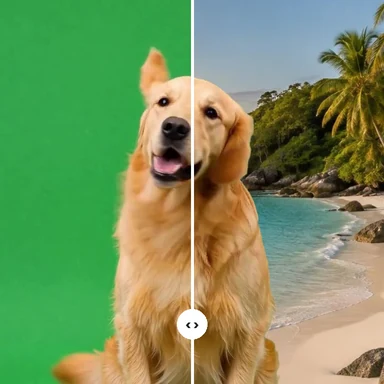
Filmed in a messy room? AI cuts you out of every frame of the recording, as if you had stood in front of a green screen.
Take the green-screen clip into your video editor and put any backdrop behind you, or switch to Picture to place an office or studio photo right here.
MP4, MOV, WebM or MKV with a person in it. No green screen needed.
Or paste a video. Exports cover up to 60 seconds at a time.Need a clip? Create one with AIPeople filmed in rooms and streets, no green screen. Pick one to see the background disappear.
Drop or choose a clip of yourself. It stays on your device.
Green screen is already selected. Press Remove background and check the edges in the live preview, or choose Picture and upload an office or studio photo.
Download an MP4 with sound. In your video editor, key out the green to place any backdrop, still or moving, behind you.
Generate the backdrop for your cut-out video, or a whole new clip, from a prompt with WaveSpeed AI.
Create moving backgrounds, B-roll and full scenes from a prompt or a photo.
Make a studio, city or fantasy backdrop to put behind your video.
Turn an object into a 3D model for your set.
$1 in free credits for eligible new accounts. No card needed. Generators have separate account and credit requirements. The video background remover is free.
Add the recording and press Remove background. With Green screen selected, the AI puts flat green behind you in every frame, and your editor's chroma key swaps it for any backdrop. For a still backdrop, choose Picture and upload it here instead.
No. It works on recorded clips, not a live webcam feed. For calls, use your meeting app's own virtual background setting.
Almost every video editor and phone app can key out green, and MP4 plays everywhere. If your editor supports transparent video, choose Transparent and export WebM with alpha or PNG frames instead.
It looks best with even lighting, a steady camera and a backdrop whose light matches yours. Fast movement, fine hair and see-through objects can leave rough edges; the Detail and edge settings help clean them up.
Green screen without one · Or a picture backdrop · No upload
/filters:quality(82)/media/images/1791123751656780930_IfFPY7R0.webp)
/filters:quality(82)/media/images/1791123737177812425_RjKT3cku.webp)
/filters:quality(82)/media/images/1791123748309870128_xlkNgK8N.webp)
/filters:quality(82)/media/images/1791123738630744263_oR09R0aj.webp)
/filters:quality(82)/media/images/1791177033162457776_uQ09OY7g.webp)
/filters:quality(82)/media/images/1791123734319125607_JdnwGPY7.webp)
/filters:quality(82)/media/images/1791123746355630206_udnxGPY7.webp)
/filters:quality(82)/media/images/1791123744771362580_yC0sPezZ.webp)
/filters:quality(82)/media/images/1791123738606970169_5KIR1ais.webp)
/filters:quality(82)/media/images/1791123748197655725_EUmuFNW6.webp)