Add your video
Drop an MP4, MOV or WebM of a person: a talking head, a dance, a product demo. It stays on your device.
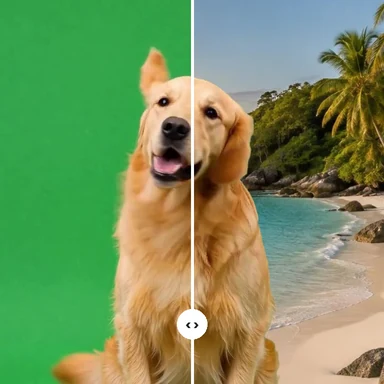
AI finds the person in every frame and lifts them off the background, right in your browser.
Keep it transparent, swap in a colour, picture or blur, or export a green screen clip for your editor.
MP4, MOV, WebM or MKV with a person in it. No green screen needed.
Or paste a video. Exports cover up to 60 seconds at a time.Need a clip? Create one with AIPeople filmed in rooms and streets, no green screen. Pick one to see the background disappear.
Drop an MP4, MOV or WebM of a person: a talking head, a dance, a product demo. It stays on your device.
Press Remove background and watch the live preview. Fine-tune edges, outline and anti-flicker, and trim the part you need.
Keep it transparent for WebM or a PNG sequence, or choose green screen, a colour, blur or your own picture and save an MP4 with the sound.
Generate the backdrop for your cut-out video, or a whole new clip, from a prompt with WaveSpeed AI.
Create moving backgrounds, B-roll and full scenes from a prompt or a photo.
Make a studio, city or fantasy backdrop to put behind your video.
Turn an object into a 3D model for your set.
$1 in free credits for eligible new accounts. No card needed. Generators have separate account and credit requirements. The video background remover is free.
Yes. Remove backgrounds from as many videos as you like, with no account, no watermark and full-quality downloads up to 1080p.
No. The AI separates the person from any background, such as a room, an office or a street, frame by frame. You can even export the result as a green screen clip to use in any video editor.
Choose Transparent and export WebM with alpha, which plays transparent in Chrome, Edge and Firefox and imports into editors that support WebM alpha. For editors that prefer images, export a transparent PNG sequence as a ZIP.
Yes. Pick Blur for a soft, professional look, a solid colour, or upload your own picture, then export an MP4 with the original sound.
No. The AI runs in your browser and your video never leaves your device. The first time, your browser downloads the AI model (about 13 MB) once and keeps it for next time.
Use Fine detail, keep the person well lit and in focus, and use the Matte view to check the outline. Edge softness smooths hair, Outline shrinks or grows the cut-out, and Anti-flicker steadies it between frames.
Clips with people, such as talking heads, interviews, tutorials, dances and fitness videos. Each export covers up to 60 seconds, so longer videos can be done in parts with the trim sliders.
Free, private and no sign-up. Your video never leaves your device.
/filters:quality(82)/media/images/1791123751656780930_IfFPY7R0.webp)
/filters:quality(82)/media/images/1791123737177812425_RjKT3cku.webp)
/filters:quality(82)/media/images/1791123748309870128_xlkNgK8N.webp)
/filters:quality(82)/media/images/1791123738630744263_oR09R0aj.webp)
/filters:quality(82)/media/images/1791177033162457776_uQ09OY7g.webp)
/filters:quality(82)/media/images/1791123734319125607_JdnwGPY7.webp)
/filters:quality(82)/media/images/1791123746355630206_udnxGPY7.webp)
/filters:quality(82)/media/images/1791123744771362580_yC0sPezZ.webp)
/filters:quality(82)/media/images/1791123738606970169_5KIR1ais.webp)
/filters:quality(82)/media/images/1791123748197655725_EUmuFNW6.webp)