
Veo Automation Guide 2026: Batch Video Workflows
Veo automation guide 2026 shows how to queue, track, retry, store, and cost one batch video workflow without relying on browser automation.
The first duplicate is usually harmless. The twentieth is a billing problem.
That is where veo automation gets difficult. A worker submits a video job, loses the HTTP response, assumes the request failed, and submits it again. Both generations finish. The campaign now has two clips, two charges, and one database row.
This guide builds one controlled workflow for short product ads: queue input, submit an asynchronous Veo job, poll it, classify failures, download the file, review it, and reconcile the cost. No browser automation. No account workarounds. Just the API path that has to survive production.
Define the Veo Batch Workflow
Choose One Repeatable Video Task
Start with one narrow task: turn an approved product image into an eight-second, 9:16 advertising clip with native audio.
Do not mix product videos, character scenes, extensions, and first-last-frame tests in the same pilot. Their inputs and acceptance rules differ. If everything enters one queue, a failure report becomes difficult to interpret.
For the initial veo batch generation test, I would lock:
- Model:
veo-3.1-fast-generate-preview - Input: one owned product image
- Duration: eight seconds
- Resolution: 720p
- Aspect ratio: 9:16
- Output quantity: one video
- Prompt language: English
- Review batch: 12 products
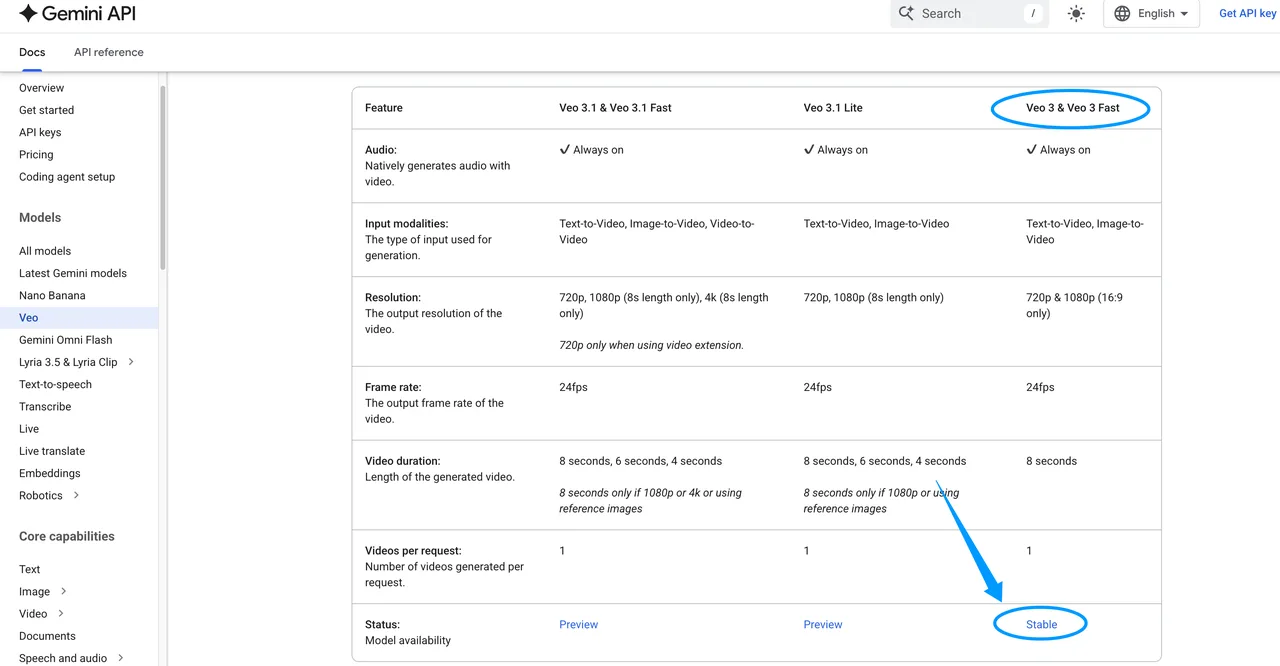
Google’s current Veo guide labels Veo 3 and Veo 3 Fast as ‘Stable’ in its feature table, but the same page marks their model IDs deprecated; Google’s deprecation schedule lists June 30, 2026 as their shutdown date. Veo 3.1, Fast, and Lite remain preview models in the Gemini API. Preview access is useful for evaluation, but model behavior and availability can change. Store the complete model ID on every job.
Set Success, Cost, and Delivery Criteria
A completed API operation is not automatically a successful advertising clip.
Define acceptance before submitting the queue:
| Check | Pass condition |
|---|---|
| Product identity | Shape, color, label structure, and key details remain recognizable |
| Motion | Camera movement stays within the brief |
| Audio | No clipping, unrelated speech, or distracting effects |
| Composition | Product remains visible inside the 9:16 safe area |
| File | MP4 downloads, opens, and passes checksum verification |
| Delivery | Final asset reaches permanent storage with metadata |
Track three different outcomes: technically completed, review-approved, and delivered. Cost per usable clip uses the second or third number—not the first.
Prepare the Input Queue
Structure Prompts, References, and Output Settings
Each queue row should contain data, not an improvised prompt hidden inside worker code. I use fields such as:
job_key
campaign_id
asset_id
prompt
reference_uri
reference_sha256
model_id
duration_seconds
resolution
aspect_ratio
seed
status
attempt_count
Store the reference hash after downloading or receiving the source file. A filename is not an identity check. “hero-final.png” has probably been final three times already.
Build the prompt from versioned components: fixed production instructions, product-specific details, prohibited changes, and audio direction. Save the rendered prompt as submitted. If the template changes, increment its version instead of overwriting history.
Store Job IDs and Idempotent Application State
Application idempotency and model reproducibility are different problems.
Create a deterministic job_key from the campaign revision, model ID, prompt, reference hash, and settings. Add a unique database constraint so two workers cannot create the same intended job.
A practical state machine is:
queued → submitting → submitted → running
       → succeeded → stored → approved/rejected
       → retryable_error / final_error
After submission, save the returned operation name immediately. Google does not document a Veo-specific idempotency key for this generation call. Your database, queue lease, and recovery process therefore carry the duplicate-prevention work.
The seed may reduce variation, but it cannot tell you whether a request was already submitted. Never use it as a job identifier.
Submit and Track Veo Jobs

Create Requests Through the Current API
The current Python SDK pattern uses google-genai and returns a long-running operation:
from google import genai
from google.genai import types

client = genai.Client()

operation = client.models.generate_videos(
    model="veo-3.1-fast-generate-preview",
    prompt=row["prompt"],
    image=source_image,
    config=types.GenerateVideosConfig(
        aspect_ratio="9:16",
        resolution="720p",
        number_of_videos=1,
        seed=row["seed"],
    ),
)

save_operation_name(row["job_key"], operation.name)
Keep SDK and schema versions pinned in the deployment manifest. Validate every field against the current documentation before release; a copied 2025 example is not a production contract.
Veo 3.1 supports four-, six-, and eight-second outputs, but references and higher resolutions can require eight seconds. It returns one video per request. Native audio is always enabled on the current Veo 3 routes.
Poll Status Without Duplicating Work
The worker should poll the saved operation rather than resubmit the generation:
operation = client.operations.get(operation)

if operation.done:
    handle_terminal_result(operation)
else:
    schedule_next_poll(operation.name)
Start with a ten-second interval, add jitter, and increase the interval after repeated polls. A polling timeout means “stop waiting for now.” It does not mean the generation failed.
This step cannot be skipped. If you skip it, you pay it back later.
When a process restarts, load unfinished operation names from the database. Do not infer job state from an empty local output folder. The remote operation may still be running—or may already have completed.
Handle Failures and Save Outputs
Separate Safety Blocks, Timeouts, and Transient Errors
Use separate failure classes because they require different actions:
- Safety or policy block: final unless a human changes the input.
- Invalid request: fix the schema; automatic retries repeat the same mistake.
- Authentication or permission error: stop the worker and alert.
- Rate or spend limit: delay with exponential backoff.
- Temporary service error: retry polling or submission within a controlled limit.
- Client timeout: query the existing operation before doing anything else.
- Review rejection: generation succeeded, but the clip is unusable.
Google documents request latency from roughly 11 seconds to six minutes during peak periods. A three-minute client deadline can therefore expire while a legitimate job continues.
The current guide also says blocked generations are not charged. That does not make blind retries safe: a client timeout may hide a successful, billable generation.
Retry Selectively and Persist Final Assets
Retry transport and temporary capacity failures without changing the prompt. A safety block or invalid parameter should not enter that loop.
For review failures, create a new revision. Keep the previous operation, prompt, seed, output URI, and rejection reason. Otherwise, a team eventually compares two files named final_2.mp4 and tries to reconstruct what changed from memory.
Download successful videos immediately, calculate a checksum, and write them to your own object storage. Save the provider URI for audit purposes, but do not treat it as permanent storage.
Measure Batch Cost and Throughput
Track Per-Job Spend and Cost per Usable Clip
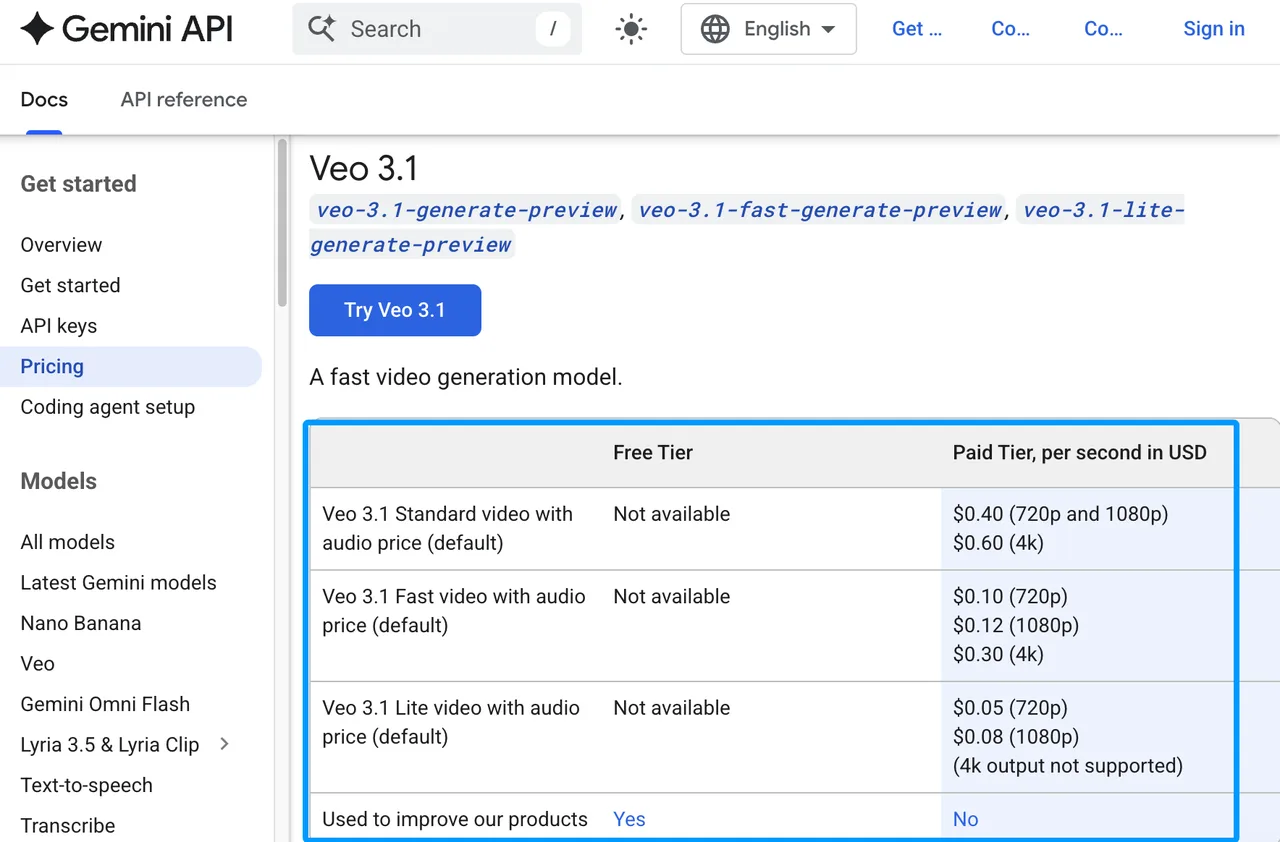
Current Google Veo 3 pricing lists Veo 3.1 Standard with audio at $0.40 per second for 720p or 1080p. Fast costs $0.10 per second at 720p and $0.12 at 1080p. Lite costs $0.05 and $0.08 respectively.
An eight-second Fast 720p clip therefore costs $0.80 when successfully generated. Standard would cost $3.20.
Suppose a 100-job batch produces 88 files, and 70 pass review:
Generation spend = 88 × $0.80 = $70.40
Cost per completed file = $70.40 ÷ 88 = $0.80
Cost per usable clip = $70.40 ÷ 70 = $1.01
Add review labor, storage, editing, and reruns separately. Google states that certain blocked or audio-failed jobs are charged only when video generation succeeds, but your ledger should still reconcile actual billing rather than estimating failure behavior.
Respect Quotas, Concurrency, and Provider Limits
Do not hard-code a concurrency number from somebody else’s account. Current Gemini API rate limits vary by project, model, usage tier, billing history, and account status. Preview models can have tighter limits.
The limits are applied per project, not per API key. Multiple workers using different keys can still collide with the same project quota.
Use a shared concurrency controller. On 429 RESOURCE_EXHAUSTED, reduce submission rate and honor backoff. Monitor rolling spend limits as well as request limits; expensive video jobs can hit the financial guardrail before they hit requests per minute.
Validate the Workflow Before Scaling
Test Duplicates, Partial Failures, and Missing Files
Before increasing concurrency, deliberately test:
- Two workers claim the same queue row.
- The submit response is lost after Google accepts the request.
- Polling fails three times and later recovers.
- Generation succeeds but download fails.
- The downloaded file is empty or corrupted.
- Storage succeeds but the database update fails.
- Eleven jobs finish and one remains pending.
The problem is not that it cannot generate. The problem is that no one trusts it at batch scale.
Each scenario needs a deterministic recovery action. “Rerun the batch” is not recovery. It is another batch.
Add Logs, Alerts, and a Manual Review Path
Every state transition should log the internal job key, Google operation name, model version, input hash, attempt number, previous status, new status, error class, latency, output URI, checksum, and estimated cost.
Alert on stuck operations, sudden rejection spikes, quota errors, download failures, and unusual cost per approved clip. Keep safety-blocked prompts out of general logs if they may contain sensitive customer data.
Finally, require human approval before an ad enters the publishing system. Video automation can remove repetitive handling. It should not remove the last person who notices that the model changed the product label.
FAQ
Can a submitted Veo generation job be canceled?
The current Gemini Veo guide does not document a cancellation method for an already submitted video-generation operation. Stopping the client or abandoning polling does not cancel the server-side job.
Do not confuse Veo operations with Gemini Batch API or background-interaction cancellation methods. If cancellation is operationally required, confirm support with Google for the exact API route before designing around it.
How long do Google-hosted Veo output URLs remain available?
Generated Veo videos are retained by Google for two days. After that, they are removed.
Download each successful output to controlled storage immediately. The provider URI is a retrieval location, not your archive.
Does Veo expose a seed for reproducible reruns?
Yes. Veo 3 models expose a seed parameter, but Google states that it does not guarantee deterministic output. It only improves reproducibility slightly.
Store the seed with the prompt, input hash, model version, and settings. Two requests with the same seed may still produce different videos.
Can organizations restrict Veo processing to approved regions?
Not through a Gemini API request parameter documented in the current Veo guide. Teams with regional requirements should evaluate Vertex AI regional endpoints and Google’s generative AI security controls.
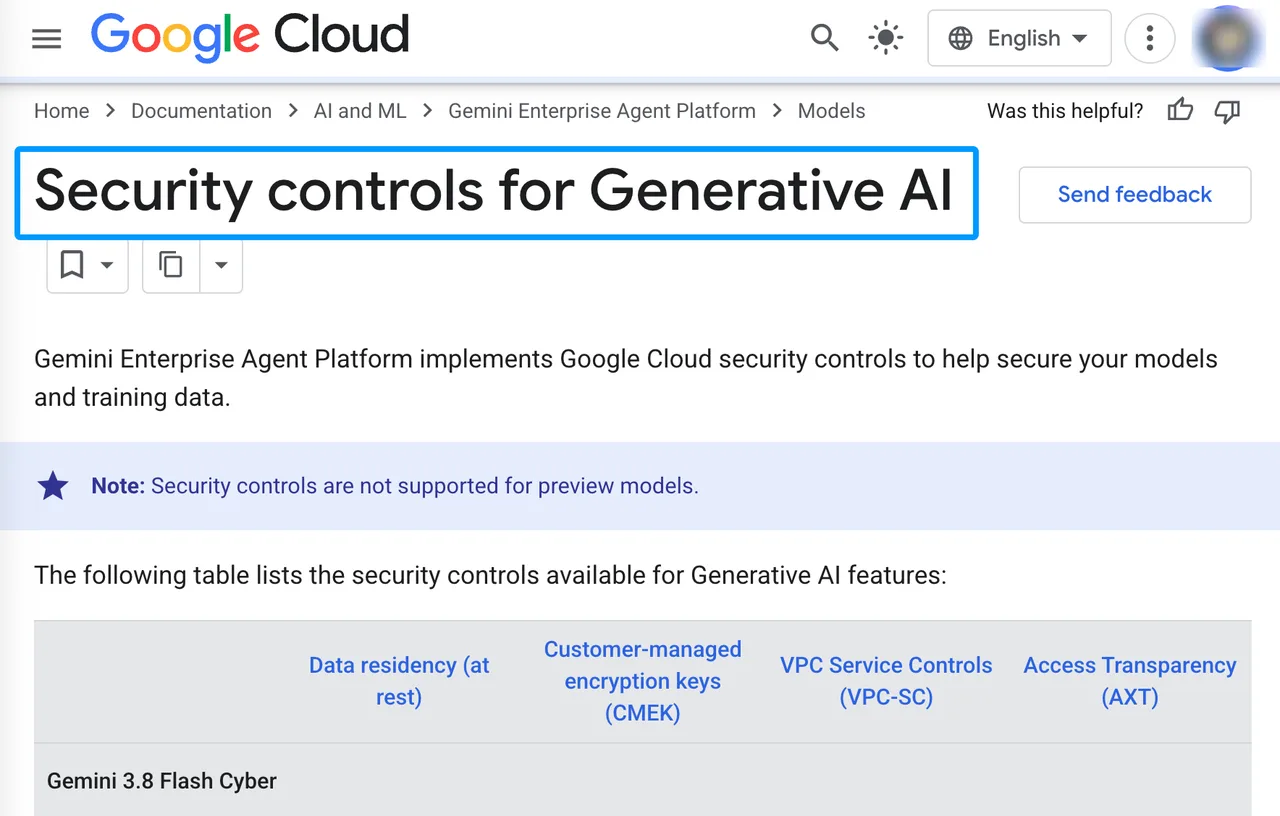
A resource-location policy is not automatically a contractual data-residency guarantee. Confirm supported Veo regions and processing commitments with Google before production.
Which audit logs identify who submitted each generation?
For Vertex AI, Google Cloud Audit Logs can record the caller identity in the AuthenticationInfo field. The Cloud Audit Logs documentation describes this identity trail.
API-key access may identify a project or credential without identifying the employee behind an internal action. Keep an application audit record containing the authenticated user, service account, campaign, internal request ID, and Google operation name.
Conclusion
Reliable veo automation is mostly state management. The model creates the clip; the application prevents duplicate requests, remembers operation names, downloads temporary outputs, separates retryable errors from final failures, and calculates cost from approved files.
Start with 12 controlled jobs. Break the workflow on purpose. When every partial failure has a recovery path—and the cost ledger balances—then increase concurrency.
Previous posts:
Related Articles
/filters:quality(82)/media/images/1790589731632080935_0wwFPY8h.webp)
Google Veo 3 Pricing 2026: API Costs and Access
/filters:quality(82)/media/images/1790590062795265714_fANXfpxI.webp)
Luma AI Pricing 2026: App and API Costs Explained
/filters:quality(82)/media/images/1773962750383987480_n3hqzHRZ.webp)
Kling 4.0 vs Kling 3.0: What Is Expected to Change and How to Upgrade
Kling 4.0 vs Seedance 2.5: How to Choose for Commercial Video
Kling 4.0 vs Veo 3.1 vs Seedance 2.5: Choosing a Flagship Video Model