GPT-6 Astra Text-to-3D generates textured 3D models or scenes from text descriptions, supporting fast 3D asset creation for game assets, product visualization, concept design, virtual scenes, and production workflows. Ready-to-use REST inference API, best performance, no coldstarts, affordable pricing.
Idle

$8per run
ExamplesView all

A compact uncrewed exploration spacecraft resting on three landing legs inside a maintenance hangar. Build a coherent rounded fuselage, short swept wings, a sealed smoked-glass cockpit canopy, recessed engine nozzles, thin ceramic hull panels with visible seams, and landing gear firmly supporting the craft on the floor. Add a maintenance gantry, two equipment carts, organized cables and tool cases. Surround the craft with structural ribs, a high ceiling and a large closed hangar door. Use brushed metal, off-white ceramic, dark rubber and glass, with subtle surface wear and contrasting orange service panels. Keep the whole spacecraft visible and leave room around it for inspection. No people, weapons, brands, logos or readable text.
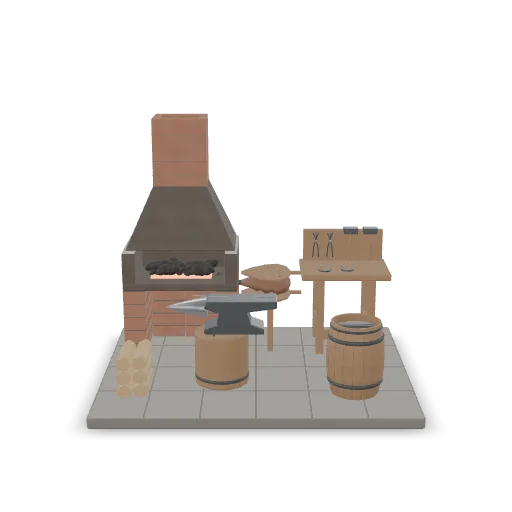
A medieval blacksmith's forge corner as a compact scene. Include a brick forge with a glowing coal bed and a leather bellows, a heavy iron anvil on an oak stump, a quenching barrel, a rack of tongs and hammers, a half-finished sword on the anvil, stacked firewood and a workbench with horseshoes. Stone floor base, soot-stained bricks, worn metal and wood with realistic wear.
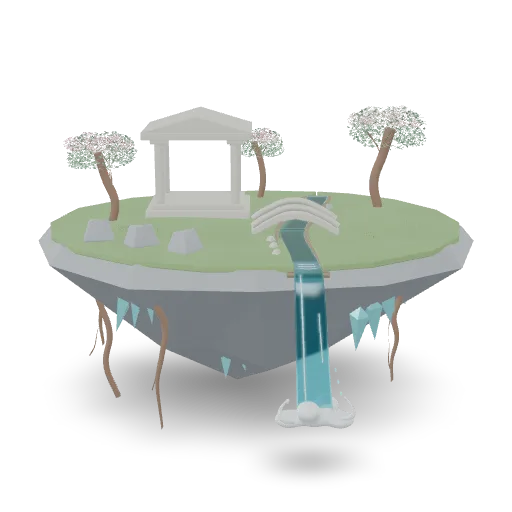
A fantasy floating island diorama: an inverted rocky landmass with dangling roots and crystals beneath, a grassy top with a small stone shrine with pillars, a waterfall spilling over the edge into mist, a stone footbridge over a stream, a few flowering trees and scattered boulders. Stylized but coherent materials, one self-contained scene.
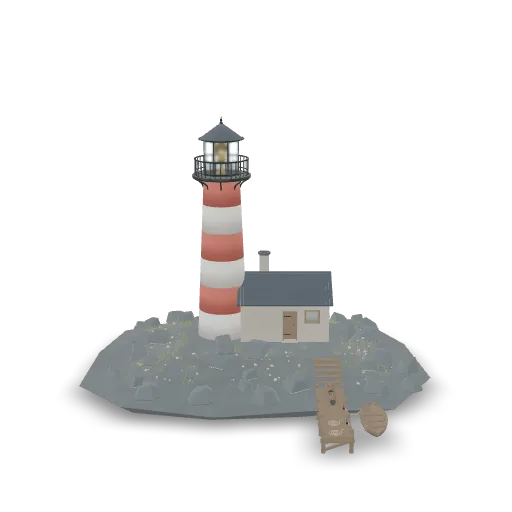
A weathered stone lighthouse standing on a small rocky islet. Build a tapered white-and-red striped tower with a wrought-iron gallery railing, a glass lantern room with a brass lamp, and a small keeper's cottage with a slate roof attached at the base. Add a wooden jetty with a moored rowboat, coiled ropes, lobster traps, scattered barnacled rocks and tufts of sea grass. Realistic materials and coherent scale, the whole islet as one compact scene.
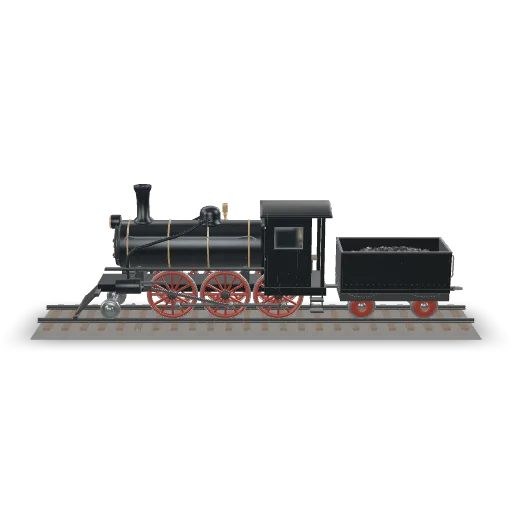
A vintage steam locomotive standing on a short straight section of track with wooden sleepers and gravel ballast. Build a black boiler with polished brass bands, a tall smokestack, a domed steam chest, large red spoked driving wheels with connecting rods, a cab with small windows, a coal tender behind it, and a front cowcatcher and headlamp. Realistic proportions and oily, weathered metal.
Related Models
/filters:quality(82)/media/images/1789120746143744570_VtCMW5en.webp)
/filters:quality(82)/media/images/1790055357630118327_7rW5fpyH.webp)
/filters:quality(82)/media/images/1790055359461222633_sVA5nxPe.webp)
/filters:quality(82)/media/images/1789118312974471104_PeBKU3ck.webp)
/filters:quality(82)/media/images/1789119184005756217_r4sCMU3d.webp)
/filters:quality(82)/media/images/1789121897153465635_WuENX6fp.webp)
README
GPT-6 Astra Text to 3D
GPT-6 Astra Text to 3D turns a creative brief into a textured 3D object or scene that can be rotated, explored, and developed further. Describe an object, place, product, interior, vehicle, or imagined world, set the subject scale, and generate a portable GLB model for downstream 3D workflows.
Why Choose This?
-
Text-to-3D generation
Generate a 3D object or scene directly from a written prompt. -
Object and scene creation
Create standalone products, props, vehicles, interiors, buildings, environments, or broader spatial concepts. -
Material-aware output
Guide materials such as timber, stone, glass, painted metal, fabric, ceramic, or worn surfaces through the prompt. -
PBR texture support
The exported model includes geometry and embedded PBR textures. -
Portable GLB output
Download a GLB model that can be viewed in compatible browser viewers or imported into 3D applications.
Parameters
| Parameter | Required | Description |
|---|---|---|
| prompt | Yes | Describe the object or scene to generate. Maximum length: 4000 characters. |
| size | No | Longest subject dimension in meters. Range: 0.05–20. Default: 1. |
How to Use
- Write your prompt — Describe the subject, shape, materials, surrounding space, and important visual details.
- Set size optional — Define the longest subject dimension when a specific physical scale is needed.
- Submit — Generate the 3D result.
- Download the GLB — Retrieve the generated GLB model URL from
outputs.
Pricing
Pricing is fixed at $8 per generation.
| Output | Cost |
|---|---|
| One GLB model generation | $8.00 |
Output
Each successful request returns a GLB model URL in outputs.
The generated model includes geometry and embedded PBR textures. Tasks have a 120-minute timeout.
Best Use Cases
- Text-based 3D asset creation — Generate 3D models directly from creative briefs.
- Product visualization — Turn product ideas into 3D assets for inspection and presentation.
- Concept design — Explore vehicles, architecture, props, interiors, environments, and imagined worlds.
- Scene prototyping — Generate spatial concepts such as courtyards, workshops, hangars, rooms, or landscapes.
- Interactive experiences — Create starting assets for viewers, prototypes, games, or immersive workflows.
- Creative iteration — Compare multiple design directions from different prompt variations.
Pro Tips
- Start with the overall silhouette, structure, and scene layout.
- Describe how parts connect and how the subject relates to its surroundings.
- Include material details such as surface wear, glass, metal, stone, fabric, ceramic, or wood.
- For scenes, describe both the main subject and the surrounding space.
- Add practical details such as door openings, furniture placement, props, lighting, or landscape elements.
- Inspect the first result from several angles before refining the next prompt.
- Generated assets may need cleanup for production use.
- The result is a generated interpretation, not a dimensionally exact CAD model.
Example Prompt
A compact exploration spacecraft resting on three landing legs inside a service hangar. Give it a rounded ceramic hull, a smoked-glass cockpit, recessed engine nozzles, and visible panel seams. Include maintenance carts and a grated floor, with enough space to inspect the craft from all sides.
Notes
promptis required.promptsupports up to4000characters.sizecontrols the longest subject dimension in meters.- Exact physical accuracy, likeness, and photorealism are not guaranteed.
- Lighting and material appearance may vary by 3D viewer.
Related Models
- GPT-6 Astra Image to 3D — Generate a textured 3D object or scene from reference images.
Gpt 6 Astra Text To 3d API — Quick start
Grab a WaveSpeedAI API key, then call POST https://api.wavespeed.ai/api/v3/openai/gpt-6-astra/text-to-3d with your input as JSON. The endpoint returns a prediction id. Start polling the result endpoint around every 2 seconds, increase the interval for long-running tasks, and stop on any terminal status. On completed, read output values from data.outputs. Examples for Gpt 6 Astra Text To 3d below.
HTTP example
set -euo pipefail

: "${WAVESPEED_API_KEY:?Set WAVESPEED_API_KEY}"

REQUEST_BODY=$(cat <<'JSON'
{
    "prompt": "A cinematic shot of a city at sunset, soft golden light",
    "size": 1
}
JSON
)

# 1. Submit the prediction.
SUBMIT_RESPONSE=$(curl --silent --show-error --fail-with-body \
  -X POST "https://api.wavespeed.ai/api/v3/openai/gpt-6-astra/text-to-3d" \
  -H "Content-Type: application/json" \
  -H "Authorization: Bearer $WAVESPEED_API_KEY" \
  -d "$REQUEST_BODY")

TASK=$(printf '%s' "$SUBMIT_RESPONSE" | jq 'if has("data") then .data else . end')
PREDICTION_ID=$(printf '%s' "$TASK" | jq -r '.id')
if [ -z "$PREDICTION_ID" ] || [ "$PREDICTION_ID" = "null" ]; then
  printf 'Submission response did not contain a prediction id
' >&2
  exit 1
fi
RESULT_URL="https://api.wavespeed.ai/api/v3/predictions/$PREDICTION_ID/result"

# 2. Poll until the prediction finishes.
while true; do
  RESPONSE=$(curl --silent --show-error --fail-with-body "$RESULT_URL" \
    -H "Authorization: Bearer $WAVESPEED_API_KEY")
  RESULT=$(printf '%s' "$RESPONSE" | jq 'if has("data") then .data else . end')
  STATUS=$(printf '%s' "$RESULT" | jq -r '.status')
  case "$STATUS" in
    completed) printf '%s\n' "$RESULT" | jq '.outputs'; break ;;
    failed|cancelled|timeout|deleted) printf '%s\n' "$RESULT" | jq . >&2; exit 1 ;;
    *) sleep 2 ;;
  esac
done
Node.js example
const submitUrl = "https://api.wavespeed.ai/api/v3/openai/gpt-6-astra/text-to-3d";
const apiKey = process.env.WAVESPEED_API_KEY;
if (!apiKey) throw new Error('Set WAVESPEED_API_KEY');

async function requestJson(url, options = {}) {
  const response = await fetch(url, options);
  if (!response.ok) throw new Error(await response.text());
  return response.json();
}

// 1. Submit the prediction.
const body = await requestJson(submitUrl, {
  method: "POST",
  headers: {
    "Authorization": `Bearer ${apiKey}`,
    "Content-Type": "application/json",
  },
  body: JSON.stringify({
        "prompt": "A cinematic shot of a city at sunset, soft golden light",
        "size": 1
}),
});
const task = body.data ?? body;
if (!task.id) throw new Error("Submission response did not contain a prediction id");
const resultUrl = `https://api.wavespeed.ai/api/v3/predictions/${task.id}/result`;

// 2. Poll until the prediction finishes.
while (true) {
  const resultBody = await requestJson(resultUrl, {
    headers: { "Authorization": `Bearer ${apiKey}` },
  });
  const result = resultBody.data ?? resultBody;
  if (result.status === "completed") {
    console.log(result.outputs);
    break;
  }
  if (["failed", "cancelled", "timeout", "deleted"].includes(result.status)) throw new Error(JSON.stringify(result));
  await new Promise(resolve => setTimeout(resolve, 2000));
}
Python example
import json
import os
import time
from urllib.request import Request, urlopen

api_key = os.environ["WAVESPEED_API_KEY"]
headers = {"Authorization": f"Bearer {api_key}", "Content-Type": "application/json"}
payload = {
    "prompt": "A cinematic shot of a city at sunset, soft golden light",
    "size": 1
}

def request_json(url, data=None):
    request = Request(url, data=data, headers=headers, method="POST" if data else "GET")
    with urlopen(request) as response:
        return json.load(response)

# 1. Submit the prediction.
body = request_json("https://api.wavespeed.ai/api/v3/openai/gpt-6-astra/text-to-3d", json.dumps(payload).encode())
task = body.get("data", body)
if not task.get("id"):
    raise RuntimeError("Submission response did not contain a prediction id")
result_url = f"https://api.wavespeed.ai/api/v3/predictions/{task['id']}/result"

# 2. Poll until the prediction finishes.
while True:
    result_body = request_json(result_url)
    result = result_body.get("data", result_body)
    status = result.get("status")
    if status == "completed":
        print(result.get("outputs", []))
        break
    if status in {"failed", "cancelled", "timeout", "deleted"}:
        raise RuntimeError(result)
    time.sleep(2)
Gpt 6 Astra Text To 3d API — Frequently asked questions
What is the Gpt 6 Astra Text To 3d API?
Gpt 6 Astra Text To 3d is a OpenAI model for 3D asset generation, exposed as a REST API on WaveSpeedAI. GPT-6 Astra Text-to-3D generates textured 3D models or scenes from text descriptions, supporting fast 3D asset creation for game assets, product visualization, concept design, virtual scenes, and production workflows. Ready-to-use REST inference API, best performance, no coldstarts, affordable pricing. You can call it programmatically or try it from the playground above.
How do I call the Gpt 6 Astra Text To 3d API?
POST your input parameters to the model's REST endpoint (shown in the API tab of this playground) with your WaveSpeedAI API key in the Authorization header. Submission returns a prediction ID. Poll the result endpoint starting around every 2 seconds, increase the interval for long-running tasks, and stop on any terminal status. The playground generates Python, JavaScript, and cURL examples for submitting requests and polling results. Full request/response shape is documented at https://wavespeed.ai/docs/docs-api/openai/openai-gpt-6-astra-text-to-3d.
How much does Gpt 6 Astra Text To 3d cost per run?
Gpt 6 Astra Text To 3d starts at $8 per run. That figure is the base price — the final charge scales with the parameters you set in the form (output size, length, count, references, or whatever knobs this model exposes), so a higher-quality or larger output costs more than a minimal one. The exact cost for your current input is shown live next to the Generate button before you submit, and the actual per-call charge is recorded on the prediction afterwards.
What inputs does Gpt 6 Astra Text To 3d accept?
Key inputs: `prompt`, `size`. The full JSON schema (types, defaults, allowed values) is rendered above the Generate button and mirrored in the API reference at https://wavespeed.ai/docs/docs-api/openai/openai-gpt-6-astra-text-to-3d.
How do I get started with the Gpt 6 Astra Text To 3d API?
Sign up for a free WaveSpeedAI account to claim starter credits, copy your API key from /accesskey, then call the endpoint shown in the API tab of the playground. The playground also auto-generates a code sample in Python, JavaScript, or cURL for the parameters you've set.
Can I use Gpt 6 Astra Text To 3d outputs commercially?
Commercial usage rights depend on the model's license, set by its provider (OpenAI). Check the provider's applicable terms and WaveSpeedAI's Terms of Service before commercial use.
More from OpenAI
View all- openai/gpt-6-astra/image-to-3dImage to 3D
- openai/gpt-image-1.5/editImage Editing
- openai/gpt-image-1.5/text-to-imageText to Image
- openai/gpt-image-2.5-flare/editImage Editing
- openai/gpt-image-2.5-flare/text-to-imageText to Image
- openai/gpt-image-2.5-sunburst/editImage Editing
- openai/gpt-image-2.5-sunburst/text-to-imageText to Image
- openai/gpt-image-2/editImage Editing
More Text to 3D models
View all- tripo3d/h3.1/text-to-3dText to 3D
- wavespeed-ai/hunyuan-3d-v3.1/text-to-3d-rapidText to 3D
- hyper3d/rodin-v2.5/text-to-3dText to 3D
- meshy/v6/text-to-3dText to 3D
- wavespeed-ai/hunyuan3d-v3/text-to-3dText to 3D
- hyper3d/rodin-v2/text-to-3dText to 3D
- meshy/v7.1/text-to-3dText to 3D
- tripo3d/p2/text-to-3dText to 3D