GPT-6 Astra Image-to-3D generates textured 3D models or scenes from reference images, with optional text guidance for image-guided 3D asset creation, product visualization, concept design, virtual scenes, and production workflows. Ready-to-use REST inference API, best performance, no coldstarts, affordable pricing.
Idle
$8per run
ExamplesView all
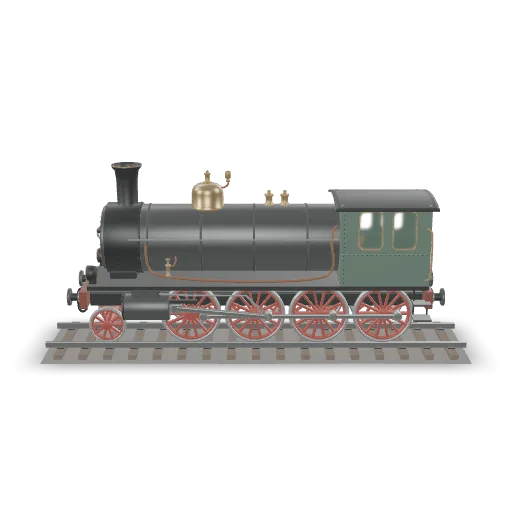
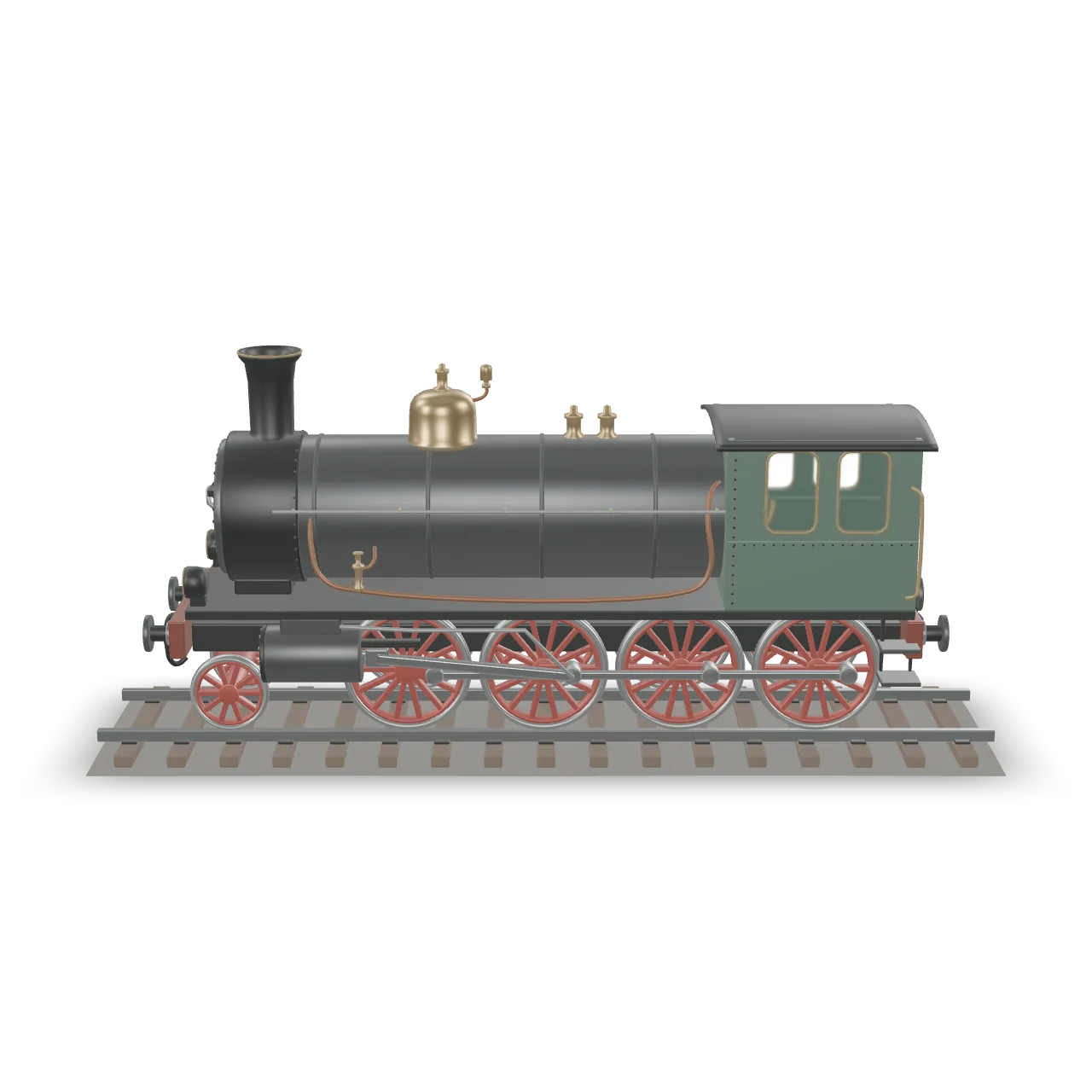
Reconstruct the complete steam locomotive shown in the reference image as a detailed three-dimensional asset, including a short section of railway track. Preserve the overall proportions, cylindrical boiler and circular smokebox, tall chimney, brass domes and valves, green enclosed cab, visible wheel arrangement, red spoked driving wheels, connecting rods, front cylinders, buffers and fine external piping. Match the weathered dark steel, aged brass, copper, green paint and red wheel finish. Build coherent unseen sides with corresponding mechanical parts and closed surfaces. Keep the wheels on the rails and the rods connected to the wheels. Include cab window openings and glazing, riveted seams, handrails and step plates. Use a neutral presentation with no surrounding buildings, people, smoke, text, logos or branding.
Related Models
/filters:quality(82)/media/images/1789120746143744570_VtCMW5en.webp)
/filters:quality(82)/media/images/1790055357630118327_7rW5fpyH.webp)
/filters:quality(82)/media/images/1790055359461222633_sVA5nxPe.webp)
/filters:quality(82)/media/images/1789118312974471104_PeBKU3ck.webp)
/filters:quality(82)/media/images/1789119184005756217_r4sCMU3d.webp)
/filters:quality(82)/media/images/1789121897153465635_WuENX6fp.webp)
README
GPT-6 Astra Image to 3D
GPT-6 Astra Image to 3D turns reference images into a textured 3D object or scene that can be rotated, explored, and developed further. Provide one or more images, add optional prompt guidance, set the subject scale, and generate a portable GLB model for downstream 3D workflows.
Why Choose This?
-
Image-to-3D generation
Convert reference images into a generated 3D object or scene. -
Object and scene creation
Generate standalone products, props, vehicles, interiors, buildings, environments, or broader spatial concepts. -
Material-aware output
Guide materials such as timber, stone, glass, painted metal, fabric, ceramic, or worn surfaces through the prompt. -
PBR texture support
The exported model includes geometry and embedded PBR textures. -
Portable GLB output
Download a GLB model that can be viewed in compatible browser viewers or imported into 3D applications.
Parameters
| Parameter | Required | Description |
|---|---|---|
| images | Yes | Reference image URLs. Supports up to 10 images. |
| prompt | No | Optional guidance for the subject, materials, surroundings, or scene interpretation. Maximum length: 4000 characters. |
| size | No | Longest subject dimension in meters. Range: 0.05–20. Default: 1. |
How to Use
- Provide reference images — Upload images of the subject or scene you want to convert into 3D.
- Add prompt guidance optional — Describe the subject, materials, hidden details, or surrounding environment.
- Set size optional — Define the longest subject dimension when a specific physical scale is needed.
- Submit — Generate the 3D result.
- Download the GLB — Retrieve the generated GLB model URL from
outputs.
Pricing
Pricing is fixed at $8 per generation.
| Output | Cost |
|---|---|
| One GLB model generation | $8.00 |
Output
Each successful request returns a GLB model URL in outputs.
The generated model includes geometry and embedded PBR textures. Tasks have a 120-minute timeout.
Best Use Cases
- Product visualization — Turn product references into 3D assets for inspection and presentation.
- Concept design — Explore objects, vehicles, architecture, props, interiors, and environments in 3D.
- Scene prototyping — Generate spatial concepts such as rooms, courtyards, workshops, hangars, or landscapes.
- Interactive experiences — Create starting assets for viewers, prototypes, games, or immersive workflows.
- Creative iteration — Compare multiple design directions from the same set of reference images.
Pro Tips
- Use clear, consistent reference images of the same subject.
- Add multiple angles when shape and proportions matter.
- Use the prompt to explain details that are hidden, ambiguous, or not visible in the images.
- For scenes, describe both the main subject and the surrounding space.
- Include material details such as surface wear, glass, metal, stone, fabric, or wood when appearance matters.
- Inspect the first result from several angles before refining the next prompt.
- Generated assets may need cleanup for production use.
- The result is a generated interpretation, not a dimensionally exact scan.
Example Prompt
A compact exploration spacecraft resting on three landing legs inside a service hangar. Give it a rounded ceramic hull, a smoked-glass cockpit, recessed engine nozzles, and visible panel seams. Include maintenance carts and a grated floor, with enough space to inspect the craft from all sides.
Notes
imagesis required.- Up to
10reference images are supported. promptis optional and supports up to4000characters.sizecontrols the longest subject dimension in meters.- Exact likeness, physical accuracy, and photorealism are not guaranteed.
- Lighting and material appearance may vary by 3D viewer.
Related Models
- GPT-6 Astra Text to 3D — Generate a textured 3D object or scene directly from a text prompt.
Gpt 6 Astra Image To 3d API — Quick start
Grab a WaveSpeedAI API key, then call POST https://api.wavespeed.ai/api/v3/openai/gpt-6-astra/image-to-3d with your input as JSON. The endpoint returns a prediction id. Start polling the result endpoint around every 2 seconds, increase the interval for long-running tasks, and stop on any terminal status. On completed, read output values from data.outputs. Examples for Gpt 6 Astra Image To 3d below.
HTTP example
set -euo pipefail

: "${WAVESPEED_API_KEY:?Set WAVESPEED_API_KEY}"

REQUEST_BODY=$(cat <<'JSON'
{
    "images": [
        "https://interactive-examples.mdn.mozilla.net/media/cc0-images/painted-hand-298-332.jpg"
    ],
    "size": 1
}
JSON
)

# 1. Submit the prediction.
SUBMIT_RESPONSE=$(curl --silent --show-error --fail-with-body \
  -X POST "https://api.wavespeed.ai/api/v3/openai/gpt-6-astra/image-to-3d" \
  -H "Content-Type: application/json" \
  -H "Authorization: Bearer $WAVESPEED_API_KEY" \
  -d "$REQUEST_BODY")

TASK=$(printf '%s' "$SUBMIT_RESPONSE" | jq 'if has("data") then .data else . end')
PREDICTION_ID=$(printf '%s' "$TASK" | jq -r '.id')
if [ -z "$PREDICTION_ID" ] || [ "$PREDICTION_ID" = "null" ]; then
  printf 'Submission response did not contain a prediction id
' >&2
  exit 1
fi
RESULT_URL="https://api.wavespeed.ai/api/v3/predictions/$PREDICTION_ID/result"

# 2. Poll until the prediction finishes.
while true; do
  RESPONSE=$(curl --silent --show-error --fail-with-body "$RESULT_URL" \
    -H "Authorization: Bearer $WAVESPEED_API_KEY")
  RESULT=$(printf '%s' "$RESPONSE" | jq 'if has("data") then .data else . end')
  STATUS=$(printf '%s' "$RESULT" | jq -r '.status')
  case "$STATUS" in
    completed) printf '%s\n' "$RESULT" | jq '.outputs'; break ;;
    failed|cancelled|timeout|deleted) printf '%s\n' "$RESULT" | jq . >&2; exit 1 ;;
    *) sleep 2 ;;
  esac
done
Node.js example
const submitUrl = "https://api.wavespeed.ai/api/v3/openai/gpt-6-astra/image-to-3d";
const apiKey = process.env.WAVESPEED_API_KEY;
if (!apiKey) throw new Error('Set WAVESPEED_API_KEY');

async function requestJson(url, options = {}) {
  const response = await fetch(url, options);
  if (!response.ok) throw new Error(await response.text());
  return response.json();
}

// 1. Submit the prediction.
const body = await requestJson(submitUrl, {
  method: "POST",
  headers: {
    "Authorization": `Bearer ${apiKey}`,
    "Content-Type": "application/json",
  },
  body: JSON.stringify({
        "images": [
                "https://interactive-examples.mdn.mozilla.net/media/cc0-images/painted-hand-298-332.jpg"
        ],
        "size": 1
}),
});
const task = body.data ?? body;
if (!task.id) throw new Error("Submission response did not contain a prediction id");
const resultUrl = `https://api.wavespeed.ai/api/v3/predictions/${task.id}/result`;

// 2. Poll until the prediction finishes.
while (true) {
  const resultBody = await requestJson(resultUrl, {
    headers: { "Authorization": `Bearer ${apiKey}` },
  });
  const result = resultBody.data ?? resultBody;
  if (result.status === "completed") {
    console.log(result.outputs);
    break;
  }
  if (["failed", "cancelled", "timeout", "deleted"].includes(result.status)) throw new Error(JSON.stringify(result));
  await new Promise(resolve => setTimeout(resolve, 2000));
}
Python example
import json
import os
import time
from urllib.request import Request, urlopen

api_key = os.environ["WAVESPEED_API_KEY"]
headers = {"Authorization": f"Bearer {api_key}", "Content-Type": "application/json"}
payload = {
    "images": [
        "https://interactive-examples.mdn.mozilla.net/media/cc0-images/painted-hand-298-332.jpg"
    ],
    "size": 1
}

def request_json(url, data=None):
    request = Request(url, data=data, headers=headers, method="POST" if data else "GET")
    with urlopen(request) as response:
        return json.load(response)

# 1. Submit the prediction.
body = request_json("https://api.wavespeed.ai/api/v3/openai/gpt-6-astra/image-to-3d", json.dumps(payload).encode())
task = body.get("data", body)
if not task.get("id"):
    raise RuntimeError("Submission response did not contain a prediction id")
result_url = f"https://api.wavespeed.ai/api/v3/predictions/{task['id']}/result"

# 2. Poll until the prediction finishes.
while True:
    result_body = request_json(result_url)
    result = result_body.get("data", result_body)
    status = result.get("status")
    if status == "completed":
        print(result.get("outputs", []))
        break
    if status in {"failed", "cancelled", "timeout", "deleted"}:
        raise RuntimeError(result)
    time.sleep(2)
Gpt 6 Astra Image To 3d API — Frequently asked questions
What is the Gpt 6 Astra Image To 3d API?
Gpt 6 Astra Image To 3d is a OpenAI model for 3D asset generation from images, exposed as a REST API on WaveSpeedAI. GPT-6 Astra Image-to-3D generates textured 3D models or scenes from reference images, with optional text guidance for image-guided 3D asset creation, product visualization, concept design, virtual scenes, and production workflows. Ready-to-use REST inference API, best performance, no coldstarts, affordable pricing. You can call it programmatically or try it from the playground above.
How do I call the Gpt 6 Astra Image To 3d API?
POST your input parameters to the model's REST endpoint (shown in the API tab of this playground) with your WaveSpeedAI API key in the Authorization header. Submission returns a prediction ID. Poll the result endpoint starting around every 2 seconds, increase the interval for long-running tasks, and stop on any terminal status. The playground generates Python, JavaScript, and cURL examples for submitting requests and polling results. Full request/response shape is documented at https://wavespeed.ai/docs/docs-api/openai/openai-gpt-6-astra-image-to-3d.
How much does Gpt 6 Astra Image To 3d cost per run?
Gpt 6 Astra Image To 3d starts at $8 per run. That figure is the base price — the final charge scales with the parameters you set in the form (output size, length, count, references, or whatever knobs this model exposes), so a higher-quality or larger output costs more than a minimal one. The exact cost for your current input is shown live next to the Generate button before you submit, and the actual per-call charge is recorded on the prediction afterwards.
What inputs does Gpt 6 Astra Image To 3d accept?
Key inputs: `prompt`, `images`, `size`. The full JSON schema (types, defaults, allowed values) is rendered above the Generate button and mirrored in the API reference at https://wavespeed.ai/docs/docs-api/openai/openai-gpt-6-astra-image-to-3d.
How do I get started with the Gpt 6 Astra Image To 3d API?
Sign up for a free WaveSpeedAI account to claim starter credits, copy your API key from /accesskey, then call the endpoint shown in the API tab of the playground. The playground also auto-generates a code sample in Python, JavaScript, or cURL for the parameters you've set.
Can I use Gpt 6 Astra Image To 3d outputs commercially?
Commercial usage rights depend on the model's license, set by its provider (OpenAI). Check the provider's applicable terms and WaveSpeedAI's Terms of Service before commercial use.
More from OpenAI
View all- openai/gpt-6-astra/text-to-3dText to 3D
- openai/gpt-image-1.5/editImage Editing
- openai/gpt-image-1.5/text-to-imageText to Image
- openai/gpt-image-2.5-flare/editImage Editing
- openai/gpt-image-2.5-flare/text-to-imageText to Image
- openai/gpt-image-2.5-sunburst/editImage Editing
- openai/gpt-image-2.5-sunburst/text-to-imageText to Image
- openai/gpt-image-2/editImage Editing
More Image to 3D models
View all- tripo3d/h3.1/image-to-3dImage to 3D
- bytedance/seed3d-2.0/image-to-3dImage to 3D
- wavespeed-ai/hunyuan-3d-v3.1/image-to-3d-rapidImage to 3D
- tripo3d/h3.1/multiview-to-3dImage to 3D
- wavespeed-ai/hunyuan3d-v3/image-to-3dImage to 3D
- hyper3d/rodin-v2.5/image-to-3dImage to 3D
- meshy/v7/multi-image-to-3dImage to 3D
- meshy/v7/image-to-3dImage to 3D