Hunyuan 3D V3.1 Rapid is a fast text-to-3D generation model that quickly creates 3D models from text descriptions. Ready-to-use REST inference API, best performance, no coldstarts, affordable pricing.
निष्क्रिय

$0.27प्रति रन·~37 / $10
उदाहरणसभी देखें

A three-tier strawberry cream cake on a porcelain stand, piped cream swirls, fresh strawberries and blueberries, pink glaze drips
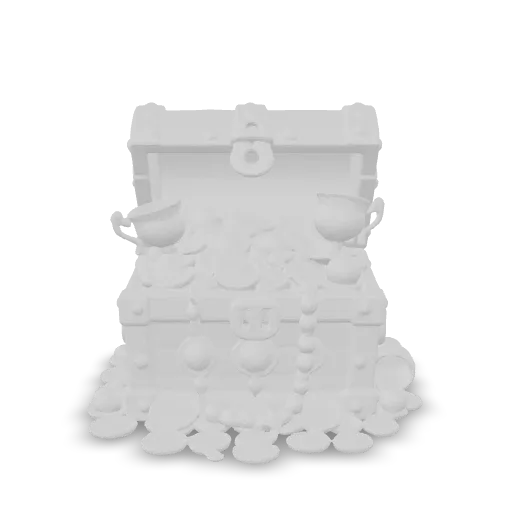
A pirate treasure chest overflowing with gold coins, jeweled goblets and pearls, weathered oak, iron bands, open lid

A chubby baby dragon hatchling sitting in a cracked speckled eggshell, big eyes, tiny wings, emerald scales, cute figurine
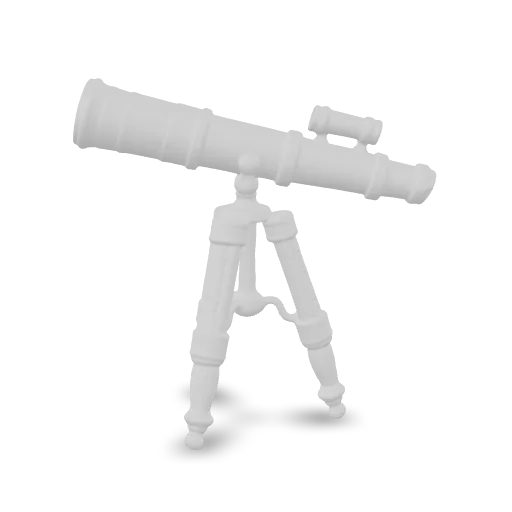
An ornate Victorian brass telescope on a carved mahogany tripod, engraved brass rings, leather-wrapped barrel, detailed collectible prop

A vintage hot air balloon with a patterned quilted envelope, rope netting, sandbags and a woven wicker basket with a small brass burner
संबंधित मॉडल
/filters:quality(82)/media/images/20260408105909_0dgcs4ju.webp)
/filters:quality(82)/media/images/20260408111111_e41njrhh.webp)
/filters:quality(82)/media/images/1789116903089615525_rhenxGPZ.webp)
/filters:quality(82)/media/images/1789121202949516194_iYoyHQZ9.webp)
/filters:quality(82)/media/images/1789124787640423161_ZFOX7hqy.webp)
/filters:quality(82)/media/images/20260408110824_jforwjzb.webp)
README
Hunyuan 3D V3.1 Text-to-3D Rapid
Hunyuan 3D V3.1 Rapid is Tencent's fast text-to-3D generation model that creates high-quality 3D models from text descriptions. Simply describe any object — the model generates a complete 3D mesh with textures in seconds. Perfect for rapid prototyping, game assets, e-commerce visualization, and 3D content creation.
Why Choose This?
-
Text-driven generation Create complete 3D models from natural language descriptions — no images or 3D expertise required.
-
Rapid generation Fast processing delivers 3D assets quickly for rapid iteration and prototyping.
-
High-quality output Produces detailed 3D meshes with accurate geometry and textures.
-
Prompt Enhancer Built-in tool to automatically improve your descriptions for better 3D results.
-
Ultra-affordable Just $0.27 per generation — cost-effective for high-volume workflows.
Parameters
| Parameter | Required | Description |
|---|---|---|
| prompt | Yes | Text description of the 3D object to generate |
How to Use
- Write your prompt — describe the object you want to create (shape, style, details, pose).
- Use Prompt Enhancer (optional) — refine your description for better results.
- Run — submit and download your 3D model.
Pricing
| Output | Cost |
|---|---|
| Per 3D model | $0.27 |
Billing Rules
- Flat rate: $0.27 per generation
- No additional charges for mesh complexity or texture quality
Best Use Cases
- Game Development — Quickly generate 3D assets from concept descriptions.
- Prototyping — Rapidly visualize object ideas in 3D before production.
- E-commerce — Create 3D product models for interactive experiences.
- AR/VR Content — Generate 3D assets for augmented and virtual reality applications.
- 3D Printing — Generate printable 3D models from text descriptions.
- Creative Exploration — Experiment with 3D concepts without modeling skills.
Pro Tips
- Be specific about shape, style, pose, and details in your prompt.
- Include style keywords like "cartoon style", "realistic", "low poly", or "high detail".
- Describe the pose or orientation for character models (e.g., "standing pose", "T-pose").
- Use the Prompt Enhancer to automatically refine vague descriptions.
- Start with simple objects and iterate to more complex designs.
Notes
- Prompt is the only required field.
- Output format is a 3D mesh with textures.
- More detailed prompts generally produce better results.
Related Models
- Hunyuan 3D V3.1 Image-to-3D Rapid — Generate 3D models from images.
Hunyuan 3d v3.1 Text To 3d Rapid API — Quick start
Grab a WaveSpeedAI API key, then call POST https://api.wavespeed.ai/api/v3/wavespeed-ai/hunyuan-3d-v3.1/text-to-3d-rapid with your input as JSON. The endpoint returns a prediction id. Start polling the result endpoint around every 2 seconds, increase the interval for long-running tasks, and stop on any terminal status. On completed, read output values from data.outputs. Examples for Hunyuan 3d v3.1 Text To 3d Rapid below.
HTTP example
set -euo pipefail

: "${WAVESPEED_API_KEY:?Set WAVESPEED_API_KEY}"

REQUEST_BODY=$(cat <<'JSON'
{
    "prompt": "A cinematic shot of a city at sunset, soft golden light"
}
JSON
)

# 1. Submit the prediction.
SUBMIT_RESPONSE=$(curl --silent --show-error --fail-with-body \
  -X POST "https://api.wavespeed.ai/api/v3/wavespeed-ai/hunyuan-3d-v3.1/text-to-3d-rapid" \
  -H "Content-Type: application/json" \
  -H "Authorization: Bearer $WAVESPEED_API_KEY" \
  -d "$REQUEST_BODY")

TASK=$(printf '%s' "$SUBMIT_RESPONSE" | jq 'if has("data") then .data else . end')
PREDICTION_ID=$(printf '%s' "$TASK" | jq -r '.id')
if [ -z "$PREDICTION_ID" ] || [ "$PREDICTION_ID" = "null" ]; then
  printf 'Submission response did not contain a prediction id
' >&2
  exit 1
fi
RESULT_URL="https://api.wavespeed.ai/api/v3/predictions/$PREDICTION_ID/result"

# 2. Poll until the prediction finishes.
while true; do
  RESPONSE=$(curl --silent --show-error --fail-with-body "$RESULT_URL" \
    -H "Authorization: Bearer $WAVESPEED_API_KEY")
  RESULT=$(printf '%s' "$RESPONSE" | jq 'if has("data") then .data else . end')
  STATUS=$(printf '%s' "$RESULT" | jq -r '.status')
  case "$STATUS" in
    completed) printf '%s\n' "$RESULT" | jq '.outputs'; break ;;
    failed|cancelled|timeout|deleted) printf '%s\n' "$RESULT" | jq . >&2; exit 1 ;;
    *) sleep 2 ;;
  esac
done
Node.js example
const submitUrl = "https://api.wavespeed.ai/api/v3/wavespeed-ai/hunyuan-3d-v3.1/text-to-3d-rapid";
const apiKey = process.env.WAVESPEED_API_KEY;
if (!apiKey) throw new Error('Set WAVESPEED_API_KEY');

async function requestJson(url, options = {}) {
  const response = await fetch(url, options);
  if (!response.ok) throw new Error(await response.text());
  return response.json();
}

// 1. Submit the prediction.
const body = await requestJson(submitUrl, {
  method: "POST",
  headers: {
    "Authorization": `Bearer ${apiKey}`,
    "Content-Type": "application/json",
  },
  body: JSON.stringify({
        "prompt": "A cinematic shot of a city at sunset, soft golden light"
}),
});
const task = body.data ?? body;
if (!task.id) throw new Error("Submission response did not contain a prediction id");
const resultUrl = `https://api.wavespeed.ai/api/v3/predictions/${task.id}/result`;

// 2. Poll until the prediction finishes.
while (true) {
  const resultBody = await requestJson(resultUrl, {
    headers: { "Authorization": `Bearer ${apiKey}` },
  });
  const result = resultBody.data ?? resultBody;
  if (result.status === "completed") {
    console.log(result.outputs);
    break;
  }
  if (["failed", "cancelled", "timeout", "deleted"].includes(result.status)) throw new Error(JSON.stringify(result));
  await new Promise(resolve => setTimeout(resolve, 2000));
}
Python example
import json
import os
import time
from urllib.request import Request, urlopen

api_key = os.environ["WAVESPEED_API_KEY"]
headers = {"Authorization": f"Bearer {api_key}", "Content-Type": "application/json"}
payload = {
    "prompt": "A cinematic shot of a city at sunset, soft golden light"
}

def request_json(url, data=None):
    request = Request(url, data=data, headers=headers, method="POST" if data else "GET")
    with urlopen(request) as response:
        return json.load(response)

# 1. Submit the prediction.
body = request_json("https://api.wavespeed.ai/api/v3/wavespeed-ai/hunyuan-3d-v3.1/text-to-3d-rapid", json.dumps(payload).encode())
task = body.get("data", body)
if not task.get("id"):
    raise RuntimeError("Submission response did not contain a prediction id")
result_url = f"https://api.wavespeed.ai/api/v3/predictions/{task['id']}/result"

# 2. Poll until the prediction finishes.
while True:
    result_body = request_json(result_url)
    result = result_body.get("data", result_body)
    status = result.get("status")
    if status == "completed":
        print(result.get("outputs", []))
        break
    if status in {"failed", "cancelled", "timeout", "deleted"}:
        raise RuntimeError(result)
    time.sleep(2)
Hunyuan 3d v3.1 Text To 3d Rapid API — Frequently asked questions
What is the Hunyuan 3d v3.1 Text To 3d Rapid API?
Hunyuan 3d v3.1 Text To 3d Rapid is a WaveSpeedAI model for 3D asset generation, exposed as a REST API on WaveSpeedAI. Hunyuan 3D V3.1 Rapid is a fast text-to-3D generation model that quickly creates 3D models from text descriptions. Ready-to-use REST inference API, best performance, no coldstarts, affordable pricing. You can call it programmatically or try it from the playground above.
How do I call the Hunyuan 3d v3.1 Text To 3d Rapid API?
POST your input parameters to the model's REST endpoint (shown in the API tab of this playground) with your WaveSpeedAI API key in the Authorization header. Submission returns a prediction ID. Poll the result endpoint starting around every 2 seconds, increase the interval for long-running tasks, and stop on any terminal status. The playground generates Python, JavaScript, and cURL examples for submitting requests and polling results. Full request/response shape is documented at https://wavespeed.ai/docs/docs-api/wavespeed-ai/hunyuan-3d-v3.1-text-to-3d-rapid.
How much does Hunyuan 3d v3.1 Text To 3d Rapid cost per run?
Hunyuan 3d v3.1 Text To 3d Rapid starts at $0.27 per run. That figure is the base price — the final charge scales with the parameters you set in the form (output size, length, count, references, or whatever knobs this model exposes), so a higher-quality or larger output costs more than a minimal one. The exact cost for your current input is shown live next to the Generate button before you submit, and the actual per-call charge is recorded on the prediction afterwards.
What inputs does Hunyuan 3d v3.1 Text To 3d Rapid accept?
Key inputs: `prompt`. The full JSON schema (types, defaults, allowed values) is rendered above the Generate button and mirrored in the API reference at https://wavespeed.ai/docs/docs-api/wavespeed-ai/hunyuan-3d-v3.1-text-to-3d-rapid.
How long does Hunyuan 3d v3.1 Text To 3d Rapid take to generate?
Reported generation time on WaveSpeedAI is around 32 seconds per request. This is an estimate, not a latency guarantee; queue time and input settings can change the total wait. live status is visible in the prediction record.
Can I use Hunyuan 3d v3.1 Text To 3d Rapid outputs commercially?
Commercial usage rights depend on the model's license, set by its provider (WaveSpeedAI). Check the provider's applicable terms and WaveSpeedAI's Terms of Service before commercial use.
WaveSpeed के और मॉडल
सभी देखें- wavespeed-ai/ace-stepAI Music Generation
- wavespeed-ai/ace-step-1.5AI Music Generation
- wavespeed-ai/ace-step/audio-inpaintMusic Editing
- wavespeed-ai/ace-step/audio-outpaintMusic Editing
- wavespeed-ai/ace-step/audio-to-audioMusic Editing
- wavespeed-ai/ace-step/prompt-to-audioAI Music Generation
- wavespeed-ai/ai-age-filterImage Editing
- wavespeed-ai/ai-breast-expansionImage Editing