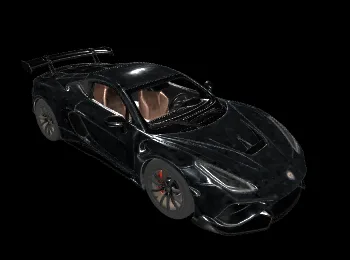
Introducing Tripo3D H3.1 Text-to-3D on WaveSpeedAI
Tripo3D H3.1 Text-to-3D — generate high-quality 3D models from text. HD textures, PBR materials, detailed geometry, quad topology, auto-sizing. Now live on WaveSpeedAI.

Describe a 3D Asset. Get a Production-Ready Mesh.
For years, text-to-3D felt like a toy — melted geometry, hallucinated textures, mostly unusable past concepting. Tripo3D’s H3.1 changes that bar. Feed it a description, get back a textured, PBR-ready, animation-capable 3D model. We’re excited to announce that Tripo3D H3.1 Text-to-3D is now live on WaveSpeedAI.
What Is Tripo3D H3.1 Text-to-3D?
Tripo3D H3.1 Text-to-3D is a prompt-to-3D generation model. Write a description, get back a textured 3D mesh with PBR materials, with configuration for:
- Texture on/off — geometry-only or textured.
- Texture quality — standard or HD (detailed).
- Geometry quality — standard or detailed.
- Quad mesh topology — retopologized, animation-ready.
- Auto-sizing — consistent physical scale across assets.
- PBR materials — full basecolor, normal, roughness, metalness channels.
The result: a model that imports into Blender, Maya, Unreal, Unity, or any DCC and sits cleanly in your scene without cleanup.
Key Features
HD Texture Quality
texture_quality = "detailed" produces high-resolution textures that hold up on hero assets and close camera work.
Detailed Geometry Mode
geometry_quality = "detailed" substantially bumps vertex density — cleaner silhouettes, finer surface features.
Quad Mesh Topology
Enable quad for retopologized quad output — ready to rig and animate.
Auto-Sizing Assets come out with consistent physical scale — no guesswork about mesh units or import scaling.
Full PBR Materials Basecolor, normal, roughness, metalness channels, all aligned. Drop-in compatible with any PBR renderer.
Strong Prompt Adherence H3.1 follows prompt subject, style, and modifiers more literally than prior generations — useful for getting specific props, not just generic ones.
Real-World Use Cases
Rapid Game Prototyping
Prototype a full level’s props from a shot list of text descriptions. Replace with hand-authored hero assets later.
Indie Dev Asset Libraries
Build a house-style asset library at a price the solo dev can actually afford.
3D Storyboarding and Previs
Generate temp scene props for previs and animatics — faster than kit-bashing, cheaper than licensing.
Concept-to-3D Iteration
Art director describes the asset; 3D team gets a starting mesh within minutes. Shorten the concept-to-model handoff loop dramatically.
3D Printing and Physical Prototyping
Describe the figurine, print the mesh. For hobbyists, tabletop games, and educational makerspaces.
Metaverse / XR Content
Bulk-produce props, decorations, and background assets for virtual worlds.
Getting Started on WaveSpeedAI
- Write your prompt — subject, style, surface properties, mood.
- Configure output — texture, texture quality, geometry detail, quad.
- Submit — production REST API, no cold starts.
- Download the mesh + PBR textures — ready for your DCC or engine.
Full schema on the model page.
Pricing
Pricing scales by the features you enable:
- Base (geometry only): $0.10
- Texture enabled: 2× base ($0.20)
- Texture HD (detailed): 3× base ($0.30)
- Detailed geometry: +2× base ($0.20)
- Quad topology: +0.5× base ($0.05)
A fully-loaded asset (HD texture + detailed geometry + quad) runs $0.55 — far below the cost of a human modeler’s hour.
Why Run Tripo3D H3.1 Text-to-3D on WaveSpeedAI
- One API across the 3D stack. Pair with Tripo3D H3.1 Image-to-3D, Multiview-to-3D, and PATINA Material for a complete 3D asset workflow.
- No cold starts. Consistent throughput at batch scale.
- Feature-modular pricing. Only pay for the output channels you need.
- Production-grade uptime. Fit for studios and consumer apps alike.
Pro Tips
- Be specific about function, not just appearance. “A medieval oak barrel with iron hoops, weathered staves, for tavern dressing” gives clearer output than “barrel.”
- Iterate without texture first. Prove out geometry, then rerun with textures once the silhouette is right.
- Use quad for animation only. Static props don’t need it; animated ones always do.
- Prompt surface material explicitly. “Brushed steel,” “polished lacquered wood,” “matte fabric” — the model uses these cues to produce correct PBR values.
- HD texture on hero, standard on background. Budget your quality where the camera lingers.
Start Creating Today
Tripo3D H3.1 Text-to-3D is among the best-in-class text-to-3D models available — textured, PBR-ready, and production-grade out of the box.
Try Tripo3D H3.1 Text-to-3D now on WaveSpeedAI and turn descriptions into usable 3D assets in minutes.
Related Articles
Claude Fable 5 Just Shipped: 80.3% on SWE-Bench Pro, 2× Opus 4.8 Pricing, Free Through June 22
Claude Sonnet 4.8: What the Leak Actually Says, and Why the Pattern Doesn't Fit
Seedance 2.1 and Seedance 2.0 Mini Are Coming: Quality Bump, Lower Price Tier
GPT-5.6 Just Showed Up in OpenAI's Codex Logs — Here's What That Actually Means
HiDream-O1-Image-Dev: The 8B Pixel-Native Model That Beat 56B FLUX.2