
Best AI Content Moderation APIs and Tools in 2026: A Complete Comparison
Compare the best AI content moderation APIs in 2026 including OpenAI Moderation, Google Cloud, AWS Rekognition, Azure AI Content Safety, and WaveSpeedAI. Pricing, features, and performance breakdown for text, image, and video moderation.

For a platform that hosts user-generated content, moderation is a baseline product decision. Regulation and user expectations add pressure, but the practical question is simpler: what can your system detect, and what happens when it is unsure?
With a growing number of AI moderation APIs on the market, choosing one is harder than it looks. Should you go with AWS or Google? Use OpenAI’s free moderation endpoint? Or choose a provider with separate text, image, and video routes?
This guide compares five options using their published capabilities and prices as checked on October 28, 2026. It covers what each service returns and how to route uncertain cases. It does not rank accuracy or speed: that would require the same labeled samples and timed calls across all five.
What to Evaluate in a Content Moderation API
Before diving into specific tools, here are the criteria that matter:
- Content type coverage: Does it handle text, images, video, or only some of them?
- Category granularity: Does it say “unsafe,” or identify the type of concern?
- Output type: Are you getting a boolean flag, a likelihood, a confidence score, or a severity level?
- Latency and cold starts: How long does your own request take, including any queue time?
- Pricing unit: Per request, image, text length, or minute of video?
- Integration complexity: What authentication, storage, and result retrieval does the workflow require?
- Customization and review: Can you set thresholds, add policy rules, and send borderline cases to a person?
One caution before the table: a confidence score is not a severity score. A high probability that an image contains violence does not, by itself, say how severe that violence is under your policy.
The Contenders
-
OpenAI Moderation API
Coverage: Text and images; no native video moderation endpointPricing: Free moderation endpoint
OpenAI’s omni-moderation-latest returns an overall flagged value, category flags, per-category scores, and the input types to which those categories apply. Some categories support both text and images; others, including harassment and hate, are text-only. That distinction matters if you plan to screen image-only uploads.
Strengths:
- Free to use through the moderation endpoint
- Text and image input in one moderation model
- Structured categories and scores for application-level routing
- Straightforward API for teams already using OpenAI
Limitations:
- No native video moderation endpoint
- Not every category applies to images; an unsupported image-only category may return a zero score
- Thresholds and human-review rules are yours to design
- The
latestmodel can change, so score-based policies need periodic checks
Best for: Teams that need free text and image screening and can build their own decision rules around the returned categories.
-
Google Cloud Content Moderation

Coverage: Text, images, and video through separate productsPricing: Varies by product and unit. Vision SafeSearch is $1.50 per 1,000 paid-tier images; Natural Language text moderation is billed in 100-character units; Video Intelligence is billed by video minute.
Google offers several routes, rather than one moderation endpoint. Cloud Vision SafeSearch returns likelihoods for adult, spoof, medical, violence, and racy image categories. Cloud Natural Language offers text moderation. Video Intelligence offers explicit-content detection for video, with a narrower visual scope than a general-purpose video safety review.
Strengths:
- Text, image, and video services within Google Cloud
- Likelihood or confidence signals that can feed your own thresholds
- Image SafeSearch has a clear five-category output
- Useful if your storage and processing already run on GCP
Limitations:
- Separate APIs and policies for each modality
- SafeSearch categories are broad; video explicit-content detection does not cover every risk type
- Billing units differ: Natural Language text moderation is not priced per “text record”
- Requires a Google Cloud project and authentication setup
Best for: Teams already invested in GCP that are willing to combine several services.
-
AWS Rekognition Content Moderation
Coverage: Images and stored video; text moderation requires another servicePricing: DetectModerationLabels is in AWS’s image-analysis pricing group, with a published example of $1.00 per 1,000 images for the first million. AWS’s US East stored-video example lists content moderation at $0.10 per minute.
Amazon Rekognition detects inappropriate content in images and stored videos. Its moderation documentation describes hierarchical labels and a Custom Moderation feature. Image results include label confidence; video results can identify when a label appeared.
Strengths:
- Image and stored-video moderation
- Granular labels, confidence values, and video timestamps
- Integration with AWS storage and review workflows
- Custom Moderation adapters for image use cases
Limitations:
- No Rekognition text-moderation route to complete a text, image, and video workflow
- Stored-video moderation is asynchronous
- IAM and storage setup can add work outside an existing AWS stack
- Image and video billing use different units
Best for: Teams running on AWS that need image or stored-video labels within their existing infrastructure.
-
Microsoft Azure AI Content Safety
Coverage: Text and images in its core content-analysis APIsPricing: Billed by text records or images; check the Azure quote for your region and tier before inserting a dollar figure into a budget.
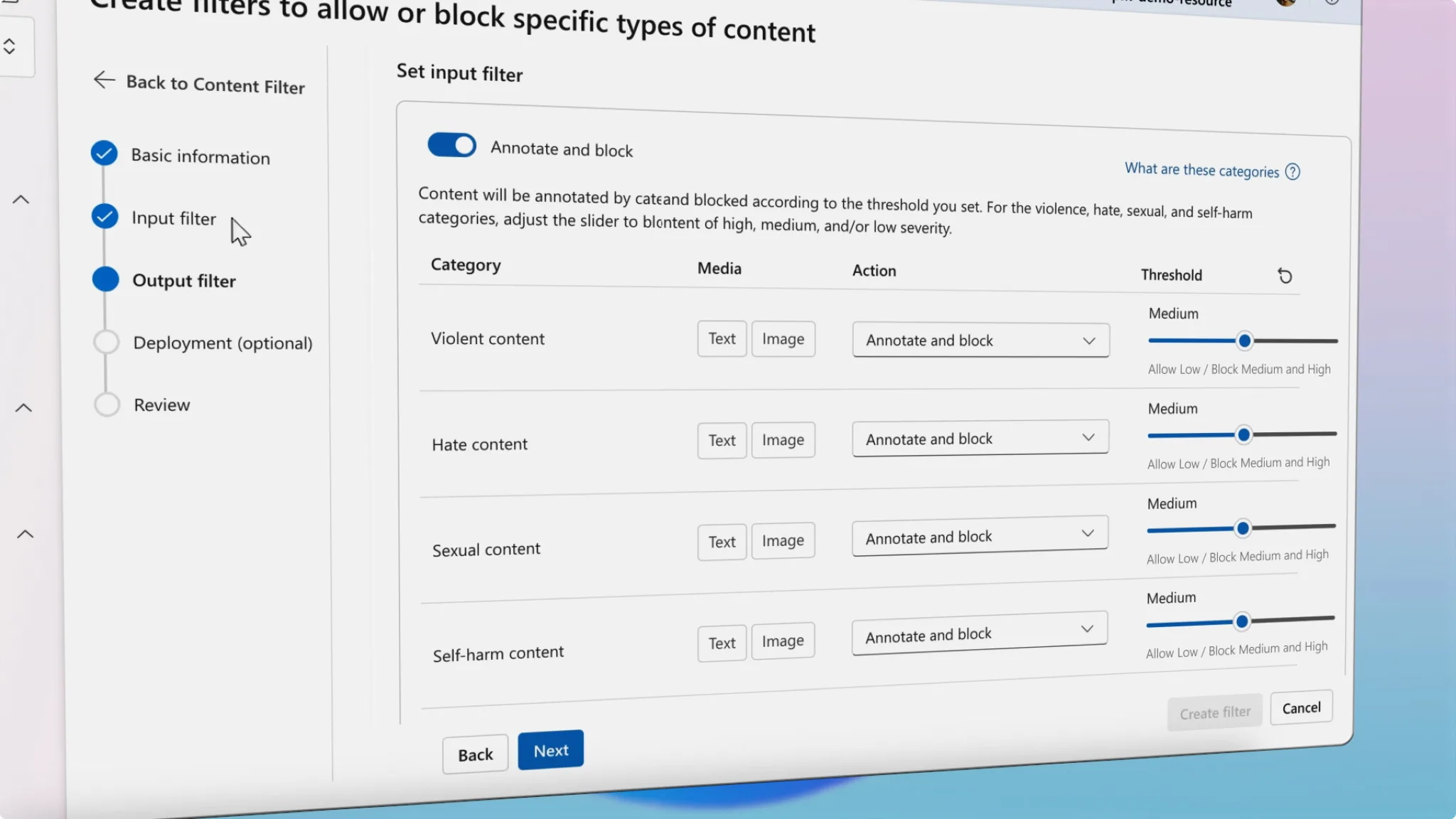
Azure AI Content Safety analyzes text and images for hate, sexual content, violence, and self-harm. It also offers related tools such as Prompt Shields, blocklists, and custom categories. Its core documentation describes text and image APIs, so I would not count video as a generally available core moderation route in this comparison.
Strengths:
- Severity levels that can support different review rules
- Text and image analysis under the same Azure service
- Blocklists and related prompt-protection tools
- A fit for teams already using Azure
Limitations:
- Four core harm categories may not cover every platform policy
- Text and image analysis still use separate calls
- Requires an Azure subscription and a supported-region resource
- Pricing depends on the applicable Azure configuration; the public page checked here did not provide a verifiable universal USD rate
Best for: Teams in the Microsoft ecosystem that want severity-based decisions for text and images.
-
WaveSpeedAI Content Moderation
Coverage: Text, images, and video through separate model endpointsPricing: Published endpoint prices are $0.001 per text request, $0.002 per image, and $0.003 per video as checked on October 28, 2026. Check the selected model page and final task charge before budgeting.
WaveSpeedAI’s content detection collection includes text and image moderation routes plus a Molmo2 video content moderator. They use the same platform’s API pattern, but they are three endpoints, not one call that moderates all modalities.
Strengths:
- Text, image, and video moderation options in one platform
- Published per-run prices for the specific routes above
- The image route accepts optional associated text as context
- Separate captioning and visual-QA models can help a reviewer investigate a case
Limitations:
- An API key and task-result handling are still required; this is not a zero-setup integration
- The published video moderator output uses category booleans. Do not assume it provides confidence or severity scores
- Captioning and visual QA add context, but they are not substitutes for a moderation decision
- No matched benchmark here establishes a speed or accuracy advantage over the other providers
Best for: Teams that want text, image, and video routes from one provider and can build human review around model-specific outputs.
Head-to-Head Comparison
| Feature | OpenAI | Google Cloud | AWS Rekognition | Azure AI | WaveSpeedAI |
|---|---|---|---|---|---|
| Text moderation | Yes | Yes, Natural Language | Not in Rekognition | Yes | Yes |
| Image moderation | Yes; category support varies | Yes, SafeSearch | Yes | Yes | Yes |
| Video moderation | No native route | Explicit-content detection | Stored video | Not in the core APIs compared here | Yes, separate model |
| Decision signal | Flags and category scores | Likelihoods or confidence, by service | Labels and confidence | Category severity | Model-specific; video route shows booleans |
| Threshold control | Set in your application | Set in your application | MinConfidence for labels | Set policy using severity | Set in your application where output permits |
| Text billing | Free | Per 100-character unit | N/A | Per text record; regional quote | $0.001/request |
| Image billing | Free | $1.50/1K in the cited paid tier | $1.00/1K in the cited first tier | Per image; regional quote | $0.002/image |
| Video billing | N/A | Per minute | Per minute | N/A here | $0.003/video on the cited route |
| Review path | Build your own queue | Build your own queue | Can connect to AWS human review | Build policy around severity | Build your own queue |
Prices are published examples, not a single-volume quote. Free tiers, regions, usage tiers, video lengths, and the categories each model can detect change the comparison. The WaveSpeed figures describe the linked endpoints, not every model on the platform.
How to Test the Shortlist Against Your Policy
I would not choose a moderation API from the price row alone. Take the same labeled set of permitted, clearly disallowed, and borderline items from your own product. Keep separate sets for text, images, and video; a text score cannot stand in for a video result.
For each provider, record the returned category and field: OpenAI’s flagged and category_scores, Google’s likelihood or confidence, AWS’s label and Confidence, Azure’s severity, and the WaveSpeed route’s actual output. Then record false positives, missed cases, review volume, elapsed time, and cost after applying your policy. Send borderline cases to human review. A score of 0.8 from one provider should never be treated as equivalent to 0.8 from another.
These are test instructions, not results from a five-provider benchmark.
Which API Should You Choose?
Choose OpenAI Moderation if free text and image screening covers your categories and you can supply the review rules yourself.
Choose Google Cloud if you’re already on GCP and are comfortable combining its text, image, and narrower video-detection services.
Choose AWS Rekognition if your infrastructure lives on AWS and you need image or stored-video labels with confidence and timestamps.
Choose Azure AI Content Safety if you’re in the Microsoft ecosystem and want severity-based rules for text and images.
Choose WaveSpeedAI if you want:
- Text, image, and video moderation routes from one provider
- Published per-run prices for the selected endpoints
- Optional text context on the image route
- Separate captioning or visual-QA tools for cases that need more investigation
Whichever route you choose, write down what gets allowed, what gets blocked, and what goes to a person. The API supplies signals; your product still owns the decision.
Getting Started with WaveSpeedAI Content Moderation

- Open the Content Detection Models collection and check the current model pages.
- Create an account and API key, then try a small set of your own permitted and borderline examples in the playground.
- Choose separate routes for text, images, and video. Submit a task, then retrieve its result using the returned prediction ID.
- Inspect each route’s actual output before setting a block rule. Put uncertain results into a review queue.
- Confirm the displayed price and your recorded task charges at the volume you expect.
No subscriptions or minimum commitment are listed for these routes. You still need an account, an API key, and a policy for what happens after a result comes back.
Start moderating content now →
Previous posts:
Related Articles

GPT Image 2.6: What Is Confirmed, What Is Rumor, and What to Build On Today

GPT Image 2.5 API Guide: Flare & Sunburst on WaveSpeedAI
Kling 4.0 Is Live on WaveSpeedAI: Models, Pricing, and How to Use Them

MiniMax H3 Now Makes Images: Text-to-Image and Image Edit APIs Live on WaveSpeedAI
Bria Fibo 1.5 on WaveSpeedAI: Generate 1.5 and Edit 1.5 Versus the Fibo Family