Tripo3D H3.1 Text-to-3D generates high-quality 3D models from text descriptions. Supports textures with standard and HD quality, PBR materials, detailed geometry, quad mesh topology, and auto-sizing. Ready-to-use REST inference API, best performance, no coldstarts, affordable pricing.
就緒
$0.12每次運行·~83 / $10
示例查看全部
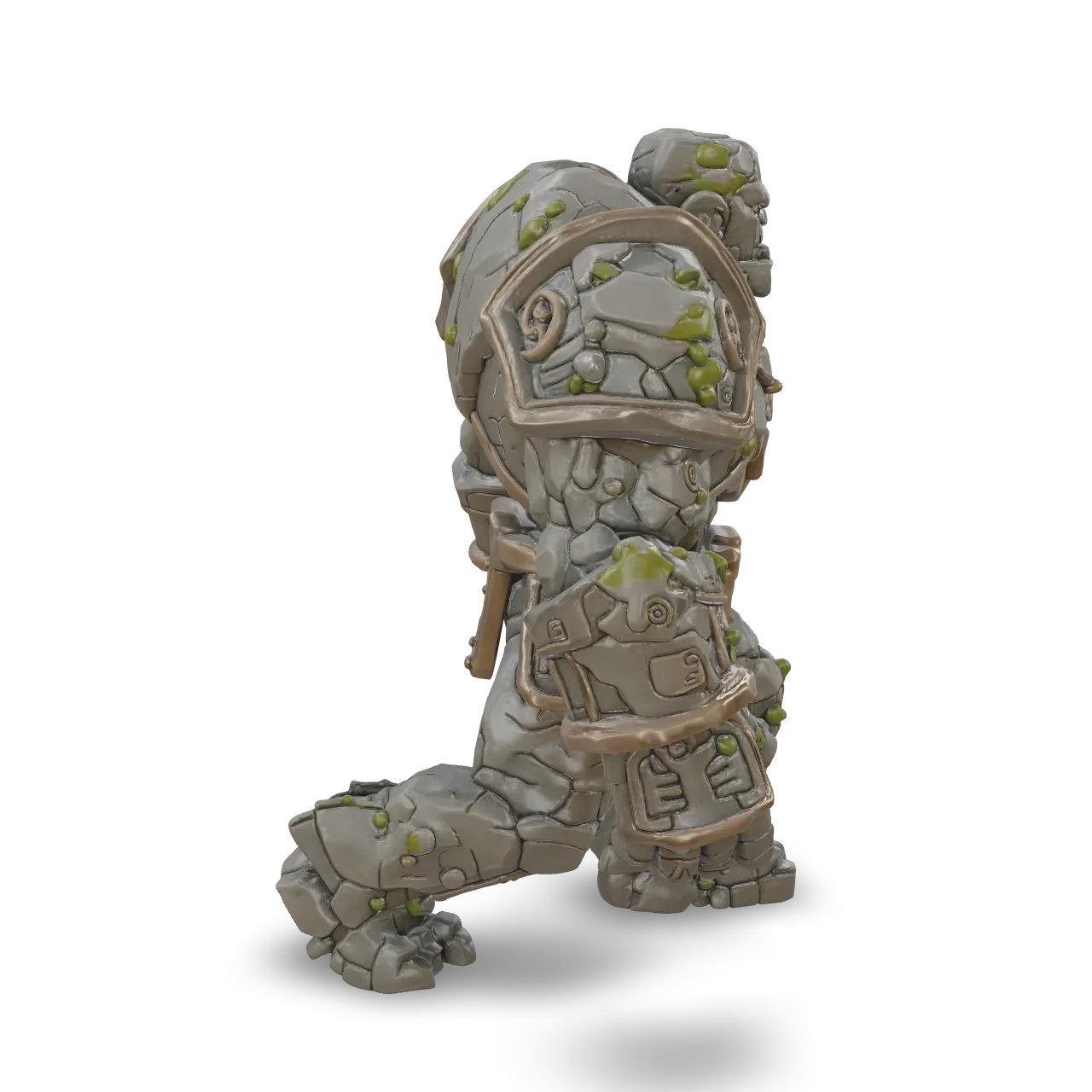
An ancient stone golem, massive humanoid body made of cracked granite blocks, engraved runes, bronze bindings, glowing amber core in the chest, moss and weathering, powerful silhouette, highly detailed fantasy 3D creature, centered, isolated, no background.

A chubby cartoon panda wearing a red scarf, big round head, stubby limbs, matte plush texture, cute stylized proportions
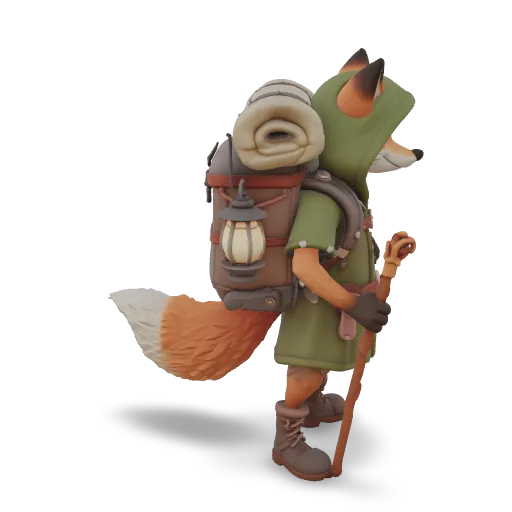
A stylized cartoon fox adventurer standing upright, wearing a green hooded cloak and leather boots, a large backpack with a bedroll and a hanging lantern, a walking staff in one paw, bushy orange tail, friendly expression, game character, centered, isolated.
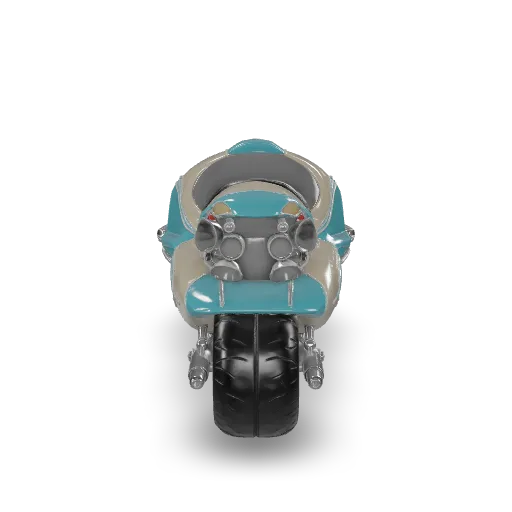
A retro-futuristic hover motorcycle with a sleek teardrop body in cream and turquoise enamel, chrome trim, round headlight, twin glowing hover pads instead of wheels, leather seat, exposed turbine at the back, highly detailed vehicle model, centered, isolated.
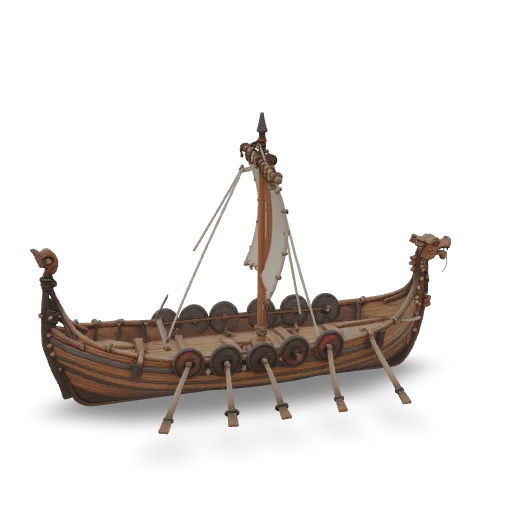
A detailed Viking longship model with overlapping oak planks, a carved dragon head at the prow, a row of painted round shields along the sides, a striped square sail on a single mast, oars extended, rope rigging, weathered wood, centered, isolated.
相關模型
/filters:quality(82)/media/images/1789120746143744570_VtCMW5en.webp)
/filters:quality(82)/media/images/1790055357630118327_7rW5fpyH.webp)
/filters:quality(82)/media/images/1790055359461222633_sVA5nxPe.webp)
/filters:quality(82)/media/images/1789118312974471104_PeBKU3ck.webp)
/filters:quality(82)/media/images/1789119184005756217_r4sCMU3d.webp)
/filters:quality(82)/media/images/1789121897153465635_WuENX6fp.webp)
README
Tripo3D H3.1 Text-to-3D
Tripo3D H3.1 Text-to-3D generates a production-ready 3D model directly from a text description. Describe the object you want — the model creates accurate geometry with optional PBR textures, quad mesh topology, and detailed quality tiers for both geometry and texture. No reference image needed.
- Have a reference photo? Try Tripo3D H3.1 Image-to-3D for more accurate results.
Why Choose This?
-
Text-driven 3D generation Create 3D models from natural language descriptions alone — no photography or reference images required.
-
Negative prompt support Specify features to avoid in the generated model for more precise control over the output geometry and style.
-
PBR material generation Generate Physically Based Rendering materials alongside the mesh for realistic real-time rendering in game engines and 3D tools.
-
Geometry and texture quality tiers Choose between standard and detailed quality independently for geometry and texture.
-
Quad mesh support Generate quad (4-sided) mesh topology instead of triangles for cleaner topology compatible with animation and sculpting workflows.
Parameters
| Parameter | Required | Description |
|---|---|---|
| prompt | Yes | Text description of the 3D object to generate. Max 1024 characters. |
| negative_prompt | No | Features to avoid in the generated model. Max 1024 characters. |
| texture | No | Whether to generate textures for the model. Default: true. |
| pbr | No | Whether to generate PBR materials. Requires texture to be enabled. Default: true. |
| texture_quality | No | Texture quality: standard (default) or detailed (higher resolution). |
| geometry_quality | No | Geometry quality: standard (default) or detailed. |
| auto_size | No | Auto-scale the model to real-world dimensions. Default: false. |
| quad | No | Generate quad mesh topology instead of triangles. Default: false. |
How to Use
- Write your prompt — describe the object in detail including shape, material, style, and any distinctive features. Max 1024 characters.
- Add negative prompt (optional) — specify features or styles you want to avoid.
- Configure texture settings (optional) — enable or disable texture and PBR generation, and choose standard or detailed texture quality.
- Set geometry quality (optional) — choose standard for faster results or detailed for higher fidelity.
- Enable quad mesh (optional) — use quad topology for animation or sculpting workflows.
- Submit — generate and download your 3D model.
Pricing
| Texture | Texture Quality | Geometry Quality | Quad | Cost |
|---|---|---|---|---|
| No | — | Standard | No | $0.12 |
| No | — | Detailed | No | $0.36 |
| Yes | Standard | Standard | No | $0.24 |
| Yes | Standard | Detailed | No | $0.48 |
| Yes | Detailed | Standard | No | $0.36 |
| Yes | Detailed | Detailed | No | $0.60 |
Add +$0.06 to any combination above when quad is enabled.
Billing Rules
- Base: $0.12 × texture multiplier (no texture: ×1, standard texture: ×2, detailed texture: ×3)
- Detailed geometry surcharge: +$0.24
- Quad surcharge: +$0.06
- Default configuration (texture standard, geometry standard, no quad): $0.24
Best Use Cases
- Concept art & prototyping — Rapidly generate 3D assets from written descriptions for ideation and visualization.
- Game asset creation — Create textured 3D props and objects from descriptive prompts without photography.
- Animation & VFX — Use quad mesh output for animation-ready topology compatible with rigging and sculpting.
- AR/VR content — Generate PBR-textured models for immersive application development.
- Developer workflows — Embed text-driven 3D generation into creative pipelines and tools.
Pro Tips
- Be specific and descriptive in your prompt — include shape, material, style, color, and any distinctive features.
- Use negative_prompt to avoid unwanted stylistic elements or geometric artifacts.
- Use detailed geometry quality for complex shapes with fine surface detail.
- Use quad mesh when the model will be used for animation or further sculpting in tools like Blender or ZBrush.
- For objects with a known visual reference, consider using Image-to-3D for more accurate results.
Notes
- Only prompt is required; all other parameters are optional.
- Prompt and negative_prompt are each limited to 1024 characters.
- Please ensure your content complies with Tripo3D's usage policies.
Related Models
- Tripo3D H3.1 Image-to-3D — Generate 3D models from a single reference image.
- Tripo3D H3.1 Multiview-to-3D — Higher accuracy reconstruction from 2–4 reference images.
H3.1 Text To 3d API — Quick start
Grab a WaveSpeedAI API key, then call POST https://api.wavespeed.ai/api/v3/tripo3d/h3.1/text-to-3d with your input as JSON. The endpoint returns a prediction id. Start polling the result endpoint around every 2 seconds, increase the interval for long-running tasks, and stop on any terminal status. On completed, read output values from data.outputs. Examples for H3.1 Text To 3d below.
HTTP example
set -euo pipefail

: "${WAVESPEED_API_KEY:?Set WAVESPEED_API_KEY}"

REQUEST_BODY=$(cat <<'JSON'
{
    "prompt": "A cinematic shot of a city at sunset, soft golden light",
    "texture": true,
    "pbr": true,
    "texture_quality": "standard",
    "geometry_quality": "standard",
    "auto_size": false,
    "quad": false
}
JSON
)

# 1. Submit the prediction.
SUBMIT_RESPONSE=$(curl --silent --show-error --fail-with-body \
  -X POST "https://api.wavespeed.ai/api/v3/tripo3d/h3.1/text-to-3d" \
  -H "Content-Type: application/json" \
  -H "Authorization: Bearer $WAVESPEED_API_KEY" \
  -d "$REQUEST_BODY")

TASK=$(printf '%s' "$SUBMIT_RESPONSE" | jq 'if has("data") then .data else . end')
PREDICTION_ID=$(printf '%s' "$TASK" | jq -r '.id')
if [ -z "$PREDICTION_ID" ] || [ "$PREDICTION_ID" = "null" ]; then
  printf 'Submission response did not contain a prediction id
' >&2
  exit 1
fi
RESULT_URL="https://api.wavespeed.ai/api/v3/predictions/$PREDICTION_ID/result"

# 2. Poll until the prediction finishes.
while true; do
  RESPONSE=$(curl --silent --show-error --fail-with-body "$RESULT_URL" \
    -H "Authorization: Bearer $WAVESPEED_API_KEY")
  RESULT=$(printf '%s' "$RESPONSE" | jq 'if has("data") then .data else . end')
  STATUS=$(printf '%s' "$RESULT" | jq -r '.status')
  case "$STATUS" in
    completed) printf '%s\n' "$RESULT" | jq '.outputs'; break ;;
    failed|cancelled|timeout|deleted) printf '%s\n' "$RESULT" | jq . >&2; exit 1 ;;
    *) sleep 2 ;;
  esac
done
Node.js example
const submitUrl = "https://api.wavespeed.ai/api/v3/tripo3d/h3.1/text-to-3d";
const apiKey = process.env.WAVESPEED_API_KEY;
if (!apiKey) throw new Error('Set WAVESPEED_API_KEY');

async function requestJson(url, options = {}) {
  const response = await fetch(url, options);
  if (!response.ok) throw new Error(await response.text());
  return response.json();
}

// 1. Submit the prediction.
const body = await requestJson(submitUrl, {
  method: "POST",
  headers: {
    "Authorization": `Bearer ${apiKey}`,
    "Content-Type": "application/json",
  },
  body: JSON.stringify({
        "prompt": "A cinematic shot of a city at sunset, soft golden light",
        "texture": true,
        "pbr": true,
        "texture_quality": "standard",
        "geometry_quality": "standard",
        "auto_size": false,
        "quad": false
}),
});
const task = body.data ?? body;
if (!task.id) throw new Error("Submission response did not contain a prediction id");
const resultUrl = `https://api.wavespeed.ai/api/v3/predictions/${task.id}/result`;

// 2. Poll until the prediction finishes.
while (true) {
  const resultBody = await requestJson(resultUrl, {
    headers: { "Authorization": `Bearer ${apiKey}` },
  });
  const result = resultBody.data ?? resultBody;
  if (result.status === "completed") {
    console.log(result.outputs);
    break;
  }
  if (["failed", "cancelled", "timeout", "deleted"].includes(result.status)) throw new Error(JSON.stringify(result));
  await new Promise(resolve => setTimeout(resolve, 2000));
}
Python example
import json
import os
import time
from urllib.request import Request, urlopen

api_key = os.environ["WAVESPEED_API_KEY"]
headers = {"Authorization": f"Bearer {api_key}", "Content-Type": "application/json"}
payload = {
    "prompt": "A cinematic shot of a city at sunset, soft golden light",
    "texture": True,
    "pbr": True,
    "texture_quality": "standard",
    "geometry_quality": "standard",
    "auto_size": False,
    "quad": False
}

def request_json(url, data=None):
    request = Request(url, data=data, headers=headers, method="POST" if data else "GET")
    with urlopen(request) as response:
        return json.load(response)

# 1. Submit the prediction.
body = request_json("https://api.wavespeed.ai/api/v3/tripo3d/h3.1/text-to-3d", json.dumps(payload).encode())
task = body.get("data", body)
if not task.get("id"):
    raise RuntimeError("Submission response did not contain a prediction id")
result_url = f"https://api.wavespeed.ai/api/v3/predictions/{task['id']}/result"

# 2. Poll until the prediction finishes.
while True:
    result_body = request_json(result_url)
    result = result_body.get("data", result_body)
    status = result.get("status")
    if status == "completed":
        print(result.get("outputs", []))
        break
    if status in {"failed", "cancelled", "timeout", "deleted"}:
        raise RuntimeError(result)
    time.sleep(2)
H3.1 Text To 3d API — Frequently asked questions
What is the H3.1 Text To 3d API?
H3.1 Text To 3d is a Tripo3D model for 3D asset generation, exposed as a REST API on WaveSpeedAI. Tripo3D H3.1 Text-to-3D generates high-quality 3D models from text descriptions. Supports textures with standard and HD quality, PBR materials, detailed geometry, quad mesh topology, and auto-sizing. Ready-to-use REST inference API, best performance, no coldstarts, affordable pricing. You can call it programmatically or try it from the playground above.
How do I call the H3.1 Text To 3d API?
POST your input parameters to the model's REST endpoint (shown in the API tab of this playground) with your WaveSpeedAI API key in the Authorization header. Submission returns a prediction ID. Poll the result endpoint starting around every 2 seconds, increase the interval for long-running tasks, and stop on any terminal status. The playground generates Python, JavaScript, and cURL examples for submitting requests and polling results. Full request/response shape is documented at https://wavespeed.ai/docs/docs-api/tripo3d/tripo3d-h3.1-text-to-3d.
How much does H3.1 Text To 3d cost per run?
H3.1 Text To 3d starts at $0.12 per run. That figure is the base price — the final charge scales with the parameters you set in the form (output size, length, count, references, or whatever knobs this model exposes), so a higher-quality or larger output costs more than a minimal one. The exact cost for your current input is shown live next to the Generate button before you submit, and the actual per-call charge is recorded on the prediction afterwards.
What inputs does H3.1 Text To 3d accept?
Key inputs: `prompt`, `negative_prompt`, `auto_size`, `geometry_quality`, `pbr`, `quad`. The full JSON schema (types, defaults, allowed values) is rendered above the Generate button and mirrored in the API reference at https://wavespeed.ai/docs/docs-api/tripo3d/tripo3d-h3.1-text-to-3d.
How long does H3.1 Text To 3d take to generate?
Reported generation time on WaveSpeedAI is around 225 seconds per request. This is an estimate, not a latency guarantee; queue time and input settings can change the total wait. live status is visible in the prediction record.
Can I use H3.1 Text To 3d outputs commercially?
Commercial usage rights depend on the model's license, set by its provider (Tripo3D). Check the provider's applicable terms and WaveSpeedAI's Terms of Service before commercial use.
Tripo3D 的更多模型
查看全部更多 Text to 3D 模型
查看全部- wavespeed-ai/hunyuan-3d-v3.1/text-to-3d-rapidText to 3D
- hyper3d/rodin-v2.5/text-to-3dText to 3D
- meshy/v6/text-to-3dText to 3D
- wavespeed-ai/hunyuan3d-v3/text-to-3dText to 3D
- hyper3d/rodin-v2/text-to-3dText to 3D
- meshy/v7.1/text-to-3dText to 3D
- tripo3d/p2/text-to-3dText to 3D
- openai/gpt-6-astra/text-to-3dText to 3D