Turn text prompts into detailed, fully-textured 3D models with Tencent's Hunyuan3D V3. Generate high-quality 3D assets with PBR materials from simple descriptions, ready for Unity, Unreal, and Blender. Ready-to-use REST inference API, best performance, no coldstarts, affordable pricing.
Chờ

$0.3cho mỗi lần chạy·~33 / $10
Ví dụXem tất cả

A compact sci-fi handheld scanner, matte black polymer body with brushed aluminum accents, subtle wear on corners, single object centered, game-ready prop, clean silhouette, no base, no environment.
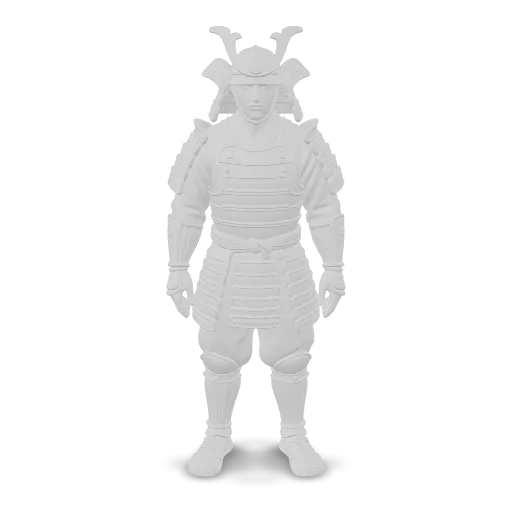
A modrn samurai.
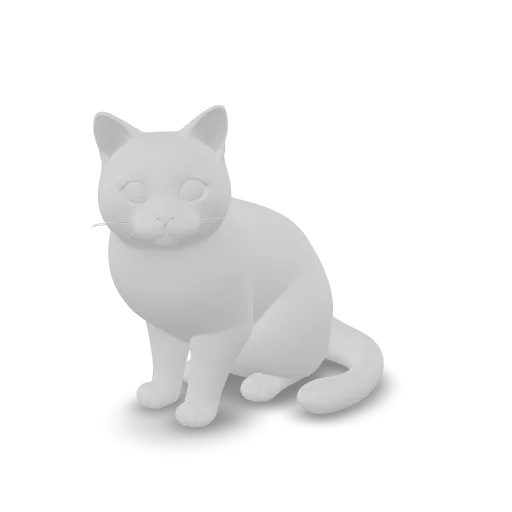
A cat.
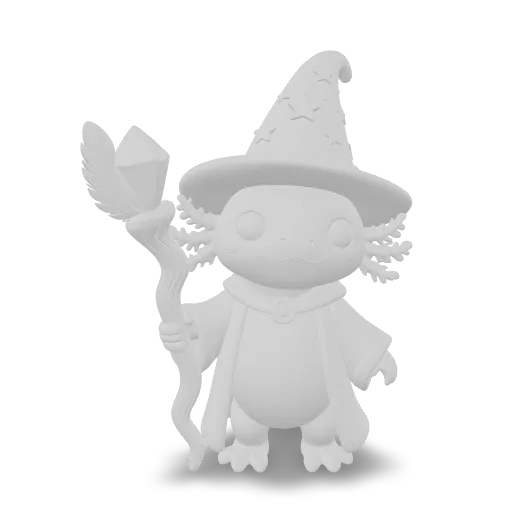
A cute stylized pink axolotl wizard standing upright, wearing a starry purple pointed hat and a flowing robe, holding a crooked wooden staff topped with a glowing crystal, feathery gills, big friendly eyes, collectible figurine, single object, centered.
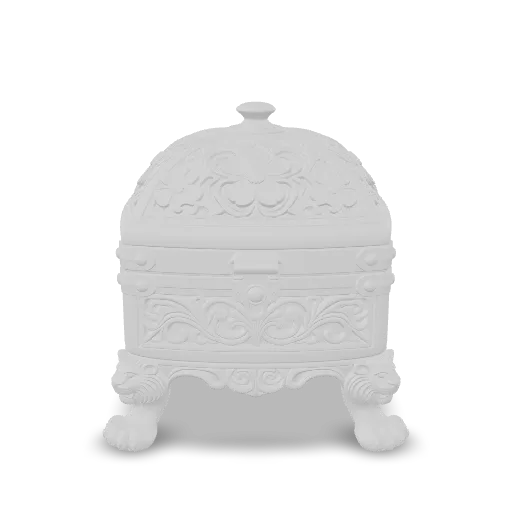
An intricately carved rosewood jewelry box with a domed lid, inlaid mother-of-pearl flower patterns, brass corner guards and a small brass clasp, standing on four carved lion paw feet, polished lacquer finish, single object, centered, no background.
Mô hình liên quan
/filters:quality(82)/media/images/20260408105909_0dgcs4ju.webp)
/filters:quality(82)/media/images/20260408111111_e41njrhh.webp)
/filters:quality(82)/media/images/20260408111114_3i3e67ml.webp)
/filters:quality(82)/media/images/1789121202949516194_iYoyHQZ9.webp)
/filters:quality(82)/media/images/1789124787640423161_ZFOX7hqy.webp)
/filters:quality(82)/media/images/20260408110824_jforwjzb.webp)
README
WaveSpeedAI Hunyuan3D v3 Text-to-3D
Hunyuan3D v3 Text-to-3D is a 3D asset generation wrapper that turns a short text description into a downloadable 3D model you can use in DCC tools (Blender/Maya), game engines, or product visualization pipelines. It’s designed for fast iteration: describe an object, pick a generation mode (textured vs. geometry-only vs. low-poly), and generate a mesh with an optional texture/material setup.
This task is best for single-object assets (props, furniture, simple characters) where you want a usable starting point and can refine topology/materials afterward.
Key capabilities
-
Text-to-3D generation with multiple output styles Choose between textured meshes, geometry-only (white model), or low-poly variants depending on your target workflow.
-
Low-poly generation with topology control In low-poly mode, you can control polygon style (triangle vs. mixed quad/tri) for game-ready or edit-friendly meshes.
-
Optional PBR material generation Enable PBR materials for more realistic shading (e.g., metal/roughness/normal-style textures), when supported by the selected generation type.
-
Face-count targeting for mesh density Generate higher-detail or lighter meshes by specifying a target face count within the supported range.
-
Standardized 3D file outputs with preview Results typically include a downloadable 3D file (e.g., OBJ/GLB) plus a preview image URL for quick inspection.
Parameters and how to use
- prompt: (required) Text describing the 3D asset you want.
- generate_type: Generation mode. Typical values include
Normal,LowPolyandGeometry. - enable_pbr: Whether to generate PBR materials (when supported by the selected mode).
- face_count: Target face count for the generated mesh (within the supported range).
- polygon_type: Polygon style for
LowPolygeneration (triangleorquadrilateral). - image_url: Optional image URL (primarily used for
Sketchmode). - image_base64: Optional base64-encoded image (primarily used for
Sketchmode).
Prompt
Write prompts like you’re briefing a 3D artist:
- Start with the object and its category: “a modern desk lamp”, “a sci-fi handheld scanner”.
- Add shape cues: silhouette, proportions, key parts (“cylindrical base, articulated arm, conical shade”).
- Add material and finish: plastic/metal/wood, matte/glossy, worn/new.
- Avoid clutter: one object per run whenever possible.
- If you need low-poly: say so in the prompt and set
generate_type=LowPoly(prompt alone is not reliable).
Example prompt:
“A compact camping lantern, cylindrical body with a handle loop on top, translucent plastic cover, brushed metal base, realistic product photo style.”
Media (Images)
Only include images if you are using a mode that accepts them (for example, generate_type=Sketch).
Supported formats & limits (typical):
- Formats: JPG, PNG
- File size: ≤ 8 MB (after encoding)
- Resolution: shortest side ≥ 128 px, longest side ≤ 5000 px
Other parameters
-
generate_type Pick the output style:
-
Normal– textured 3D model (default in many setups) -
LowPoly– polygon-reduced textured model -
Geometry– geometry-only (no textures / white model) -
enable_pbr
-
true– generate PBR materials when supported -
false– standard materials/textures Note: In geometry-only modes, PBR may not apply. {/* :contentReference[oaicite:7]{index=7} */} -
face_count
-
Default is commonly 500,000
-
Supported range is typically 40,000–1,500,000 Use smaller values for faster iteration and larger values for more surface detail.
-
polygon_type (only when
generate_type=LowPoly) -
triangle(default) – triangle faces -
quadrilateral– mixed quad/tri faces (often easier to edit)
After you finish configuring the parameters, click Run, preview the result, and iterate if needed.
Pricing
Pricing depends on the selected generation type and whether PBR materials are enabled.
| Generation Type | PBR Disabled | PBR Enabled |
|---|---|---|
| Geometry | $0.45 | $0.63 |
| Normal | $0.63 | $0.81 |
| LowPoly | $0.72 | $0.90 |
Billing Rules
- Prices include the face-count allowance, including when the default face count is used.
- Changing
face_countwithin the supported range does not add further charges. - Enabling
enable_pbradds $0.18 per request. - Selecting
polygon_typedoes not add a separate charge. - Default configuration (
Normal, PBR disabled): $0.63 per request.
Notes
- Treat face count as “target,” not a guarantee. If you need strict budgets (e.g., mobile game assets), plan to retopologize or decimate after generation.
- Use
Geometryfor downstream texturing workflows. If you plan to texture in Substance or do custom UV work, starting with a clean geometry-only mesh can be easier. - Start simple, then add detail. A clear base prompt usually produces better structure than a long, highly stylized prompt.
Related Models
- Tencent Hunyuan3D v2.1 – A strong earlier Hunyuan3D generation option when you want a proven baseline model.
- Hunyuan3D v2 Base – A practical, lower-cost option for image-to-3D style workflows and quick iterations.
- Hunyuan3D v2 Mini – Faster/leaner variant for previews and early-stage ideation.
- Hunyuan3D v2 Multi-View – Best when you have multiple reference images and want higher geometric fidelity from views.
Hunyuan3d v3 Text To 3d API — Quick start
Grab a WaveSpeedAI API key, then call POST https://api.wavespeed.ai/api/v3/wavespeed-ai/hunyuan3d-v3/text-to-3d with your input as JSON. The endpoint returns a prediction id. Start polling the result endpoint around every 2 seconds, increase the interval for long-running tasks, and stop on any terminal status. On completed, read output values from data.outputs. Examples for Hunyuan3d v3 Text To 3d below.
HTTP example
set -euo pipefail

: "${WAVESPEED_API_KEY:?Set WAVESPEED_API_KEY}"

REQUEST_BODY=$(cat <<'JSON'
{
    "prompt": "A cinematic shot of a city at sunset, soft golden light",
    "enable_pbr": false,
    "polygon_type": "triangle",
    "face_count": 500000,
    "generate_type": "Normal"
}
JSON
)

# 1. Submit the prediction.
SUBMIT_RESPONSE=$(curl --silent --show-error --fail-with-body \
  -X POST "https://api.wavespeed.ai/api/v3/wavespeed-ai/hunyuan3d-v3/text-to-3d" \
  -H "Content-Type: application/json" \
  -H "Authorization: Bearer $WAVESPEED_API_KEY" \
  -d "$REQUEST_BODY")

TASK=$(printf '%s' "$SUBMIT_RESPONSE" | jq 'if has("data") then .data else . end')
PREDICTION_ID=$(printf '%s' "$TASK" | jq -r '.id')
if [ -z "$PREDICTION_ID" ] || [ "$PREDICTION_ID" = "null" ]; then
  printf 'Submission response did not contain a prediction id
' >&2
  exit 1
fi
RESULT_URL="https://api.wavespeed.ai/api/v3/predictions/$PREDICTION_ID/result"

# 2. Poll until the prediction finishes.
while true; do
  RESPONSE=$(curl --silent --show-error --fail-with-body "$RESULT_URL" \
    -H "Authorization: Bearer $WAVESPEED_API_KEY")
  RESULT=$(printf '%s' "$RESPONSE" | jq 'if has("data") then .data else . end')
  STATUS=$(printf '%s' "$RESULT" | jq -r '.status')
  case "$STATUS" in
    completed) printf '%s\n' "$RESULT" | jq '.outputs'; break ;;
    failed|cancelled|timeout|deleted) printf '%s\n' "$RESULT" | jq . >&2; exit 1 ;;
    *) sleep 2 ;;
  esac
done
Node.js example
const submitUrl = "https://api.wavespeed.ai/api/v3/wavespeed-ai/hunyuan3d-v3/text-to-3d";
const apiKey = process.env.WAVESPEED_API_KEY;
if (!apiKey) throw new Error('Set WAVESPEED_API_KEY');

async function requestJson(url, options = {}) {
  const response = await fetch(url, options);
  if (!response.ok) throw new Error(await response.text());
  return response.json();
}

// 1. Submit the prediction.
const body = await requestJson(submitUrl, {
  method: "POST",
  headers: {
    "Authorization": `Bearer ${apiKey}`,
    "Content-Type": "application/json",
  },
  body: JSON.stringify({
        "prompt": "A cinematic shot of a city at sunset, soft golden light",
        "enable_pbr": false,
        "polygon_type": "triangle",
        "face_count": 500000,
        "generate_type": "Normal"
}),
});
const task = body.data ?? body;
if (!task.id) throw new Error("Submission response did not contain a prediction id");
const resultUrl = `https://api.wavespeed.ai/api/v3/predictions/${task.id}/result`;

// 2. Poll until the prediction finishes.
while (true) {
  const resultBody = await requestJson(resultUrl, {
    headers: { "Authorization": `Bearer ${apiKey}` },
  });
  const result = resultBody.data ?? resultBody;
  if (result.status === "completed") {
    console.log(result.outputs);
    break;
  }
  if (["failed", "cancelled", "timeout", "deleted"].includes(result.status)) throw new Error(JSON.stringify(result));
  await new Promise(resolve => setTimeout(resolve, 2000));
}
Python example
import json
import os
import time
from urllib.request import Request, urlopen

api_key = os.environ["WAVESPEED_API_KEY"]
headers = {"Authorization": f"Bearer {api_key}", "Content-Type": "application/json"}
payload = {
    "prompt": "A cinematic shot of a city at sunset, soft golden light",
    "enable_pbr": False,
    "polygon_type": "triangle",
    "face_count": 500000,
    "generate_type": "Normal"
}

def request_json(url, data=None):
    request = Request(url, data=data, headers=headers, method="POST" if data else "GET")
    with urlopen(request) as response:
        return json.load(response)

# 1. Submit the prediction.
body = request_json("https://api.wavespeed.ai/api/v3/wavespeed-ai/hunyuan3d-v3/text-to-3d", json.dumps(payload).encode())
task = body.get("data", body)
if not task.get("id"):
    raise RuntimeError("Submission response did not contain a prediction id")
result_url = f"https://api.wavespeed.ai/api/v3/predictions/{task['id']}/result"

# 2. Poll until the prediction finishes.
while True:
    result_body = request_json(result_url)
    result = result_body.get("data", result_body)
    status = result.get("status")
    if status == "completed":
        print(result.get("outputs", []))
        break
    if status in {"failed", "cancelled", "timeout", "deleted"}:
        raise RuntimeError(result)
    time.sleep(2)
Hunyuan3d v3 Text To 3d API — Frequently asked questions
What is the Hunyuan3d v3 Text To 3d API?
Hunyuan3d v3 Text To 3d is a WaveSpeedAI model for 3D asset generation, exposed as a REST API on WaveSpeedAI. Turn text prompts into detailed, fully-textured 3D models with Tencent's Hunyuan3D V3. Generate high-quality 3D assets with PBR materials from simple descriptions, ready for Unity, Unreal, and Blender. Ready-to-use REST inference API, best performance, no coldstarts, affordable pricing. You can call it programmatically or try it from the playground above.
How do I call the Hunyuan3d v3 Text To 3d API?
POST your input parameters to the model's REST endpoint (shown in the API tab of this playground) with your WaveSpeedAI API key in the Authorization header. Submission returns a prediction ID. Poll the result endpoint starting around every 2 seconds, increase the interval for long-running tasks, and stop on any terminal status. The playground generates Python, JavaScript, and cURL examples for submitting requests and polling results. Full request/response shape is documented at https://wavespeed.ai/docs/docs-api/wavespeed-ai/hunyuan3d-v3-text-to-3d.
How much does Hunyuan3d v3 Text To 3d cost per run?
Hunyuan3d v3 Text To 3d starts at $0.3 per run. That figure is the base price — the final charge scales with the parameters you set in the form (output size, length, count, references, or whatever knobs this model exposes), so a higher-quality or larger output costs more than a minimal one. The exact cost for your current input is shown live next to the Generate button before you submit, and the actual per-call charge is recorded on the prediction afterwards.
What inputs does Hunyuan3d v3 Text To 3d accept?
Key inputs: `prompt`, `enable_pbr`, `face_count`, `generate_type`, `polygon_type`. The full JSON schema (types, defaults, allowed values) is rendered above the Generate button and mirrored in the API reference at https://wavespeed.ai/docs/docs-api/wavespeed-ai/hunyuan3d-v3-text-to-3d.
How long does Hunyuan3d v3 Text To 3d take to generate?
Reported generation time on WaveSpeedAI is around 139 seconds per request. This is an estimate, not a latency guarantee; queue time and input settings can change the total wait. live status is visible in the prediction record.
Can I use Hunyuan3d v3 Text To 3d outputs commercially?
Commercial usage rights depend on the model's license, set by its provider (WaveSpeedAI). Check the provider's applicable terms and WaveSpeedAI's Terms of Service before commercial use.
Thêm từ WaveSpeed
Xem tất cả- wavespeed-ai/ace-stepAI Music Generation
- wavespeed-ai/ace-step-1.5AI Music Generation
- wavespeed-ai/ace-step/audio-inpaintMusic Editing
- wavespeed-ai/ace-step/audio-outpaintMusic Editing
- wavespeed-ai/ace-step/audio-to-audioMusic Editing
- wavespeed-ai/ace-step/prompt-to-audioAI Music Generation
- wavespeed-ai/ai-age-filterImage Editing
- wavespeed-ai/ai-breast-expansionImage Editing