
Topaz Video AI Review 2026: Quality and Workflow Fit
Topaz Video AI review 2026 evaluates enhancement quality, model choice, render speed, hardware needs, export usability, pricing, and workflow fit.
If a media team handed me ten damaged archive clips, I would not start with the cleanest one. I would start with compressed faces, small text, fast motion, and the file that already failed elsewhere. That is where a restoration workflow exposes its cost.
This Topaz Video AI review is an evidence review, not a hands-on claim. I did not run a controlled local render, so there are no invented quality scores or speed numbers. I reviewed the supplied TechSifted article, plus VideoProc and UniFab; the latter two sell competing products, so I treated their comparisons as vendor marketing and checked current facts against Topaz documentation.
One naming issue matters. Topaz Video AI v7.1.5 is the discontinued legacy app. The actively developed subscription product is Topaz Video. Production planning should not mix their licenses, offline limits, or model support.
What Topaz Video AI Is Built to Do

Topaz is specialist video restoration software. It enhances existing footage; it is not a timeline editor, asset manager, or general media API.
Upscaling, Denoising, Interpolation, and Restoration
The app covers AI video upscaling, denoising, deinterlacing, frame interpolation, stabilization, motion deblur, and SDR-to-HDR conversion. Topaz’s enhancement-model documentation separates models by problem: Proteus for general cleanup, Iris for faces and compression, Nyx for denoising, Rhea for fine detail and larger upscales, and Artemis for balanced artifact reduction.
That range helps only when the source is diagnosed correctly. Two enhancement passes can remove one defect and create another.
A Local Desktop Workflow Rather Than a Media API
Topaz Video installs on Windows or Apple-silicon Macs and can render locally. The operator controls models, previews, codecs, and the export queue; selected models also support Topaz cloud rendering.
Topaz Video itself remains primarily a desktop workflow. Topaz Labs separately offers an official Video API with request IDs and status endpoints for automated video enhancement; that API is a distinct product surface from the desktop app.
How to Evaluate Topaz Video AI
Do not evaluate the app with one attractive before-and-after frame. Build a test set that exposes temporal and operational failures.
Use Fixed Low-Resolution, Compressed, and Motion Samples
I would use three short clips: low-resolution footage with faces and text; heavily compressed footage with blocking and ringing; and a motion clip containing pans, occlusion, and repeating edges. Keep the same frame ranges for every model.
Score faces, text, edge stability, texture, noise, color shift, and temporal consistency. Review at normal speed and frame by frame. A sharp still can hide detail that crawls during playback.
Record Model, Settings, Hardware, Render Time, and Export
Record the app and model versions, settings, source codec, resolution, frame rate, trim range, GPU, VRAM, driver, processing speed, elapsed time, output codec, file size, and failure state.
Keep the input and output. Without that record, Topaz Video AI performance cannot be reproduced after an update. One person can remember settings for a day. A team cannot build a process around memory.
Output Quality and Failure Patterns
Topaz Video AI quality should be judged by usable footage, not the strongest restored frame.
Detail Recovery, Faces, Text, and Compression Artifacts
Check teeth, eyes, hairlines, glasses, and background faces separately. Small faces contain fewer real pixels, so reconstructed detail can look plausible without being faithful.
Pause on every sign, label, subtitle, and product mark. Compression cleanup may reduce blocking while smoothing or rebuilding letter edges. If exact wording matters, compare the result with a trusted reference.
Motion Stability, Halos, and Over-Processing
Inspect edges while subjects move. Look for halos, texture flicker, duplicated limbs, warped geometry, interpolation errors, and sharpening that makes skin or foliage look crunchy.
Topaz’s model notes warn that aggressive recovery can distort small faces and that heavier models render slowly. My default is the least aggressive setting that fixes the visible defect. Enhancement should not rewrite the shot.
Performance and Hardware Requirements
Hardware decides whether the app is an occasional repair tool or a dependable production station.
GPU Memory, Runtime, and Batch Throughput
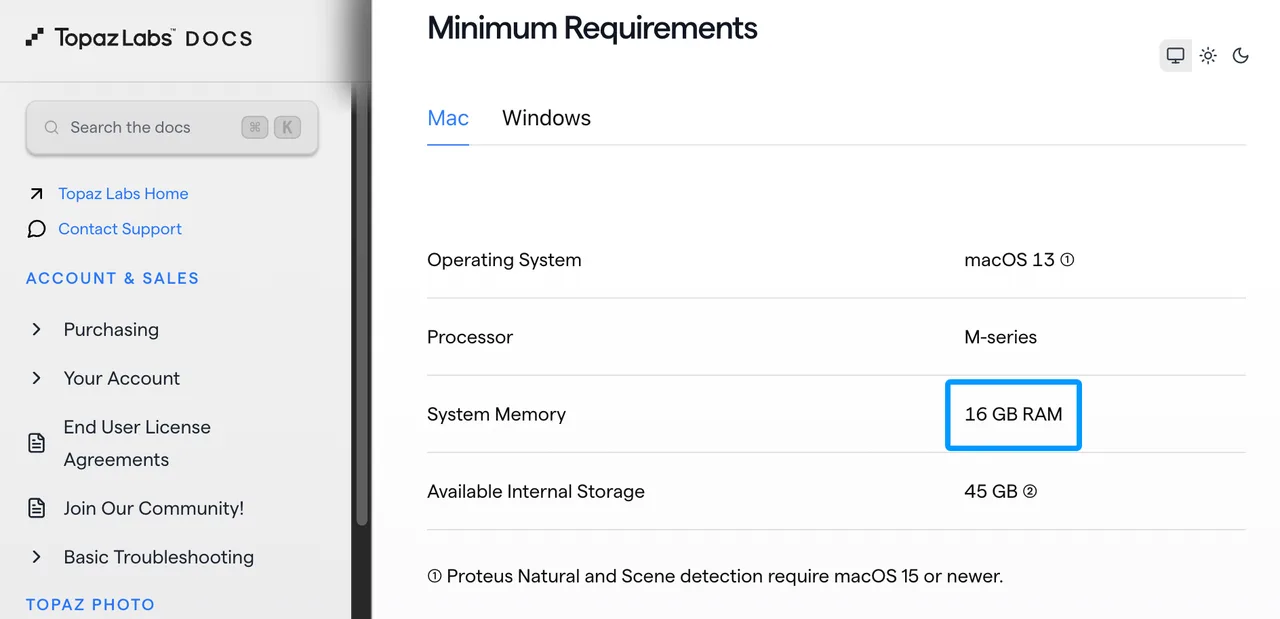
Topaz’s current system requirements list 16 GB system RAM and 6 GB dedicated VRAM as Windows minimums. It recommends 32 GB RAM, an RTX 30-series-class GPU or equivalent, and at least 8 GB VRAM. Several Starlight models require more and have platform restrictions.
Minimum does not mean productive. Batch throughput is finished usable minutes per shift, including retries, not the fastest frames-per-second reading.
Preview Speed Versus Final Export Time
A preview answers a visual question; it does not reliably forecast a long export. Final runtime includes decoding, enhancement, interpolation, encoding, storage writes, and additional passes.
Record preview latency and full export time. If comparing settings is slow, review becomes the bottleneck before the final render starts.
Pricing and Cost per Usable Minute
The Topaz Video AI pricing question now includes the workstation, operator, and rerun cost—not only the subscription.
Current License, Upgrade, and Model Download Terms
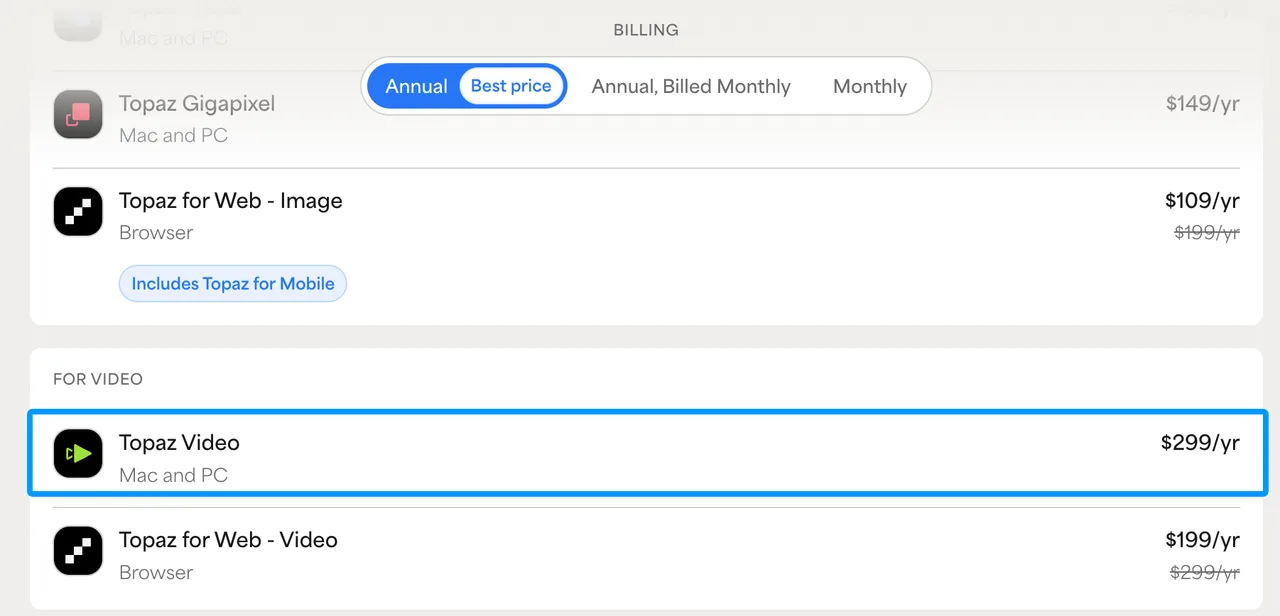
At this 2026 snapshot, the official Topaz Video page lists Personal at $299 billed annually, including unlimited local rendering and monthly cloud credits. Pro adds team licensing, broader commercial use, seat management, and extra local model access. Verify the checkout page because promotions change.
Topaz’s legacy-versus-current guide says Video AI v7.1.5 is final, while Topaz Video requires an active subscription. The current app verifies authentication monthly and allows up to one month offline. Models must be downloaded before offline work. This is general information, not legal advice.
Hardware and Operator Time Beyond the Purchase Price
Cost per usable minute includes subscription, workstation depreciation, electricity, setup, review, failed renders, and re-exports, divided by approved output minutes.
The subscription is reasonable if it removes recurring manual repair. It is expensive if the GPU stays blocked overnight and half the footage needs another pass.
Where Topaz Fits in a Production Workflow
Topaz fits best between source preparation and editorial finishing.
When Local Processing and Manual Control Matter
Local processing suits sensitive media, recurring restoration, and shots that need model-by-model tuning. It assumes a capable workstation and an operator who checks faces, text, grain, and motion instead of applying one preset everywhere.
Export a mezzanine master, keep the original untouched, then return to the editor for color, audio, captions, and delivery.
When a Cloud or API Workflow Fits Better
A cloud or API path fits when jobs arrive continuously, several people submit work, automation matters, or local GPUs become a queue. Topaz Labs’ own Video API belongs in that comparison alongside third-party routes such as WaveSpeed; API availability alone does not prove equivalent output quality.
Compare turnaround, retries, data policy, cost predictability, and integration effort. The choice is operational before it is aesthetic.
Limitations and Trade-Offs
The central limit is simple: enhancement estimates detail. It does not recover a hidden original.
Enhancement Cannot Restore Missing Ground Truth
If compression removed an eye, digit, logo edge, or texture, the model must infer it. The result may look better and still be wrong. That can be acceptable for creative footage and unacceptable for evidence, archives, or exact product representation.
Keep the source. Commercial, portrait, voice, and source-material rights still require review under the current terms and applicable law.
Model and Version Changes Require Revalidation
A saved preset name does not guarantee identical output after an app or model update. Revalidate a fixed sample set before deployment.
Record versions, presets, and acceptance results. Demos show the ceiling. Production shows the floor.
FAQ
Can Topaz Video AI run fully offline after model download?
Current Topaz Video can work offline for up to one month after authentication if the models were downloaded first. Internet is still needed for activation, subscription verification, model downloads, updates, and cloud rendering. Legacy Video AI follows different rules.
Does Topaz preserve source timecode in exported files?
Do not assume it does. The documentation covers timecode display, trimming, containers, codecs, and audio, but does not promise preservation of embedded source timecode metadata. Test a file with known starting timecode before using Topaz in a conform workflow.
Can teams move a license between workstations?
A current subscription includes one active seat by default. The app may be installed on multiple computers but used on only one at a time. Pro and Enterprise can add seats. Confirm reassignment and commercial terms with Topaz rather than sharing logins.
Which diagnostic logs are available for failed renders?
Topaz instructs users to enable Help > Logging, reproduce the problem, then choose Get Logs for Support to create a ZIP. Its troubleshooting guide also requests a system profile. Save the failed range, settings, model, format, and error with it.
Does Topaz support managed deployment across a render farm?
No public documentation reviewed here describes a supported on-prem render-farm manager. Topaz also lists virtual and ghost machines as unsupported. Pro seats and cloud concurrency are not the same as distributing one local render across a farm. Ask Enterprise sales before designing around this.
Conclusion
My conclusion in this Topaz Video AI review is conditional. Topaz Video fits teams that need careful local enhancement, have suitable hardware, and assign an operator to previews, failure checks, and version records. It fits poorly when the real requirement is automated intake, shared queues, remote scaling, or an API-first pipeline.
Run the fixed three-clip test before buying or renewing. Measure usable minutes, not impressive frames. If the output survives motion review and the workstation still meets the schedule, the workflow can stay.
Previous posts:
/filters:quality(82)/media/images/1790673203845090867_ZwbkuCLU.webp)
/filters:quality(82)/media/images/1790674052777090724_VkQ0airA.webp)
/filters:quality(82)/media/images/1790673621210536798_7KpzHQZ8.webp)
/filters:quality(82)/media/images/1790667061147571629_q61iPczX.webp)
/filters:quality(82)/media/images/1790675047405706000_iR5fnwFP.webp)
/filters:quality(82)/media/images/1790589731632080935_0wwFPY8h.webp)