P-H3-Image by Pruna AI, built on the MiniMax H3 open weights, edits an image from a text instruction with up to 8 extra reference images, keeping faces, products and details consistent, at 1K to 4K resolution. Loads up to 3 custom LoRA weights per request. Ready-to-use REST inference API, best performance, no cold starts, affordable pricing.
Idle

$0.03per run·~33 / $1
ExamplesView all
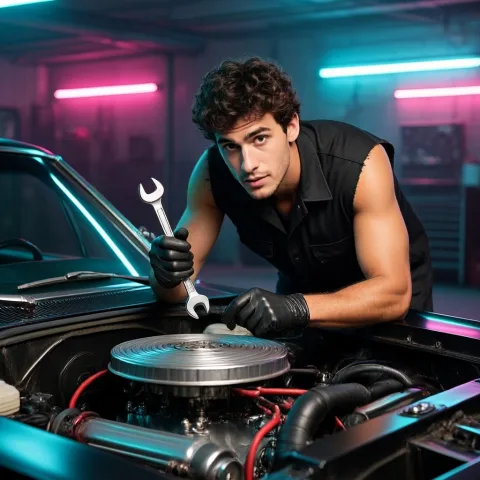
Turn him into a stylish punk mechanic in a sleeveless black work shirt and grease-stained gloves, leaning over the engine of a classic muscle car in a neon-lit garage, holding a wrench. Keep his face, curly hair and stubble.
Related Models





README
P-H3-Image Edit LoRA
P-H3-Image is Pruna AI's image generation and editing model built on the MiniMax H3 open weights. This endpoint edits the first input image from a text instruction, using up to 8 more images as references, and renders the result from 1K up to 4K. Load up to 3 custom LoRA weights per request.
Powered by MiniMax H3.
Why Choose This?
-
LoRA support
Load up to 3 LoRA weights per request, each with its own scale, for custom styles, characters and products. -
Photorealistic by default
Natural skin, light and materials, with strong prompt adherence for documentary, editorial and cinematic looks. -
Identity and product consistency
Faces, hairstyles, outfits and product details carry over from the input images. -
Up to 4K output
Choose 1k, 1.5k, 2k, 3k or 4k; 3k sits closest to the model's sweet spot for fine detail. -
Built-in prompt enhancement
Short requests are expanded into detailed prompts automatically, so a one-line idea still renders well. -
Multi-image references
Combine up to 9 images, addressed in the prompt as<Picture 1>,<Picture 2>, and so on.
Parameters
| Parameter | Required | Description |
|---|---|---|
| prompt | Yes | The edit instruction. Refer to the input images as <Picture 1> .. <Picture N>. |
| images | Yes | 1 to 9 image URLs. The first is the image being edited; the rest are references. |
| aspect_ratio | No | Output aspect ratio: 1:1, 1:2, 2:1, 1:3, 3:1, 2:3, 3:2, 3:4, 4:3, 4:5, 5:4, 9:16, 16:9, 9:21, 21:9. Defaults to the first image's aspect ratio. |
| resolution | No | Output resolution: 1k (default, ~1 MP), 1.5k (~2.4 MP), 2k (~4 MP), 3k (~9.4 MP) or 4k (~16.8 MP). |
| output_format | No | jpeg (default), png or webp. |
| loras | No | Up to 3 LoRA weights. Each item uses {path, scale}, where path is a LoRA file URL. |
| seed | No | Random seed. -1 picks a random seed. |
How to Use
- Upload images — The image to edit first; add references for outfits, products or more people.
- Describe the result — Say what should change and what should stay, e.g.
Put her in a sunflower field at golden hour wearing a wide straw hat; keep her face and braided hair. - Choose resolution —
1k–2kfor iteration,3kor4kfor final assets. - Submit — Receive the edited image URL.
Pricing
Pricing is based on the selected resolution, plus a flat $0.015 per image for LoRA support (already included below).
The prices below include the first input image. Each additional input image costs $0.005, regardless of resolution.
| Resolution | Cost per image |
|---|---|
| 1k | $0.045 |
| 1.5k | $0.075 |
| 2k | $0.105 |
| 3k | $0.165 |
| 4k | $0.255 |
Pro Tips
- Start LoRA
scalearound0.8–1.0, then adjust based on how strongly the LoRA affects the result. - Describe the scene concretely (subject, setting, light, lens); avoid hype words, which tend to make images worse.
- Name what each reference is for, e.g.
the hat from <Picture 2>. - Short quoted text such as a sign or a title renders well; long or small text is less reliable.
- Use
3kor4kfor hands, small background figures and fine textures. - Fix the
seedto iterate on wording without changing the composition.
Related Models
- P-H3-Image Text-to-Image
- P-H3-Image Edit
- P-H3-Image Text-to-Image LoRA
- MiniMax H3 Text-to-Video — Video generation with native audio on the same model family.
Reference
P H3 Image Image Edit Lora API — Quick start
Grab a WaveSpeedAI API key, then call POST https://api.wavespeed.ai/api/v3/wavespeed-ai/p-h3-image/image-edit-lora with your input as JSON. The endpoint returns a prediction id. Start polling the result endpoint around every 2 seconds, increase the interval for long-running tasks, and stop on any terminal status. On completed, read output values from data.outputs. Examples for P H3 Image Image Edit Lora below.
HTTP example
set -euo pipefail

: "${WAVESPEED_API_KEY:?Set WAVESPEED_API_KEY}"

REQUEST_BODY=$(cat <<'JSON'
{
    "prompt": "A cinematic shot of a city at sunset, soft golden light",
    "images": [
        "https://interactive-examples.mdn.mozilla.net/media/cc0-images/painted-hand-298-332.jpg"
    ],
    "aspect_ratio": "1:1",
    "resolution": "1k",
    "output_format": "jpeg"
}
JSON
)

# 1. Submit the prediction.
SUBMIT_RESPONSE=$(curl --silent --show-error --fail-with-body \
  -X POST "https://api.wavespeed.ai/api/v3/wavespeed-ai/p-h3-image/image-edit-lora" \
  -H "Content-Type: application/json" \
  -H "Authorization: Bearer $WAVESPEED_API_KEY" \
  -d "$REQUEST_BODY")

TASK=$(printf '%s' "$SUBMIT_RESPONSE" | jq 'if has("data") then .data else . end')
PREDICTION_ID=$(printf '%s' "$TASK" | jq -r '.id')
if [ -z "$PREDICTION_ID" ] || [ "$PREDICTION_ID" = "null" ]; then
  printf 'Submission response did not contain a prediction id
' >&2
  exit 1
fi
RESULT_URL="https://api.wavespeed.ai/api/v3/predictions/$PREDICTION_ID/result"

# 2. Poll until the prediction finishes.
while true; do
  RESPONSE=$(curl --silent --show-error --fail-with-body "$RESULT_URL" \
    -H "Authorization: Bearer $WAVESPEED_API_KEY")
  RESULT=$(printf '%s' "$RESPONSE" | jq 'if has("data") then .data else . end')
  STATUS=$(printf '%s' "$RESULT" | jq -r '.status')
  case "$STATUS" in
    completed) printf '%s\n' "$RESULT" | jq '.outputs'; break ;;
    failed|cancelled|timeout|deleted) printf '%s\n' "$RESULT" | jq . >&2; exit 1 ;;
    *) sleep 2 ;;
  esac
done
Node.js example
const submitUrl = "https://api.wavespeed.ai/api/v3/wavespeed-ai/p-h3-image/image-edit-lora";
const apiKey = process.env.WAVESPEED_API_KEY;
if (!apiKey) throw new Error('Set WAVESPEED_API_KEY');

async function requestJson(url, options = {}) {
  const response = await fetch(url, options);
  if (!response.ok) throw new Error(await response.text());
  return response.json();
}

// 1. Submit the prediction.
const body = await requestJson(submitUrl, {
  method: "POST",
  headers: {
    "Authorization": `Bearer ${apiKey}`,
    "Content-Type": "application/json",
  },
  body: JSON.stringify({
        "prompt": "A cinematic shot of a city at sunset, soft golden light",
        "images": [
                "https://interactive-examples.mdn.mozilla.net/media/cc0-images/painted-hand-298-332.jpg"
        ],
        "aspect_ratio": "1:1",
        "resolution": "1k",
        "output_format": "jpeg"
}),
});
const task = body.data ?? body;
if (!task.id) throw new Error("Submission response did not contain a prediction id");
const resultUrl = `https://api.wavespeed.ai/api/v3/predictions/${task.id}/result`;

// 2. Poll until the prediction finishes.
while (true) {
  const resultBody = await requestJson(resultUrl, {
    headers: { "Authorization": `Bearer ${apiKey}` },
  });
  const result = resultBody.data ?? resultBody;
  if (result.status === "completed") {
    console.log(result.outputs);
    break;
  }
  if (["failed", "cancelled", "timeout", "deleted"].includes(result.status)) throw new Error(JSON.stringify(result));
  await new Promise(resolve => setTimeout(resolve, 2000));
}
Python example
import json
import os
import time
from urllib.request import Request, urlopen

api_key = os.environ["WAVESPEED_API_KEY"]
headers = {"Authorization": f"Bearer {api_key}", "Content-Type": "application/json"}
payload = {
    "prompt": "A cinematic shot of a city at sunset, soft golden light",
    "images": [
        "https://interactive-examples.mdn.mozilla.net/media/cc0-images/painted-hand-298-332.jpg"
    ],
    "aspect_ratio": "1:1",
    "resolution": "1k",
    "output_format": "jpeg"
}

def request_json(url, data=None):
    request = Request(url, data=data, headers=headers, method="POST" if data else "GET")
    with urlopen(request) as response:
        return json.load(response)

# 1. Submit the prediction.
body = request_json("https://api.wavespeed.ai/api/v3/wavespeed-ai/p-h3-image/image-edit-lora", json.dumps(payload).encode())
task = body.get("data", body)
if not task.get("id"):
    raise RuntimeError("Submission response did not contain a prediction id")
result_url = f"https://api.wavespeed.ai/api/v3/predictions/{task['id']}/result"

# 2. Poll until the prediction finishes.
while True:
    result_body = request_json(result_url)
    result = result_body.get("data", result_body)
    status = result.get("status")
    if status == "completed":
        print(result.get("outputs", []))
        break
    if status in {"failed", "cancelled", "timeout", "deleted"}:
        raise RuntimeError(result)
    time.sleep(2)
P H3 Image Image Edit Lora API — Frequently asked questions
What is the P H3 Image Image Edit Lora API?
P H3 Image Image Edit Lora is a WaveSpeedAI model for image editing, exposed as a REST API on WaveSpeedAI. P-H3-Image by Pruna AI, built on the MiniMax H3 open weights, edits an image from a text instruction with up to 8 extra reference images, keeping faces, products and details consistent, at 1K to 4K resolution. Loads up to 3 custom LoRA weights per request. Ready-to-use REST inference API, best performance, no cold starts, affordable pricing. You can call it programmatically or try it from the playground above.
How do I call the P H3 Image Image Edit Lora API?
POST your input parameters to the model's REST endpoint (shown in the API tab of this playground) with your WaveSpeedAI API key in the Authorization header. Submission returns a prediction ID. Poll the result endpoint starting around every 2 seconds, increase the interval for long-running tasks, and stop on any terminal status. The playground generates Python, JavaScript, and cURL examples for submitting requests and polling results. Full request/response shape is documented at https://wavespeed.ai/docs/docs-api/wavespeed-ai/p-h3-image-image-edit-lora.
How much does P H3 Image Image Edit Lora cost per run or per second?
P H3 Image Image Edit Lora starts at $0.03 per run or per second. That figure is the base price — the final charge scales with the parameters you set in the form (output size, length, count, references, or whatever knobs this model exposes), so a higher-quality or larger output costs more than a minimal one. The exact cost for your current input is shown live next to the Generate button before you submit, and the actual per-call charge is recorded on the prediction afterwards.
What inputs does P H3 Image Image Edit Lora accept?
Key inputs: `prompt`, `images`, `aspect_ratio`, `resolution`, `seed`, `loras`. The full JSON schema (types, defaults, allowed values) is rendered above the Generate button and mirrored in the API reference at https://wavespeed.ai/docs/docs-api/wavespeed-ai/p-h3-image-image-edit-lora.
How do I get started with the P H3 Image Image Edit Lora API?
Sign up for a free WaveSpeedAI account to claim starter credits, copy your API key from /accesskey, then call the endpoint shown in the API tab of the playground. The playground also auto-generates a code sample in Python, JavaScript, or cURL for the parameters you've set.
Can I use P H3 Image Image Edit Lora outputs commercially?
Commercial usage rights depend on the model's license, set by its provider (WaveSpeedAI). Check the provider's applicable terms and WaveSpeedAI's Terms of Service before commercial use.
More from WaveSpeed
View all- wavespeed-ai/ace-stepAI Music Generation
- wavespeed-ai/ace-step-1.5AI Music Generation
- wavespeed-ai/ai-age-filterImage Effects
- wavespeed-ai/ai-breast-expansionImage Effects
- wavespeed-ai/ai-celebrity-look-alike-finderImage Effects
- wavespeed-ai/ai-clothes-changerImage Effects
- wavespeed-ai/ai-dog-selfieImage Effects
- wavespeed-ai/ai-dog-selfie-videoVideo Effects
More Image Editing models
View all- bytedance/seedream-v5.0-pro/editImage Editing
- bytedance/seedream-v4.5/editImage Editing
- google/nano-banana-pro/editImage Editing
- alibaba/wan-2.7/image-editImage Editing
- openai/gpt-image-2/editImage Editing
- google/nano-banana-2/editImage Editing
- alibaba/qwen-image-3.0/editImage Editing
- alibaba/wan-2.7/image-edit-proImage Editing