WAN 2.7 Image Edit Pro performs prompt-driven image editing with multi-image reference support and up to 2K output. Ready-to-use REST inference API, best performance, no coldstarts, affordable pricing.
Idle
$0.075per run·~13 / $1
ExamplesView all
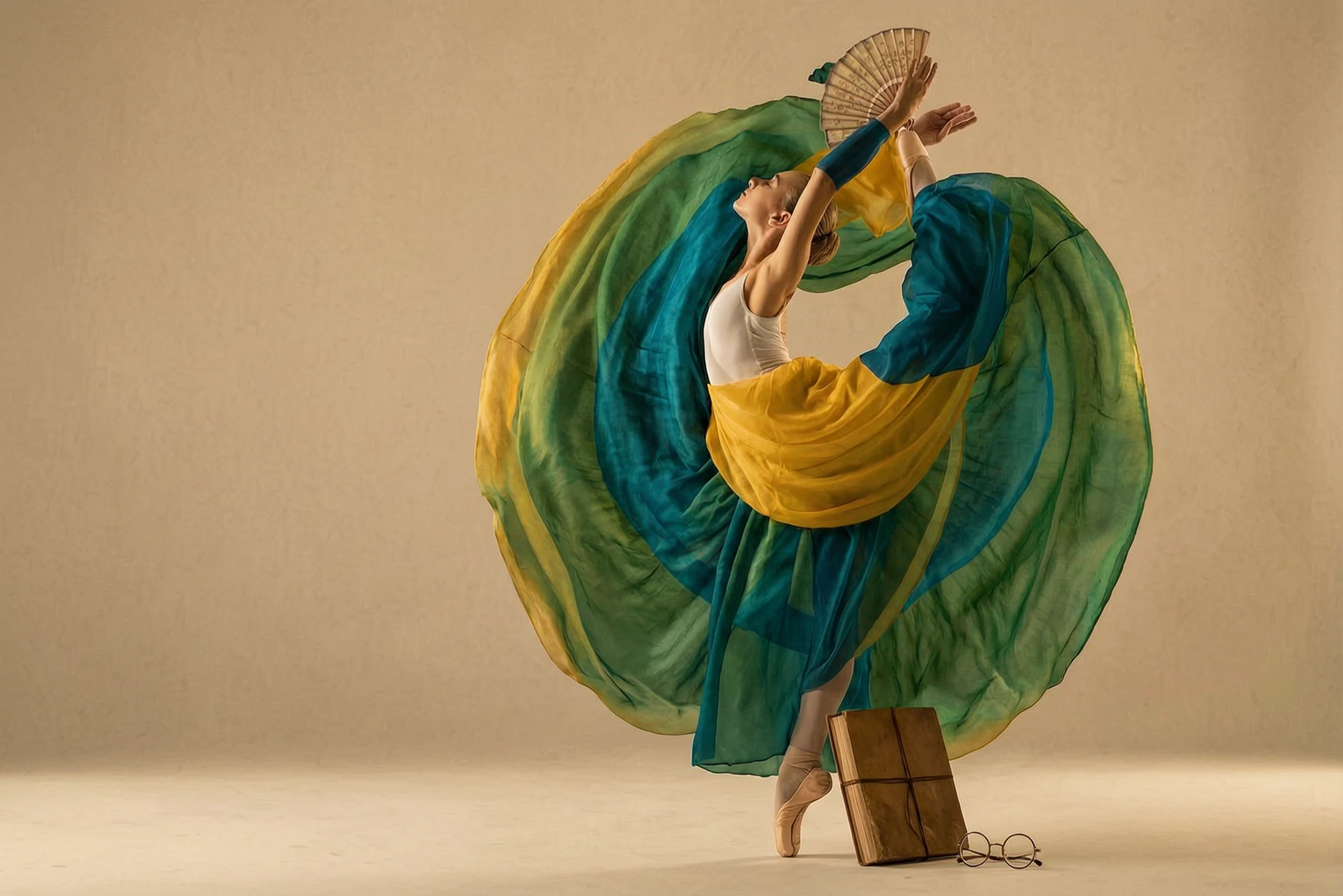
Color-match the skirt in Figure 1 according to the colors of the bird in Figure 2, full of artistic sense, keeping the clothing style unchanged and the model unchanged.Props: Folding fan / Thread-bound book / Round-frame glasses Color Palette: Warm yellow / Dark cyan / Sepia
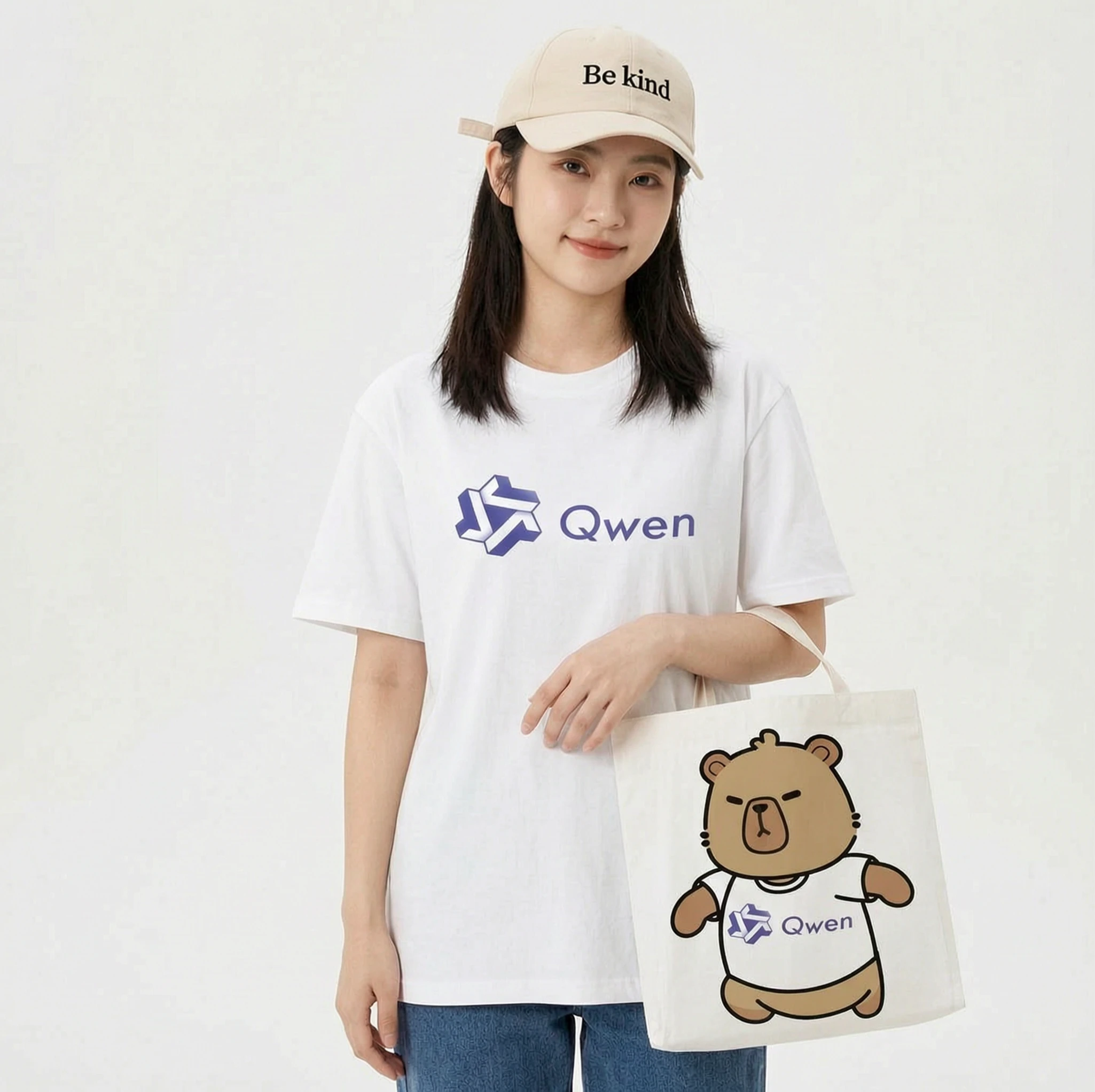
Print this pattern on a T-shirt and a paper tote bag. A female model is showcasing these items. The girl is also wearing a baseball cap with the words 'Be kind' written on it.
![[Basic Facial Description] The character's appearance is based on Reference Figure 1, wearing a dark cyan long gown, round gold-rimmed glasses, and holding a folding fan. The background is an old Shanghai study room with wooden bookshelves, warm yellow tones, vintage film texture, soft side lighting, dust particles dancing in the light beams, cultural atmosphere, quiet and restrained. Shot on Hasselblad medium format, 85mm lens, high resolution, cinematic color grading, Wong Kar-wai style.
Props: Folding fan / Thread-bound book / Round-frame glasses
Color Palette: Warm yellow / Dark cyan / Sepia](https://static.wavespeed.ai/examples/370b298c8a4d4375ae2888387321021a/1783683766496038997_4uFvi5TI.webp)
[Basic Facial Description] The character's appearance is based on Reference Figure 1, wearing a dark cyan long gown, round gold-rimmed glasses, and holding a folding fan. The background is an old Shanghai study room with wooden bookshelves, warm yellow tones, vintage film texture, soft side lighting, dust particles dancing in the light beams, cultural atmosphere, quiet and restrained. Shot on Hasselblad medium format, 85mm lens, high resolution, cinematic color grading, Wong Kar-wai style. Props: Folding fan / Thread-bound book / Round-frame glasses Color Palette: Warm yellow / Dark cyan / Sepia
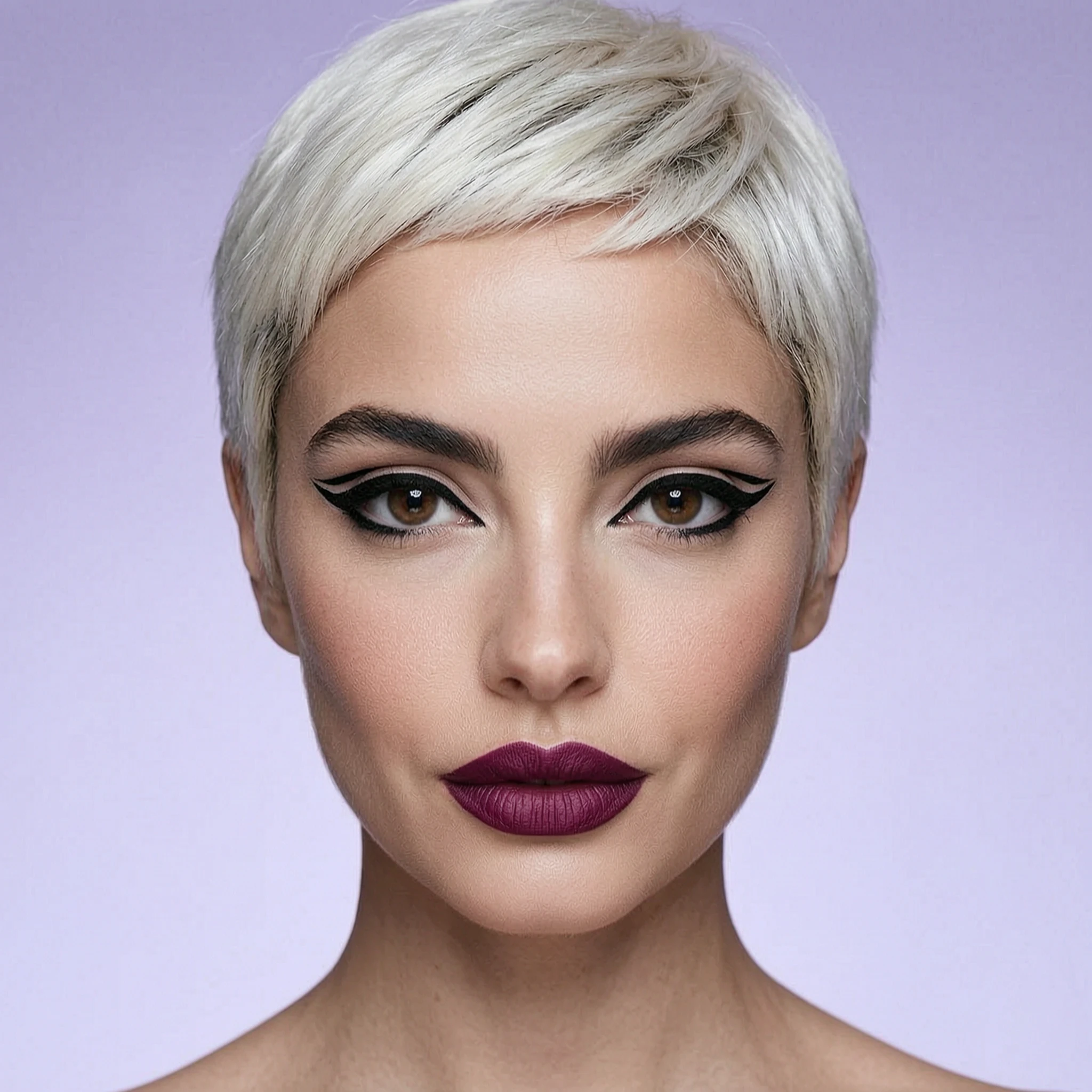
Keep the woman's face and identity unchanged. Give her a short platinum blonde pixie cut, bold graphic black eyeliner and a deep berry lipstick, and change the background to a soft lilac studio backdrop, high-fashion beauty editorial lighting.
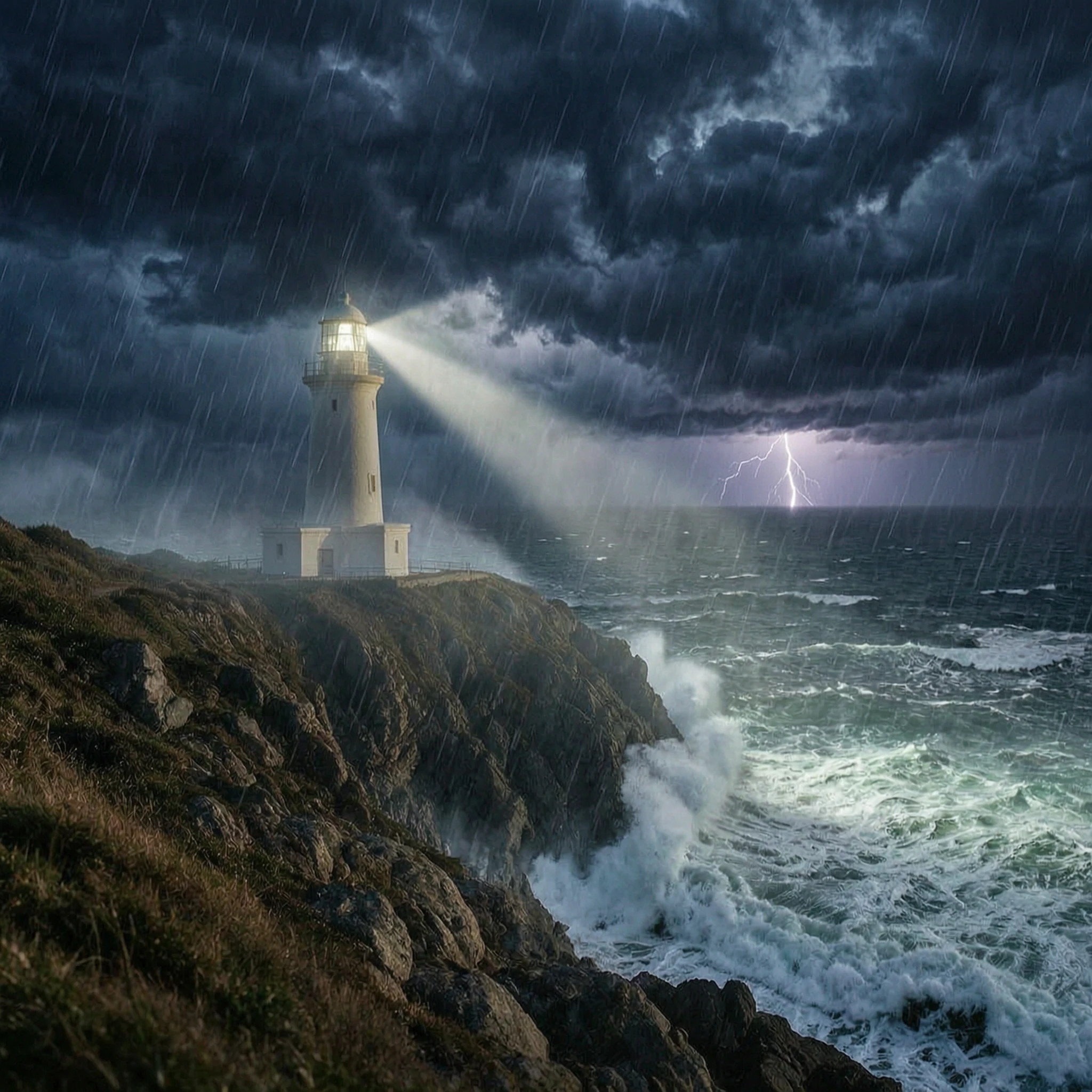
Turn this calm scene into a dramatic stormy night: huge waves crashing against the rocks, dark swirling clouds, a lightning bolt in the distance, rain in the air, and the lighthouse beam cutting through the storm. Keep the lighthouse and cliff shape unchanged.
Related Models
/filters:quality(82)/media/images/1780805363960584973_J6AfozIS.webp)
/filters:quality(82)/media/images/20260408104338_4kdl2itm.webp)
/filters:quality(82)/media/images/20260408104411_n33dp5gc.webp)
/filters:quality(82)/media/images/20260408104408_wr1r10h3.webp)
/filters:quality(82)/media/images/20260408104404_mqejvdc5.webp)
/filters:quality(82)/media/images/20260408104342_ej302cia.webp)
README
Wan 2.7 Image Edit Pro
Wan 2.7 Image Edit Pro is the professional tier of prompt-driven image editing model, delivering higher-fidelity results for production-grade workflows. Upload one or more reference images, describe the edit in plain language, and get a high-resolution updated image — while preserving the original structure, subject identity, and composition.
Ideal for retouching product shots, high-resolution background swaps, detailed style transfers, and any editing task where maximum output quality matters.
- Looking for a lower-cost option? Try Wan 2.7 Image Edit
Why Choose This?
-
Higher resolution output Generate edited images at up to 2048×2048 for print-ready assets, large-format displays, and high-DPI screens.
-
Natural-language editing Describe what to change and what to keep — the model follows your intent accurately for common creative workflows.
-
Multi-image reference support Upload 1 to 3 input images for style, subject, or background guidance and fusion edits.
-
Composition preservation Designed to preserve subject identity, pose, and overall structure while applying localized changes.
-
Seed control Fix a seed for repeatable outputs and more consistent iteration across prompt variations.
Parameters
| Parameter | Required | Description |
|---|---|---|
| images | Yes | One or more input images to edit (1–3 images, uploaded files or public URLs). |
| prompt | Yes | Edit instruction describing what to change and what to keep. |
| size | No | Output dimensions. Defaults to the original image size if not specified. |
| seed | No | Integer for reproducibility. Use a fixed seed to iterate with smaller prompt changes. -1 for random. |
How to Use
- Upload your image(s) — provide the main image to edit. Add up to 3 images for style or background reference.
- Write your prompt — describe both what to change and what must stay the same. For example: "Color-match the skirt in Figure 1 according to the colors of the bird in Figure 2, keeping the clothing style and model unchanged."
- Set size (optional) — specify output dimensions, or leave empty to match the original image size.
- Set seed (optional) — fix a seed to make iterations more comparable and reproducible.
- Submit — preview the output and iterate step by step if needed.
Pricing
Just $0.075 per run.
Best Use Cases
- Product Photography — Retouch and edit product images at high resolution for e-commerce and print.
- Fashion & Apparel — Swap clothing styles, colors, or materials while preserving pose and identity.
- Background Replacement — Change scene environment or mood at high fidelity without affecting the subject.
- Style Transfer — Apply detailed artistic or visual style shifts to an existing image.
- Print & Large Format — Generate edited assets at resolutions suitable for physical print and high-DPI displays.
Pro Tips
- Structure your prompt in two parts: what to change, and what to keep. Example: "Change the jacket to leather, keep the face and pose unchanged."
- If edits spill into areas you want to preserve, strengthen constraints: "keep the face unchanged", "keep the background intact", "do not alter the text."
- Use a fixed seed to make iterative prompt refinements more comparable across runs.
- If outputs look inconsistent, simplify your prompt and iterate with smaller changes.
- Higher output resolutions will take longer to generate — use the standard model for rapid iteration and Pro for final renders.
Notes
- Both images and prompt are required fields.
- Output size defaults to the original image dimensions if size is not specified.
- Output size range is 512–4096 pixels per dimension, with total pixels between 768×768 and 2048×2048 and aspect ratio between 1:8 and 8:1.
Related Models
- Wan 2.7 Image Edit — Standard version at lower cost for everyday editing needs.
- Wan 2.6 Image Edit — Previous generation Wan image-edit model with a similar prompt-driven workflow.
- Qwen Image Edit — General-purpose AI image editing with strong prompt adherence for everyday creative and product workflows.
- Google Nano Banana Pro Edit — High-fidelity image editing with strong composition preservation and reliable text handling.
Wan 2.7 Image Edit Pro API — Quick start
Grab a WaveSpeedAI API key, then call POST https://api.wavespeed.ai/api/v3/alibaba/wan-2.7/image-edit-pro with your input as JSON. The endpoint returns a prediction id. Start polling the result endpoint around every 2 seconds, increase the interval for long-running tasks, and stop on any terminal status. On completed, read output values from data.outputs. Examples for Wan 2.7 Image Edit Pro below.
HTTP example
set -euo pipefail

: "${WAVESPEED_API_KEY:?Set WAVESPEED_API_KEY}"

REQUEST_BODY=$(cat <<'JSON'
{
    "prompt": "A cinematic shot of a city at sunset, soft golden light",
    "images": [
        "https://interactive-examples.mdn.mozilla.net/media/cc0-images/painted-hand-298-332.jpg"
    ]
}
JSON
)

# 1. Submit the prediction.
SUBMIT_RESPONSE=$(curl --silent --show-error --fail-with-body \
  -X POST "https://api.wavespeed.ai/api/v3/alibaba/wan-2.7/image-edit-pro" \
  -H "Content-Type: application/json" \
  -H "Authorization: Bearer $WAVESPEED_API_KEY" \
  -d "$REQUEST_BODY")

TASK=$(printf '%s' "$SUBMIT_RESPONSE" | jq 'if has("data") then .data else . end')
PREDICTION_ID=$(printf '%s' "$TASK" | jq -r '.id')
if [ -z "$PREDICTION_ID" ] || [ "$PREDICTION_ID" = "null" ]; then
  printf 'Submission response did not contain a prediction id
' >&2
  exit 1
fi
RESULT_URL="https://api.wavespeed.ai/api/v3/predictions/$PREDICTION_ID/result"

# 2. Poll until the prediction finishes.
while true; do
  RESPONSE=$(curl --silent --show-error --fail-with-body "$RESULT_URL" \
    -H "Authorization: Bearer $WAVESPEED_API_KEY")
  RESULT=$(printf '%s' "$RESPONSE" | jq 'if has("data") then .data else . end')
  STATUS=$(printf '%s' "$RESULT" | jq -r '.status')
  case "$STATUS" in
    completed) printf '%s\n' "$RESULT" | jq '.outputs'; break ;;
    failed|cancelled|timeout|deleted) printf '%s\n' "$RESULT" | jq . >&2; exit 1 ;;
    *) sleep 2 ;;
  esac
done
Node.js example
const submitUrl = "https://api.wavespeed.ai/api/v3/alibaba/wan-2.7/image-edit-pro";
const apiKey = process.env.WAVESPEED_API_KEY;
if (!apiKey) throw new Error('Set WAVESPEED_API_KEY');

async function requestJson(url, options = {}) {
  const response = await fetch(url, options);
  if (!response.ok) throw new Error(await response.text());
  return response.json();
}

// 1. Submit the prediction.
const body = await requestJson(submitUrl, {
  method: "POST",
  headers: {
    "Authorization": `Bearer ${apiKey}`,
    "Content-Type": "application/json",
  },
  body: JSON.stringify({
        "prompt": "A cinematic shot of a city at sunset, soft golden light",
        "images": [
                "https://interactive-examples.mdn.mozilla.net/media/cc0-images/painted-hand-298-332.jpg"
        ]
}),
});
const task = body.data ?? body;
if (!task.id) throw new Error("Submission response did not contain a prediction id");
const resultUrl = `https://api.wavespeed.ai/api/v3/predictions/${task.id}/result`;

// 2. Poll until the prediction finishes.
while (true) {
  const resultBody = await requestJson(resultUrl, {
    headers: { "Authorization": `Bearer ${apiKey}` },
  });
  const result = resultBody.data ?? resultBody;
  if (result.status === "completed") {
    console.log(result.outputs);
    break;
  }
  if (["failed", "cancelled", "timeout", "deleted"].includes(result.status)) throw new Error(JSON.stringify(result));
  await new Promise(resolve => setTimeout(resolve, 2000));
}
Python example
import json
import os
import time
from urllib.request import Request, urlopen

api_key = os.environ["WAVESPEED_API_KEY"]
headers = {"Authorization": f"Bearer {api_key}", "Content-Type": "application/json"}
payload = {
    "prompt": "A cinematic shot of a city at sunset, soft golden light",
    "images": [
        "https://interactive-examples.mdn.mozilla.net/media/cc0-images/painted-hand-298-332.jpg"
    ]
}

def request_json(url, data=None):
    request = Request(url, data=data, headers=headers, method="POST" if data else "GET")
    with urlopen(request) as response:
        return json.load(response)

# 1. Submit the prediction.
body = request_json("https://api.wavespeed.ai/api/v3/alibaba/wan-2.7/image-edit-pro", json.dumps(payload).encode())
task = body.get("data", body)
if not task.get("id"):
    raise RuntimeError("Submission response did not contain a prediction id")
result_url = f"https://api.wavespeed.ai/api/v3/predictions/{task['id']}/result"

# 2. Poll until the prediction finishes.
while True:
    result_body = request_json(result_url)
    result = result_body.get("data", result_body)
    status = result.get("status")
    if status == "completed":
        print(result.get("outputs", []))
        break
    if status in {"failed", "cancelled", "timeout", "deleted"}:
        raise RuntimeError(result)
    time.sleep(2)
Wan 2.7 Image Edit Pro API — Frequently asked questions
What is the Wan 2.7 Image Edit Pro API?
Wan 2.7 Image Edit Pro is a Alibaba model for image editing, exposed as a REST API on WaveSpeedAI. WAN 2.7 Image Edit Pro performs prompt-driven image editing with multi-image reference support and up to 2K output. Ready-to-use REST inference API, best performance, no coldstarts, affordable pricing. You can call it programmatically or try it from the playground above.
How do I call the Wan 2.7 Image Edit Pro API?
POST your input parameters to the model's REST endpoint (shown in the API tab of this playground) with your WaveSpeedAI API key in the Authorization header. Submission returns a prediction ID. Poll the result endpoint starting around every 2 seconds, increase the interval for long-running tasks, and stop on any terminal status. The playground generates Python, JavaScript, and cURL examples for submitting requests and polling results. Full request/response shape is documented at https://wavespeed.ai/docs/docs-api/alibaba/alibaba-wan-2.7-image-edit-pro.
How much does Wan 2.7 Image Edit Pro cost per run?
Wan 2.7 Image Edit Pro starts at $0.075 per run. That figure is the base price — the final charge scales with the parameters you set in the form (output size, length, count, references, or whatever knobs this model exposes), so a higher-quality or larger output costs more than a minimal one. The exact cost for your current input is shown live next to the Generate button before you submit, and the actual per-call charge is recorded on the prediction afterwards.
What inputs does Wan 2.7 Image Edit Pro accept?
Key inputs: `prompt`, `images`, `seed`. The full JSON schema (types, defaults, allowed values) is rendered above the Generate button and mirrored in the API reference at https://wavespeed.ai/docs/docs-api/alibaba/alibaba-wan-2.7-image-edit-pro.
How long does Wan 2.7 Image Edit Pro take to generate?
Reported generation time on WaveSpeedAI is around 23 seconds per request. This is an estimate, not a latency guarantee; queue time and input settings can change the total wait. live status is visible in the prediction record.
Can I use Wan 2.7 Image Edit Pro outputs commercially?
Commercial usage rights depend on the model's license, set by its provider (Alibaba). Check the provider's applicable terms and WaveSpeedAI's Terms of Service before commercial use.
More from Alibaba
View all- alibaba/happyhorse-1.0/image-to-videoImage to Video
- alibaba/happyhorse-1.0/reference-to-videoImage to Video
- alibaba/happyhorse-1.0/text-to-videoText to Video
- alibaba/happyhorse-1.0/video-editVideo to Video
- alibaba/happyhorse-1.0/video-extendVideo Extend
- alibaba/happyhorse-1.1/image-to-videoImage to Video
- alibaba/happyhorse-1.1/reference-to-videoImage to Video
- alibaba/happyhorse-1.1/text-to-videoText to Video
More Image to Image models
View all- bytedance/seedream-v5.0-pro/editImage to Image
- bytedance/seedream-v4.5/editImage to Image
- google/nano-banana-pro/editImage to Image
- alibaba/wan-2.7/image-editImage to Image
- openai/gpt-image-2/editImage to Image
- google/nano-banana-2/editImage to Image
- alibaba/qwen-image-3.0/editImage to Image
- alibaba/qwen-image-3.0-pro/editImage to Image