Google Nano Banana 2 Lite Text to Image generates high-quality images from text prompts with low latency, flexible aspect ratios, and fast image creation for creative and production workflows. Ready-to-use REST inference API, best performance, no coldstarts, affordable pricing.
Idle
$0.04per run·~25 / $1
ExamplesView all
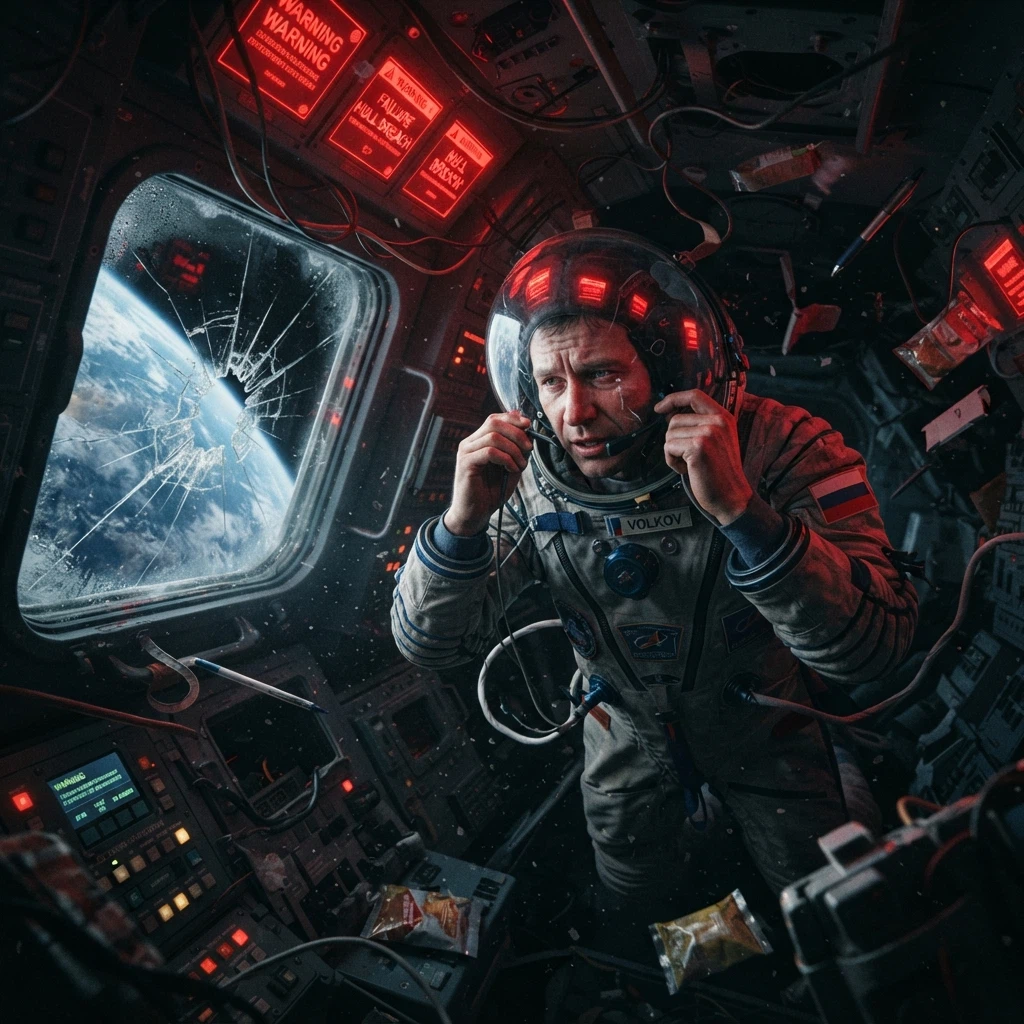
A foreign astronaut floating inside a damaged spacecraft cabin, red emergency lights flashing, Earth visible through a cracked window, loose objects drifting around him, microphone near his mouth, helmet visor reflecting warning screens, claustrophobic sci-fi composition, emotional final-message storytelling, cinematic realism
Related Models
/filters:quality(82)/media/images/1782844270650853082_MTSGtith.webp)
/filters:quality(82)/media/images/1782844482067816517_tMQErwk9.webp)
/filters:quality(82)/media/images/1782844339498489332_IxVa0gtH.webp)
/filters:quality(82)/media/images/1782846273040443129_5T5fPY8h.webp)
/filters:quality(82)/media/images/1787905895838346577_TAnUdIey.webp)
/filters:quality(82)/media/images/1787905944076060699_hjTBXftJ.webp)
README
Google Nano Banana 2 Lite Text-to-Image
Google Nano Banana 2 Lite Text-to-Image generates images from text prompts with a fast, lightweight image model. The public interface keeps the workflow simple: write a prompt, choose an aspect ratio, select an output format, and generate a single image result.
Why Choose This?
-
Fast text-to-image generation
Generate images quickly from natural-language prompts. -
Flexible aspect ratios
Choose common square, portrait, landscape, and wide-format aspect ratio presets. -
Simple generation controls
The public form focuses onprompt,size, andoutput_format. -
Single-image output
Each request generates one image for predictable cost and behavior. -
Standard image output
Generated images are returned as URLs in the standard WaveSpeed prediction response.
Parameters
| Parameter | Required | Description |
|---|---|---|
| prompt | Yes | Text prompt describing the image to generate. |
| aspect_ratio | No | Output aspect ratio preset. Default: 1:1. |
| output_format | No | Output image format: png or jpeg. Default: png. |
| enable_sync_mode | No | Wait for the result to be generated and uploaded before returning the response. API only. Synchronous requests may hit timeouts because Google inference time can fluctuate. Default: false. |
| enable_base64_output | No | Return output as a BASE64 string instead of a URL. API only. Default: false. |
How to Use
- Write your prompt — Describe the subject, scene, style, lighting, and composition.
- Choose aspect ratio — Select the output
sizebased on your target layout. - Choose output format — Use
pngorjpegdepending on your workflow. - Submit — Generate the image and retrieve the output URL.
Pricing
| Output Images | Price |
|---|---|
| 1 | $0.04 |
Best Use Cases
- Creative image generation — Generate concept art, illustrations, thumbnails, and visual ideas from text.
- Marketing assets — Create campaign images, social visuals, blog graphics, and promotional content.
- Prompt testing — Quickly iterate on prompt wording, style direction, and composition.
- Layout-specific generation — Generate square, portrait, landscape, or banner-style images for different use cases.
Pro Tips
- Use clear prompts with subject, scene, lighting, style, and composition.
- Keep the prompt focused on the main subject and visual intent.
- Use
pngfor higher-quality general output. - Use
jpegfor smaller file sizes. - Choose the aspect ratio based on the final placement, such as square, portrait, landscape, or wide banner.
Nano Banana 2 Lite Text To Image API — Quick start
Grab a WaveSpeedAI API key, then call POST https://api.wavespeed.ai/api/v3/google/nano-banana-2-lite/text-to-image with your input as JSON. The endpoint returns a prediction id. Start polling the result endpoint around every 2 seconds, increase the interval for long-running tasks, and stop on any terminal status. On completed, read output values from data.outputs. Examples for Nano Banana 2 Lite Text To Image below.
HTTP example
set -euo pipefail

: "${WAVESPEED_API_KEY:?Set WAVESPEED_API_KEY}"

REQUEST_BODY=$(cat <<'JSON'
{
    "prompt": "A cinematic shot of a city at sunset, soft golden light",
    "aspect_ratio": "1:1",
    "output_format": "png"
}
JSON
)

# 1. Submit the prediction.
SUBMIT_RESPONSE=$(curl --silent --show-error --fail-with-body \
  -X POST "https://api.wavespeed.ai/api/v3/google/nano-banana-2-lite/text-to-image" \
  -H "Content-Type: application/json" \
  -H "Authorization: Bearer $WAVESPEED_API_KEY" \
  -d "$REQUEST_BODY")

TASK=$(printf '%s' "$SUBMIT_RESPONSE" | jq 'if has("data") then .data else . end')
PREDICTION_ID=$(printf '%s' "$TASK" | jq -r '.id')
if [ -z "$PREDICTION_ID" ] || [ "$PREDICTION_ID" = "null" ]; then
  printf 'Submission response did not contain a prediction id
' >&2
  exit 1
fi
RESULT_URL="https://api.wavespeed.ai/api/v3/predictions/$PREDICTION_ID/result"

# 2. Poll until the prediction finishes.
while true; do
  RESPONSE=$(curl --silent --show-error --fail-with-body "$RESULT_URL" \
    -H "Authorization: Bearer $WAVESPEED_API_KEY")
  RESULT=$(printf '%s' "$RESPONSE" | jq 'if has("data") then .data else . end')
  STATUS=$(printf '%s' "$RESULT" | jq -r '.status')
  case "$STATUS" in
    completed) printf '%s\n' "$RESULT" | jq '.outputs'; break ;;
    failed|cancelled|timeout|deleted) printf '%s\n' "$RESULT" | jq . >&2; exit 1 ;;
    *) sleep 2 ;;
  esac
done
Node.js example
const submitUrl = "https://api.wavespeed.ai/api/v3/google/nano-banana-2-lite/text-to-image";
const apiKey = process.env.WAVESPEED_API_KEY;
if (!apiKey) throw new Error('Set WAVESPEED_API_KEY');

async function requestJson(url, options = {}) {
  const response = await fetch(url, options);
  if (!response.ok) throw new Error(await response.text());
  return response.json();
}

// 1. Submit the prediction.
const body = await requestJson(submitUrl, {
  method: "POST",
  headers: {
    "Authorization": `Bearer ${apiKey}`,
    "Content-Type": "application/json",
  },
  body: JSON.stringify({
        "prompt": "A cinematic shot of a city at sunset, soft golden light",
        "aspect_ratio": "1:1",
        "output_format": "png"
}),
});
const task = body.data ?? body;
if (!task.id) throw new Error("Submission response did not contain a prediction id");
const resultUrl = `https://api.wavespeed.ai/api/v3/predictions/${task.id}/result`;

// 2. Poll until the prediction finishes.
while (true) {
  const resultBody = await requestJson(resultUrl, {
    headers: { "Authorization": `Bearer ${apiKey}` },
  });
  const result = resultBody.data ?? resultBody;
  if (result.status === "completed") {
    console.log(result.outputs);
    break;
  }
  if (["failed", "cancelled", "timeout", "deleted"].includes(result.status)) throw new Error(JSON.stringify(result));
  await new Promise(resolve => setTimeout(resolve, 2000));
}
Python example
import json
import os
import time
from urllib.request import Request, urlopen

api_key = os.environ["WAVESPEED_API_KEY"]
headers = {"Authorization": f"Bearer {api_key}", "Content-Type": "application/json"}
payload = {
    "prompt": "A cinematic shot of a city at sunset, soft golden light",
    "aspect_ratio": "1:1",
    "output_format": "png"
}

def request_json(url, data=None):
    request = Request(url, data=data, headers=headers, method="POST" if data else "GET")
    with urlopen(request) as response:
        return json.load(response)

# 1. Submit the prediction.
body = request_json("https://api.wavespeed.ai/api/v3/google/nano-banana-2-lite/text-to-image", json.dumps(payload).encode())
task = body.get("data", body)
if not task.get("id"):
    raise RuntimeError("Submission response did not contain a prediction id")
result_url = f"https://api.wavespeed.ai/api/v3/predictions/{task['id']}/result"

# 2. Poll until the prediction finishes.
while True:
    result_body = request_json(result_url)
    result = result_body.get("data", result_body)
    status = result.get("status")
    if status == "completed":
        print(result.get("outputs", []))
        break
    if status in {"failed", "cancelled", "timeout", "deleted"}:
        raise RuntimeError(result)
    time.sleep(2)
Nano Banana 2 Lite Text To Image API — Frequently asked questions
What is the Nano Banana 2 Lite Text To Image API?
Nano Banana 2 Lite Text To Image is a Google model for image generation, exposed as a REST API on WaveSpeedAI. Google Nano Banana 2 Lite Text to Image generates high-quality images from text prompts with low latency, flexible aspect ratios, and fast image creation for creative and production workflows. Ready-to-use REST inference API, best performance, no coldstarts, affordable pricing. You can call it programmatically or try it from the playground above.
How do I call the Nano Banana 2 Lite Text To Image API?
POST your input parameters to the model's REST endpoint (shown in the API tab of this playground) with your WaveSpeedAI API key in the Authorization header. Submission returns a prediction ID. Poll the result endpoint starting around every 2 seconds, increase the interval for long-running tasks, and stop on any terminal status. The playground generates Python, JavaScript, and cURL examples for submitting requests and polling results. Full request/response shape is documented at https://wavespeed.ai/docs/docs-api/google/google-nano-banana-2-lite-text-to-image.
How much does Nano Banana 2 Lite Text To Image cost per run?
Nano Banana 2 Lite Text To Image starts at $0.04 per run. That figure is the base price — the final charge scales with the parameters you set in the form (output size, length, count, references, or whatever knobs this model exposes), so a higher-quality or larger output costs more than a minimal one. The exact cost for your current input is shown live next to the Generate button before you submit, and the actual per-call charge is recorded on the prediction afterwards.
What inputs does Nano Banana 2 Lite Text To Image accept?
Key inputs: `prompt`, `aspect_ratio`, `enable_base64_output`, `enable_sync_mode`, `output_format`. The full JSON schema (types, defaults, allowed values) is rendered above the Generate button and mirrored in the API reference at https://wavespeed.ai/docs/docs-api/google/google-nano-banana-2-lite-text-to-image.
How long does Nano Banana 2 Lite Text To Image take to generate?
Reported generation time on WaveSpeedAI is around 12 seconds per request. This is an estimate, not a latency guarantee; queue time and input settings can change the total wait. live status is visible in the prediction record.
Can I use Nano Banana 2 Lite Text To Image outputs commercially?
Commercial usage rights depend on the model's license, set by its provider (Google). Check the provider's applicable terms and WaveSpeedAI's Terms of Service before commercial use.
More from Google
View all- google/gemini-2.5-flash-image-preview/editImage to Image
- google/gemini-2.5-flash-image-preview/text-to-imageText to Image
- google/gemini-2.5-flash-image/editImage to Image
- google/gemini-2.5-flash-image/text-to-imageText to Image
- google/gemini-2.5-flash/text-to-speechText to Audio
- google/gemini-2.5-pro/text-to-speechText to Audio
- google/gemini-3-pro-image/editImage to Image
- google/gemini-3-pro-image/text-to-imageText to Image
More Text to Image models
View all- bytedance/seedream-v5.0-proText to Image
- openai/gpt-image-2/text-to-imageText to Image
- google/nano-banana-pro/text-to-imageText to Image
- google/nano-banana-2/text-to-imageText to Image
- wavespeed-ai/z-image/turboText to Image
- bytedance/seedream-v4.5Text to Image
- alibaba/wan-2.7/text-to-imageText to Image
- alibaba/qwen-image-3.0/text-to-imageText to Image