Hyper3D Rodin v2 generates production-ready 3D assets from text prompts, delivering clean meshes with UVs and textures. Ready-to-use REST inference API, best performance, no coldstarts, affordable pricing.
निष्क्रिय
$0.48प्रति रन·~20 / $10
उदाहरणसभी देखें
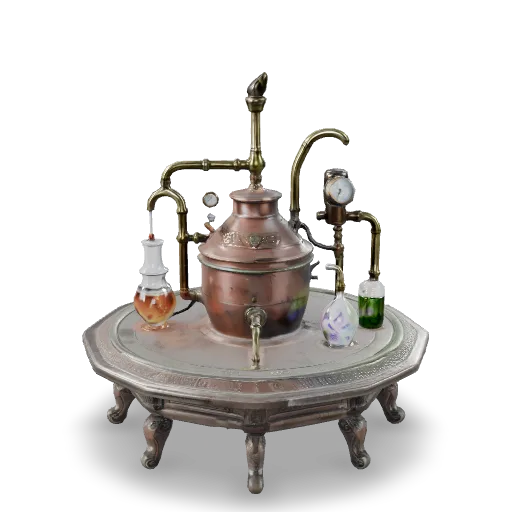
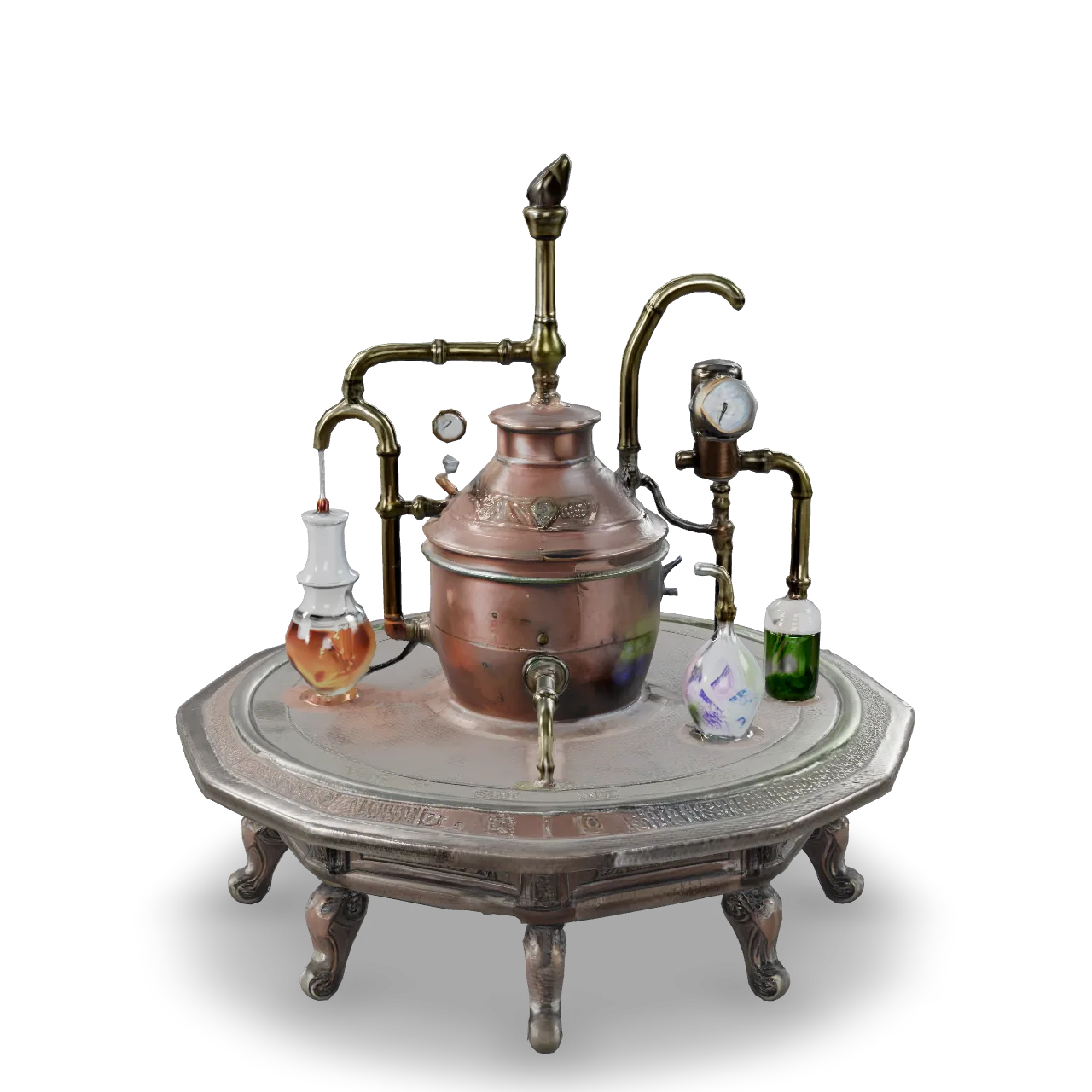
An elaborate fantasy alchemy apparatus, copper boiler, glass vessels, curved brass pipes, pressure gauges, crystal containers filled with glowing liquid, engraved metal fittings, aged patina, intricate tabletop prop, highly detailed 3D model, centered, isolated.
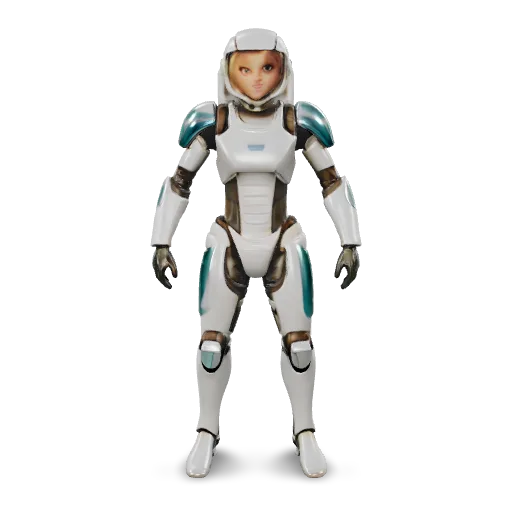
Create a fully textured 3D model of a female sci-fi explorer in a sleek white and teal exosuit. She is in a neutral T-pose, no helmet, short hair, athletic but realistic proportions. The suit has layered armor plates, glowing blue accents and flexible fabric areas at the joints. Output a game-ready character with clean topology and PBR textures (metal, fabric, emissive), suitable for real-time use in Unity or Unreal. No base, no environment, just the character on a neutral ground plane.
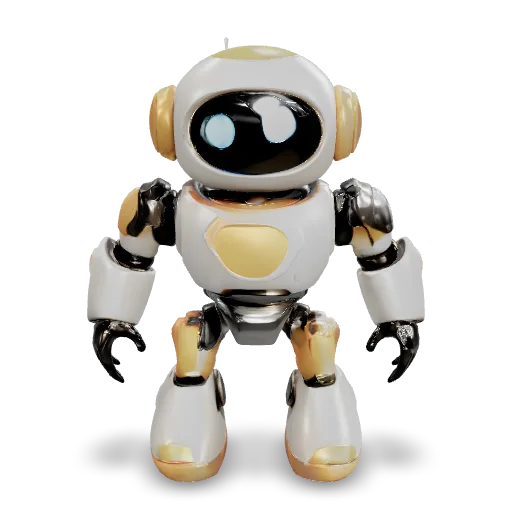
a 3D model of a small companion robot with a spherical main body, two short cylindrical legs with rounded feet, no arms, a flat circular face screen showing expressive LED eyes, smooth plastic shell with panel lines, primary color white with soft gray accents, a thin glowing ring around the middle of the body, low-to-mid poly friendly design
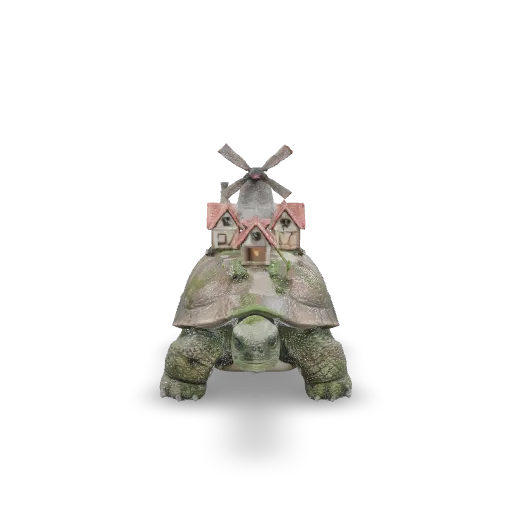
A giant ancient tortoise carrying a tiny village on its shell: small timber-framed houses with red tile roofs, a stone windmill, winding paths, little trees and lanterns, the tortoise with mossy wrinkled skin and a calm expression, whimsical fantasy creature, single isolated object.
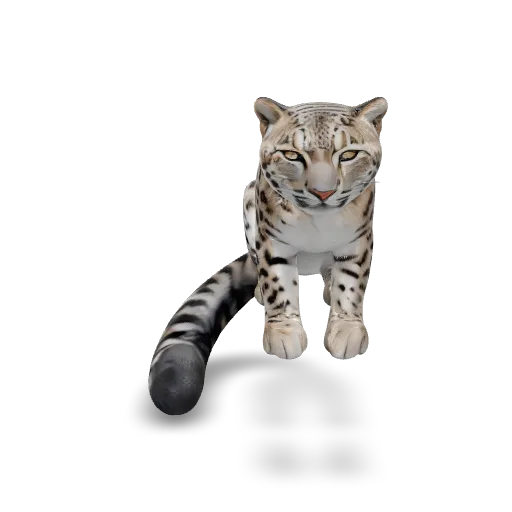
A majestic snow leopard crouching on a rocky outcrop, thick spotted fur, long bushy tail wrapped around the rock, alert gaze, realistic wildlife sculpture with detailed fur texture, single isolated object.
संबंधित मॉडल
/filters:quality(82)/media/images/1789120746143744570_VtCMW5en.webp)
/filters:quality(82)/media/images/1790055357630118327_7rW5fpyH.webp)
/filters:quality(82)/media/images/1790055359461222633_sVA5nxPe.webp)
/filters:quality(82)/media/images/1789118312974471104_PeBKU3ck.webp)
/filters:quality(82)/media/images/1789119184005756217_r4sCMU3d.webp)
/filters:quality(82)/media/images/1789121897153465635_WuENX6fp.webp)
README
Hyper3D — Rodin v2 Text-to-3D
hyper3d/rodin-v2/text-to-3d turns a single text prompt into a fully textured 3D asset, using Hyper3D’s Rodin v2 generation pipeline. It’s designed for game props, characters, film previs, XR assets and 3D printing where you want clean topology plus usable UVs and textures straight out of the API.
Key Highlights
- Pure text-to-3D – Describe what you want in natural language (shape, style, material, use case) and get a ready-to-import 3D model.
- Quad or triangle meshes – Choose topology and polycount tier to match real production needs (rigging, sculpting, or in-engine use).
- PBR or shaded textures – Output can target realistic PBR workflows or stylised “baked” looks.
- Engine & DCC friendly – Export directly as glb / fbx / obj / stl / usdz and drop into Unity, Unreal, Blender, Maya, etc.
- Pose & scale control – Optional T/A-pose for characters and bounding-box constraints for consistent size across assets.
Parameters
Core input
- prompt* A detailed description of the desired 3D object. Example: “A low-poly stylised treasure chest with gold trims, slightly worn wood, game-ready, PBR, suitable for top-down RPG.”
Look & topology
-
material
- PBR – Physically based textures (albedo, normal, roughness, metallic, etc.)
- Shaded – Baked / stylised look.
- All – Export both PBR and shaded versions.
-
quality_and_mesh Controls topology type and approximate face count:
-
4K Quad, 8K Quad, 18K Quad, 50K Quad – Quad meshes at increasing resolution Best for sculpting, retopo, rigging, hero characters.
-
2K Triangle, 20K Triangle, 150K Triangle, 500K Triangle – Triangle meshes at increasing density Good for direct engine use or high-detail props.
-
-
geometry_file_format Choose preferred output format:
- glb – Recommended default; compact, widely supported (web + engines).
- fbx – Common for DCC tools and game pipelines.
- obj – Simple, legacy-friendly geometry + MTL.
- stl – 3D printing workflows.
- usdz – AR-friendly on Apple platforms.
-
addons
- HighPack – Optional enhancement pack for higher mesh + texture fidelity (heavier but closer to final production quality).
Advanced control
-
bbox_condition Optional bounding-box constraint (ControlNet-style) to cap the maximum size of the generated model (width/height/depth). Useful when you need scale consistency across a library of assets.
-
TAPose When enabled, enforces a T/A-pose for humanoid characters, simplifying rigging and animation.
-
use_original_alpha Reserved for workflows that process existing images; can usually be left off for pure text-to-3D on this endpoint.
-
preview_render If enabled, adds a quick preview render of the generated model (e.g. turntable) to the download bundle so you can inspect it without opening a 3D app.
-
seed Random seed for reproducibility:
- Leave empty / default to get a new variation each run.
- Set to a fixed integer to regenerate a similar model for iteration.
Pricing
Simple, flat pricing:
- $0.48 per run
Each run generates one 3D asset (mesh + textures) with your chosen quality and format. Change any parameters (prompt, mesh tier, format, etc.) → counts as a new run at $0.48.
How to Use
-
Write a clear prompt describing:
- Overall type of object (character, prop, vehicle, environment piece, etc.)
- Style (realistic, stylised, low-poly, hand-painted, sci-fi, medieval, etc.)
- Material hints (metal, leather, plastic, stone…) and intended usage (game-ready, film concept, 3D print).
-
Choose material (usually PBR for pipelines, Shaded for stylised/baked).
-
Set quality_and_mesh:
- Start with 8K Quad or 20K Triangle for iteration.
- Move up to 18K Quad, 50K Quad, 150K Triangle + HighPack for final assets.
-
Pick geometry_file_format that fits your toolchain (e.g. glb or fbx).
-
(Optional)
- Add a bbox_condition for consistent scale.
- Enable TAPose for rig-ready characters.
- Toggle preview_render if you want a quick turntable image in the output.
-
Set a seed if you want reproducible results, otherwise leave blank.
-
Click Run – after generation, download the archive and import the asset into your DCC, engine, or printing workflow.
Prompt & Workflow Tips
- Mention poly style (“low-poly”, “mid-poly”, “realistic high-poly”) in the prompt to better match your chosen mesh tier.
- For game assets, specify camera distance or usage (“seen from top-down”, “first-person view weapon”) to help the model prioritise detail.
- Iterate fast at medium quality, then lock a seed and re-run at higher tiers + HighPack for the final deliverable.
Mode 3D Models
-
tripo3d/v2.5/image-to-3d Tripo3D’s v2.5 image-to-3D model turns a single product or concept image into a textured, game-ready 3D asset for e-commerce, AR/VR and real-time engines.
-
tripo3d/v2.5/multiview-to-3d Tripo3D’s multi-view 3D reconstruction model uses several photos of the same object to generate higher-fidelity meshes and textures for digital twins and 3D catalogs.
-
hunyuan3d/v2.1 Tencent Hunyuan3D v2.1 (hosted by WaveSpeedAI) converts text prompts into detailed 3D models, ideal for stylised characters, props and environment assets in games and animation.
-
hunyuan3d-v2-multi-view Tencent Hunyuan3D v2 multi-view leverages multiple reference images to create accurate, textured 3D assets for digital humans, product visualization and virtual production workflows.
Rodin v2 Text To 3d API — Quick start
Grab a WaveSpeedAI API key, then call POST https://api.wavespeed.ai/api/v3/hyper3d/rodin-v2/text-to-3d with your input as JSON. The endpoint returns a prediction id. Start polling the result endpoint around every 2 seconds, increase the interval for long-running tasks, and stop on any terminal status. On completed, read output values from data.outputs. Examples for Rodin v2 Text To 3d below.
HTTP example
set -euo pipefail

: "${WAVESPEED_API_KEY:?Set WAVESPEED_API_KEY}"

REQUEST_BODY=$(cat <<'JSON'
{
    "prompt": "A cinematic shot of a city at sunset, soft golden light",
    "material": "PBR",
    "quality_and_mesh": "4K Quad",
    "geometry_file_format": "glb",
    "addons": "HighPack"
}
JSON
)

# 1. Submit the prediction.
SUBMIT_RESPONSE=$(curl --silent --show-error --fail-with-body \
  -X POST "https://api.wavespeed.ai/api/v3/hyper3d/rodin-v2/text-to-3d" \
  -H "Content-Type: application/json" \
  -H "Authorization: Bearer $WAVESPEED_API_KEY" \
  -d "$REQUEST_BODY")

TASK=$(printf '%s' "$SUBMIT_RESPONSE" | jq 'if has("data") then .data else . end')
PREDICTION_ID=$(printf '%s' "$TASK" | jq -r '.id')
if [ -z "$PREDICTION_ID" ] || [ "$PREDICTION_ID" = "null" ]; then
  printf 'Submission response did not contain a prediction id
' >&2
  exit 1
fi
RESULT_URL="https://api.wavespeed.ai/api/v3/predictions/$PREDICTION_ID/result"

# 2. Poll until the prediction finishes.
while true; do
  RESPONSE=$(curl --silent --show-error --fail-with-body "$RESULT_URL" \
    -H "Authorization: Bearer $WAVESPEED_API_KEY")
  RESULT=$(printf '%s' "$RESPONSE" | jq 'if has("data") then .data else . end')
  STATUS=$(printf '%s' "$RESULT" | jq -r '.status')
  case "$STATUS" in
    completed) printf '%s\n' "$RESULT" | jq '.outputs'; break ;;
    failed|cancelled|timeout|deleted) printf '%s\n' "$RESULT" | jq . >&2; exit 1 ;;
    *) sleep 2 ;;
  esac
done
Node.js example
const submitUrl = "https://api.wavespeed.ai/api/v3/hyper3d/rodin-v2/text-to-3d";
const apiKey = process.env.WAVESPEED_API_KEY;
if (!apiKey) throw new Error('Set WAVESPEED_API_KEY');

async function requestJson(url, options = {}) {
  const response = await fetch(url, options);
  if (!response.ok) throw new Error(await response.text());
  return response.json();
}

// 1. Submit the prediction.
const body = await requestJson(submitUrl, {
  method: "POST",
  headers: {
    "Authorization": `Bearer ${apiKey}`,
    "Content-Type": "application/json",
  },
  body: JSON.stringify({
        "prompt": "A cinematic shot of a city at sunset, soft golden light",
        "material": "PBR",
        "quality_and_mesh": "4K Quad",
        "geometry_file_format": "glb",
        "addons": "HighPack"
}),
});
const task = body.data ?? body;
if (!task.id) throw new Error("Submission response did not contain a prediction id");
const resultUrl = `https://api.wavespeed.ai/api/v3/predictions/${task.id}/result`;

// 2. Poll until the prediction finishes.
while (true) {
  const resultBody = await requestJson(resultUrl, {
    headers: { "Authorization": `Bearer ${apiKey}` },
  });
  const result = resultBody.data ?? resultBody;
  if (result.status === "completed") {
    console.log(result.outputs);
    break;
  }
  if (["failed", "cancelled", "timeout", "deleted"].includes(result.status)) throw new Error(JSON.stringify(result));
  await new Promise(resolve => setTimeout(resolve, 2000));
}
Python example
import json
import os
import time
from urllib.request import Request, urlopen

api_key = os.environ["WAVESPEED_API_KEY"]
headers = {"Authorization": f"Bearer {api_key}", "Content-Type": "application/json"}
payload = {
    "prompt": "A cinematic shot of a city at sunset, soft golden light",
    "material": "PBR",
    "quality_and_mesh": "4K Quad",
    "geometry_file_format": "glb",
    "addons": "HighPack"
}

def request_json(url, data=None):
    request = Request(url, data=data, headers=headers, method="POST" if data else "GET")
    with urlopen(request) as response:
        return json.load(response)

# 1. Submit the prediction.
body = request_json("https://api.wavespeed.ai/api/v3/hyper3d/rodin-v2/text-to-3d", json.dumps(payload).encode())
task = body.get("data", body)
if not task.get("id"):
    raise RuntimeError("Submission response did not contain a prediction id")
result_url = f"https://api.wavespeed.ai/api/v3/predictions/{task['id']}/result"

# 2. Poll until the prediction finishes.
while True:
    result_body = request_json(result_url)
    result = result_body.get("data", result_body)
    status = result.get("status")
    if status == "completed":
        print(result.get("outputs", []))
        break
    if status in {"failed", "cancelled", "timeout", "deleted"}:
        raise RuntimeError(result)
    time.sleep(2)
Rodin v2 Text To 3d API — Frequently asked questions
What is the Rodin v2 Text To 3d API?
Rodin v2 Text To 3d is a Hyper3d model for 3D asset generation, exposed as a REST API on WaveSpeedAI. Hyper3D Rodin v2 generates production-ready 3D assets from text prompts, delivering clean meshes with UVs and textures. Ready-to-use REST inference API, best performance, no coldstarts, affordable pricing. You can call it programmatically or try it from the playground above.
How do I call the Rodin v2 Text To 3d API?
POST your input parameters to the model's REST endpoint (shown in the API tab of this playground) with your WaveSpeedAI API key in the Authorization header. Submission returns a prediction ID. Poll the result endpoint starting around every 2 seconds, increase the interval for long-running tasks, and stop on any terminal status. The playground generates Python, JavaScript, and cURL examples for submitting requests and polling results. Full request/response shape is documented at https://wavespeed.ai/docs/docs-api/hyper3d/hyper3d-rodin-v2-text-to-3d.
How much does Rodin v2 Text To 3d cost per run?
Rodin v2 Text To 3d starts at $0.48 per run. That figure is the base price — the final charge scales with the parameters you set in the form (output size, length, count, references, or whatever knobs this model exposes), so a higher-quality or larger output costs more than a minimal one. The exact cost for your current input is shown live next to the Generate button before you submit, and the actual per-call charge is recorded on the prediction afterwards.
What inputs does Rodin v2 Text To 3d accept?
Key inputs: `prompt`, `seed`, `addons`, `bbox_condition`, `geometry_file_format`, `material`. The full JSON schema (types, defaults, allowed values) is rendered above the Generate button and mirrored in the API reference at https://wavespeed.ai/docs/docs-api/hyper3d/hyper3d-rodin-v2-text-to-3d.
How long does Rodin v2 Text To 3d take to generate?
Reported generation time on WaveSpeedAI is around 100 seconds per request. This is an estimate, not a latency guarantee; queue time and input settings can change the total wait. live status is visible in the prediction record.
Can I use Rodin v2 Text To 3d outputs commercially?
Commercial usage rights depend on the model's license, set by its provider (Hyper3d). Check the provider's applicable terms and WaveSpeedAI's Terms of Service before commercial use.
Hyper3d के और मॉडल
सभी देखेंऔर Text to 3D मॉडल
सभी देखें- tripo3d/h3.1/text-to-3dText to 3D
- wavespeed-ai/hunyuan-3d-v3.1/text-to-3d-rapidText to 3D
- hyper3d/rodin-v2.5/text-to-3dText to 3D
- meshy/v6/text-to-3dText to 3D
- wavespeed-ai/hunyuan3d-v3/text-to-3dText to 3D
- meshy/v7.1/text-to-3dText to 3D
- tripo3d/p2/text-to-3dText to 3D
- openai/gpt-6-astra/text-to-3dText to 3D