Add a photo
Choose, drop or paste a selfie or portrait. The faces are found in a few seconds; the first time, the face detection files download once.
/filters:quality(82)/media/images/eb45dfbd-7df7-42dc-811a-6a4af5593d00.webp)
/filters:quality(82)/media/images/1444e482-1070-433a-887d-29eee97a583e.webp) BEFOREAFTERSoft look
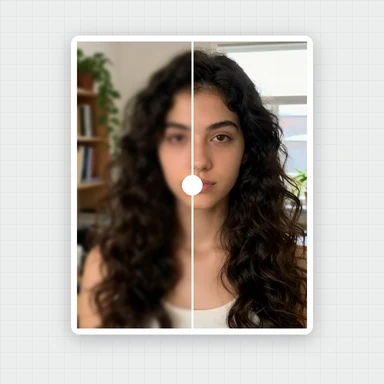
BEFOREAFTERSoft lookSoft, even skin that keeps its real texture, brighter eyes, a whiter smile and a touch of makeup.
Tap a look, set the strength and save the full-size photo. It never leaves your device.
Choose, drop or paste a photo. JPG, PNG, WebP or HEIC.
Portraits of people who do not exist, ready to try. Hover or tap the sparkle to peek at the result, then open one and pick your look.
Choose, drop or paste a selfie or portrait. The faces are found in a few seconds; the first time, the face detection files download once.
Tap Natural, Soft, Fresh, Matte or Glam and set its strength, or adjust skin, face shape, eyes, mouth and makeup one slider at a time.
Hold Compare or use the split line to check the change, then save the full-size photo as JPG, PNG or WebP.
Start with the Natural look at a medium strength. Most portraits look best when people notice that you look well rested, not that the photo was edited.
Smooth skin with the keep-texture slider at 50 or more: blotches and uneven tone fade, while pores and fine detail stay, so skin does not look plastic.
Check eyes, hairline and the edge of the face at 100% with the split line. If something looks off, lower that one slider instead of the whole look.
Small shape changes look the most natural. Reshaping fades out around the face to keep the background straight; in tight close-ups with door frames or tiles beside the cheek, keep shape sliders on the lower side.
Soft, even light from a window in front of you gives smoother skin and brighter eyes before any slider is touched.
Every face is retouched. In the One-tap tab, set each face's strength, or switch a face off if that person prefers the original.
This retoucher improves the photo you have. To create new headshots, styles or backgrounds, WaveSpeed AI makes images from a prompt or a photo.
Create professional-looking headshots, profile pictures and portraits in any style from a prompt.
Bring a portrait to life as a short clip for social media.
Turn a character portrait into a 3D figure.
$1 in free credits for eligible new accounts. No card needed. Generators have separate account and credit requirements. The portrait beautifier is free.
Yes. Retouch and save as many portraits as you like online for free, with no sign-up, no watermark and no limit.
No. Your photo is retouched right in your browser and never leaves your device. Only the face detection files download, once, and your browser keeps them for next time.
Open your photo and tap the Natural or Soft look, or set Smooth skin in the Skin tab. Keep texture holds on to pores and fine detail, and Compare shows the before and after.
Yes. Smoothing works on the skin only, keeps eyes, brows and lips sharp and puts fine texture back with the Keep texture slider. For the most natural result, keep texture at 50 or more.
Yes. Every face in a group photo is found and retouched together, and in the One-tap tab you can set each face's strength or switch a face off.
Skin (smoothing, blemishes, even tone, shine, brightness), face shape (slim face, jawline, chin, forehead, nose), eyes (size, brightness, dark circles), mouth (smile, whiter teeth) and makeup (lip colour, blush, eyeshadow, lipstick), or start from five one-tap looks.
Yes. Tilted heads and three-quarter views work: shape changes and makeup follow the visible side of the face, so the result stays natural.
Yes. Dark circles lightens the shadows under the eyes, Brighten eyes adds a little sparkle, and Whiten teeth takes the yellow out of a smile, all with a natural finish.
Open JPG, PNG, WebP or HEIC photos, or paste one, and save the full-size result as JPG, PNG or WebP, up to 4096 pixels on the long side.
Yes. It runs in current Chrome, Edge, Firefox and Safari on phones, tablets and computers, with no app to install. Pinch to zoom and hold Compare to check the result.
Free, private, and your skin still looks like skin.
/filters:quality(82)/media/images/1791123751656780930_IfFPY7R0.webp)
/filters:quality(82)/media/images/1791123737177812425_RjKT3cku.webp)
/filters:quality(82)/media/images/1791123748309870128_xlkNgK8N.webp)
/filters:quality(82)/media/images/1791123738630744263_oR09R0aj.webp)
/filters:quality(82)/media/images/1791177033162457776_uQ09OY7g.webp)
/filters:quality(82)/media/images/1791123734319125607_JdnwGPY7.webp)
/filters:quality(82)/media/images/1791123746355630206_udnxGPY7.webp)
/filters:quality(82)/media/images/1791123744771362580_yC0sPezZ.webp)
/filters:quality(82)/media/images/1791123738606970169_5KIR1ais.webp)
/filters:quality(82)/media/images/1791123748197655725_EUmuFNW6.webp)