WAN 2.5 Text-to-Image turns text prompts into AI-generated images with the WAN 2.5 model for on-demand image creation. Ready-to-use REST inference API, best performance, no coldstarts, affordable pricing.
En attente
$0.03par exécution·~33 / $1
ExemplesTout voir
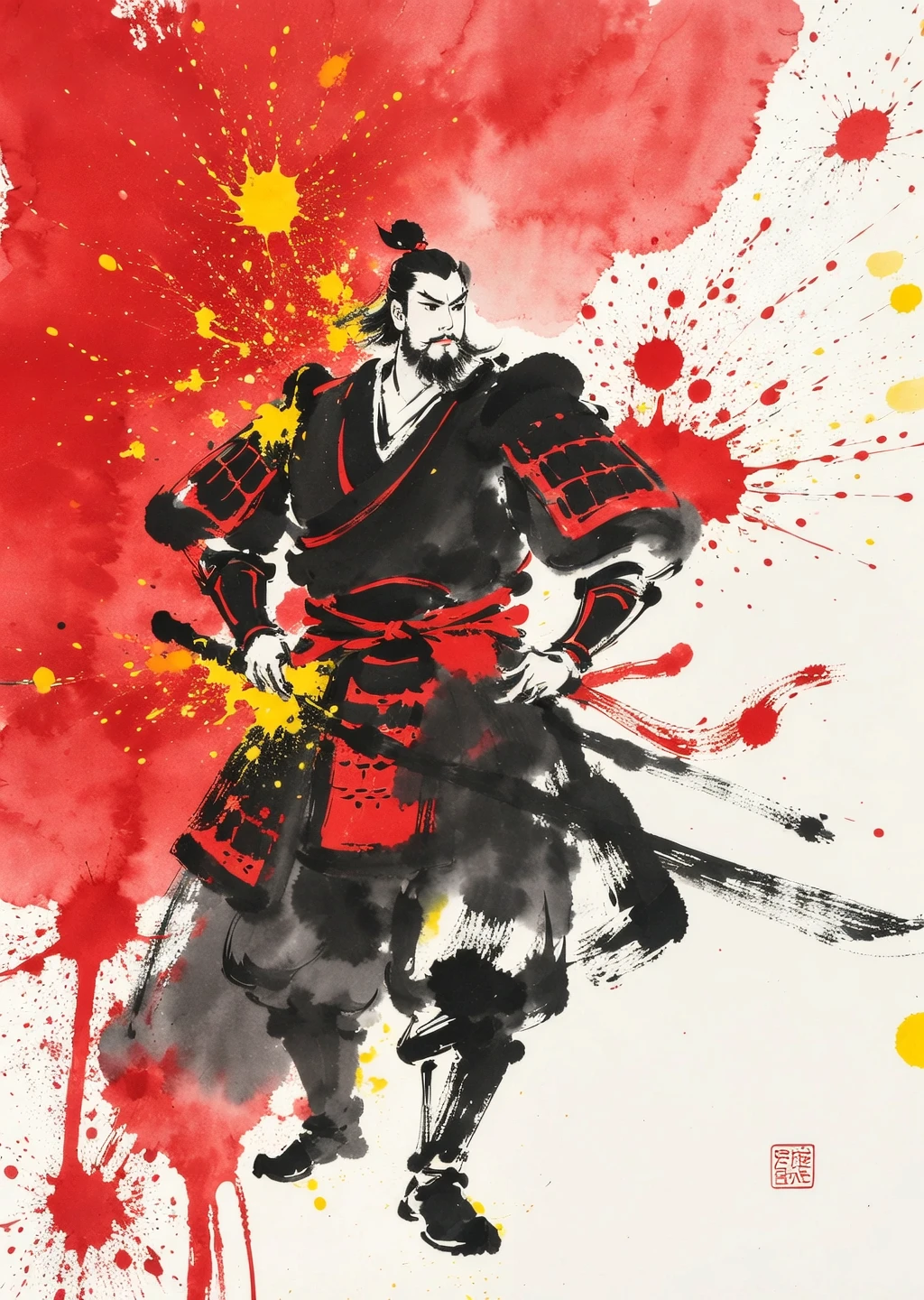
A Sumi-e Inspired Watercolor portrayal of warrior, blending traditional East Asian ink wash techniques with modern watercolor splashes. Use primarily red with accents of yellow for a minimalist yet expressive composition
Modèles associés
/filters:quality(82)/media/images/20260408104159_4c1hr4ym.webp)
/filters:quality(82)/media/images/20260408104205_99s4gqxu.webp)
/filters:quality(82)/media/images/20260408104222_y5iz96kb.webp)
/filters:quality(82)/media/images/20260408104214_334vajy7.webp)
/filters:quality(82)/media/images/20260408104158_jzbs7q2h.webp)
/filters:quality(82)/media/images/20260408104203_64hpvi1b.webp)
README
WAN 2.5 Text-to-Image Model
WAN 2.5 is a cutting-edge text-to-image model from Alibaba. It generates high-quality, detailed images directly from text prompts and supports multiple output resolutions.
What makes it stand out?
- High Fidelity: Wan 2.5 produces crisp, detailed images that capture complex scene descriptions and artistic styles.
- Creative Flexibility: From product design mockups to character art, Wan 2.5 supports diverse use cases and genres.
- Multiple Styles & Formats: Choose from photo-realistic, anime, sketch, or artistic rendering modes—adaptable to your creative vision.
- Customizable Size: Easily adjust width and height with simple sliders. Set the exact dimensions you need.
Designed For
- Design teams: Quick iterations on visuals, product concepts, and campaign mockups.
- Content creators: Generate unique visuals for blogs, social posts, and digital branding.
- Storytellers & artists: Visualize characters, scenes, and worlds from simple text prompts.
- Enterprises: Efficiently produce consistent visuals across marketing, training, and documentation.
Pricing
- Every image is just cost $0.03!!
Billing Rules
- Minimum charge: 1 image.
- Total cost = number of images × price per resolution.
How to Use
- Write your prompt.
- Submit your request.
- Preview and download the generated image.
Wan 2.5 Text To Image API — Quick start
Grab a WaveSpeedAI API key, then call POST https://api.wavespeed.ai/api/v3/alibaba/wan-2.5/text-to-image with your input as JSON. The endpoint returns a prediction id. Start polling the result endpoint around every 2 seconds, increase the interval for long-running tasks, and stop on any terminal status. On completed, read output values from data.outputs. Examples for Wan 2.5 Text To Image below.
HTTP example
set -euo pipefail

: "${WAVESPEED_API_KEY:?Set WAVESPEED_API_KEY}"

REQUEST_BODY=$(cat <<'JSON'
{
    "prompt": "A cinematic shot of a city at sunset, soft golden light",
    "size": "1024*1024",
    "enable_prompt_expansion": false
}
JSON
)

# 1. Submit the prediction.
SUBMIT_RESPONSE=$(curl --silent --show-error --fail-with-body \
  -X POST "https://api.wavespeed.ai/api/v3/alibaba/wan-2.5/text-to-image" \
  -H "Content-Type: application/json" \
  -H "Authorization: Bearer $WAVESPEED_API_KEY" \
  -d "$REQUEST_BODY")

TASK=$(printf '%s' "$SUBMIT_RESPONSE" | jq 'if has("data") then .data else . end')
PREDICTION_ID=$(printf '%s' "$TASK" | jq -r '.id')
if [ -z "$PREDICTION_ID" ] || [ "$PREDICTION_ID" = "null" ]; then
  printf 'Submission response did not contain a prediction id
' >&2
  exit 1
fi
RESULT_URL="https://api.wavespeed.ai/api/v3/predictions/$PREDICTION_ID/result"

# 2. Poll until the prediction finishes.
while true; do
  RESPONSE=$(curl --silent --show-error --fail-with-body "$RESULT_URL" \
    -H "Authorization: Bearer $WAVESPEED_API_KEY")
  RESULT=$(printf '%s' "$RESPONSE" | jq 'if has("data") then .data else . end')
  STATUS=$(printf '%s' "$RESULT" | jq -r '.status')
  case "$STATUS" in
    completed) printf '%s\n' "$RESULT" | jq '.outputs'; break ;;
    failed|cancelled|timeout|deleted) printf '%s\n' "$RESULT" | jq . >&2; exit 1 ;;
    *) sleep 2 ;;
  esac
done
Node.js example
const submitUrl = "https://api.wavespeed.ai/api/v3/alibaba/wan-2.5/text-to-image";
const apiKey = process.env.WAVESPEED_API_KEY;
if (!apiKey) throw new Error('Set WAVESPEED_API_KEY');

async function requestJson(url, options = {}) {
  const response = await fetch(url, options);
  if (!response.ok) throw new Error(await response.text());
  return response.json();
}

// 1. Submit the prediction.
const body = await requestJson(submitUrl, {
  method: "POST",
  headers: {
    "Authorization": `Bearer ${apiKey}`,
    "Content-Type": "application/json",
  },
  body: JSON.stringify({
        "prompt": "A cinematic shot of a city at sunset, soft golden light",
        "size": "1024*1024",
        "enable_prompt_expansion": false
}),
});
const task = body.data ?? body;
if (!task.id) throw new Error("Submission response did not contain a prediction id");
const resultUrl = `https://api.wavespeed.ai/api/v3/predictions/${task.id}/result`;

// 2. Poll until the prediction finishes.
while (true) {
  const resultBody = await requestJson(resultUrl, {
    headers: { "Authorization": `Bearer ${apiKey}` },
  });
  const result = resultBody.data ?? resultBody;
  if (result.status === "completed") {
    console.log(result.outputs);
    break;
  }
  if (["failed", "cancelled", "timeout", "deleted"].includes(result.status)) throw new Error(JSON.stringify(result));
  await new Promise(resolve => setTimeout(resolve, 2000));
}
Python example
import json
import os
import time
from urllib.request import Request, urlopen

api_key = os.environ["WAVESPEED_API_KEY"]
headers = {"Authorization": f"Bearer {api_key}", "Content-Type": "application/json"}
payload = {
    "prompt": "A cinematic shot of a city at sunset, soft golden light",
    "size": "1024*1024",
    "enable_prompt_expansion": False
}

def request_json(url, data=None):
    request = Request(url, data=data, headers=headers, method="POST" if data else "GET")
    with urlopen(request) as response:
        return json.load(response)

# 1. Submit the prediction.
body = request_json("https://api.wavespeed.ai/api/v3/alibaba/wan-2.5/text-to-image", json.dumps(payload).encode())
task = body.get("data", body)
if not task.get("id"):
    raise RuntimeError("Submission response did not contain a prediction id")
result_url = f"https://api.wavespeed.ai/api/v3/predictions/{task['id']}/result"

# 2. Poll until the prediction finishes.
while True:
    result_body = request_json(result_url)
    result = result_body.get("data", result_body)
    status = result.get("status")
    if status == "completed":
        print(result.get("outputs", []))
        break
    if status in {"failed", "cancelled", "timeout", "deleted"}:
        raise RuntimeError(result)
    time.sleep(2)
Wan 2.5 Text To Image API — Frequently asked questions
What is the Wan 2.5 Text To Image API?
Wan 2.5 Text To Image is a Alibaba model for image generation, exposed as a REST API on WaveSpeedAI. WAN 2.5 Text-to-Image turns text prompts into AI-generated images with the WAN 2.5 model for on-demand image creation. Ready-to-use REST inference API, best performance, no coldstarts, affordable pricing. You can call it programmatically or try it from the playground above.
How do I call the Wan 2.5 Text To Image API?
POST your input parameters to the model's REST endpoint (shown in the API tab of this playground) with your WaveSpeedAI API key in the Authorization header. Submission returns a prediction ID. Poll the result endpoint starting around every 2 seconds, increase the interval for long-running tasks, and stop on any terminal status. The playground generates Python, JavaScript, and cURL examples for submitting requests and polling results. Full request/response shape is documented at https://wavespeed.ai/docs/docs-api/alibaba/alibaba-wan-2.5-text-to-image.
How much does Wan 2.5 Text To Image cost per run?
Wan 2.5 Text To Image starts at $0.03 per run. That figure is the base price — the final charge scales with the parameters you set in the form (output size, length, count, references, or whatever knobs this model exposes), so a higher-quality or larger output costs more than a minimal one. The exact cost for your current input is shown live next to the Generate button before you submit, and the actual per-call charge is recorded on the prediction afterwards.
What inputs does Wan 2.5 Text To Image accept?
Key inputs: `prompt`, `size`, `seed`, `negative_prompt`, `enable_prompt_expansion`. The full JSON schema (types, defaults, allowed values) is rendered above the Generate button and mirrored in the API reference at https://wavespeed.ai/docs/docs-api/alibaba/alibaba-wan-2.5-text-to-image.
How long does Wan 2.5 Text To Image take to generate?
Reported generation time on WaveSpeedAI is around 12 seconds per request. This is an estimate, not a latency guarantee; queue time and input settings can change the total wait. live status is visible in the prediction record.
Can I use Wan 2.5 Text To Image outputs commercially?
Commercial usage rights depend on the model's license, set by its provider (Alibaba). Check the provider's applicable terms and WaveSpeedAI's Terms of Service before commercial use.
Plus de Alibaba
Tout voir- alibaba/happyhorse-1.0/image-to-videoImage to Video
- alibaba/happyhorse-1.0/reference-to-videoReference to Video
- alibaba/happyhorse-1.0/text-to-videoText to Video
- alibaba/happyhorse-1.0/video-editVideo Editing
- alibaba/happyhorse-1.0/video-extendVideo Extension
- alibaba/happyhorse-1.1/image-to-videoImage to Video
- alibaba/happyhorse-1.1/reference-to-videoReference to Video
- alibaba/happyhorse-1.1/text-to-videoText to Video
Plus de modèles Text to Image
Tout voir- bytedance/seedream-v5.0-proText to Image
- openai/gpt-image-2/text-to-imageText to Image
- google/nano-banana-pro/text-to-imageText to Image
- google/nano-banana-2/text-to-imageText to Image
- wavespeed-ai/z-image/turboText to Image
- bytedance/seedream-v4.5Text to Image
- alibaba/wan-2.7/text-to-imageText to Image
- alibaba/qwen-image-3.0/text-to-imageText to Image