
WaveSpeedAI vs BytePlus: The Smarter Way to Access ByteDance AI
Get ByteDance AI models without enterprise complexity. Compare WaveSpeedAI and BytePlus for Seedream, Kling, and Seedance access.
Introduction
BytePlus and WaveSpeedAI both offer access to ByteDance AI models, but they serve different workflows. BytePlus ModelArk is ByteDance’s cloud platform for teams that want to manage model access directly. WaveSpeedAI offers ByteDance models alongside models from other providers through one API.

The choice is less about avoiding an enterprise contract than the original draft suggested. BytePlus’s quick start describes an API key and a first call within minutes. The useful question is which platform’s model catalog, API flow, region, and support arrangements fit your project.
Overview Comparison Table
| Feature | BytePlus ModelArk | WaveSpeedAI |
|---|---|---|
| ByteDance model access | Direct access to supported models, subject to activation and region | Supported ByteDance models through WaveSpeedAI endpoints |
| Total models | ByteDance models and selected third-party models | A broader image, video, audio, and other model catalog |
| First API call | Create an API key and activate the model | Create an API key and select a model endpoint |
| Minimum commitment | Published pay-as-you-go pricing exists for supported models | Pay-per-use pricing is shown by model |
| Pricing model | Varies by model and output | Varies by model and output |
| API flow | ModelArk REST API; response depends on the task | REST submission followed by a prediction result |
| Region and support | Check the selected ModelArk region and account terms | Check the selected endpoint and WaveSpeedAI support terms |
BytePlus is not limited to ByteDance models: its ModelArk model list also includes providers such as DeepSeek. The two catalogs still differ, so check the specific model you need before choosing a platform.
Key Differentiators
Access Without a Mandatory Enterprise Process
BytePlus’s approach: Create a ModelArk API key, activate the model you need, and call its API in a supported region. Teams with additional infrastructure or procurement requirements can evaluate those arrangements separately. A weeks-long sales process is not a published prerequisite for every first call.
WaveSpeedAI’s approach: Select a listed model and call its WaveSpeedAI endpoint with one API key. That is useful when your application needs to try models from several providers. Access is not exclusive, and a model appearing on both platforms does not mean its endpoint parameters are interchangeable.
The Real Cost: Compare the Same Output
The original draft called BytePlus expensive without a comparable quote. For a concrete example, BytePlus’s published ModelArk pricing lists Seedream 4.5 at **$0.04 per output image**. WaveSpeedAI’s listed price for its Seedream 4.5 text-to-image endpoint was also $0.04 per image when checked on November 3, 2026.
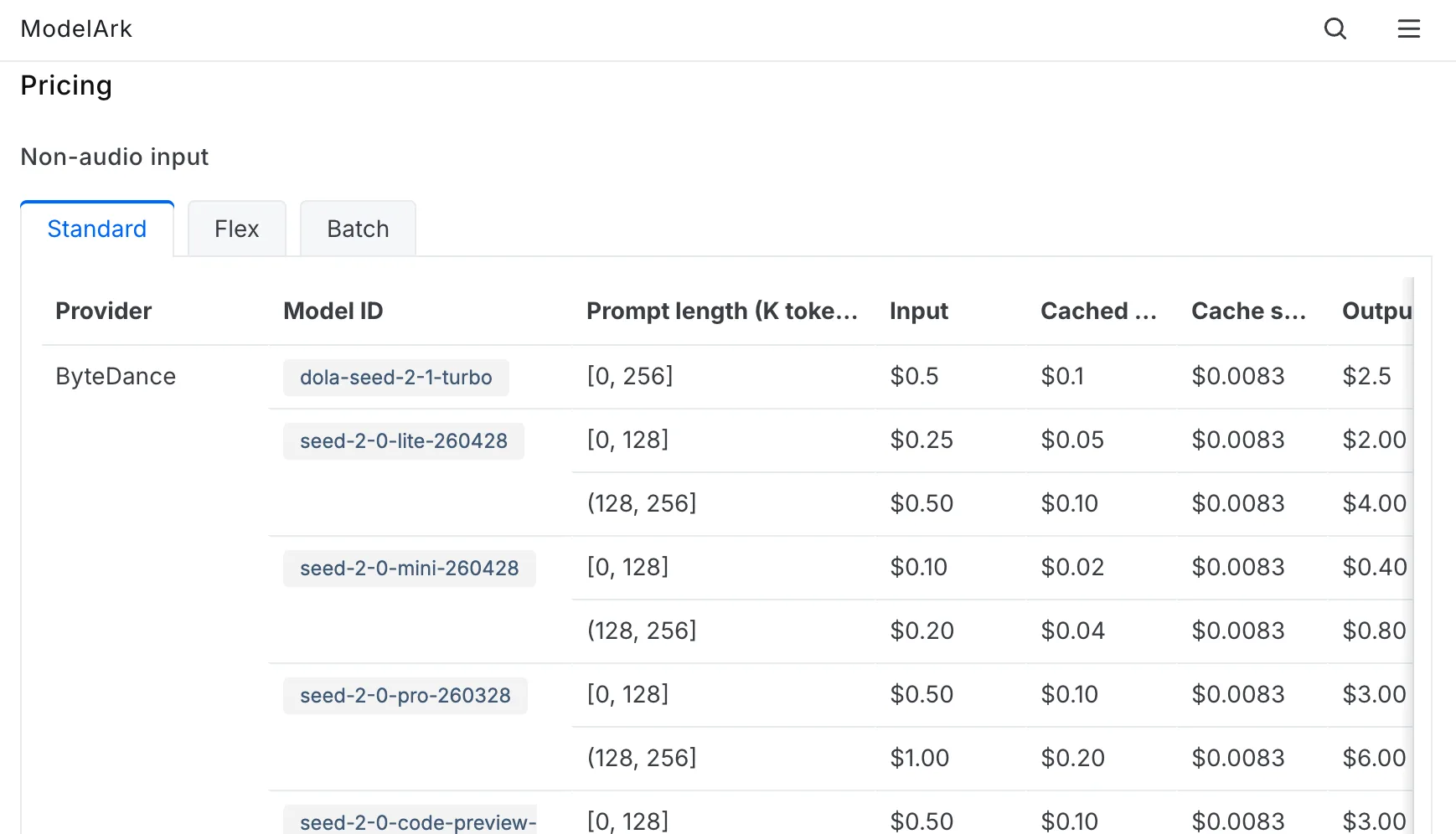
That is a price snapshot for one task, not a platform-wide cost verdict. For batches, editing, or video, compare the exact model, output count, settings, and current price on each platform.
Model Breadth
BytePlus: ModelArk includes ByteDance models and selected outside providers. It may be the simpler place to manage a project already built around ModelArk services.
WaveSpeedAI: Its catalog spans more model providers and media tasks under one account. That matters if your team routinely compares image and video models or changes providers within a product.
One correction matters here: Kling is a Kuaishou model, so it should not be listed as ByteDance technology.
Onboarding Time
Both platforms publish a self-service route. BytePlus adds a model activation step; WaveSpeedAI requires you to pick the right model-specific endpoint. Neither route supports a universal “2–4 weeks versus 5 minutes” claim. Account eligibility, region, and production approval can affect either team’s timeline.
Same Model, Two API Paths

Use Seedream 4.5 text-to-image as a small comparison task. Give both services the same prompt, request one image at a comparable size, and record the actual charge and time from submission to downloadable result.
- BytePlus: Activate
seedream-4-5-251128, then sendmodelandpromptto its image generation API. Check the supported region and read the returned image data. - WaveSpeedAI: Send
promptand the endpoint’s supportedsizetobytedance/seedream-v4.5. Save the prediction ID, query its result, and read the output URL when the task completes. The Seedream 4.5 API documentation shows that flow.
This check gives you a decision based on a task your team actually runs. Keep each platform’s request and response handling separate; moving between them takes more than changing a model name.
Use Case Recommendations
Choose BytePlus If You:
- Want to manage supported ByteDance models directly in ModelArk
- Already use BytePlus services or need its regional setup
- Need to evaluate its account-level controls or a negotiated arrangement
Choose WaveSpeedAI If You:
- Need to test ByteDance models alongside models from other providers
- Prefer one account and API flow across several generation tasks
- Want to compare model-specific prices before committing production traffic
Frequently Asked Questions
Can I use ByteDance models through WaveSpeedAI?
Yes, for the ByteDance models listed in its catalog. Check the exact endpoint and current availability. WaveSpeedAI is not the exclusive source of Seedream or Seedance.
What’s the difference between BytePlus and WaveSpeedAI’s ByteDance models?
They offer access through different platforms and APIs. Check the model version, input limits, output format, region, and terms for the specific endpoints you plan to use; the shared model family name alone does not establish identical behavior.
How does WaveSpeedAI keep costs low while BytePlus is expensive?
That premise does not hold for every task. The published Seedream 4.5 single-image prices above match. Compare a real workload before drawing a cost conclusion.
Can I start with WaveSpeedAI and migrate to BytePlus later?
Yes, but plan for integration work. You will need to change authentication, request fields, result handling, and possibly storage or regional settings. Test outputs again after migrating.
Conclusion
Choose BytePlus when direct ModelArk access, its supported regions, or its account controls fit the way your team already works.
Choose WaveSpeedAI when accessing and comparing models across providers is the more important part of the workflow.
For either choice, start with one real model and one real task. Check the current endpoint, price, output, and support terms before you scale it.
Previous posts:
Related Articles

Seedance 3.0 Rumors: Native Audio-Video Sync, Multi-Shot Storytelling, and What to Expect
GPT Image 2.6: What Is Confirmed, What Is Rumor, and What to Build On Today
Seedream 5.5: What to Expect, and How to Get Ready
Seedance 2.5 vs WAN 3.0 vs Kling 4.0: Specs, References and Price Compared
Kling 4.0 vs Kling 3.0: What Changed and How to Choose