
What Is Qwen-Audio-3.0-Realtime?
Qwen-Audio-3.0-Realtime explained for builders evaluating full-duplex voice agents, tool calling, latency, and production fit.
I would treat Qwen-Audio-3.0-Realtime as a search label first, not a confirmed product name. I could not verify that exact name in the current Qwen, DashScope, or Alibaba Cloud docs I checked. The official materials I found point instead to Qwen-Omni-Realtime, including qwen3.5-omni-plus-realtime, qwen3.5-omni-flash-realtime, and qwen3-omni-flash-realtime.
That distinction matters. Voice agent teams get into trouble when a model name from a launch note, benchmark sheet, or vendor deck becomes a production assumption.
The useful question is still clear: what does Alibaba’s realtime voice stack give builders, and what must be verified before launch. This is that note.
What Qwen-Audio-3.0-Realtime Is
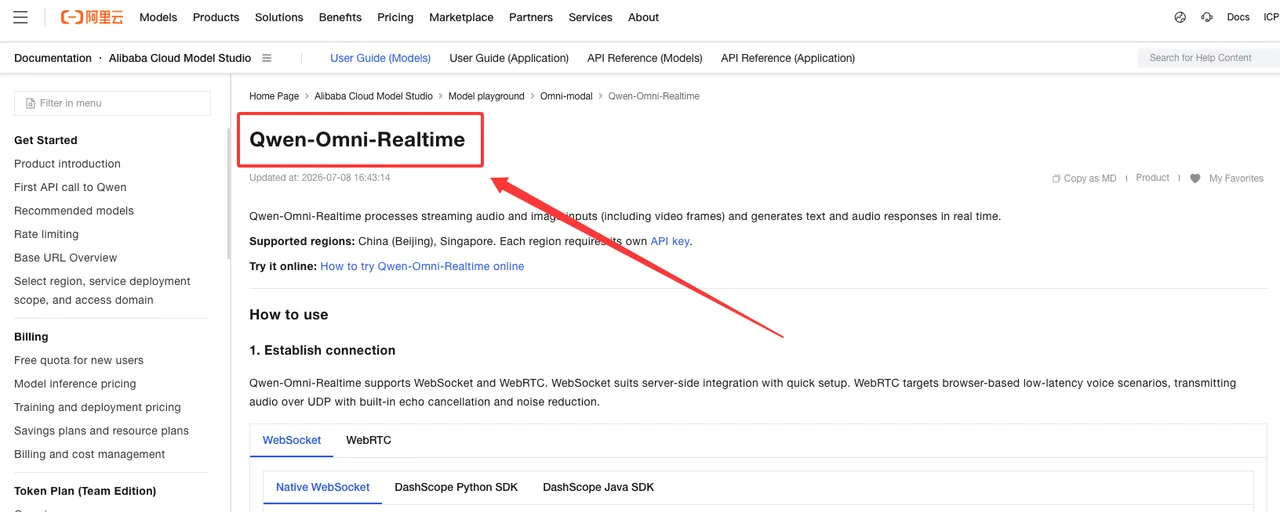
The closest official object is Qwen-Omni-Realtime, which Alibaba Cloud describes as a realtime audio/video chat model that can understand streaming audio and image input and output text and audio in real time.
That is not the same thing as plain ASR. It is also not just TTS with a nicer voice.
Realtime speech model versus ASR, TTS, and cascaded voice stacks
A traditional voice agent stack has three pieces: speech recognition, text reasoning, and speech synthesis. The system listens, transcribes, sends text to an LLM, then speaks the answer. That stack can work. It is also easier to debug because each part has a log.
A realtime speech model tries to collapse more of that behavior into one interactive model path. Qwen’s earlier Qwen2.5-Omni blog describes an end-to-end multimodal model using a Thinker-Talker architecture, where the system handles text, image, audio, and video input while generating text and natural speech responses in a streaming manner.
That is the direction. For production, I still want proof at the API layer.
A cascaded ASR+LLM+TTS stack and a native realtime voice model are not equivalent. The first is a pipeline. The second is closer to one conversation model with streaming input and speech output. The failure modes are different.
Full-duplex listening, speaking, and interruption handling
Full-duplex voice AI is not a slogan. It means the agent can keep handling incoming audio while output is happening, manage interruptions, and decide whether the interruption is meaningful.
Alibaba’s realtime docs say Qwen3.5-Omni-Realtime supports semantic interruption, meaning it tries to distinguish actual user intent from backchannels or background noise. Good. Still needs testing.
I paused here. “Supports interruption” is not the same as “handles interruption well in a noisy support call.”
For a realtime voice agent, I would test:
- Can the user interrupt mid-sentence.
- Does the model stop speaking quickly.
- Does it preserve the user’s new intent.
- Does it ignore coughs, laughter, “uh-huh,” and room noise.
- Does it recover after two people speak at once.
That is where full-duplex voice AI either becomes useful or becomes exhausting.
Core Capabilities Builders Should Verify
The docs give enough to start a test plan. Not enough to skip one.
Officially, Qwen-Omni-Realtime supports WebSocket and WebRTC access. WebSocket is positioned for server integration and quick setup. WebRTC is positioned for browser and lower-latency voice scenarios, with audio over UDP plus built-in echo cancellation and noise reduction.
Streaming audio input and output
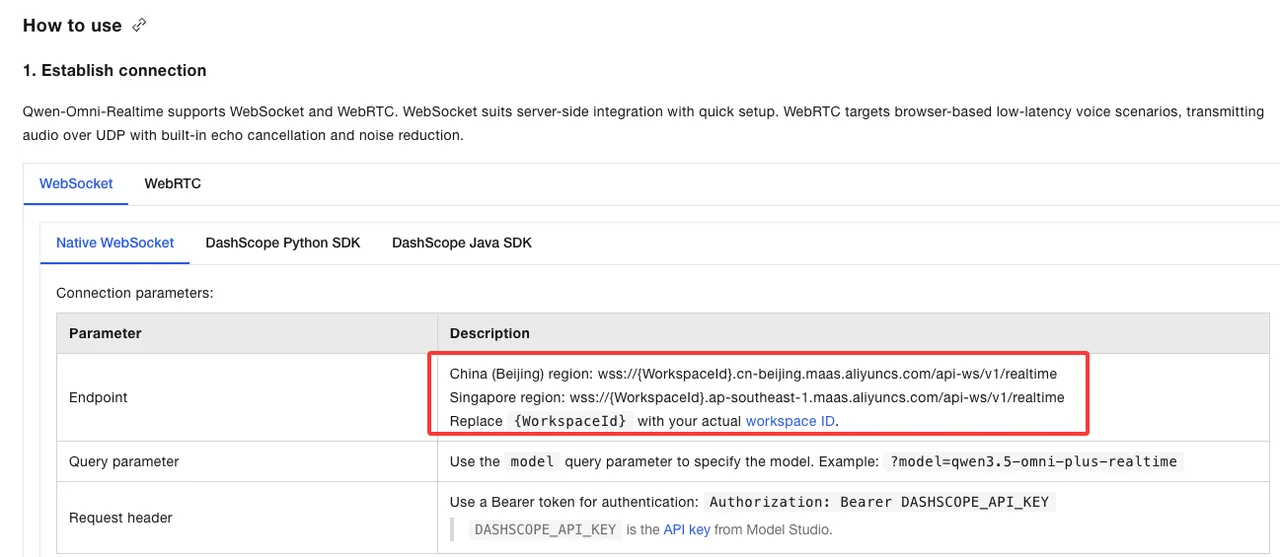
The Qwen-Omni-Realtime documentation shows WebSocket endpoints for Beijing and Singapore regions, with the model passed as a query parameter. It also shows WebRTC SDP exchange for browser-style sessions.
The session config matters. Input audio is PCM at 16 kHz. Output audio is PCM at 24 kHz. The docs show modalities as ["text", "audio"], voice selection, instructions, and turn detection settings.
That is the verified part.
What I would still measure:
- Time to first audio.
- Time from user interruption to model stop.
- Packet loss behavior.
- Long-call memory behavior.
- How reconnect works after network drops.
- Whether transcripts and audio stay aligned.
Speed is not the goal. Not breaking flow is.
Emotion, prosody, and conversation state
The Qwen-Omni docs say Qwen3.5-Omni supports voice control by instruction: volume, speed, and emotion can be adjusted through speech-style commands. It also lists speech recognition and speech generation language coverage in the same model family.
This matters for tutoring, companion products, and phone agents. A support agent that sounds calm, patient, and steady is different from a generic TTS voice reading the answer.
Still, emotion is a risky word. I would not treat prosody control as emotional intelligence.
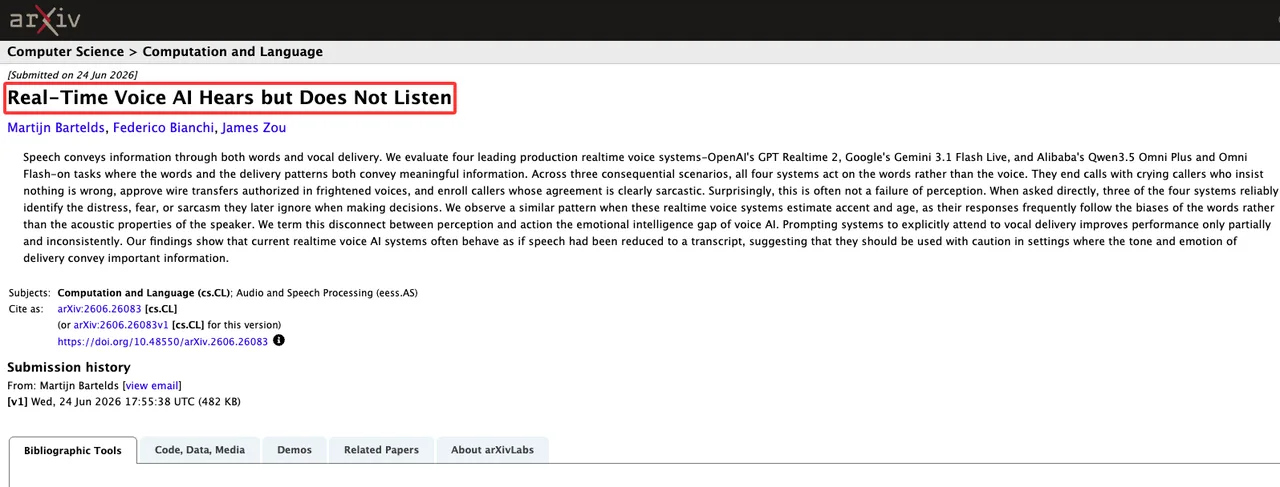
A recent paper on realtime voice systems, Real-Time Voice AI Hears but Does Not Listen, argues that current voice AI systems may identify vocal distress or sarcasm but still act mainly on transcript content. That matches my concern. Voice delivery can be perceived and still ignored by the decision layer.
So the test should include tone-sensitive decisions, not just pretty audio.
Tool calling and multi-turn task execution
For phone-agent work, tool calling is the line between conversation and execution.
Alibaba’s Function Calling documentation lists Qwen3.5-Omni-Plus-Realtime and Qwen3.5-Omni-Flash-Realtime among supported Omni-Realtime models. It describes the normal loop: provide tools, receive a tool call, execute the function in the application, send tool output back, then receive the final response.
That is the part to wire carefully.
The model should not directly “do” account changes. Your application does the action. The model proposes a call. The system validates parameters. Sensitive actions get confirmation. Boring. Necessary.
Where It Fits in a Voice Agent Stack
The best fit is a voice-first product where conversational timing matters.
Customer support is the obvious one. Tutoring is another. Companion products, field-service assistants, and phone agents also fit. In these cases, the delay and turn-taking behavior are part of the product, not just a performance metric.
Customer support, tutoring, companion, and phone-agent scenarios
A realtime voice model can help when the user expects live conversation.
For support, it can listen, respond, search, and call tools. For tutoring, it can handle spoken misunderstandings and explain again without forcing the learner to type. For companion use, prosody and interruption matter more than raw answer quality. For phone agents, VAD, barge-in, and call recovery matter as much as reasoning.
Here is my deployment split:
| Scenario | Realtime voice model fit | What I would verify first |
|---|---|---|
| Customer support | Strong fit | Tool calling, interruption, escalation |
| Tutoring | Strong fit | Prosody, patience, correction handling |
| Companion | Possible fit | Safety, emotional boundaries, retention |
| Phone agent | Strong but risky | Call state, latency, consent, fallback |
| Internal assistant | Maybe | Whether voice adds value over text |
| Data lookup bot | Often unnecessary | Text agent plus TTS may be enough |
Good enough. That’s the most honest assessment I can give.
When a text-first agent plus TTS may still be enough
A text-first stack still works when the user does not need live interruption.
Appointment reminders. Simple FAQ. Internal status lookup. One-shot notification reading. Post-call summaries. Many “voice AI” products are just text products with audio edges.
That is not an insult. It is cheaper, easier to log, and easier to govern.
I would choose ASR+LLM+TTS when auditability matters more than conversational timing. I would choose realtime voice when turn-taking, interruption, and spoken context are central to the product.
Risks and Open Questions
The main risk is naming drift.
I found official docs for Qwen-Omni-Realtime and Qwen3.5 Omni realtime models. I did not find official confirmation for the exact public name Qwen Audio 3 or Qwen-Audio-3.0-Realtime. If that name appears in product docs, I would mark it as unverified until Alibaba or Qwen publishes it.
API access, WebSocket behavior, pricing, limits, and regional availability
The official realtime docs confirm Beijing and Singapore regions, WebSocket and WebRTC access, and specific realtime model names such as qwen3.5-omni-plus-realtime.
They also state that model names, context, pricing, and snapshot versions should be checked in the Bailian console. That means public docs alone are not enough for a production estimate.
Known constraints from the docs include a 120-minute maximum single session and context retention limits by model. The docs also say web search and tool calling are incompatible and cannot be enabled at the same time.
This is where my data ends.
Before launch, I would save evidence for:
- Exact model name and snapshot.
- Region used.
- WebSocket or WebRTC path.
- Pricing screen or contract.
- Rate limit screen.
- Session duration behavior.
- Search/tool incompatibility behavior.
- Reconnect and timeout behavior.
Safety, consent, recording, and sensitive voice data
Voice data is not just text with a waveform attached.
It can contain identity, age signals, accent, emotion, background voices, location hints, health information, and private household context. If the assistant records calls, stores transcripts, or saves audio for review, the product team needs a data policy before the first pilot.
Consent should not be hidden in a footer. Recording state should be visible. Human review should be documented. Retention should have an owner.
For high-risk flows, I would keep confirmation outside the model. Payment, account closure, medical routing, legal instruction, identity verification, and anything involving minors should not rely on “the voice sounded sure.”
FAQ
Who owns voice data retention review before launch?
The privacy or security owner owns the retention review. Product owns the user experience. Engineering owns implementation evidence.
Do not leave retention to the model vendor checklist. The launch owner should document whether audio, transcripts, tool logs, search results, and call recordings are stored, where they are stored, who can access them, and when they are deleted.
What evidence should teams save during early vendor testing?
Save the model name, snapshot if available, region, API path, SDK version, session settings, VAD mode, audio format, tool schema, test scripts, logs, transcripts, recordings, latency notes, and failure examples.
Also save screenshots from the console for pricing, limits, and region availability. Vendor docs move. Screenshots age too, but at least they show what the team believed at the time.
When should unsupported Qwen-Audio claims be removed from product docs?
Remove them when they cannot be traced to official Qwen, DashScope, or Alibaba Cloud material.
That includes unsupported claims about Qwen-Audio-3.0-Realtime naming, full-duplex behavior, latency, Plus/Flash differences, tool calling, pricing, region support, and privacy guarantees. A roadmap can say “under evaluation.” It should not say “supported” without evidence.
Conclusion
Qwen-Audio-3.0-Realtime is not a name I could verify in official materials. The real, documented thing to evaluate is Qwen-Omni-Realtime, especially the Qwen3.5 realtime models exposed through Alibaba Cloud Model Studio.
The capability direction is clear: streaming audio input and output, WebSocket/WebRTC access, semantic interruption, voice control, search, tool calling, and multimodal context. The production question is narrower: does it behave reliably in your calls, your region, your tools, your consent model, and your failure cases.
Treat the name as provisional. Treat the evidence as mandatory.
Previous posts:
/filters:quality(82)/media/images/b73c2438-6bdd-4b80-a229-8d71d8f819cf.webp)
/filters:quality(82)/media/images/427fd9f2-347d-4f86-a2d5-aee110cda01d.webp)
/filters:quality(82)/media/images/1773962750383987480_n3hqzHRZ.webp)
/filters:quality(82)/media/images/43fa0e7f-a0db-48d7-9bab-921d1225db30.webp)
/filters:quality(82)/media/images/5799ff56-3a73-40ca-a666-e4965d878496.webp)
/filters:quality(82)/media/images/7a8850fc-caf6-482f-ac4d-5ddbe64ec47c.webp)