
Text to Video AI Leaderboard: How Builders Should Read It
Text to video leaderboard analysis for builders turning public rankings into API selection, testing, and routing decisions.
I’m Dora. I check a text to video leaderboard the same way I check a model launch post: useful, but not final. It tells me what changed in the market. It does not tell me what will survive inside my workflow.
If you are building an AI video feature into a SaaS product, ad tool, creator platform, or internal media pipeline, the leaderboard is not the decision. It is the alarm bell. Something moved. A model improved. A provider added audio. A cheaper endpoint became acceptable. Fine. Now the real work starts.
This piece is about how I read public rankings without letting them run my product roadmap. I am not going to reproduce a live table. Rankings move too fast, and copying them into an article is how stale content gets made. If I record a score or rank for an internal review, I save the date, screenshot the page, and keep the prompt set that triggered the review. Boring. Necessary.
What Text-to-Video Leaderboards Actually Measure
A leaderboard is a compression layer. It takes a messy thing - generated video quality - and turns it into a score, rank, Elo, win rate, preference share, or blended metric. That compression is useful. It is also lossy.
The first mistake is treating “top model” as if it means “best model for my product.” It usually means “best model under this benchmark’s scoring method, prompt set, sample settings, output format, and judge population.”
That is still information. Just not the whole decision.
Quality scores, arena results, latency, and output samples
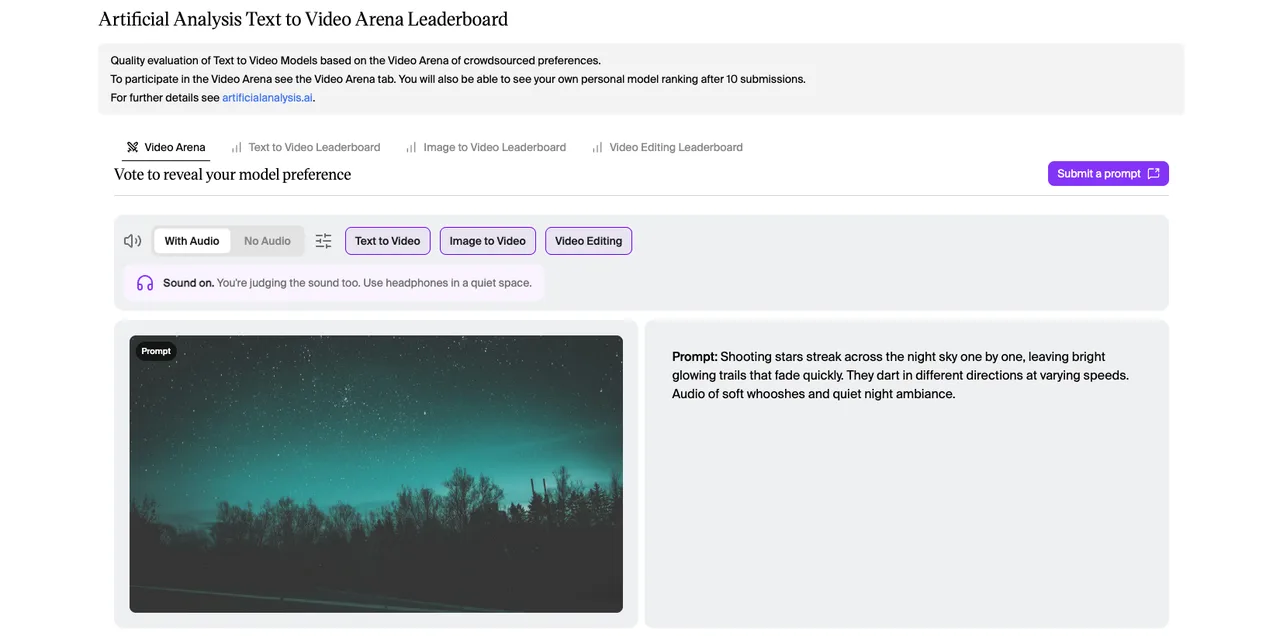
Public rankings usually measure some mix of four things.
- Quality scores try to summarize how good the video looks. Some systems use automated metrics. Some use human preference. Some combine style, motion, prompt matching, and artifact penalties. The Artificial Analysis Text to Video Arena, for example, is based on crowdsourced preferences from head-to-head video comparisons. That makes it useful for broad taste signals. It also means the ranking reflects what voters preferred under the arena setup.
- Arena results are good at answering one question: which output did people prefer when shown two choices? That is not the same as answering whether the model followed a brand constraint, stayed inside a safe content policy, or produced a clip your customer can legally use.
- Latency is a different signal. A slow model can still win a quality leaderboard. That does not help if your product promises fast preview generation. A 90-second wait may be fine for a polished cinematic export. It is painful inside an ad-iteration loop where users test 20 prompts before lunch. I counted. That number is not dramatic in a real production day.
- Output samples are the part I trust most, but only when I can inspect them. I want to see motion, scene continuity, identity retention, prompt adherence, camera behavior, text rendering if relevant, and whether artifacts appear in the last third of the clip. Many models start strong and then quietly fall apart. The last two seconds are where marketing demos often stop being useful.
A good AI video leaderboard gives me three things: a direction of travel, a shortlist, and a reason to rerun internal tests. It does not give me a shipping decision.
Why leaderboard rank does not equal production fit
Rank is not workflow fit.
A model can rank high because it makes visually pleasing clips. That does not mean it is stable enough for production. It may have weak API reliability, poor queue behavior, limited duration options, high variance across styles, unclear licensing, or unpredictable cost at batch scale.
Video generation has more failure surfaces than image generation. One image has composition, detail, style, prompt fit. A video adds time. Motion has to make sense. Subjects have to remain themselves. Objects should not drift. Camera movement should not fight the prompt. Lighting should not pulse unless asked. The model has to keep track of what it already made.
This is where leaderboard reading gets tricky. A model can win on cinematic appeal and lose on operational reliability. Another model can look less dramatic but produce steadier clips across a narrow product use case. For a builder, the second model may be better.
VBench is useful here because it breaks video generation into multiple dimensions instead of pretending quality is one number. The VBench benchmark suite describes evaluation dimensions such as subject consistency, motion smoothness, temporal flickering, spatial relationships, and video-condition consistency. That is closer to how production teams debug real failures.
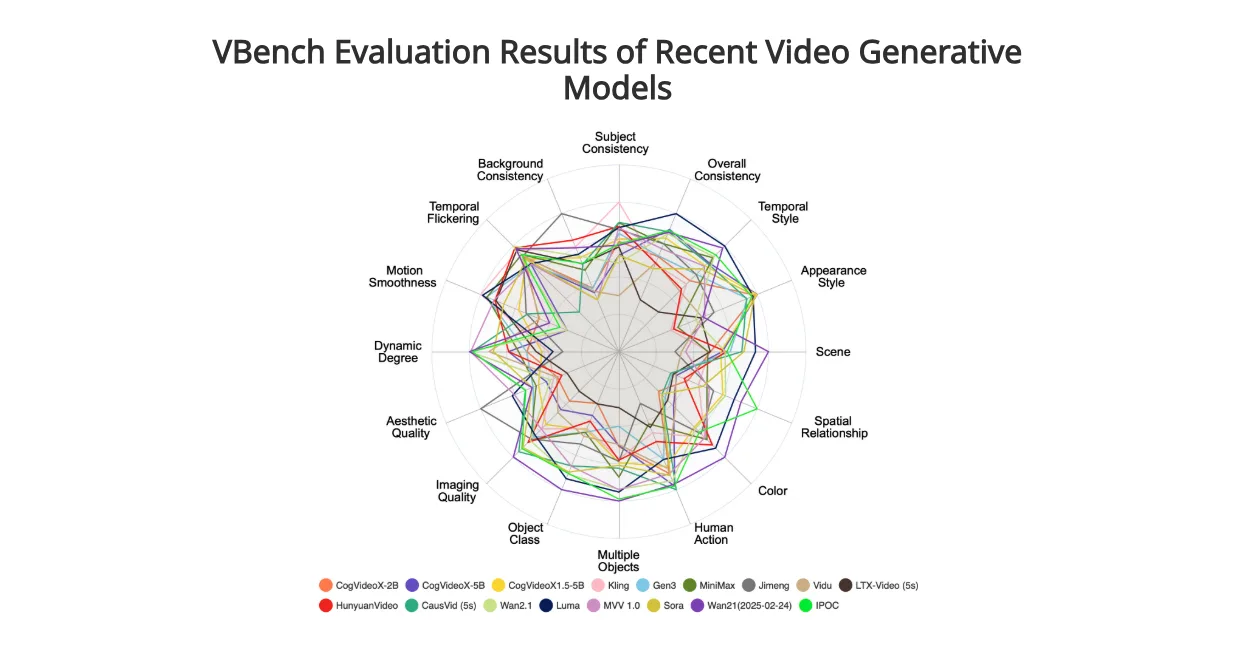 Still, a benchmark dimension is not your product requirement. It has to be mapped.
If you generate fashion product videos, body and clothing consistency matter more than fantasy motion range. If you generate social ads, first-frame clarity and prompt adherence may matter more than long scene continuity. If you generate storyboards, controllability may matter more than polish. The leaderboard does not know your product. Annoying, but fair.
How Builders Should Interpret Rankings
I use public rankings as a triage tool. Not as a procurement memo.
The workflow is simple: watch the leaderboard, mark movement, inspect samples, check provider details, rerun internal prompts, compare failure rates, then decide whether the routing map changes.
Not glamorous. It works.
Match comparison tasks to product use cases
The prompt suite matters more than the ranking.
If your product makes real estate fly-throughs, test interiors, windows, camera movement, reflections, and scale. If your product makes short-form ads, test products, hands, text overlays, scene cuts, and brand colors. If your product makes educational explainers, test diagram-like scenes, object persistence, pacing, and whether the model respects instruction order.
Do not test “a dragon flying over a city” unless your users generate dragons. I have nothing against dragons. They just keep sneaking into model demos as if they pay the invoices.
I split internal prompts into five buckets:
| Prompt Bucket | What It Tests | Example Failure |
|---|---|---|
| Product reality | Object shape, material, scale, brand constraints | Product mutates after 3 seconds |
| Motion control | Camera, action, pacing, physics | Camera ignores the requested movement |
| Temporal consistency | Identity, lighting, background continuity | Subject face or object texture drifts |
| Prompt adherence | Instruction following and constraint order | Model follows style but misses required action |
| Operational edge cases | Aspect ratio, duration, retries, batch variance | Same prompt produces unstable outputs |
This is where prompt adherence becomes concrete. It is not “did the video feel related to the prompt.” It is “did the model execute the required constraints in the order my product needs.” For builder teams, the most useful video model comparison is narrow. One workflow. One user promise. One output format. One acceptance rubric.
Broad leaderboards help you find candidates. Internal tests decide if they belong in your product.
Separate creative quality from operational reliability
Creative 011101001111111quality and operational reliability should be scored separately.
A beautiful clip that fails 30% of the time is not beautiful inside a paid workflow. A slightly less impressive model that finishes reliably, returns predictable errors, and supports your required duration may be the better production choice.
I usually separate model evaluation into two layers.
Creative quality asks:
- Does the model follow the prompt?
- Does the motion make sense?
- Does the subject stay consistent?
- Does the style match the request?
- Does the clip avoid visible artifacts?
- Does the last frame still look usable?
Operational reliability asks:
- How often does the request complete?
- How long does it take at median and p95?
- How often do retries work?
- Are errors classified clearly?
- Can the output be stored and traced?
- Does cost stay predictable at batch scale?
- Does the provider change behavior without enough notice?
EvalCrafter uses dimensions such as visual quality, text-video alignment, motion quality, and temporal consistency in its video generation benchmark. Those are useful creative signals. They still need to be paired with production telemetry.
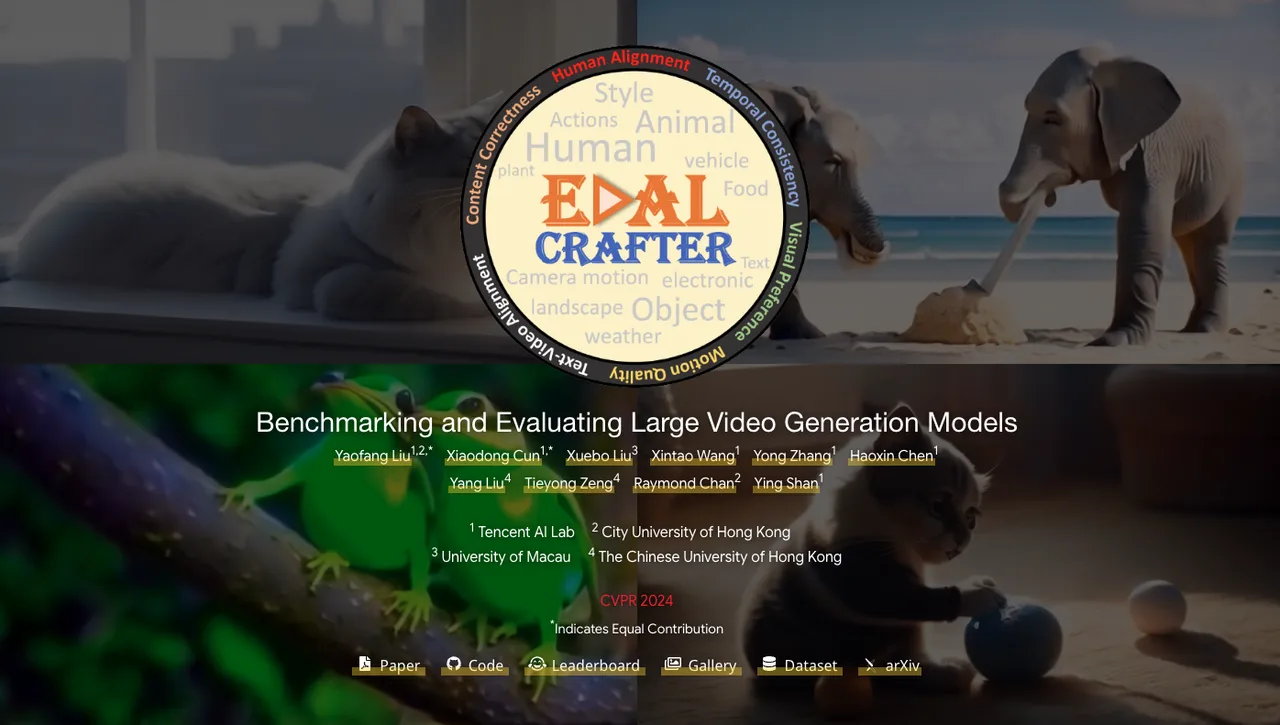
This is where many teams get stuck. They choose the model that wins the review meeting, not the model that survives the queue.
Having many tools is not the problem. Having to manage your tools is.
A public AI video leaderboard can tell you what to inspect. It cannot tell you how often your own users will hit timeout, moderation, quota, or storage issues.
Turning Leaderboards into Internal Tests
A leaderboard should trigger a test, not a migration.
That is the core rule.
If a model jumps meaningfully, appears in a new category, adds a capability your product needs, or becomes available through a provider you already use, then reopen evaluation. Not before. Constant model switching burns team attention. The distance between choice freedom and choice fatigue is short.
Build a prompt suite for your own workflow
Your internal prompt suite should be small enough to run often and specific enough to catch regressions.
I like 30 to 60 prompts for a recurring evaluation. More if the product has multiple user groups. Fewer if the product is still early and cost matters. Each prompt should represent a real job, not a demo fantasy.
For each prompt, store:
- Prompt text.
- Required aspect ratio and duration.
- Required input type, if any.
- Expected motion.
- Must-keep visual constraints.
- Disallowed artifacts.
- Minimum acceptable output.
- Known failure notes.
- Human reviewer rubric.
If your model supports image-to-video too, keep it in a separate suite. Do not mix text-only and image-conditioned tasks unless your product actually routes them together.
T2V-CompBench is worth reading because it focuses on compositional generation: attributes, actions, spatial relationships, object interactions, motion binding, and numeracy. The T2V-CompBench project is a reminder that prompt matching is not one thing. A model can understand the style but fail the relationship. It can animate the subject but miss the count. It can follow the action but lose the attribute.
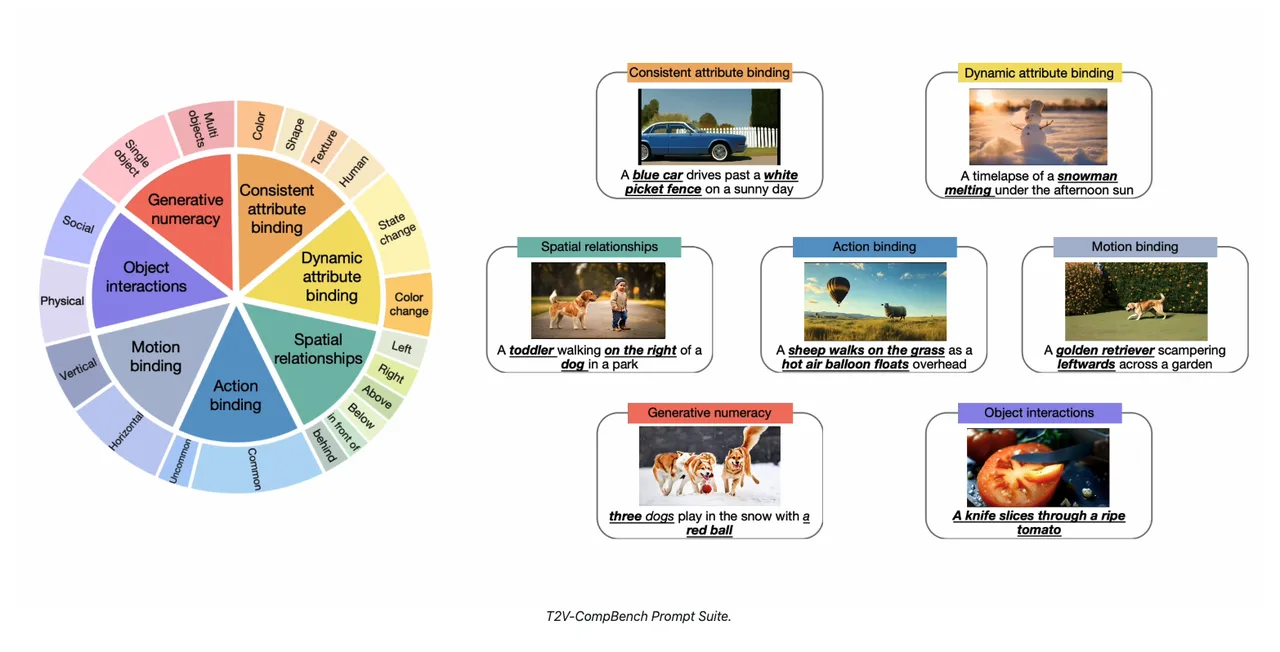
I would include at least one prompt for each of these:
- Attribute binding: “red bag beside blue shoes.”
- Spatial relation: “cup behind laptop, not in front.”
- Motion binding: “camera slowly pushes in while subject turns left.”
- Multi-object interaction: “person places box on shelf.”
- Negative constraint: “no text, no logo, no extra people.”
- Temporal consistency: “same character across the full clip.”
This looks fussy. It is cheaper than discovering the issue after users do.
For scoring, I use a 1-5 scale per dimension and one binary decision: usable or not usable. The binary decision matters. A clip can score a 4 on visual quality and still be unusable because it violates the product requirement.
So that is where the bottleneck was.
Track rank changes, regressions, and provider updates
Rank movement needs a threshold.
If you reopen evaluation every time a model moves one place, the team will never finish anything. If you ignore movement for months, the product falls behind. Pick the rule before the leaderboard changes.
I use this pattern:
| Trigger | Reopen Evaluation? | What To Do |
|---|---|---|
| New model enters top group for your category | Yes | Run the full internal prompt suite |
| Current model drops sharply across multiple boards | Yes | Rerun baseline and inspect provider changes |
| Small rank movement within confidence range | No | Log it, wait for more signal |
| Provider adds required feature | Yes | Run targeted tests for that feature |
| Cost or latency changes | Yes | Rerun production economics |
| Viral sample appears on social media | No | Save it, do not migrate from a demo |
If you cite a ranking internally, store the date. If you cite a score, store the screenshot. The Arena text-to-video leaderboard shows why this matters: rankings can include confidence intervals, vote counts, model ranks, lab ranks, and rank spread. A movement that looks dramatic in a screenshot may be less meaningful once confidence intervals are considered.
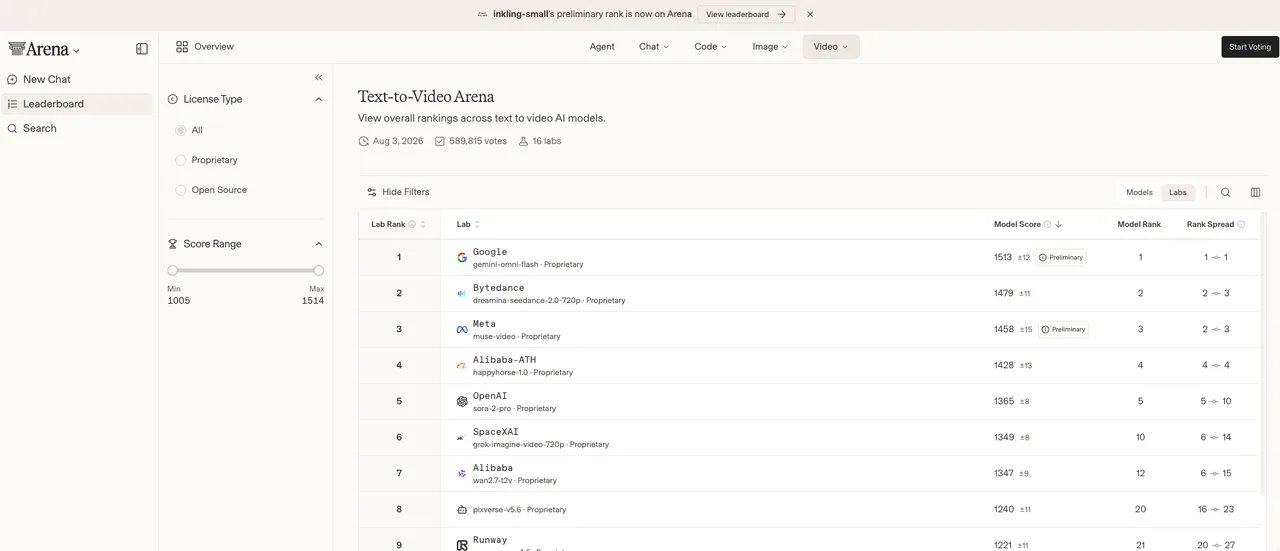
I do not treat all movement equally.
A model moving from rank 7 to rank 5 may not matter if the confidence bands overlap and the outputs are not relevant to your workflow. A model moving from “not usable” to “usable for product demos under 5 seconds” matters more, even if the public rank barely changes.
Provider updates are the quiet part. Watch release notes, API behavior, duration options, content policies, queue limits, pricing units, watermark rules, and output retention. A model can stay in the same leaderboard position while becoming better or worse for your product.
This is where automated checks help. Not full automation. Just enough to avoid forgetting.
Run a weekly or biweekly suite. Save outputs. Compare acceptance rate. Track median and p95 latency. Track retry rate. Track cost per accepted clip. Track artifact categories. Tag regressions by type: prompt adherence, temporal consistency, motion, identity, visual artifacts, policy, timeout, provider error.
The research literature is also a useful warning label. The CVPR 2024 paper on content bias in Fréchet Video Distance shows that video metrics can overemphasize frame quality relative to temporal realism.

That does not mean automated metrics are useless.
It means they are not enough.
Use metrics to narrow the field. Use human review to catch what metrics miss. Use production telemetry to decide whether the model belongs in your product.
FAQ
Who should approve a leaderboard-driven model switch?
The product owner should not approve it alone. The model owner should not approve it alone either.
A leaderboard-driven switch affects product behavior, cost, support, and sometimes legal or brand risk. I would require sign-off from the AI platform owner, the product owner for the workflow, and whoever owns customer-facing quality. If the use case touches regulated content, brand safety, or paid ad delivery, add policy or legal review.
The approval packet should include the leaderboard trigger, dated evidence, internal prompt results, cost comparison, latency comparison, failure categories, rollback plan, and customer impact. No rollback plan, no switch. Good enough. That is the most honest assessment I can give.
What ranking movement is large enough to reopen evaluation?
I would not use rank movement alone. Use rank movement plus relevance.
Reopen evaluation when a model moves into the top candidate group for your specific category, when your current model drops across multiple credible sources, when a provider adds a feature your product needs, or when samples show a clear improvement in a failure category you already track.
Do not reopen evaluation for one-place movement, social clips, or a leaderboard update without enough evidence. If the ranking change sits inside the confidence interval, log it and wait. If the movement lines up with your own failure categories, test it.
How should teams explain ranking uncertainty to stakeholders?
Say it plainly. A leaderboard is a market signal, not a production guarantee.
Tell stakeholders what the ranking measures, when it was checked, what it does not measure, and what internal tests are still required. If you show a rank, show the date. If the leaderboard includes confidence intervals or vote counts, mention them. If the score is based on human preference, say that it reflects preference under that arena, not your exact product workflow.
I would use this wording internally:
“The model moved enough to reopen evaluation. We are not switching yet. We are running our prompt suite against prompt adherence, temporal consistency, latency, retry rate, cost, and failure type. The decision will be based on accepted output rate, not public rank alone.”
That usually calms the room.
Mostly.
Conclusion
A text to video leaderboard is useful when it changes what you test. It is dangerous when it changes what you ship without testing.
For builders, the right workflow is simple: read the leaderboard, record the date, inspect samples, map the ranking to your use case, run your own prompt suite, separate creative quality from operational reliability, and only then update routing.
Public rankings answer public questions. Your product has private ones. Does the model follow your prompts? Does it keep subjects consistent? Does it handle motion without breaking the scene? Does it finish on time? Does it fail cleanly? Does cost stay predictable? Does support know what to say when it breaks?
That is the real video model comparison. Run it yourself. That will tell you more than the leaderboard row.
Previous posts:
Related Articles
/filters:quality(82)/media/images/1773962750383987480_n3hqzHRZ.webp)
Seedance 3.0 Rumors: Native Audio-Video Sync, Multi-Shot Storytelling, and What to Expect
GPT Image 2.6: What Is Confirmed, What Is Rumor, and What to Build On Today
Pika H3 Flex Explained: What It Is and How to Try the H3 Family via API
Seedream 5.5: What to Expect, and How to Get Ready
AI Lip Sync Dialogue Scenes with Seedance 2.5: Prompts and Settings