xAI Grok Imagine Image Quality Edit is a fast AI image editing model that edits and enhances images with high-quality visual output using a dedicated RunPod workflow. Ready-to-use REST inference API for photo retouching, creative image edits, product image enhancement, marketing assets, social media visuals, and professional AI image editing workflows with simple integration, no coldstarts, and affordable pricing.
Idle
$0.07per run·~14 / $1
ExamplesView all
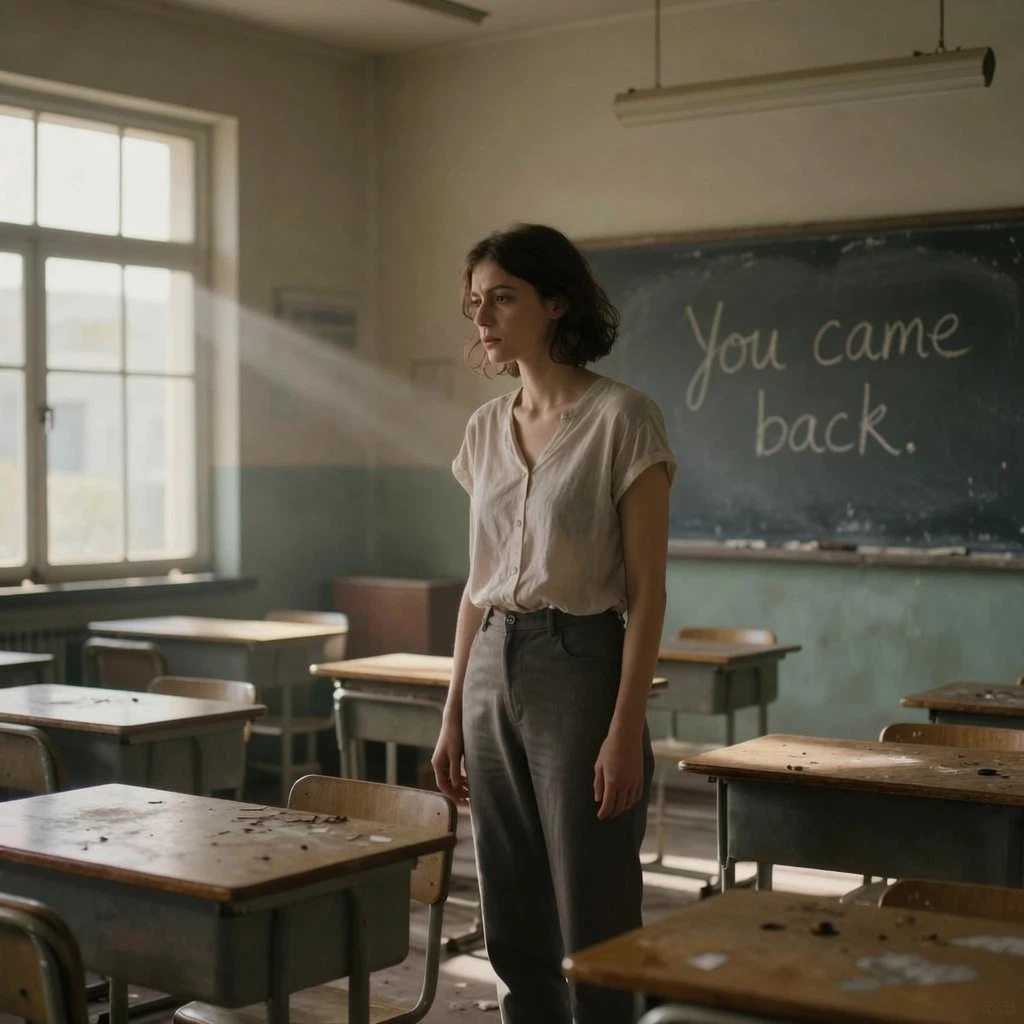
Add a faint handwritten chalk message on the old blackboard: “You came back.” Preserve the woman, classroom layout, desks, broken windows, sunlight beams, and muted color palette. The message should look old, dusty, and naturally written in chalk.
Related Models
/filters:quality(82)/media/images/1780290793452152876_raxttpql.webp)
grok-imagine-video-v1.5/image-to-video
image-to-video
/filters:quality(82)/media/images/1785749772128372417_bNuDMV5d.webp)
grok-imagine-video-v1.5/reference-to-video
image-to-video
/filters:quality(82)/media/images/1785749650076968608_eqPY8hqA.webp)
grok-imagine-video-v1.5/text-to-video
text-to-video
/filters:quality(82)/media/images/1786700074373690328_xjsCLU3L.webp)
grok-imagine-image-v2.0/edit
image-to-image
/filters:quality(82)/media/images/1786700032745264683_7hmyLV5d.webp)
grok-imagine-image-v2.0/text-to-image
text-to-image
/filters:quality(82)/media/images/1778662983454818472_O3IOiH7A.webp)
grok-imagine-image-quality/text-to-image
text-to-image
README
xAI Grok Imagine Image Quality Edit
xAI Grok Imagine Image Quality Edit edits an input image using natural-language instructions, with support for multiple aspect ratios, two resolution tiers, selectable output formats, and multi-image generation in a single request. It is suitable for image refinement, style changes, composition adjustments, product visuals, and other prompt-driven image editing workflows.
Why Choose This?
-
Prompt-based image editing Edit an existing image by describing the changes you want in natural language.
-
Quality-focused edit workflow Built for higher-quality image editing with support for resolution tiers and multiple output formats.
-
Flexible aspect ratios Choose
autoto preserve the source framing, or select a preset aspect ratio for a new composition. -
Multiple image generation Generate up to
4edited variations in one request withnum_images. -
Multiple output formats Export results as
jpeg,png, orwebp. -
Multi-image reference editing Provide up to
3input images in one request. -
Simple pricing Pricing depends on
resolution,num_images, and the number of input images.
Parameters
| Parameter | Required | Description |
|---|---|---|
| prompt | Yes | Text prompt describing the desired edit. |
| images | Yes | Input images to edit. Up to 3 reference images. |
| aspect_ratio | No | Output aspect ratio. Supported values: auto, 1:1, 16:9, 9:16, 4:3, 3:4, 3:2, 2:3. Default: auto. |
| resolution | No | Output resolution tier: 1k or 2k. Default: 1k. |
| num_images | No | Number of edited images to generate. Range: 1–4. Default: 1. |
| output_format | No | Output image format: jpeg, png, or webp. Default: jpeg. |
How to Use
- Upload your images — provide up to
3source images to edit from. - Write your prompt — describe what should change and what should remain consistent.
- Choose aspect ratio — keep
autoto follow the source framing, or pick a preset ratio if you want a different composition. - Choose resolution — use
1kfor lower cost or2kfor higher-quality output. - Set number of images — choose how many edited variations you want, from
1to4. - Choose output format — select
jpeg,png, orwebp. - Submit — run the model and download the edited images.
Example Prompt
Turn this product photo into a premium studio advertisement with soft cinematic lighting, a clean neutral background, realistic reflections, and polished commercial styling.
Pricing
Pricing is based on resolution, num_images, and the number of input images.
Per Image
| Resolution | Cost per Image |
|---|---|
| 1k | $0.07 |
| 2k | $0.09 |
Example Costs
| Resolution | 1 Image | 2 Images | 3 Images | 4 Images |
|---|---|---|---|---|
| 1k | $0.07 | $0.14 | $0.21 | $0.28 |
| 2k | $0.09 | $0.18 | $0.27 | $0.36 |
Extra Input Images
| Input images | Surcharge |
|---|---|
| 1 | included |
| 2 | +$0.01 |
| 3 | +$0.02 |
Billing Rules
1kcosts $0.07 per generated image2kcosts $0.09 per generated image- The first input image is included; each additional input image adds $0.01
- Total price = per-image price ×
num_images+ $0.01 × (input images − 1) aspect_ratioandoutput_formatdo not affect pricing
Best Use Cases
- Product photo refinement — Upgrade product shots for ads, listings, and brand materials.
- Style changes — Rework an image into a new visual style or mood.
- Composition adjustments — Use aspect ratio controls to adapt the edit for different formats.
- Creative variations — Generate multiple edited options in one run with
num_images. - Marketing creatives — Produce polished visuals for campaigns, social media, and presentations.
Pro Tips
- Be specific about what should change and what should stay the same.
- Use
autoaspect ratio when you want to preserve the original image framing. - Use
1kfor quick testing and2kfor higher-quality final outputs. - Increase
num_imageswhen you want multiple edit variations from the same prompt. - Choose
pngwhen image quality matters more than file size.
Notes
- Both
promptandimageare required. - This edit workflow supports one input image.
num_imagessupports values from1to4.aspect_ratiodefaults toauto.resolutiondefaults to1k.output_formatdefaults tojpeg.- Pricing depends only on
resolutionandnum_images.
Related Models
- xAI Grok Imagine Image Quality Text-to-Image — Generate images directly from prompts.
Grok Imagine Image Quality Edit API — Quick start
Grab a WaveSpeedAI API key, then call POST https://api.wavespeed.ai/api/v3/x-ai/grok-imagine-image-quality/edit with your input as JSON. The endpoint returns a prediction id. Start polling the result endpoint around every 2 seconds, increase the interval for long-running tasks, and stop on any terminal status. On completed, read output values from data.outputs. Examples for Grok Imagine Image Quality Edit below.
HTTP example
set -euo pipefail

: "${WAVESPEED_API_KEY:?Set WAVESPEED_API_KEY}"

REQUEST_BODY=$(cat <<'JSON'
{
    "prompt": "A cinematic shot of a city at sunset, soft golden light",
    "images": [
        "https://interactive-examples.mdn.mozilla.net/media/cc0-images/painted-hand-298-332.jpg"
    ],
    "aspect_ratio": "auto",
    "resolution": "1k",
    "num_images": 1,
    "output_format": "jpeg"
}
JSON
)

# 1. Submit the prediction.
SUBMIT_RESPONSE=$(curl --silent --show-error --fail-with-body \
  -X POST "https://api.wavespeed.ai/api/v3/x-ai/grok-imagine-image-quality/edit" \
  -H "Content-Type: application/json" \
  -H "Authorization: Bearer $WAVESPEED_API_KEY" \
  -d "$REQUEST_BODY")

TASK=$(printf '%s' "$SUBMIT_RESPONSE" | jq 'if has("data") then .data else . end')
PREDICTION_ID=$(printf '%s' "$TASK" | jq -r '.id')
if [ -z "$PREDICTION_ID" ] || [ "$PREDICTION_ID" = "null" ]; then
  printf 'Submission response did not contain a prediction id
' >&2
  exit 1
fi
RESULT_URL="https://api.wavespeed.ai/api/v3/predictions/$PREDICTION_ID/result"

# 2. Poll until the prediction finishes.
while true; do
  RESPONSE=$(curl --silent --show-error --fail-with-body "$RESULT_URL" \
    -H "Authorization: Bearer $WAVESPEED_API_KEY")
  RESULT=$(printf '%s' "$RESPONSE" | jq 'if has("data") then .data else . end')
  STATUS=$(printf '%s' "$RESULT" | jq -r '.status')
  case "$STATUS" in
    completed) printf '%s\n' "$RESULT" | jq '.outputs'; break ;;
    failed|cancelled|timeout|deleted) printf '%s\n' "$RESULT" | jq . >&2; exit 1 ;;
    *) sleep 2 ;;
  esac
done
Node.js example
const submitUrl = "https://api.wavespeed.ai/api/v3/x-ai/grok-imagine-image-quality/edit";
const apiKey = process.env.WAVESPEED_API_KEY;
if (!apiKey) throw new Error('Set WAVESPEED_API_KEY');

async function requestJson(url, options = {}) {
  const response = await fetch(url, options);
  if (!response.ok) throw new Error(await response.text());
  return response.json();
}

// 1. Submit the prediction.
const body = await requestJson(submitUrl, {
  method: "POST",
  headers: {
    "Authorization": `Bearer ${apiKey}`,
    "Content-Type": "application/json",
  },
  body: JSON.stringify({
        "prompt": "A cinematic shot of a city at sunset, soft golden light",
        "images": [
                "https://interactive-examples.mdn.mozilla.net/media/cc0-images/painted-hand-298-332.jpg"
        ],
        "aspect_ratio": "auto",
        "resolution": "1k",
        "num_images": 1,
        "output_format": "jpeg"
}),
});
const task = body.data ?? body;
if (!task.id) throw new Error("Submission response did not contain a prediction id");
const resultUrl = `https://api.wavespeed.ai/api/v3/predictions/${task.id}/result`;

// 2. Poll until the prediction finishes.
while (true) {
  const resultBody = await requestJson(resultUrl, {
    headers: { "Authorization": `Bearer ${apiKey}` },
  });
  const result = resultBody.data ?? resultBody;
  if (result.status === "completed") {
    console.log(result.outputs);
    break;
  }
  if (["failed", "cancelled", "timeout", "deleted"].includes(result.status)) throw new Error(JSON.stringify(result));
  await new Promise(resolve => setTimeout(resolve, 2000));
}
Python example
import json
import os
import time
from urllib.request import Request, urlopen

api_key = os.environ["WAVESPEED_API_KEY"]
headers = {"Authorization": f"Bearer {api_key}", "Content-Type": "application/json"}
payload = {
    "prompt": "A cinematic shot of a city at sunset, soft golden light",
    "images": [
        "https://interactive-examples.mdn.mozilla.net/media/cc0-images/painted-hand-298-332.jpg"
    ],
    "aspect_ratio": "auto",
    "resolution": "1k",
    "num_images": 1,
    "output_format": "jpeg"
}

def request_json(url, data=None):
    request = Request(url, data=data, headers=headers, method="POST" if data else "GET")
    with urlopen(request) as response:
        return json.load(response)

# 1. Submit the prediction.
body = request_json("https://api.wavespeed.ai/api/v3/x-ai/grok-imagine-image-quality/edit", json.dumps(payload).encode())
task = body.get("data", body)
if not task.get("id"):
    raise RuntimeError("Submission response did not contain a prediction id")
result_url = f"https://api.wavespeed.ai/api/v3/predictions/{task['id']}/result"

# 2. Poll until the prediction finishes.
while True:
    result_body = request_json(result_url)
    result = result_body.get("data", result_body)
    status = result.get("status")
    if status == "completed":
        print(result.get("outputs", []))
        break
    if status in {"failed", "cancelled", "timeout", "deleted"}:
        raise RuntimeError(result)
    time.sleep(2)
Grok Imagine Image Quality Edit API — Frequently asked questions
What is the Grok Imagine Image Quality Edit API?
Grok Imagine Image Quality Edit is a xAI model for image editing, exposed as a REST API on WaveSpeedAI. xAI Grok Imagine Image Quality Edit is a fast AI image editing model that edits and enhances images with high-quality visual output using a dedicated RunPod workflow. Ready-to-use REST inference API for photo retouching, creative image edits, product image enhancement, marketing assets, social media visuals, and professional AI image editing workflows with simple integration, no coldstarts, and affordable pricing. You can call it programmatically or try it from the playground above.
How do I call the Grok Imagine Image Quality Edit API?
POST your input parameters to the model's REST endpoint (shown in the API tab of this playground) with your WaveSpeedAI API key in the Authorization header. Submission returns a prediction ID. Poll the result endpoint starting around every 2 seconds, increase the interval for long-running tasks, and stop on any terminal status. The playground generates Python, JavaScript, and cURL examples for submitting requests and polling results. Full request/response shape is documented at https://wavespeed.ai/docs/docs-api/x-ai/x-ai-grok-imagine-image-quality-edit.
How much does Grok Imagine Image Quality Edit cost per run?
Grok Imagine Image Quality Edit starts at $0.07 per run. That figure is the base price — the final charge scales with the parameters you set in the form (output size, length, count, references, or whatever knobs this model exposes), so a higher-quality or larger output costs more than a minimal one. The exact cost for your current input is shown live next to the Generate button before you submit, and the actual per-call charge is recorded on the prediction afterwards.
What inputs does Grok Imagine Image Quality Edit accept?
Key inputs: `prompt`, `images`, `aspect_ratio`, `resolution`, `enable_base64_output`, `num_images`. The full JSON schema (types, defaults, allowed values) is rendered above the Generate button and mirrored in the API reference at https://wavespeed.ai/docs/docs-api/x-ai/x-ai-grok-imagine-image-quality-edit.
How long does Grok Imagine Image Quality Edit take to generate?
Reported generation time on WaveSpeedAI is around 22 seconds per request. This is an estimate, not a latency guarantee; queue time and input settings can change the total wait. live status is visible in the prediction record.
Can I use Grok Imagine Image Quality Edit outputs commercially?
Commercial usage rights depend on the model's license, set by its provider (xAI). Check the provider's applicable terms and WaveSpeedAI's Terms of Service before commercial use.
More from xAI
View all- x-ai/grok-2-imageText to Image
- x-ai/grok-imagine-image-quality/text-to-imageText to Image
- x-ai/grok-imagine-image-v2.0/editImage to Image
- x-ai/grok-imagine-image-v2.0/text-to-imageText to Image
- x-ai/grok-imagine-image/editImage to Image
- x-ai/grok-imagine-image/text-to-imageText to Image
- x-ai/grok-imagine-video-v1.5/image-to-videoImage to Video
- x-ai/grok-imagine-video-v1.5/reference-to-videoImage to Video
More Image to Image models
View all- bytedance/seedream-v5.0-pro/editImage to Image
- bytedance/seedream-v4.5/editImage to Image
- google/nano-banana-pro/editImage to Image
- alibaba/wan-2.7/image-editImage to Image
- openai/gpt-image-2/editImage to Image
- google/nano-banana-2/editImage to Image
- alibaba/qwen-image-3.0/editImage to Image
- alibaba/wan-2.7/image-edit-proImage to Image