P-H3-Image by Pruna AI, built on MiniMax H3 open weights, edits images from text instructions with reference-guided consistency, helping preserve faces, products, and important visual details. It is well suited for creative edits, branded assets, product imagery, and production workflows. Ready-to-use REST inference API.
Idle

$0.03per run·~33 / $1
ExamplesView all

Preserve the woman, identity, pose, hands, clothing, tent, and lighting. Transform only the stone tablet into a layered translucent resin artifact containing a glowing topographic map, fine metallic route lines, tiny embedded symbols, and subtle amber illumination inside the material. Preserve the original tablet shape and size.

The woman from <Picture 1> and the man from <Picture 2> sitting together in a booth of a retro American diner at night, sharing a milkshake, both keeping their exact faces and hair. Photorealistic, warm neon light.
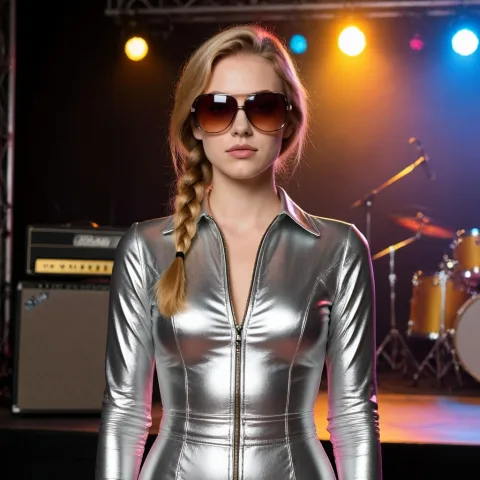
Transform her into a glamorous 1970s rock star wearing a metallic silver jumpsuit and oversized tinted sunglasses, standing backstage before a huge concert with colorful stage lights and vintage amplifiers. Keep her face and braided blonde hair unchanged.
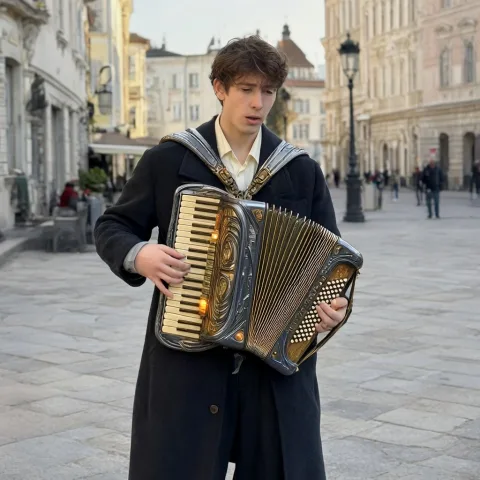
Preserve the musician, face, pose, hands, clothing, square, and camera angle. Transform only the accordion into an elegant biomechanical instrument with dark metallic ribs, ivory bellows, brass joints, subtle organic curves, and small glowing amber details. Keep the original instrument proportions and playing position.
Related Models





README
P-H3-Image Edit
P-H3-Image Edit edits an existing image from a text instruction using the MiniMax H3 open weights. The first input image is treated as the image to edit, while up to 8 additional images can be used as references for people, products, clothing, styles, and other visual details.
Generate edited images from 1k up to 4k with flexible aspect ratios and output formats.
Why Choose This?
- Instruction-based image editing — Describe what should change while using the first image as the main editing target.
- Multi-image references — Use up to
9images in one request, addressed as<Picture 1>,<Picture 2>, and so on. - Reference consistency — Use additional images to guide people, products, clothing, hairstyles, and visual details.
- Up to 4K output — Choose
1k,1.5k,2k,3k, or4k. - Flexible framing — Keep the first image's aspect ratio or choose a supported output ratio.
- Multiple output formats — Export as JPEG, PNG, or WebP.
Parameters
| Parameter | Required | Description |
|---|---|---|
| prompt | Yes | Edit instruction describing the desired result. Refer to input images as <Picture 1>, <Picture 2>, and so on. |
| images | Yes | Between 1 and 9 image URLs. The first image is edited; additional images are used as references. |
| aspect_ratio | No | Output aspect ratio: 1:1, 1:2, 2:1, 1:3, 3:1, 2:3, 3:2, 3:4, 4:3, 4:5, 5:4, 9:16, 16:9, 9:21, or 21:9. Defaults to the first image's aspect ratio. |
| resolution | No | Output resolution: 1k, 1.5k, 2k, 3k, or 4k. Default: 1k. |
| output_format | No | Output format: jpeg, png, or webp. Default: jpeg. |
| seed | No | Random seed. Use -1 for random generation. |
How to Use
- Upload images — Place the image to edit first, followed by any reference images.
- Write an edit instruction — Describe what should change and what should remain consistent.
- Reference images clearly — Use
<Picture 1>,<Picture 2>, and so on when explaining the role of each image. - Choose resolution — Select
1kthrough4kdepending on the required detail. - Choose framing optional — Keep the original aspect ratio or select another supported ratio.
- Submit — Generate and retrieve the edited image.
Pricing
Pricing is based on the selected resolution.
The first input image is included in the base price. Each additional input image costs $0.005.
| Resolution | Base Price |
|---|---|
| 1K | $0.03 |
| 1.5K | $0.045 |
| 2K | $0.06 |
| 3K | $0.12 |
| 4K | $0.18 |
Additional Images
| Additional Reference Images | Additional Cost |
|---|---|
| 1 | +$0.005 |
| 4 | +$0.020 |
| 8 | +$0.040 |
Aspect ratio, output format, and seed do not add separate charges.
Best Use Cases
- Portrait editing — Change clothing, environment, lighting, or styling while using the original person as the main subject.
- Product editing — Place products into new scenes or use reference images to guide product details.
- Multi-reference composition — Combine people, objects, styles, and visual elements from multiple sources.
- Advertising creatives — Adapt existing images for campaigns, promotions, and social content.
- Style transformation — Change materials, lighting, colors, or overall visual direction.
- High-resolution editing — Generate detailed final assets up to
4k.
Pro Tips
- Clearly describe what should change and what should remain unchanged.
- Refer to each important image explicitly, such as
the jacket from <Picture 2>. - Use fewer references when several images provide conflicting visual guidance.
- Use
3kor4kwhen finer detail is important. - Use a fixed
seedwhen comparing prompt changes or reference combinations. - Put short text that should appear in the image inside quotation marks.
Notes
promptandimagesare required.imagessupports between1and9inputs.- The first image is the primary image being edited.
- Additional images are treated as references.
aspect_ratiodefaults to the first image's aspect ratio.resolutiondefaults to1k.output_formatdefaults tojpeg.- Use
seed=-1for random seed selection. - Higher resolutions increase the base generation price.
- Additional reference images add a fixed
$0.005each after the first image.
Related Models
- P-H3-Image Text-to-Image — Generate images directly from text prompts.
- P-H3-Image Text-to-Image LoRA — Generate images with custom LoRA guidance.
- P-H3-Image Edit LoRA — Edit images with custom LoRA guidance.
- MiniMax H3 Text-to-Video — Generate videos with the MiniMax H3 model family.
P H3 Image Edit API — Quick start
Grab a WaveSpeedAI API key, then call POST https://api.wavespeed.ai/api/v3/wavespeed-ai/p-h3-image/edit with your input as JSON. The endpoint returns a prediction id. Start polling the result endpoint around every 2 seconds, increase the interval for long-running tasks, and stop on any terminal status. On completed, read output values from data.outputs. Examples for P H3 Image Edit below.
HTTP example
set -euo pipefail

: "${WAVESPEED_API_KEY:?Set WAVESPEED_API_KEY}"

REQUEST_BODY=$(cat <<'JSON'
{
    "prompt": "A cinematic shot of a city at sunset, soft golden light",
    "images": [
        "https://interactive-examples.mdn.mozilla.net/media/cc0-images/painted-hand-298-332.jpg"
    ],
    "aspect_ratio": "1:1",
    "resolution": "1k",
    "output_format": "jpeg"
}
JSON
)

# 1. Submit the prediction.
SUBMIT_RESPONSE=$(curl --silent --show-error --fail-with-body \
  -X POST "https://api.wavespeed.ai/api/v3/wavespeed-ai/p-h3-image/edit" \
  -H "Content-Type: application/json" \
  -H "Authorization: Bearer $WAVESPEED_API_KEY" \
  -d "$REQUEST_BODY")

TASK=$(printf '%s' "$SUBMIT_RESPONSE" | jq 'if has("data") then .data else . end')
PREDICTION_ID=$(printf '%s' "$TASK" | jq -r '.id')
if [ -z "$PREDICTION_ID" ] || [ "$PREDICTION_ID" = "null" ]; then
  printf 'Submission response did not contain a prediction id
' >&2
  exit 1
fi
RESULT_URL="https://api.wavespeed.ai/api/v3/predictions/$PREDICTION_ID/result"

# 2. Poll until the prediction finishes.
while true; do
  RESPONSE=$(curl --silent --show-error --fail-with-body "$RESULT_URL" \
    -H "Authorization: Bearer $WAVESPEED_API_KEY")
  RESULT=$(printf '%s' "$RESPONSE" | jq 'if has("data") then .data else . end')
  STATUS=$(printf '%s' "$RESULT" | jq -r '.status')
  case "$STATUS" in
    completed) printf '%s\n' "$RESULT" | jq '.outputs'; break ;;
    failed|cancelled|timeout|deleted) printf '%s\n' "$RESULT" | jq . >&2; exit 1 ;;
    *) sleep 2 ;;
  esac
done
Node.js example
const submitUrl = "https://api.wavespeed.ai/api/v3/wavespeed-ai/p-h3-image/edit";
const apiKey = process.env.WAVESPEED_API_KEY;
if (!apiKey) throw new Error('Set WAVESPEED_API_KEY');

async function requestJson(url, options = {}) {
  const response = await fetch(url, options);
  if (!response.ok) throw new Error(await response.text());
  return response.json();
}

// 1. Submit the prediction.
const body = await requestJson(submitUrl, {
  method: "POST",
  headers: {
    "Authorization": `Bearer ${apiKey}`,
    "Content-Type": "application/json",
  },
  body: JSON.stringify({
        "prompt": "A cinematic shot of a city at sunset, soft golden light",
        "images": [
                "https://interactive-examples.mdn.mozilla.net/media/cc0-images/painted-hand-298-332.jpg"
        ],
        "aspect_ratio": "1:1",
        "resolution": "1k",
        "output_format": "jpeg"
}),
});
const task = body.data ?? body;
if (!task.id) throw new Error("Submission response did not contain a prediction id");
const resultUrl = `https://api.wavespeed.ai/api/v3/predictions/${task.id}/result`;

// 2. Poll until the prediction finishes.
while (true) {
  const resultBody = await requestJson(resultUrl, {
    headers: { "Authorization": `Bearer ${apiKey}` },
  });
  const result = resultBody.data ?? resultBody;
  if (result.status === "completed") {
    console.log(result.outputs);
    break;
  }
  if (["failed", "cancelled", "timeout", "deleted"].includes(result.status)) throw new Error(JSON.stringify(result));
  await new Promise(resolve => setTimeout(resolve, 2000));
}
Python example
import json
import os
import time
from urllib.request import Request, urlopen

api_key = os.environ["WAVESPEED_API_KEY"]
headers = {"Authorization": f"Bearer {api_key}", "Content-Type": "application/json"}
payload = {
    "prompt": "A cinematic shot of a city at sunset, soft golden light",
    "images": [
        "https://interactive-examples.mdn.mozilla.net/media/cc0-images/painted-hand-298-332.jpg"
    ],
    "aspect_ratio": "1:1",
    "resolution": "1k",
    "output_format": "jpeg"
}

def request_json(url, data=None):
    request = Request(url, data=data, headers=headers, method="POST" if data else "GET")
    with urlopen(request) as response:
        return json.load(response)

# 1. Submit the prediction.
body = request_json("https://api.wavespeed.ai/api/v3/wavespeed-ai/p-h3-image/edit", json.dumps(payload).encode())
task = body.get("data", body)
if not task.get("id"):
    raise RuntimeError("Submission response did not contain a prediction id")
result_url = f"https://api.wavespeed.ai/api/v3/predictions/{task['id']}/result"

# 2. Poll until the prediction finishes.
while True:
    result_body = request_json(result_url)
    result = result_body.get("data", result_body)
    status = result.get("status")
    if status == "completed":
        print(result.get("outputs", []))
        break
    if status in {"failed", "cancelled", "timeout", "deleted"}:
        raise RuntimeError(result)
    time.sleep(2)
P H3 Image Edit API — Frequently asked questions
What is the P H3 Image Edit API?
P H3 Image Edit is a WaveSpeedAI model for image editing, exposed as a REST API on WaveSpeedAI. P-H3-Image by Pruna AI, built on MiniMax H3 open weights, edits images from text instructions with reference-guided consistency, helping preserve faces, products, and important visual details. It is well suited for creative edits, branded assets, product imagery, and production workflows. Ready-to-use REST inference API. You can call it programmatically or try it from the playground above.
How do I call the P H3 Image Edit API?
POST your input parameters to the model's REST endpoint (shown in the API tab of this playground) with your WaveSpeedAI API key in the Authorization header. Submission returns a prediction ID. Poll the result endpoint starting around every 2 seconds, increase the interval for long-running tasks, and stop on any terminal status. The playground generates Python, JavaScript, and cURL examples for submitting requests and polling results. Full request/response shape is documented at https://wavespeed.ai/docs/docs-api/wavespeed-ai/p-h3-image-edit.
How much does P H3 Image Edit cost per run or per second?
P H3 Image Edit starts at $0.03 per run or per second. That figure is the base price — the final charge scales with the parameters you set in the form (output size, length, count, references, or whatever knobs this model exposes), so a higher-quality or larger output costs more than a minimal one. The exact cost for your current input is shown live next to the Generate button before you submit, and the actual per-call charge is recorded on the prediction afterwards.
What inputs does P H3 Image Edit accept?
Key inputs: `prompt`, `images`, `aspect_ratio`, `resolution`, `seed`, `output_format`. The full JSON schema (types, defaults, allowed values) is rendered above the Generate button and mirrored in the API reference at https://wavespeed.ai/docs/docs-api/wavespeed-ai/p-h3-image-edit.
How do I get started with the P H3 Image Edit API?
Sign up for a free WaveSpeedAI account to claim starter credits, copy your API key from /accesskey, then call the endpoint shown in the API tab of the playground. The playground also auto-generates a code sample in Python, JavaScript, or cURL for the parameters you've set.
Can I use P H3 Image Edit outputs commercially?
Commercial usage rights depend on the model's license, set by its provider (WaveSpeedAI). Check the provider's applicable terms and WaveSpeedAI's Terms of Service before commercial use.
More from WaveSpeed
View all- wavespeed-ai/ace-stepAI Music Generation
- wavespeed-ai/ace-step-1.5AI Music Generation
- wavespeed-ai/ai-age-filterImage Effects
- wavespeed-ai/ai-breast-expansionImage Effects
- wavespeed-ai/ai-celebrity-look-alike-finderImage Effects
- wavespeed-ai/ai-clothes-changerImage Effects
- wavespeed-ai/ai-dog-selfieImage Effects
- wavespeed-ai/ai-dog-selfie-videoVideo Effects
More Image Editing models
View all- bytedance/seedream-v5.0-pro/editImage Editing
- bytedance/seedream-v4.5/editImage Editing
- google/nano-banana-pro/editImage Editing
- alibaba/wan-2.7/image-editImage Editing
- openai/gpt-image-2/editImage Editing
- google/nano-banana-2/editImage Editing
- alibaba/qwen-image-3.0/editImage Editing
- alibaba/wan-2.7/image-edit-proImage Editing