MaxClaw Use Cases: 7 Ways to Put Your AI Agent to Work
From daily research briefs to automated Slack reports — discover 7 practical MaxClaw use cases you can set up today, no coding required.
Hi, I’m Dora. A few weeks ago, I caught myself doing the same morning dance: open calendar, skim three inboxes, scroll Slack, check a couple dashboards, then try to remember the one doc I promised to update. None of this is hard work, but it’s the kind that eats edges off your day. I’d seen Maxclaw mention enough times that I finally tried it, not because I wanted a new toy, but because these edges add up.
What follows isn’t a feature tour. It’s how I put Maxclaw to work in small, steady ways. Consider these maxclaw use cases as a field note from a week of trial, mistake, and a few quiet wins. If you’re already surrounded by AI tools and the volume is too high, this is the gentler version: systems that reduce clicks, not personality.

Use Case 1 — Morning Briefing Agent
What it does, how to set it up
I wanted one message that lands by 8:15 a.m. with only what I need: today’s meetings (with links), unread mentions in Slack, top three metrics from analytics, and one nudge from my task list.
What it does: Every weekday morning, Maxclaw pulls my Google Calendar, scans Slack mentions from the last 24 hours, grabs a daily snapshot from a metrics endpoint, and surfaces one task due today. It arrives as a single note in my inbox and a DM in Slack. The tone is brief. No fluff.
Setup (took about 40 minutes):
- Connected Google Calendar (OAuth) and set read-only scope.
- Added Slack via a bot token with mentions: read and channels: history. The official Slack bot permissions guide helped.
- Pointed Maxclaw to a tiny metrics API I already had (just a GET with a key): you could use a Google Sheet if that’s your world.
- Linked my tasks from Todoist using their API: one item due today gets included.
- Wrote a short system prompt: “Be concise. Bullet the day. Include links. No congratulations.”
First morning, it was… fine. The second morning, I noticed I wasn’t grazing across five tabs. That didn’t save raw minutes at first, but it cut the mental shuffling. By day four, it probably saved me 10–12 minutes and a bit of cortisol. Limits: if Slack is noisy, the mentions can crowd out the essentials: I capped them at three with a ‘see more’ link.
Use Case 2 — Meeting Prep & Summarizer
I don’t love going into meetings blind, but I also don’t love over-prep. I set up a small flow: 30 minutes before a meeting, Maxclaw drafts a prep card, agenda, names, last three threads related to the topic, and a one-paragraph context from the relevant doc. After the meeting, it listens to the recording and drops action items and decisions into a shared note doc.
What helped: tying it to the calendar description. If the event title includes a Jira ticket or a doc link, Maxclaw grabs it and builds from there. If there’s nothing, it defaults to a light prep: attendees, recent email threads with those people (subject lines only), and one suggested question to unstick the conversation.
I tested this across six meetings in early March. Two were great, prep matched reality. Two were decent. Two missed the mark because the calendar info was vague. Practical fix: I now add one line in the event description. That small habit shift made the summaries more useful than decorative. Bonus: I set a rule to highlight only action items with owners: everything else goes into a “notes” section, so it doesn’t pretend to be more decisive than we were.
Limits: if you rely on live transcription, double-check time zones and permissions. Also, this won’t replace a real agenda. It nudges you toward one.
Use Case 3 — Customer Support Bot on Telegram
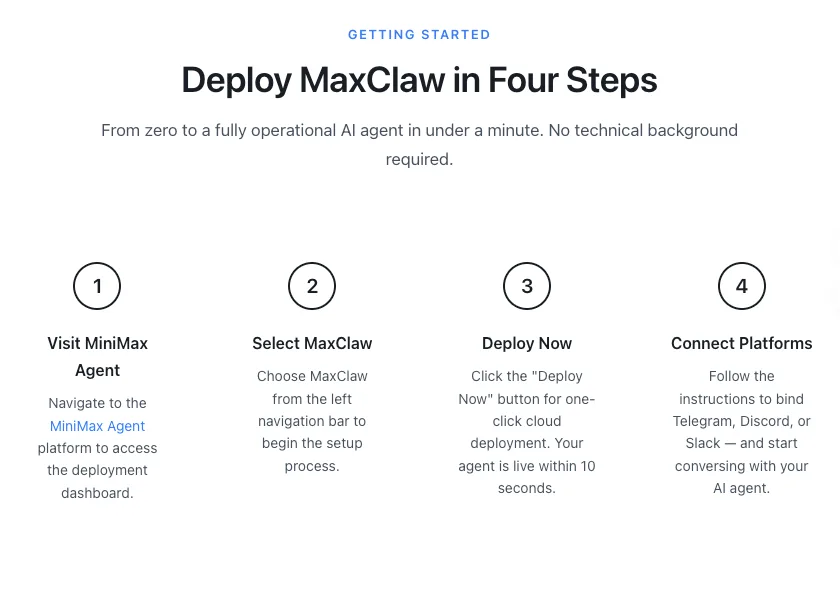
I have a quiet support channel on Telegram for a small product. People ask the same four questions over and over. I wired Maxclaw to a Telegram bot (via BotFather) and gave it a small, curated FAQ plus three policies (refund, outage, escalation).
The bot handles first responses, suggests links, and tags the conversation if it looks like billing or account issues (those still need a human). In a typical week, it answers 60–70% of questions well enough on the first try. When it’s unsure, it offers two clarifying options instead of guessing.
Set up took an afternoon:
- Created a Telegram bot and token.
- Connected Maxclaw’s webhook to the bot’s updates.
- Loaded a 12-page mini knowledge base (pre-cleaned for clarity: short Qs, short As).
- Added a simple handoff: if three back-and-forths pass without a resolution, tag me and shift to email.
The win wasn’t just speed, it was tone. I asked for plain language and no promises. People still feel heard. Limits: images and file uploads are clunky, and Telegram usernames don’t always map to accounts, so I avoid account-specific actions here. For that, I route to email.
Use Case 4 — Internal Knowledge Q&A (Enterprise)
I tried Maxclaw against a messy internal wiki at a client site in late February. Think overlapping Confluence spaces, stale Google Docs, and a graveyard of PDFs. The goal: reduce the “Do we have a doc for that?” pings.
What worked: a narrow index. We picked three living sources (product specs, onboarding playbooks, and architecture decisions), chunked them, and embedded them with role-based access. We skipped the rot.
With that, Maxclaw could answer “where do I find…?” and “what’s the latest on…?” with citations and last-modified dates. The citations mattered: people trust answers they can click. Adoption ticked up only when we added a Slack slash command, typing /ask felt easier than visiting another tool.
Two friction points:
- Version drift. If you don’t update embeddings on commit, answers go stale. We set a nightly re-index and a webhook to refresh on merge.
- Permissions. Respecting group-level access was non‑negotiable: we mirrored Google Group membership. No exceptions.
If your knowledge is mostly email and slides, this won’t feel magical. If you have a decent spine of documents, it’s a relief.
Use Case 5 — Multi-Step Research → Report Generator
This was the one I expected to roll my eyes at, and it ended up sticking. I ran a small research loop on a new market: gather recent blog posts and docs from 8–10 credible sources, extract claims, cross-check a few stats, then draft a two-page brief with citations and open questions.
My Maxclaw flow:
- Pull seed links (a curated RSS bundle plus a few newsletters).
- Crawl and extract sections that match three questions I care about.
- Compare claims across sources: flag conflicts.
- Draft a brief with inline citations and a one-paragraph counterpoint section.
First pass took 20 minutes and was messy, too many links, soft language. After two prompt tweaks (“prefer primary sources: compress quotes: show dates”), the brief became usable. I still read the sources: I’m not outsourcing judgment. But the scaffolding is there. Real savings: about 45 minutes per brief, mostly from not formatting citations and not losing track of what I already read.
Limits: paywalled sources break the flow unless you have access tokens. Also, the model can over-summarize nuance: I keep a ‘don’t compress’ list for certain authors or reports.
Use Case 6 — Personal Task & Calendar Manager
I didn’t want another task app. I wanted fewer places to look. So I let Maxclaw be the glue: it watches my calendar, Todoist, and one shared family calendar, and it negotiates time blocks with me.
Here’s the cadence that worked:
- Each evening, it suggests two 45‑minute blocks for deep work tomorrow, based on meetings and energy patterns I set (mornings good, late afternoons light).
- It asks if any task is a better fit for the block: I reply with a short code (“R2” for a report, “P1” for a proposal), and it updates the calendar title accordingly.
- If a meeting gets added mid‑day, it offers a nudge to move the block, not cancel it.
The surprise: I said “no” a lot the first week. That was fine. By week two, I said “yes” more, and the schedule actually reflected my intentions. Limits: recurring tasks need care, or they start to pile up in suggestions. I set a rule to ignore anything older than two weeks unless I revive it.
Use Case 7 — Team Slack Automation
I added three tiny automations that no one noticed at first, which is perfect:
- Stand up collects replies for 10 minutes, formats them, and posts a single thread with tags.
- When a new GitHub issue mentions “docs,” Maxclaw pings the docs channel with a link and a suggested owner based on recent edits.
- On Fridays at 3 p.m., it posts unresolved decisions from meeting notes with a yes/no/skip button. The buttons matter: people actually click them.
Setup details: Slack bot with the right scopes, a GitHub webhook filtered to one repo, and a lightweight store to track “decision” items. None of this is novel. The value is that it kept small admin work off the team’s plate. Over two weeks, it probably saved our PM an hour, but more importantly, fewer “Did someone post standup?” messages.
Limits: keep a changelog. Even tiny automations can confuse people if they change silently. I posted one short message in #general explaining each command.
How to Pick the Right Use Case to Start With
I started with the morning briefing because it had the lowest blast radius. If it failed, only I would notice. That’s my general rule for new tools: begin where stakes are low and repetition is high.
A quick way to choose:
- List three repetitive loops you touch daily (prep, status, routing, summarizing).
- For each, note where context switching hurts more than the work itself.
- Pick the one you can test in under an hour with real data, not samples.
If you’re more ops-focused, try the Slack automations. If you handle support, the Telegram bot is a sharp, contained win. If your team is doc‑heavy and skeptical, the internal Q&A with citations usually earns trust without fanfare.
I like Maxclaw most when it removes steps and says less. These maxclaw use cases aren’t impressive on a demo stage, and that’s the point. If any of them reduce your mental shuffling, that’s a good start.
Related Articles

Best AI Video Platforms for Production Teams in 2027

Best Sora 2 Alternatives for Video Teams in 2027

Lanta AI Review 2027: Best Uses, Pricing, and Limits

Sora 2 Review 2027: API Quality, Cost, and Limits

Build a GPT-6 Astra 3D Workflow With Blender Assets