
Seedream 5.0 Pro API Guide for Builders
Seedream 5.0 Pro API guide for builders checking editing, references, layer separation, access, and production QA.
I ran into this while checking an image-editing pipeline, not while browsing model launches.
The question was simple on paper: can Seedream 5.0 Pro sit behind a production image API workflow, or is it still a model name that needs platform-level confirmation?
That distinction matters. A model can look real in demos, in benchmark mentions, and in third-party comparisons. A production endpoint is a different thing. It needs a platform page, a model ID, a price surface, a rate-limit policy, failure modes, and a way to explain to the team what changed when outputs start drifting.
This is my working checklist for the Seedream 5.0 Pro API. Not a verdict. A pre-approval note.
Seedream 5.0 Pro API Status
The first thing I would separate is model capability from API availability.
ByteDance Seedream already has a public technical lineage. The Seedream 4.0 technical report describes a system that combines text-to-image generation, image editing, and multi-image composition in one framework. It also says Seedream 4.0 was accessible through 火山引擎 / Volcano Engine’s Ark experience page.

That proves the family is real. It does not prove that Seedream 5.0 Pro API is ready for production.
For 5.0, public references I found were more careful to treat “Lite” as the clearer public name. A recent paper comparing frontier image systems refers to Seedream 5.0 Lite, not Pro. Another risk-focused paper also groups Seedream 5.0 Lite with other frontier image models.
That is enough to justify investigation. It is not enough to approve a Pro endpoint.
What is confirmed vs what needs API-platform verification
Confirmed, at the time of this check:
- ByteDance has shipped earlier Seedream image models.
- Seedream 4.0 publicly emphasized image generation, image editing, and multi-image composition.
- 火山引擎 / Volcano Engine Ark is part of the official Seedream access path for earlier versions.
- Public research mentions Seedream 5.0 Lite.
- I did not find a stable, indexable official page that exposed Seedream 5.0 Pro API details in text.
Needs verification on publish day:
- Whether “Seedream 5.0 Pro” is the exact official API model name.
- Whether it is available through BytePlus, 火山引擎, or both.
- The actual endpoint format.
- The model ID.
- Whether editing and generation use the same endpoint or separate endpoints.
- Pricing unit.
- Supported regions.
- Rate limits.
- Content retention rules.
- Commercial-use terms.
- Whether Pro is self-serve, allowlisted, enterprise-only, or routed through a partner layer.
This is where I would open the official surfaces directly: ByteDance Seed, BytePlus ModelArk, and 火山方舟体验中心. If the page needs login or JavaScript, that is not a blocker. It just means the publish-day source has to be checked in the console, not from search snippets.
Lite, Pro, and naming risks
The naming risk is the part that usually causes production bugs later.
“Seedream 5.0” can mean the model family. “Seedream 5.0 Lite” can mean a smaller or public-access variant. “Seedream 5.0 Pro” may mean a higher-quality tier, an internal name, a platform SKU, or a marketing label. Those are not interchangeable.
I would not let a ticket say “use Seedream 5.0” and call that done.
The approval note should record four names:
| Field | What to record |
|---|---|
| Marketing name | The name shown on the model/platform page |
| API model ID | The exact string passed in the request |
| Platform | BytePlus, 火山引擎, partner layer, or internal gateway |
| Version date | The date the platform page was checked |
If the team is also evaluating GPT Image 2 or another AI image API in the same sprint, keep the naming table identical across providers. Comparison gets messy fast when one model is tracked by product name and another by endpoint ID.
Image Editing Workflows to Test
I would not start with a beautiful prompt.
I would start with the failure cases that are expensive in real work: product images, ad variants, local edits, reference consistency, and partial changes that should not disturb the rest of the image.
Seedream’s earlier public work makes image editing worth testing. The Seedream 4.0 report specifically discusses unified image generation, editing, and multi-image composition. Good direction. Still not a production guarantee.
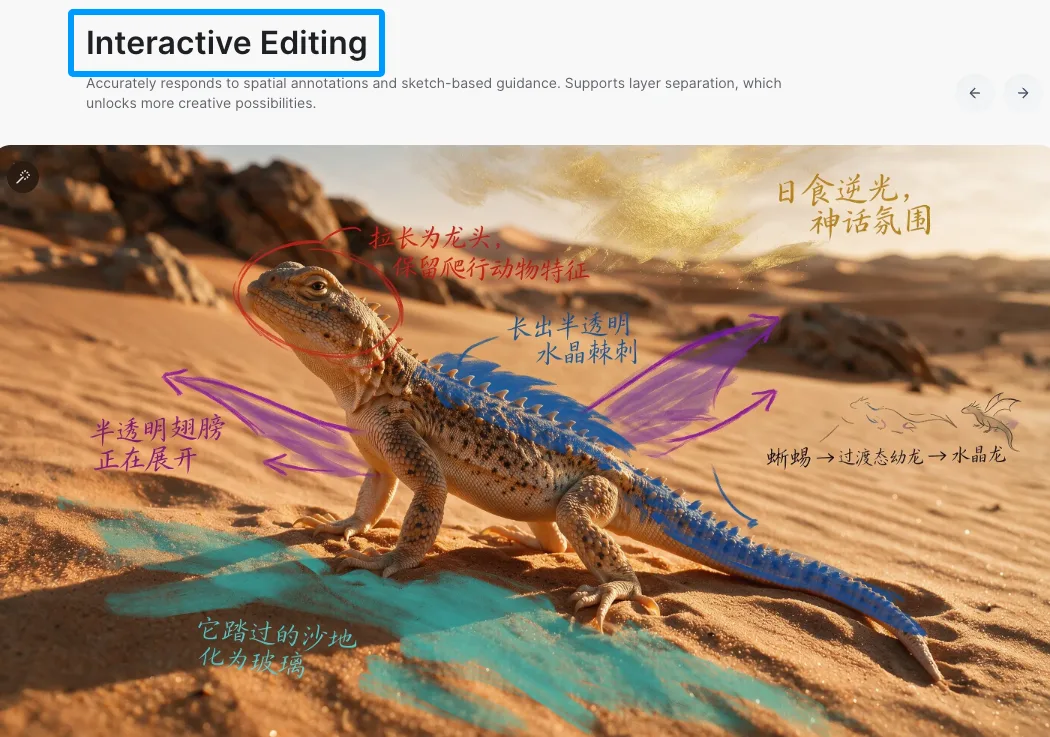
Local edits, references, product images, ad variants
For builders, the first test set should be boring.
Use the same base image across providers. A product photo. A person-free lifestyle shot. A packaging mockup. A simple ad layout with readable text. A background replacement task. A color-change task. A small object removal task.
Then run the same edit categories:
- Change only the background.
- Change only a product color.
- Add one object.
- Remove one object.
- Preserve the product shape.
- Preserve logo placement.
- Preserve readable text.
- Generate three ad variants from one reference.
- Use multiple references and check which one dominates.
I would score each output on three axes: edit accuracy, preservation, and production cleanup cost.
The cleanup cost is the number people skip. It is also the one that decides whether the API stays in the workflow. A model that makes one impressive output and four slightly broken ones is not cheaper if a designer has to fix every fifth image.
Layer separation and mask-like controls to verify
Do not assume layer separation.
The outline says to check it, so I would check it. I would not claim it.
For a production API, “layer separation” can mean several different things:
- The model returns separate editable layers.
- The model accepts masks.
- The model behaves like it understands foreground and background separation.
- The platform provides a UI feature but not an API feature.
- A partner layer simulates masks by pre-processing the input.
Those are different capabilities.
The API verification should answer:
- Can I send a mask?
- Can I request transparent background or alpha output?
- Can I preserve foreground while regenerating background?
- Can I isolate product, person, text, and shadow separately?
- Does the response include structured layer data, or only a final raster image?
- Is the feature available in Pro only, Lite only, UI only, or API only?
If the answer is “it seems to work from prompt wording,” I would label it as behavioral, not structural. Behavioral separation can be useful. It is not the same as layer control.
Production Readiness Checklist
The production checklist is less exciting than model output.
It is also where most image API integrations either become real or stay as demos.
Endpoint, model ID, pricing, latency, and rate limits
Before I would approve Seedream Pro for production, I would want a short internal note with these fields filled in:
| Area | Question |
|---|---|
| Endpoint | What exact URL or SDK method is used? |
| Model ID | What exact model string is passed? |
| Availability | Is it self-serve, allowlisted, enterprise, or partner-routed? |
| Region | Where is inference available? |
| Pricing | Per image, per token, per credit, or another unit? |
| Resolution | What sizes are supported? |
| Editing inputs | Text only, image, multiple images, mask, reference set? |
| Latency | P50, P90, timeout threshold from our own tests |
| Rate limits | Requests per minute, concurrent jobs, batch support |
| Retention | How long inputs and outputs are stored |
| License | Whether commercial use depends on model or platform terms |
I would not copy pricing from a third-party article into production docs. Pricing changes, regional billing differs, and image models often hide the real cost inside resolution, quality, or edit mode.
Same for latency. Public model papers and launch pages can give a direction. Production latency should come from the team’s own logs.
Output QA, fallback, logging, and rollback
Image editing needs a rollback plan.
For text APIs, a bad response can often be retried or filtered. For image APIs, failure is visual and messy. The model may preserve the wrong part, distort a logo, alter the product shape, invent text, or make a reference image look “almost right” in a way that slips through review.
My minimum QA setup would include:
- Save request payloads without storing sensitive source assets longer than needed.
- Save the model ID and platform route for every output.
- Log prompt, reference count, resolution, edit mode, seed if available, and latency.
- Tag failure category manually during the first test batch.
- Keep a fallback model for each workflow type.
- Keep a “no edit” fallback for product images where distortion is worse than delay.
- Compare outputs against a small golden set before switching traffic.
If WaveSpeed is used in the stack, I would document it as the access or aggregation layer. Not the model provider. The model ownership, licensing, and platform availability still belong to the underlying provider path.
That sounds like a small distinction. It is not. It affects support, attribution, pricing checks, and incident handling.
FAQ
Who should approve Seedream Pro for production use?
A builder can approve the integration shape. A product owner should approve the workflow fit. Legal or policy should approve asset use, commercial terms, and retention. Finance should approve pricing once the platform page is checked.
I would not let a single “looks good” output approve the whole thing.
For image editing, production approval needs at least one person who understands the actual downstream cleanup work. The model does not just need to generate. It needs to fail in ways the team can catch.
What source proves Pro availability on publish day?
The strongest source is the official API platform where the model can actually be called: BytePlus, 火山引擎, or another ByteDance-controlled console or documentation page.
A launch post is useful. A benchmark mention is useful. A third-party comparison is useful for market context. None of those prove the production API is available for your account.
For this article, I would treat ByteDance Seed, BytePlus ModelArk, and 火山方舟 as the publish-day verification path. If Pro appears only after login, screenshot and archive the model card internally with the check date.
How should teams document image-editing failures?
Use failure categories, not vague comments.
I would start with:
- Wrong edit target
- Product shape drift
- Logo distortion
- Text corruption
- Identity drift
- Reference ignored
- Background bleed
- Lighting mismatch
- Perspective mismatch
- Unsafe or policy-blocked output
- Timeout
- Rate-limit failure
- Cost anomaly
Each failed output should keep the source image ID, model ID, prompt, references, platform route, and reviewer note. Without that, the team only has opinions. Opinions are hard to debug.
The final decision is not “Seedream Pro is good” or “Seedream Pro is bad.”
The useful decision is narrower: this endpoint, under this platform account, with this model ID, passed these editing workflows, at this cost and latency, with these known failure modes.
That is the version I would ship.
Previous posts:
- WaveSpeed API Pricing: How Credits Work + A Simple Cost Calculator
- Z-Image Turbo Image-to-Image: Best Denoise/Strength Values for Consistent Results
- Seed2.1 API: What Builders Should Verify
- Z-Image Edit Workflow on WaveSpeed: Inpainting, Outpainting, and Object Removal
- AI Image Editing Models: Benchmark for Builders
/filters:quality(82)/media/images/c347367a-a007-4466-b8f7-d37f5fb52819.webp)
/filters:quality(82)/media/images/cd4db796-7728-45fb-8267-6813ed28e173.webp)
/filters:quality(82)/media/images/1791535252286714222_v4jvJT2a.webp)
/filters:quality(82)/media/images/1791451065663755033_qNqAKS1a.webp)
/filters:quality(82)/media/images/1791359984291066138_tW5eOX6f.webp)
/filters:quality(82)/media/images/1773962750383987480_n3hqzHRZ.webp)