Pruna AI P-Image Edit is a fast AI image editing model that edits and transforms images based on text instructions and reference images. Ready-to-use REST inference API for photo retouching, creative edits, product image updates, background changes, marketing assets, and AI image editing workflows with simple integration, no coldstarts, and affordable pricing.
Idle
$0.01per run·~100 / $1
ExamplesView all
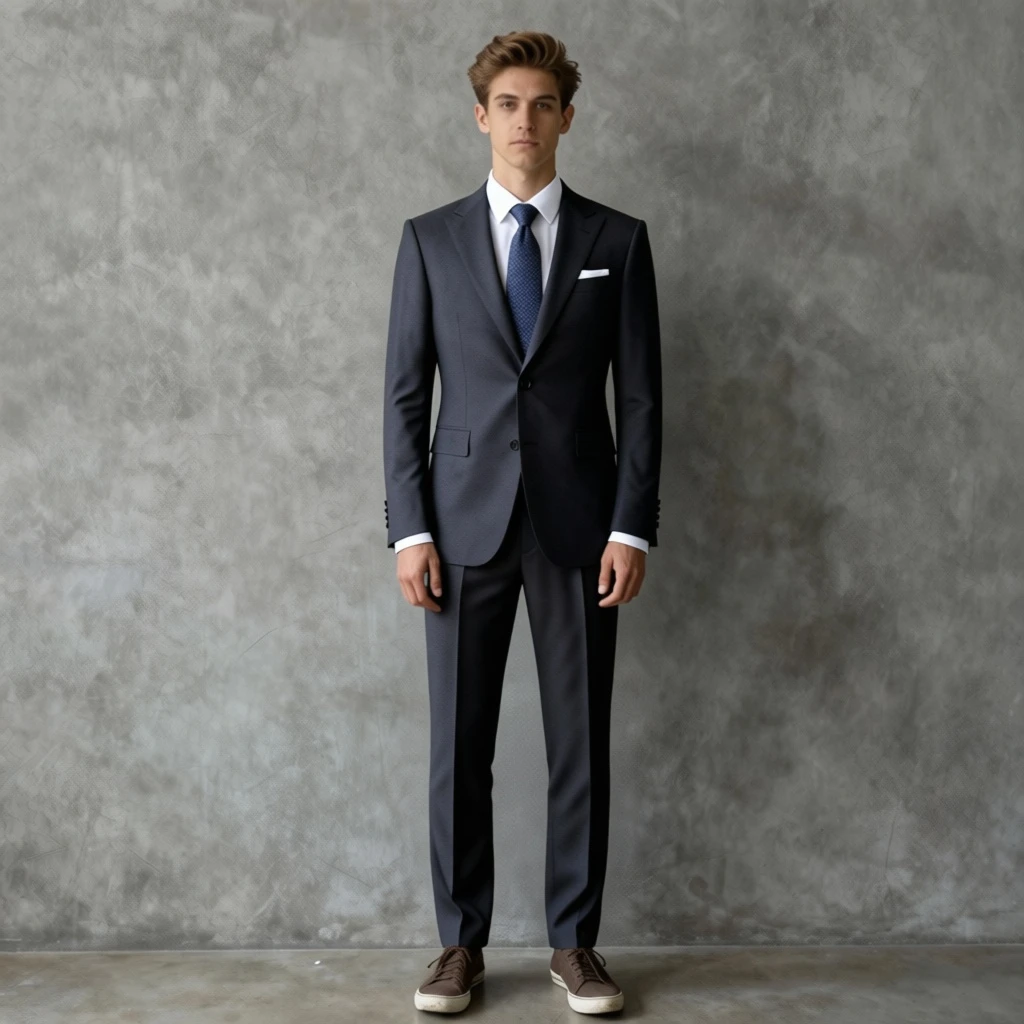
Change the figure 1 man's suit to the clothes in figure 2.
Related Models
/filters:quality(82)/media/images/1789378645513203523_cFvFOX6f.webp)
/filters:quality(82)/media/images/1789378308423133686_bYAKT2bl.webp)
/filters:quality(82)/media/images/1788778004589068805_6GPY8hqA.webp)
/filters:quality(82)/media/images/1788777979409318591_PrAKT2cl.webp)
/filters:quality(82)/media/images/1782720561522727015_mHPZ8hLV.webp)
/filters:quality(82)/media/images/1788345414090495122_C6gpyGQZ.webp)
README
Pruna AI P-Image Edit
Pruna AI P-Image Edit transforms one or more reference images using natural-language editing instructions. It is designed for image modification workflows such as outfit changes, style transfer, object replacement, visual refinement, and other prompt-guided image edits.
Why Choose This?
-
Prompt-driven image editing Edit images by describing exactly what you want to change in natural language.
-
Multi-image reference support Upload one or more images to guide the edit, making it easier to preserve identity, style, or visual consistency.
-
Flexible aspect ratio control Choose the output aspect ratio that best fits your use case.
-
Multiple output formats Export the edited image in a supported format such as
png. -
Seed support for reproducibility Use
seedto get more consistent results across repeated edits. -
Simple fixed pricing Each edit run uses a straightforward per-image price.
Parameters
| Parameter | Required | Description |
|---|---|---|
| prompt | Yes | Text instruction describing the desired edit. |
| images | Yes | One or more reference images used for the edit. |
| aspect_ratio | No | Output aspect ratio for the edited image. |
| output_format | No | Output image format, such as png. |
| seed | No | Random seed for reproducibility. Use the same seed to get more consistent results. |
How to Use
- Upload your reference images — provide one or more images you want to use for the edit.
- Write your prompt — describe what should change and what should stay consistent.
- Choose aspect ratio (optional) — select the output ratio that matches your target use case.
- Choose output format (optional) — select the format that best fits your workflow.
- Set a seed (optional) — use a fixed seed for more reproducible results.
- Submit — run the model and download the edited image.
Example Prompt
Change the figure 1 man's suit to the clothes in figure 2.
Pricing
Just $0.01 per image.
Best Use Cases
- Outfit and apparel changes — Replace clothing or accessories while preserving the subject.
- Style transfer — Apply the look or styling of one image to another.
- Visual refinement — Improve or adjust details using prompt-based instructions.
- Character consistency edits — Modify appearance while keeping identity and composition stable.
- Creative image adaptation — Rework an existing image into a new variation for marketing, design, or social content.
- Reference-guided editing — Use multiple images when you need stronger control over the desired result.
Pro Tips
- Be specific about what should change and what should remain unchanged.
- If using multiple images, make sure each image clearly supports the edit you want.
- Mention identity, clothing, background, or composition explicitly when consistency matters.
- Use the same
seedwhen you want to iterate on an edit with more consistent outputs. - Keep prompts short and direct for simple edits, and add more detail only when necessary.
Notes
- Both
promptandimagesare required. imagescan include one or more reference images.seedhelps with reproducibility but may not guarantee identical results in every case.- Pricing is fixed at $0.01 per image.
Related Models
- Pruna AI P-Image Text-to-Image — Generate new images directly from natural-language prompts.
- Other Pruna AI image generation and image editing models may be useful when you need different quality, speed, or workflow trade-offs.
P Image Edit API — Quick start
Grab a WaveSpeedAI API key, then call POST https://api.wavespeed.ai/api/v3/pruna-ai/p-image/edit with your input as JSON. The endpoint returns a prediction id. Start polling the result endpoint around every 2 seconds, increase the interval for long-running tasks, and stop on any terminal status. On completed, read output values from data.outputs. Examples for P Image Edit below.
HTTP example
set -euo pipefail

: "${WAVESPEED_API_KEY:?Set WAVESPEED_API_KEY}"

REQUEST_BODY=$(cat <<'JSON'
{
    "prompt": "A cinematic shot of a city at sunset, soft golden light",
    "images": [
        "https://interactive-examples.mdn.mozilla.net/media/cc0-images/painted-hand-298-332.jpg"
    ],
    "aspect_ratio": "match_input_image",
    "output_format": "png"
}
JSON
)

# 1. Submit the prediction.
SUBMIT_RESPONSE=$(curl --silent --show-error --fail-with-body \
  -X POST "https://api.wavespeed.ai/api/v3/pruna-ai/p-image/edit" \
  -H "Content-Type: application/json" \
  -H "Authorization: Bearer $WAVESPEED_API_KEY" \
  -d "$REQUEST_BODY")

TASK=$(printf '%s' "$SUBMIT_RESPONSE" | jq 'if has("data") then .data else . end')
PREDICTION_ID=$(printf '%s' "$TASK" | jq -r '.id')
if [ -z "$PREDICTION_ID" ] || [ "$PREDICTION_ID" = "null" ]; then
  printf 'Submission response did not contain a prediction id
' >&2
  exit 1
fi
RESULT_URL="https://api.wavespeed.ai/api/v3/predictions/$PREDICTION_ID/result"

# 2. Poll until the prediction finishes.
while true; do
  RESPONSE=$(curl --silent --show-error --fail-with-body "$RESULT_URL" \
    -H "Authorization: Bearer $WAVESPEED_API_KEY")
  RESULT=$(printf '%s' "$RESPONSE" | jq 'if has("data") then .data else . end')
  STATUS=$(printf '%s' "$RESULT" | jq -r '.status')
  case "$STATUS" in
    completed) printf '%s\n' "$RESULT" | jq '.outputs'; break ;;
    failed|cancelled|timeout|deleted) printf '%s\n' "$RESULT" | jq . >&2; exit 1 ;;
    *) sleep 2 ;;
  esac
done
Node.js example
const submitUrl = "https://api.wavespeed.ai/api/v3/pruna-ai/p-image/edit";
const apiKey = process.env.WAVESPEED_API_KEY;
if (!apiKey) throw new Error('Set WAVESPEED_API_KEY');

async function requestJson(url, options = {}) {
  const response = await fetch(url, options);
  if (!response.ok) throw new Error(await response.text());
  return response.json();
}

// 1. Submit the prediction.
const body = await requestJson(submitUrl, {
  method: "POST",
  headers: {
    "Authorization": `Bearer ${apiKey}`,
    "Content-Type": "application/json",
  },
  body: JSON.stringify({
        "prompt": "A cinematic shot of a city at sunset, soft golden light",
        "images": [
                "https://interactive-examples.mdn.mozilla.net/media/cc0-images/painted-hand-298-332.jpg"
        ],
        "aspect_ratio": "match_input_image",
        "output_format": "png"
}),
});
const task = body.data ?? body;
if (!task.id) throw new Error("Submission response did not contain a prediction id");
const resultUrl = `https://api.wavespeed.ai/api/v3/predictions/${task.id}/result`;

// 2. Poll until the prediction finishes.
while (true) {
  const resultBody = await requestJson(resultUrl, {
    headers: { "Authorization": `Bearer ${apiKey}` },
  });
  const result = resultBody.data ?? resultBody;
  if (result.status === "completed") {
    console.log(result.outputs);
    break;
  }
  if (["failed", "cancelled", "timeout", "deleted"].includes(result.status)) throw new Error(JSON.stringify(result));
  await new Promise(resolve => setTimeout(resolve, 2000));
}
Python example
import json
import os
import time
from urllib.request import Request, urlopen

api_key = os.environ["WAVESPEED_API_KEY"]
headers = {"Authorization": f"Bearer {api_key}", "Content-Type": "application/json"}
payload = {
    "prompt": "A cinematic shot of a city at sunset, soft golden light",
    "images": [
        "https://interactive-examples.mdn.mozilla.net/media/cc0-images/painted-hand-298-332.jpg"
    ],
    "aspect_ratio": "match_input_image",
    "output_format": "png"
}

def request_json(url, data=None):
    request = Request(url, data=data, headers=headers, method="POST" if data else "GET")
    with urlopen(request) as response:
        return json.load(response)

# 1. Submit the prediction.
body = request_json("https://api.wavespeed.ai/api/v3/pruna-ai/p-image/edit", json.dumps(payload).encode())
task = body.get("data", body)
if not task.get("id"):
    raise RuntimeError("Submission response did not contain a prediction id")
result_url = f"https://api.wavespeed.ai/api/v3/predictions/{task['id']}/result"

# 2. Poll until the prediction finishes.
while True:
    result_body = request_json(result_url)
    result = result_body.get("data", result_body)
    status = result.get("status")
    if status == "completed":
        print(result.get("outputs", []))
        break
    if status in {"failed", "cancelled", "timeout", "deleted"}:
        raise RuntimeError(result)
    time.sleep(2)
P Image Edit API — Frequently asked questions
What is the P Image Edit API?
P Image Edit is a Pruna Ai model for image editing, exposed as a REST API on WaveSpeedAI. Pruna AI P-Image Edit is a fast AI image editing model that edits and transforms images based on text instructions and reference images. Ready-to-use REST inference API for photo retouching, creative edits, product image updates, background changes, marketing assets, and AI image editing workflows with simple integration, no coldstarts, and affordable pricing. You can call it programmatically or try it from the playground above.
How do I call the P Image Edit API?
POST your input parameters to the model's REST endpoint (shown in the API tab of this playground) with your WaveSpeedAI API key in the Authorization header. Submission returns a prediction ID. Poll the result endpoint starting around every 2 seconds, increase the interval for long-running tasks, and stop on any terminal status. The playground generates Python, JavaScript, and cURL examples for submitting requests and polling results. Full request/response shape is documented at https://wavespeed.ai/docs/docs-api/pruna-ai/pruna-ai-p-image-edit.
How much does P Image Edit cost per run?
P Image Edit starts at $0.01 per run. That figure is the base price — the final charge scales with the parameters you set in the form (output size, length, count, references, or whatever knobs this model exposes), so a higher-quality or larger output costs more than a minimal one. The exact cost for your current input is shown live next to the Generate button before you submit, and the actual per-call charge is recorded on the prediction afterwards.
What inputs does P Image Edit accept?
Key inputs: `prompt`, `images`, `aspect_ratio`, `seed`, `enable_base64_output`, `enable_sync_mode`. The full JSON schema (types, defaults, allowed values) is rendered above the Generate button and mirrored in the API reference at https://wavespeed.ai/docs/docs-api/pruna-ai/pruna-ai-p-image-edit.
How long does P Image Edit take to generate?
Reported generation time on WaveSpeedAI is around 4 seconds per request. This is an estimate, not a latency guarantee; queue time and input settings can change the total wait. live status is visible in the prediction record.
Can I use P Image Edit outputs commercially?
Commercial usage rights depend on the model's license, set by its provider (Pruna Ai). Check the provider's applicable terms and WaveSpeedAI's Terms of Service before commercial use.
More from Pruna Ai
View all- pruna-ai/p-image/edit-loraLora Support
- pruna-ai/p-image/edit-trainerTraining
- pruna-ai/p-image/ideogramText to Image
- pruna-ai/p-image/text-to-imageText to Image
- pruna-ai/p-image/text-to-image-loraLora Support
- pruna-ai/p-image/text-to-image-trainerTraining
- pruna-ai/p-image/upscaleUpscaler
- pruna-ai/p-video-2-pro/image-to-videoImage to Video
- pruna-ai/p-video-2-pro/text-to-videoText to Video
- pruna-ai/p-video-2/image-to-videoImage to Video
More Image to Image models
View all- bytedance/seedream-v5.0-pro/editImage to Image
- bytedance/seedream-v4.5/editImage to Image
- google/nano-banana-pro/editImage to Image
- alibaba/wan-2.7/image-editImage to Image
- openai/gpt-image-2/editImage to Image
- google/nano-banana-2/editImage to Image
- alibaba/qwen-image-3.0/editImage to Image
- alibaba/wan-2.7/image-edit-proImage to Image
- alibaba/qwen-image-3.0-pro/editImage to Image
- bytedance/seedream-v5.0-lite/editImage to Image