Ideogram V4.5 Image Edit transforms images with written instructions, reference images, masks, and precision controls, supporting targeted edits, visual refinements, composition changes, and professional creative workflows. Ready-to-use REST inference API, best performance, no coldstarts, affordable pricing.
Idle
$0.06per run·~16 / $1
ExamplesView all
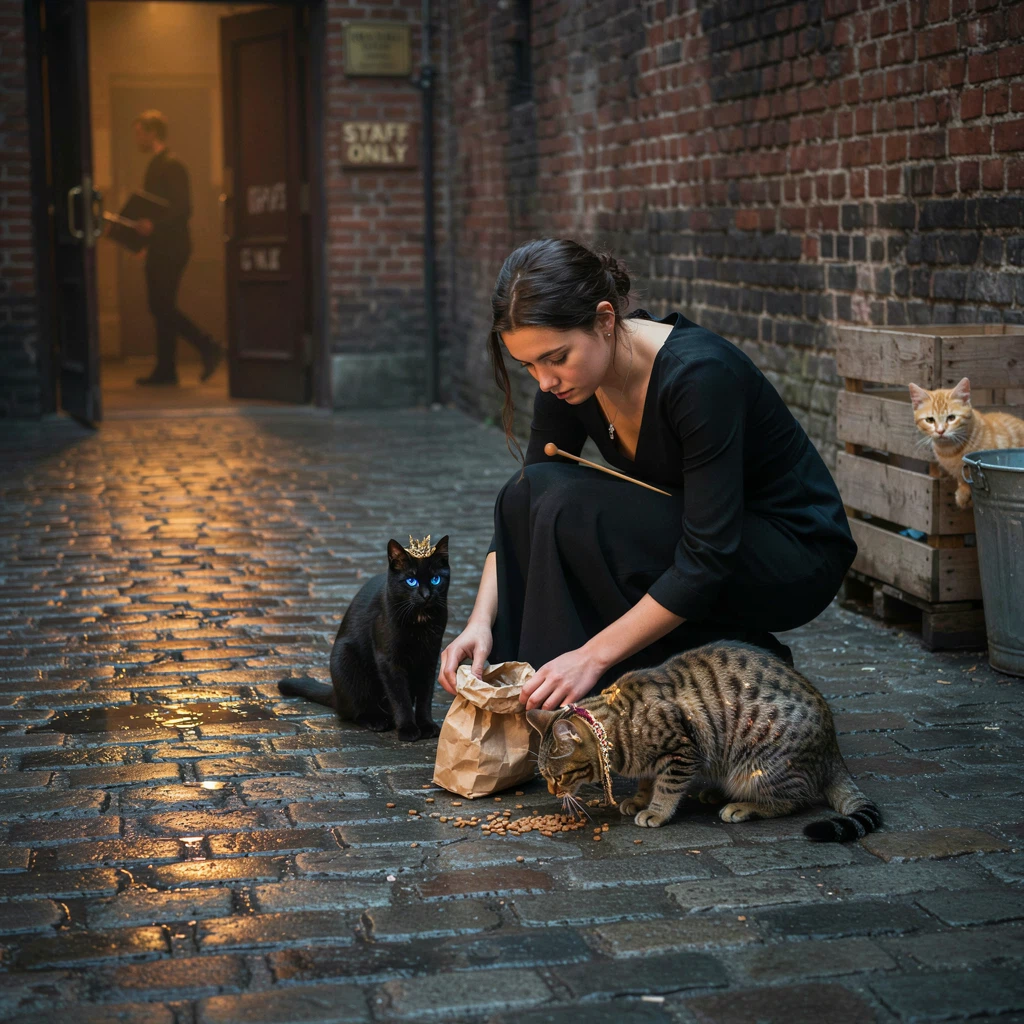
Transform the stray cats into regal fantasy cats with subtle magical details: one has a tiny gold crown, one has luminous blue eyes, one has delicate embroidered collar ornaments, and another has faint shimmering fur patterns. Keep them still recognizably cats and preserve the emotional realism of the scene. Elegant magical realism, refined fantasy detail, cinematic night atmosphere.
Related Models
/filters:quality(82)/media/images/1780544382929170513_AtJKFECB.webp)
/filters:quality(82)/media/images/1782721277946938856_w09iOY6g.webp)
/filters:quality(82)/media/images/1790833802408534708_uktCMW5f.webp)
/filters:quality(82)/media/images/1784897984576799989_JfFOktBL.webp)
/filters:quality(82)/media/images/20260408105041_aajreuu6.webp)
/filters:quality(82)/media/images/20260408105000_kjhf5kv6.webp)
README
Ideogram V4.5 Edit
Ideogram V4.5 Edit modifies an existing image using natural-language instructions, with optional reference images and mask-based control. Use it to change objects, colors, materials, text, layouts, and other visual elements while keeping the source image as the foundation.
Choose between regular editing and high-precision editing depending on how strongly unchanged areas need to be preserved.
Why Choose This?
-
Prompt-based image editing
Modify an existing image with natural-language instructions. -
Targeted visual changes
Change objects, colors, materials, text, styling, and other image elements. -
Reference-image guidance
Add supporting images to guide appearance, products, subjects, or visual direction. -
Mask-based editing
Restrict changes to specific regions while preserving the rest of the image. -
High-precision mode
Useedit_precision=highwhen preserving unaffected image regions is especially important. -
Four quality tiers
Choosevery_low,low,medium, orhighdepending on cost and output requirements.
Parameters
| Parameter | Required | Description |
|---|---|---|
| image | Yes | Public URL of the source image to edit. |
| prompt | Yes | Text instructions describing the desired edit. Supports 1–10000 characters. |
| reference_images | No | Optional reference image URLs. Supports up to 4 images without a mask, or up to 3 when mask_url is provided. |
| mask_url | No | Mask matching the source image dimensions. Black regions may be edited; white regions are preserved. The mask must contain both editable and preserved areas. |
| aspect_ratio | No | Optional output aspect ratio: 1:1, 4:3, 3:4, 16:9, or 9:16. Leave empty to follow the source image. |
| edit_precision | No | Editing precision: regular or high. Default: regular. |
| quality | No | Generation quality: very_low, low, medium, or high. Default: medium. |
Editing Rules
- Leave
aspect_ratioempty when usingedit_precision=high. - When using
mask_url, leaveaspect_ratioempty. - A masked edit supports up to
3reference images. - A regular edit without a mask supports up to
4reference images. - If
aspect_ratiois omitted, the output follows the source image geometry; large inputs may be downscaled. - Custom aspect ratios are available only for regular edits without a mask.
imageis always the source image being edited;reference_imagesonly provide additional guidance.
How to Use
- Upload the source image — Provide the image you want to modify.
- Write the edit instruction — Describe what should change and what should remain unchanged.
- Add reference images optional — Supply supporting images when appearance or style guidance is useful.
- Add a mask optional — Restrict editing to specific regions when precise localization is needed.
- Choose edit precision — Use
regularfor standard editing orhighwhen preservation of unaffected details matters more. - Choose quality — Select
very_low,low,medium, orhigh. - Submit — Generate and retrieve the edited image.
Pricing
Pricing is based only on the selected quality tier.
| Quality | Price per Image |
|---|---|
| Very Low | $0.008 |
| Low | $0.03 |
| Medium | $0.06 |
| High | $0.22 |
The default medium quality edit costs $0.06 per image.
edit_precision, aspect_ratio, mask_url, and the number of reference_images do not add separate charges.
Best Use Cases
- Product variations — Change product colors, materials, finishes, or visual styling.
- Advertising edits — Revise layouts, graphics, text, and campaign imagery.
- Selective corrections — Modify a specific area while preserving the rest of the source image.
- Interior styling — Change furniture, materials, colors, or decorative elements.
- Typography edits — Revise text or designed visual elements inside an existing image.
- Reference-guided editing — Use supporting images to guide products, subjects, or style changes.
Pro Tips
- State the requested change directly instead of redescribing the entire source image.
- Mention what should remain unchanged when preservation matters.
- Use
edit_precision=highwhen unaffected regions need stronger preservation. - Use a mask when the edit should be limited to a specific part of the image.
- Keep reference images closely related to the requested change.
- Use
very_loworlowquality for rapid iteration before moving to higher-quality output. - Check text, small details, and masked boundaries before publishing the final result.
Notes
imageandpromptare required.edit_precisiondefaults toregular.qualitydefaults tomedium.- Mask polarity is black for editing and white for preservation.
- A mask must match the source image dimensions and contain both editable and preserved regions.
- High precision is designed to reduce unintended changes but does not guarantee perfectly unchanged pixels.
- Up to
4reference images are supported without a mask. - Up to
3reference images are supported when a mask is used.
Related Models
- Ideogram V4.5 — Generate images from text with typography, composition, and prompt control.
- Ideogram V4.5 Edit — Edit existing images with prompts, references, masks, and precision control.
Ideogram v4.5 Edit API — Quick start
Grab a WaveSpeedAI API key, then call POST https://api.wavespeed.ai/api/v3/ideogram-ai/ideogram-v4.5/edit with your input as JSON. The endpoint returns a prediction id. Start polling the result endpoint around every 2 seconds, increase the interval for long-running tasks, and stop on any terminal status. On completed, read output values from data.outputs. Examples for Ideogram v4.5 Edit below.
HTTP example
set -euo pipefail

: "${WAVESPEED_API_KEY:?Set WAVESPEED_API_KEY}"

REQUEST_BODY=$(cat <<'JSON'
{
    "image": "https://interactive-examples.mdn.mozilla.net/media/cc0-images/painted-hand-298-332.jpg",
    "prompt": "A cinematic shot of a city at sunset, soft golden light",
    "aspect_ratio": "1:1",
    "edit_precision": "regular",
    "quality": "medium"
}
JSON
)

# 1. Submit the prediction.
SUBMIT_RESPONSE=$(curl --silent --show-error --fail-with-body \
  -X POST "https://api.wavespeed.ai/api/v3/ideogram-ai/ideogram-v4.5/edit" \
  -H "Content-Type: application/json" \
  -H "Authorization: Bearer $WAVESPEED_API_KEY" \
  -d "$REQUEST_BODY")

TASK=$(printf '%s' "$SUBMIT_RESPONSE" | jq 'if has("data") then .data else . end')
PREDICTION_ID=$(printf '%s' "$TASK" | jq -r '.id')
if [ -z "$PREDICTION_ID" ] || [ "$PREDICTION_ID" = "null" ]; then
  printf 'Submission response did not contain a prediction id
' >&2
  exit 1
fi
RESULT_URL="https://api.wavespeed.ai/api/v3/predictions/$PREDICTION_ID/result"

# 2. Poll until the prediction finishes.
while true; do
  RESPONSE=$(curl --silent --show-error --fail-with-body "$RESULT_URL" \
    -H "Authorization: Bearer $WAVESPEED_API_KEY")
  RESULT=$(printf '%s' "$RESPONSE" | jq 'if has("data") then .data else . end')
  STATUS=$(printf '%s' "$RESULT" | jq -r '.status')
  case "$STATUS" in
    completed) printf '%s\n' "$RESULT" | jq '.outputs'; break ;;
    failed|cancelled|timeout|deleted) printf '%s\n' "$RESULT" | jq . >&2; exit 1 ;;
    *) sleep 2 ;;
  esac
done
Node.js example
const submitUrl = "https://api.wavespeed.ai/api/v3/ideogram-ai/ideogram-v4.5/edit";
const apiKey = process.env.WAVESPEED_API_KEY;
if (!apiKey) throw new Error('Set WAVESPEED_API_KEY');

async function requestJson(url, options = {}) {
  const response = await fetch(url, options);
  if (!response.ok) throw new Error(await response.text());
  return response.json();
}

// 1. Submit the prediction.
const body = await requestJson(submitUrl, {
  method: "POST",
  headers: {
    "Authorization": `Bearer ${apiKey}`,
    "Content-Type": "application/json",
  },
  body: JSON.stringify({
        "image": "https://interactive-examples.mdn.mozilla.net/media/cc0-images/painted-hand-298-332.jpg",
        "prompt": "A cinematic shot of a city at sunset, soft golden light",
        "aspect_ratio": "1:1",
        "edit_precision": "regular",
        "quality": "medium"
}),
});
const task = body.data ?? body;
if (!task.id) throw new Error("Submission response did not contain a prediction id");
const resultUrl = `https://api.wavespeed.ai/api/v3/predictions/${task.id}/result`;

// 2. Poll until the prediction finishes.
while (true) {
  const resultBody = await requestJson(resultUrl, {
    headers: { "Authorization": `Bearer ${apiKey}` },
  });
  const result = resultBody.data ?? resultBody;
  if (result.status === "completed") {
    console.log(result.outputs);
    break;
  }
  if (["failed", "cancelled", "timeout", "deleted"].includes(result.status)) throw new Error(JSON.stringify(result));
  await new Promise(resolve => setTimeout(resolve, 2000));
}
Python example
import json
import os
import time
from urllib.request import Request, urlopen

api_key = os.environ["WAVESPEED_API_KEY"]
headers = {"Authorization": f"Bearer {api_key}", "Content-Type": "application/json"}
payload = {
    "image": "https://interactive-examples.mdn.mozilla.net/media/cc0-images/painted-hand-298-332.jpg",
    "prompt": "A cinematic shot of a city at sunset, soft golden light",
    "aspect_ratio": "1:1",
    "edit_precision": "regular",
    "quality": "medium"
}

def request_json(url, data=None):
    request = Request(url, data=data, headers=headers, method="POST" if data else "GET")
    with urlopen(request) as response:
        return json.load(response)

# 1. Submit the prediction.
body = request_json("https://api.wavespeed.ai/api/v3/ideogram-ai/ideogram-v4.5/edit", json.dumps(payload).encode())
task = body.get("data", body)
if not task.get("id"):
    raise RuntimeError("Submission response did not contain a prediction id")
result_url = f"https://api.wavespeed.ai/api/v3/predictions/{task['id']}/result"

# 2. Poll until the prediction finishes.
while True:
    result_body = request_json(result_url)
    result = result_body.get("data", result_body)
    status = result.get("status")
    if status == "completed":
        print(result.get("outputs", []))
        break
    if status in {"failed", "cancelled", "timeout", "deleted"}:
        raise RuntimeError(result)
    time.sleep(2)
Ideogram v4.5 Edit API — Frequently asked questions
What is the Ideogram v4.5 Edit API?
Ideogram v4.5 Edit is a Ideogram model for image editing, exposed as a REST API on WaveSpeedAI. Ideogram V4.5 Image Edit transforms images with written instructions, reference images, masks, and precision controls, supporting targeted edits, visual refinements, composition changes, and professional creative workflows. Ready-to-use REST inference API, best performance, no coldstarts, affordable pricing. You can call it programmatically or try it from the playground above.
How do I call the Ideogram v4.5 Edit API?
POST your input parameters to the model's REST endpoint (shown in the API tab of this playground) with your WaveSpeedAI API key in the Authorization header. Submission returns a prediction ID. Poll the result endpoint starting around every 2 seconds, increase the interval for long-running tasks, and stop on any terminal status. The playground generates Python, JavaScript, and cURL examples for submitting requests and polling results. Full request/response shape is documented at https://wavespeed.ai/docs/docs-api/ideogram-ai/ideogram-ai-ideogram-v4.5-edit.
How much does Ideogram v4.5 Edit cost per run?
Ideogram v4.5 Edit starts at $0.06 per run. That figure is the base price — the final charge scales with the parameters you set in the form (output size, length, count, references, or whatever knobs this model exposes), so a higher-quality or larger output costs more than a minimal one. The exact cost for your current input is shown live next to the Generate button before you submit, and the actual per-call charge is recorded on the prediction afterwards.
What inputs does Ideogram v4.5 Edit accept?
Key inputs: `prompt`, `image`, `aspect_ratio`, `reference_images`, `edit_precision`, `mask_url`. The full JSON schema (types, defaults, allowed values) is rendered above the Generate button and mirrored in the API reference at https://wavespeed.ai/docs/docs-api/ideogram-ai/ideogram-ai-ideogram-v4.5-edit.
How do I get started with the Ideogram v4.5 Edit API?
Sign up for a free WaveSpeedAI account to claim starter credits, copy your API key from /accesskey, then call the endpoint shown in the API tab of the playground. The playground also auto-generates a code sample in Python, JavaScript, or cURL for the parameters you've set.
Can I use Ideogram v4.5 Edit outputs commercially?
Commercial usage rights depend on the model's license, set by its provider (Ideogram). Check the provider's applicable terms and WaveSpeedAI's Terms of Service before commercial use.
More from Ideogram
View all- ideogram-ai/ideogram-characterImage to Image
- ideogram-ai/ideogram-v2Text to Image
- ideogram-ai/ideogram-v2-turboText to Image
- ideogram-ai/ideogram-v2aText to Image
- ideogram-ai/ideogram-v2a-turboText to Image
- ideogram-ai/ideogram-v3-balancedText to Image
- ideogram-ai/ideogram-v3-qualityText to Image
- ideogram-ai/ideogram-v3-turboText to Image
More Image to Image models
View all- bytedance/seedream-v5.0-pro/editImage to Image
- bytedance/seedream-v4.5/editImage to Image
- google/nano-banana-pro/editImage to Image
- alibaba/wan-2.7/image-editImage to Image
- openai/gpt-image-2/editImage to Image
- google/nano-banana-2/editImage to Image
- alibaba/qwen-image-3.0/editImage to Image
- alibaba/wan-2.7/image-edit-proImage to Image