Seedream V5.0 Pro Edit by ByteDance edits and generates images from single-image or multi-reference inputs, supporting up to 10 reference images, aspect ratio selection, and 1K / 2K output tiers. Ready-to-use REST inference API, best performance, no coldstarts, affordable pricing.
待機中

$0.04051回あたり·~24 / $1
サンプルすべて表示
Transform this image into a premium kitchen appliance commercial. Preserve the chef's face, chef jacket, posture, and kitchen composition. Upgrade the kitchen into a bright, modern luxury kitchen with elegant countertops, warm sunlight, polished appliances, clean reflections, fresh ingredients, and a professional lifestyle advertisement atmosphere. Keep it realistic, clean, warm, and trustworthy.
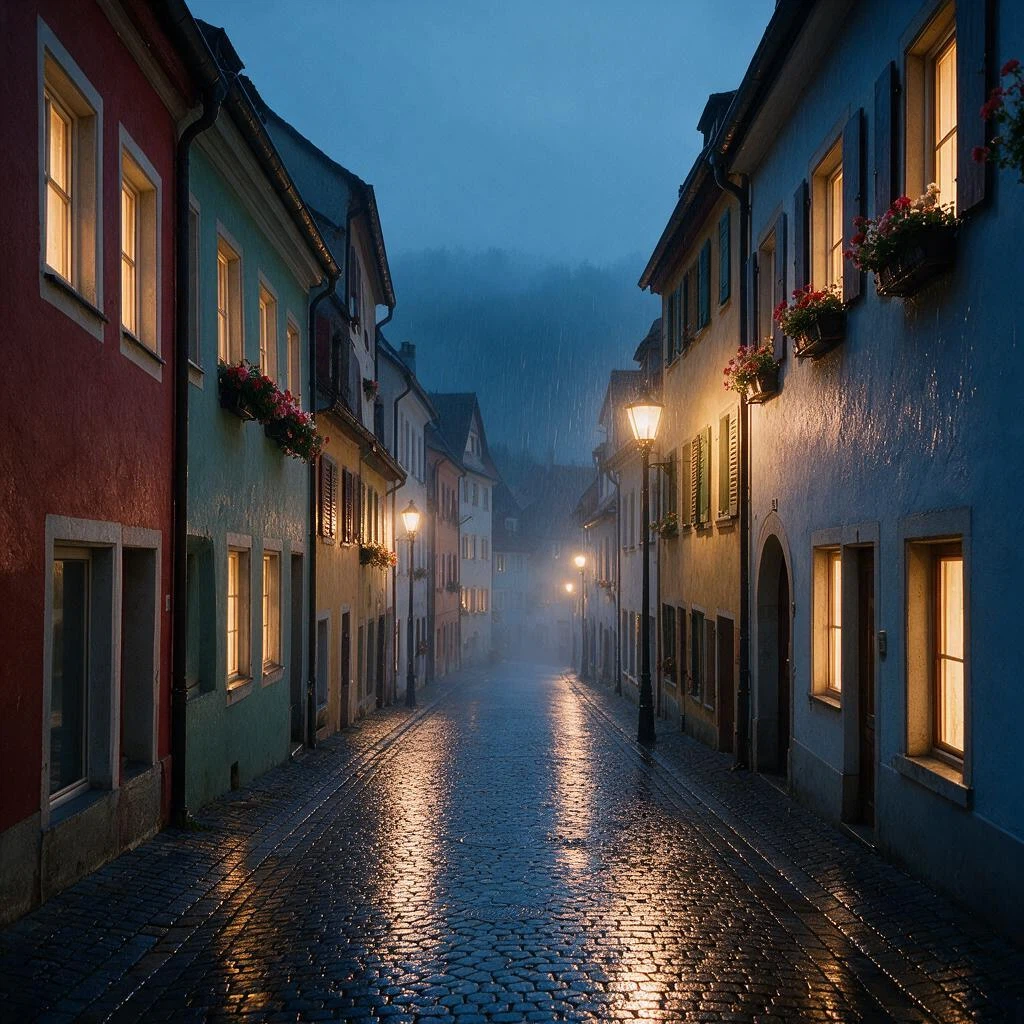
Turn this sunny old-town street into a rainy night scene. Keep the buildings, windows, flower boxes and perspective exactly the same. Make the cobblestones wet and glossy, reflecting warm glowing street lamps and lit windows, add light rain streaks and a soft blue evening mist, cinematic moody atmosphere.
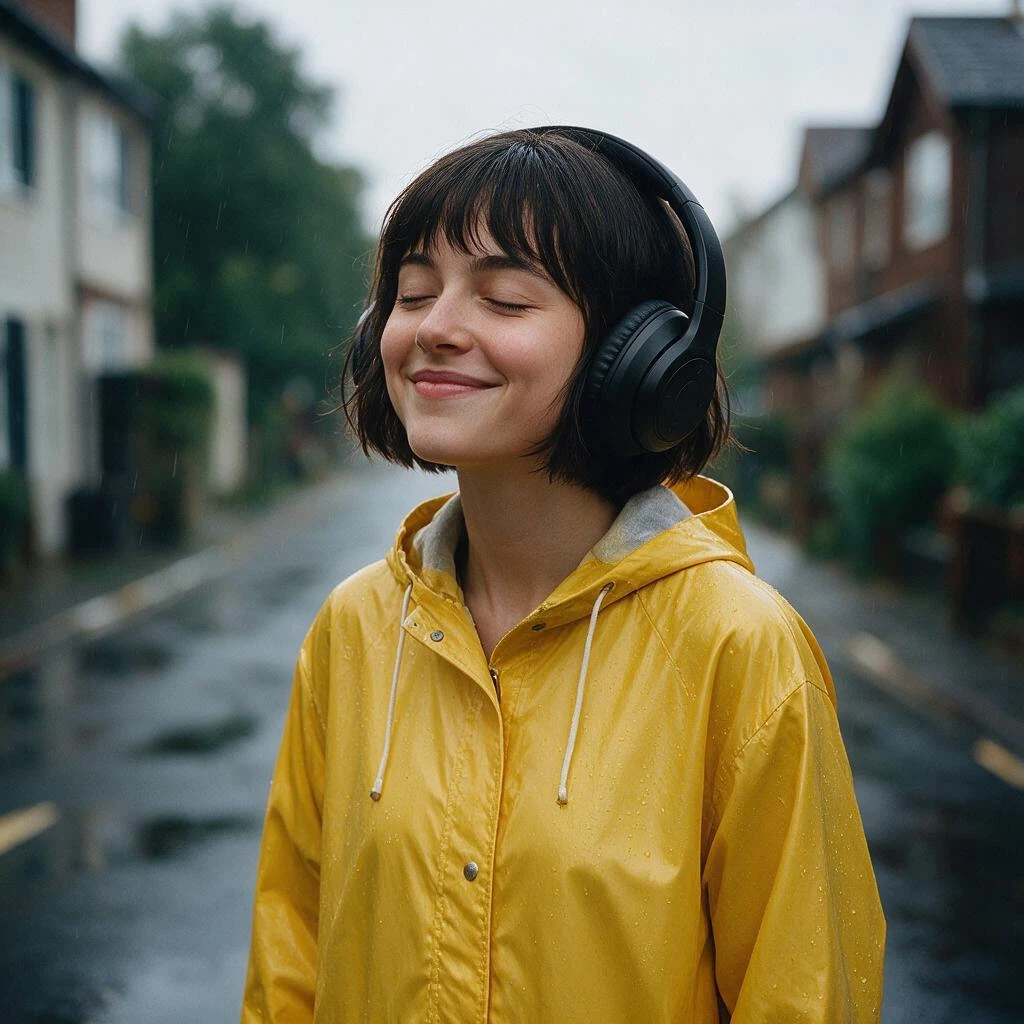
Create a premium lifestyle ad: the woman from Figure 1 wears the black over-ear headphones from Figure 2 and smiles with her eyes closed, enjoying music in the rain. Keep her face, bob haircut and yellow raincoat unchanged. Keep the headphones design exactly as shown, no logos. Soft cinematic lighting, shallow depth of field.

Turn this pencil sketch into a photorealistic fantasy matte painting. Keep the exact castle layout, towers, cliff and winding path from the sketch. Render it at golden sunset with warm light on stone walls, glowing windows, drifting clouds, a waterfall falling from the cliff and birds in the sky, epic cinematic scale.

Turn this empty storefront into a charming, busy flower shop. Paint the blank sign board dark green with elegant gold lettering that reads "WILDFLOWER & CO.". Fill the windows with colorful bouquets and hanging plants, place buckets of fresh flowers and a small chalkboard stand reading "FRESH TODAY" on the sidewalk. Keep the building architecture and camera angle unchanged.
関連モデル
/filters:quality(82)/media/images/1783519376754609746_GuDMV4dU.webp)
/filters:quality(82)/media/images/1790223807507857224_g1zJS2cl.webp)
/filters:quality(82)/media/images/1790223428359196164_57CLU4eO.webp)
/filters:quality(82)/media/images/1786523429877069688_r6rFUkDV.webp)
/filters:quality(82)/media/images/1790232710095528029_mLU4eGQ0.webp)
/filters:quality(82)/media/images/20260408113348_95nbkw6h.webp)
README
Seedream V5.0 Pro Edit
Seedream V5.0 Pro Edit is a multimodal image editing model built for professional work: interactive precision editing, multi-reference control, photographic realism, and native multilingual text.
Why Choose This?
-
Multi-image reference editing
Use up to 10 reference images for complex edits, compositions, and visual guidance. -
Natural language editing
Describe the desired edit in plain text and let the model transform the input images accordingly. -
Pro image quality
Designed for high-quality image editing with strong prompt adherence and polished visual output. -
Flexible resolution tiers
Choose1kor1.5kfor lower-cost edits, or2kfor higher-resolution output. -
Flexible aspect ratios
Supports square, portrait, landscape, tall, and wide aspect ratios. -
Standard output formats
Generate edited images injpegorpngformat.
Parameters
| Parameter | Required | Description |
|---|---|---|
| prompt | Yes | Text description of the desired edit. |
| images | Yes | Reference image URLs or Base64 strings. Supports up to 10 images. |
| aspect_ratio | No | Output aspect ratio. |
| resolution | No | Output resolution tier: 1k, 1.5k, or 2k. |
| output_format | No | Output format: jpeg or png. |
| prompt_optimization_mode | No | Prompt optimization mode: standard (default) or fast. The model rewrites your prompt before generating; fast uses a lighter rewrite that returns several times quicker but follows long or intricate prompts less closely. Reference time: 14s (fast) vs 26s (standard) on the same prompt. |
How to Use
- Upload reference images — Provide one or more images to guide the edit.
- Write your prompt — Describe what should change and what should stay the same.
- Choose aspect ratio — Select a supported aspect ratio, or leave it empty to follow the closest supported ratio from the first input image.
- Choose resolution — Use
1kor1.5kfor lower-cost edits, or2kfor higher-resolution output. - Choose output format — Select
jpegorpng. - Submit — Generate the final edited image.
Pricing
Pricing includes the selected output resolution plus reference image input cost. The first input image is included; each additional input image costs $0.003.
| Resolution | Base Price |
|---|---|
| 1k | $0.045 |
| 1.5k | $0.045 |
| 2k | $0.090 |
Example Costs
| Resolution | Input Images | Cost |
|---|---|---|
| 1k | 1 | $0.045 |
| 1k | 2 | $0.048 |
| 1k | 10 | $0.072 |
| 1.5k | 1 | $0.045 |
| 1.5k | 2 | $0.048 |
| 1.5k | 10 | $0.072 |
| 2k | 1 | $0.090 |
| 2k | 2 | $0.093 |
| 2k | 10 | $0.117 |
Best Use Cases
- Single-image editing — Edit one source image with natural-language instructions.
- Multi-reference composition — Use multiple images to guide complex edits and visual combinations.
- Product image editing — Refine product visuals, backgrounds, styles, and presentation.
- Character and style guidance — Use reference images to preserve identity, outfit, mood, or visual style.
- Marketing image workflows — Generate polished edited assets for campaigns, social media, and product content.
- Creative iteration — Test different edit directions using the same reference images.
Pro Tips
-
Use
prompt_optimization_mode: fastwhile iterating on an edit, andstandardfor the final render — the fast rewrite is several times quicker but follows long instructions less closely. -
Use clear prompts that describe both what should change and what should remain unchanged.
-
Use multiple reference images when identity, product details, or style consistency matters.
-
Leave
aspect_ratioempty when you want the output to follow the closest supported ratio from the first input image. -
Choose
1kor1.5kfor lower-cost editing and fast iteration. -
Choose
2kwhen you need higher-resolution final output. -
Use
jpegfor general-purpose edited images andpngwhen PNG output is needed. -
Keep reference images clear, relevant, and visually consistent with the desired edit.
Related Models
- Seedream V5.0 Pro — Generate images from text prompts.
- Seedream V5.0 Lite Edit — Lightweight image editing model.
Seedream v5.0 Pro Edit API — Quick start
Grab a WaveSpeedAI API key, then call POST https://api.wavespeed.ai/api/v3/bytedance/seedream-v5.0-pro/edit with your input as JSON. The endpoint returns a prediction id. Start polling the result endpoint around every 2 seconds, increase the interval for long-running tasks, and stop on any terminal status. On completed, read output values from data.outputs. Examples for Seedream v5.0 Pro Edit below.
HTTP example
set -euo pipefail

: "${WAVESPEED_API_KEY:?Set WAVESPEED_API_KEY}"

REQUEST_BODY=$(cat <<'JSON'
{
    "prompt": "A cinematic shot of a city at sunset, soft golden light",
    "images": [
        "https://interactive-examples.mdn.mozilla.net/media/cc0-images/painted-hand-298-332.jpg"
    ],
    "aspect_ratio": "1:1",
    "resolution": "1k",
    "output_format": "jpeg",
    "prompt_optimization_mode": "standard"
}
JSON
)

# 1. Submit the prediction.
SUBMIT_RESPONSE=$(curl --silent --show-error --fail-with-body \
  -X POST "https://api.wavespeed.ai/api/v3/bytedance/seedream-v5.0-pro/edit" \
  -H "Content-Type: application/json" \
  -H "Authorization: Bearer $WAVESPEED_API_KEY" \
  -d "$REQUEST_BODY")

TASK=$(printf '%s' "$SUBMIT_RESPONSE" | jq 'if has("data") then .data else . end')
PREDICTION_ID=$(printf '%s' "$TASK" | jq -r '.id')
if [ -z "$PREDICTION_ID" ] || [ "$PREDICTION_ID" = "null" ]; then
  printf 'Submission response did not contain a prediction id
' >&2
  exit 1
fi
RESULT_URL="https://api.wavespeed.ai/api/v3/predictions/$PREDICTION_ID/result"

# 2. Poll until the prediction finishes.
while true; do
  RESPONSE=$(curl --silent --show-error --fail-with-body "$RESULT_URL" \
    -H "Authorization: Bearer $WAVESPEED_API_KEY")
  RESULT=$(printf '%s' "$RESPONSE" | jq 'if has("data") then .data else . end')
  STATUS=$(printf '%s' "$RESULT" | jq -r '.status')
  case "$STATUS" in
    completed) printf '%s\n' "$RESULT" | jq '.outputs'; break ;;
    failed|cancelled|timeout|deleted) printf '%s\n' "$RESULT" | jq . >&2; exit 1 ;;
    *) sleep 2 ;;
  esac
done
Node.js example
const submitUrl = "https://api.wavespeed.ai/api/v3/bytedance/seedream-v5.0-pro/edit";
const apiKey = process.env.WAVESPEED_API_KEY;
if (!apiKey) throw new Error('Set WAVESPEED_API_KEY');

async function requestJson(url, options = {}) {
  const response = await fetch(url, options);
  if (!response.ok) throw new Error(await response.text());
  return response.json();
}

// 1. Submit the prediction.
const body = await requestJson(submitUrl, {
  method: "POST",
  headers: {
    "Authorization": `Bearer ${apiKey}`,
    "Content-Type": "application/json",
  },
  body: JSON.stringify({
        "prompt": "A cinematic shot of a city at sunset, soft golden light",
        "images": [
                "https://interactive-examples.mdn.mozilla.net/media/cc0-images/painted-hand-298-332.jpg"
        ],
        "aspect_ratio": "1:1",
        "resolution": "1k",
        "output_format": "jpeg",
        "prompt_optimization_mode": "standard"
}),
});
const task = body.data ?? body;
if (!task.id) throw new Error("Submission response did not contain a prediction id");
const resultUrl = `https://api.wavespeed.ai/api/v3/predictions/${task.id}/result`;

// 2. Poll until the prediction finishes.
while (true) {
  const resultBody = await requestJson(resultUrl, {
    headers: { "Authorization": `Bearer ${apiKey}` },
  });
  const result = resultBody.data ?? resultBody;
  if (result.status === "completed") {
    console.log(result.outputs);
    break;
  }
  if (["failed", "cancelled", "timeout", "deleted"].includes(result.status)) throw new Error(JSON.stringify(result));
  await new Promise(resolve => setTimeout(resolve, 2000));
}
Python example
import json
import os
import time
from urllib.request import Request, urlopen

api_key = os.environ["WAVESPEED_API_KEY"]
headers = {"Authorization": f"Bearer {api_key}", "Content-Type": "application/json"}
payload = {
    "prompt": "A cinematic shot of a city at sunset, soft golden light",
    "images": [
        "https://interactive-examples.mdn.mozilla.net/media/cc0-images/painted-hand-298-332.jpg"
    ],
    "aspect_ratio": "1:1",
    "resolution": "1k",
    "output_format": "jpeg",
    "prompt_optimization_mode": "standard"
}

def request_json(url, data=None):
    request = Request(url, data=data, headers=headers, method="POST" if data else "GET")
    with urlopen(request) as response:
        return json.load(response)

# 1. Submit the prediction.
body = request_json("https://api.wavespeed.ai/api/v3/bytedance/seedream-v5.0-pro/edit", json.dumps(payload).encode())
task = body.get("data", body)
if not task.get("id"):
    raise RuntimeError("Submission response did not contain a prediction id")
result_url = f"https://api.wavespeed.ai/api/v3/predictions/{task['id']}/result"

# 2. Poll until the prediction finishes.
while True:
    result_body = request_json(result_url)
    result = result_body.get("data", result_body)
    status = result.get("status")
    if status == "completed":
        print(result.get("outputs", []))
        break
    if status in {"failed", "cancelled", "timeout", "deleted"}:
        raise RuntimeError(result)
    time.sleep(2)
Seedream v5.0 Pro Edit API — Frequently asked questions
What is the Seedream v5.0 Pro Edit API?
Seedream v5.0 Pro Edit is a ByteDance model for image editing, exposed as a REST API on WaveSpeedAI. Seedream V5.0 Pro Edit by ByteDance edits and generates images from single-image or multi-reference inputs, supporting up to 10 reference images, aspect ratio selection, and 1K / 2K output tiers. Ready-to-use REST inference API, best performance, no coldstarts, affordable pricing. You can call it programmatically or try it from the playground above.
How do I call the Seedream v5.0 Pro Edit API?
POST your input parameters to the model's REST endpoint (shown in the API tab of this playground) with your WaveSpeedAI API key in the Authorization header. Submission returns a prediction ID. Poll the result endpoint starting around every 2 seconds, increase the interval for long-running tasks, and stop on any terminal status. The playground generates Python, JavaScript, and cURL examples for submitting requests and polling results. Full request/response shape is documented at https://wavespeed.ai/docs/docs-api/bytedance/bytedance-seedream-v5.0-pro-edit.
How much does Seedream v5.0 Pro Edit cost per run?
Seedream v5.0 Pro Edit starts at $0.0405 per run. That figure is the base price — the final charge scales with the parameters you set in the form (output size, length, count, references, or whatever knobs this model exposes), so a higher-quality or larger output costs more than a minimal one. The exact cost for your current input is shown live next to the Generate button before you submit, and the actual per-call charge is recorded on the prediction afterwards.
What inputs does Seedream v5.0 Pro Edit accept?
Key inputs: `prompt`, `images`, `aspect_ratio`, `resolution`, `enable_base64_output`, `enable_sync_mode`. The full JSON schema (types, defaults, allowed values) is rendered above the Generate button and mirrored in the API reference at https://wavespeed.ai/docs/docs-api/bytedance/bytedance-seedream-v5.0-pro-edit.
How long does Seedream v5.0 Pro Edit take to generate?
Reported generation time on WaveSpeedAI is around 32 seconds per request. This is an estimate, not a latency guarantee; queue time and input settings can change the total wait. live status is visible in the prediction record.
Can I use Seedream v5.0 Pro Edit outputs commercially?
Commercial usage rights depend on the model's license, set by its provider (ByteDance). Check the provider's applicable terms and WaveSpeedAI's Terms of Service before commercial use.
ByteDance のその他のモデル
すべて表示- bytedance/avatar-omni-humanDigital Human
- bytedance/avatar-omni-human-1.5Digital Human
- bytedance/dreamactor-v2Motion Control
- bytedance/latentsyncDigital Human
- bytedance/lipsync/audio-to-videoDigital Human
- bytedance/seed-audio-1.0Text to Audio
- bytedance/seed-speech-tts-2.0Text to Audio
- bytedance/seed3d-2.0/image-to-3dImage to 3d
その他の Image to Image モデル
すべて表示- bytedance/seedream-v4.5/editImage to Image
- google/nano-banana-pro/editImage to Image
- alibaba/wan-2.7/image-editImage to Image
- openai/gpt-image-2/editImage to Image
- google/nano-banana-2/editImage to Image
- alibaba/qwen-image-3.0/editImage to Image
- alibaba/wan-2.7/image-edit-proImage to Image
- alibaba/qwen-image-3.0-pro/editImage to Image