OpenAI's GPT Image 2 Edit enables image editing from natural-language instructions with one or more reference images. Ready-to-use REST inference API, best performance, no coldstarts, affordable pricing.
En attente
$0.0665par exécution·~15 / $1
ExemplesTout voir
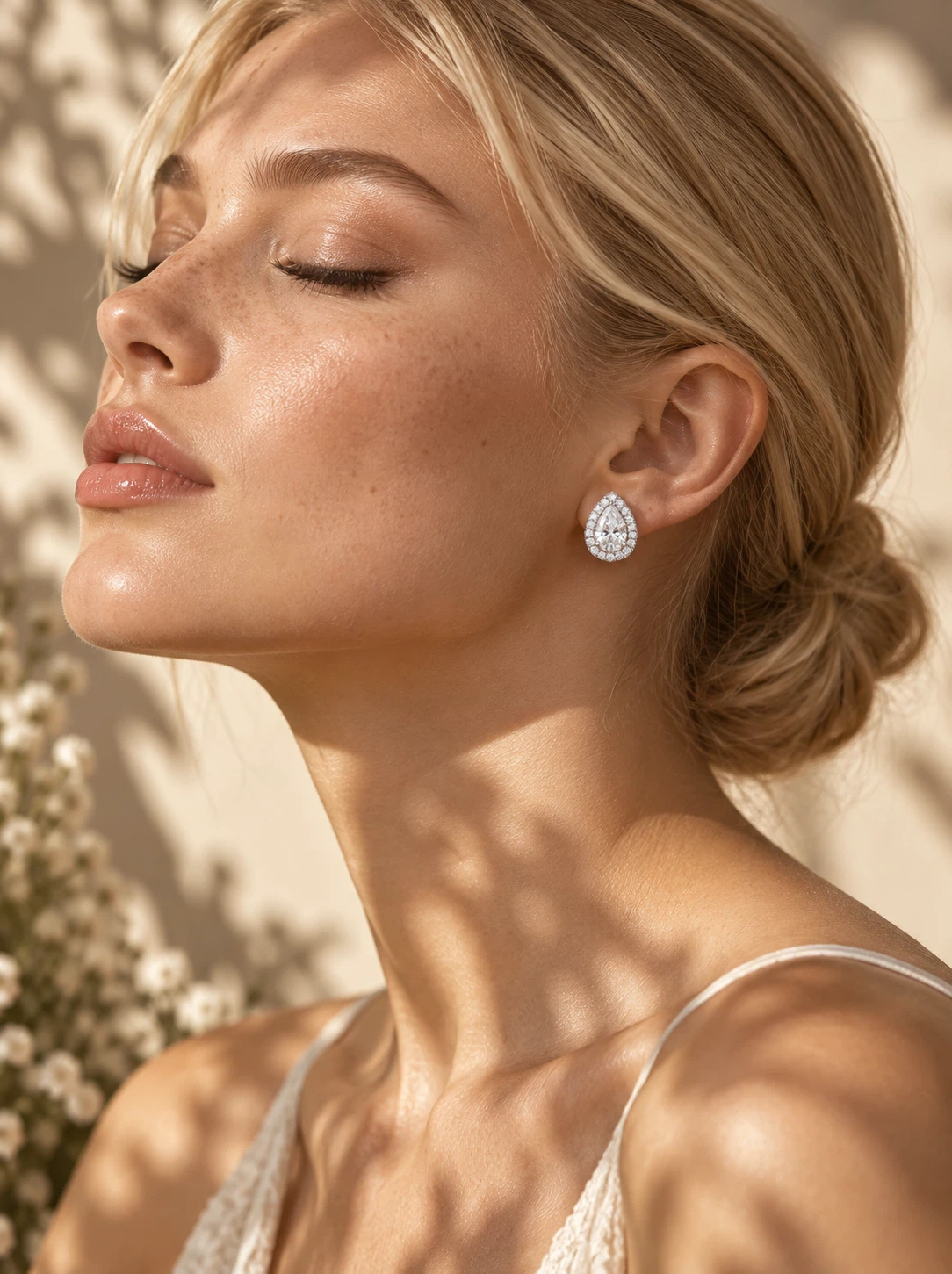
A high-end fashion editorial portrait of a blonde Western female model wearing the earrings shown in the image. The model is in her early 20s, with flawless, radiant skin and subtle freckles. She wears natural, dewy makeup with a soft blush and nude glossy lips. Her features are refined, with high cheekbones and a well-defined jawline. Her blonde hair is styled in a sleek low bun, neatly tucked behind her ears to fully showcase the earrings. She is posed in an elegant side profile, with her eyes gently closed, conveying a calm, graceful, and serene expression. The lighting is warm natural light, with soft botanical shadows cast across her face and shoulders, creating a soft yet high-contrast editorial atmosphere. The light enhances the texture of her skin as well as the reflective shine of the gold and pearl. The background is minimal, in warm beige tones, softly blurred, presenting a premium lifestyle aesthetic. Shot in an ultra-realistic style with fashion magazine quality, using an 85mm lens and shallow depth of field. The earrings are in sharp focus, with soft cinematic lighting, high detail, and a luxurious jewelry advertisement style.

Turn this plain mug into a product mockup: print a hand-drawn illustration of a mountain sunrise wrapping around the mug, with the words "MORNING RITUAL" in clean sans-serif letters beneath it. Add steam rising from fresh coffee inside, keep the table and lighting.
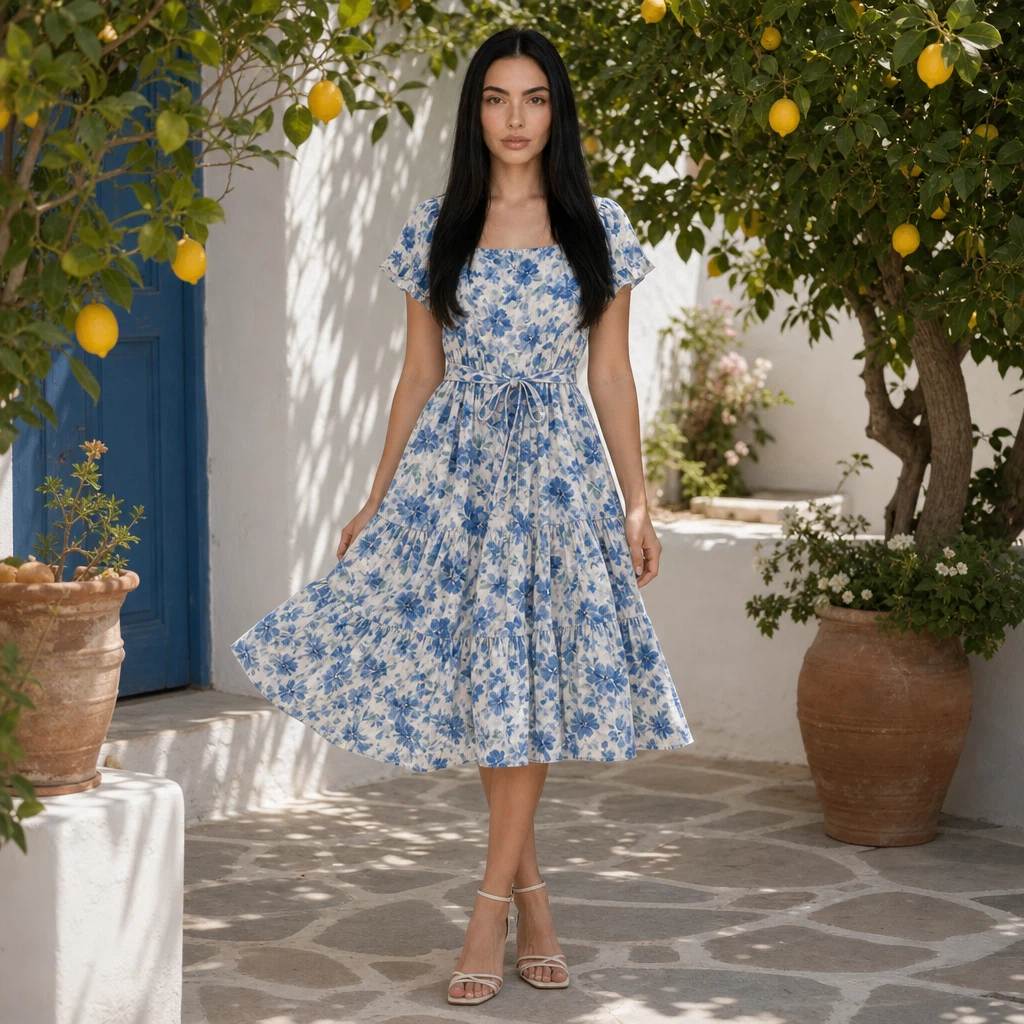
Create a professional e-commerce fashion photo: the woman from the first image wears the blue floral summer dress from the second image. Keep her face and long black hair identical. Full-body shot, standing in a sunny Mediterranean garden with white walls and lemon trees, natural relaxed pose, soft daylight.
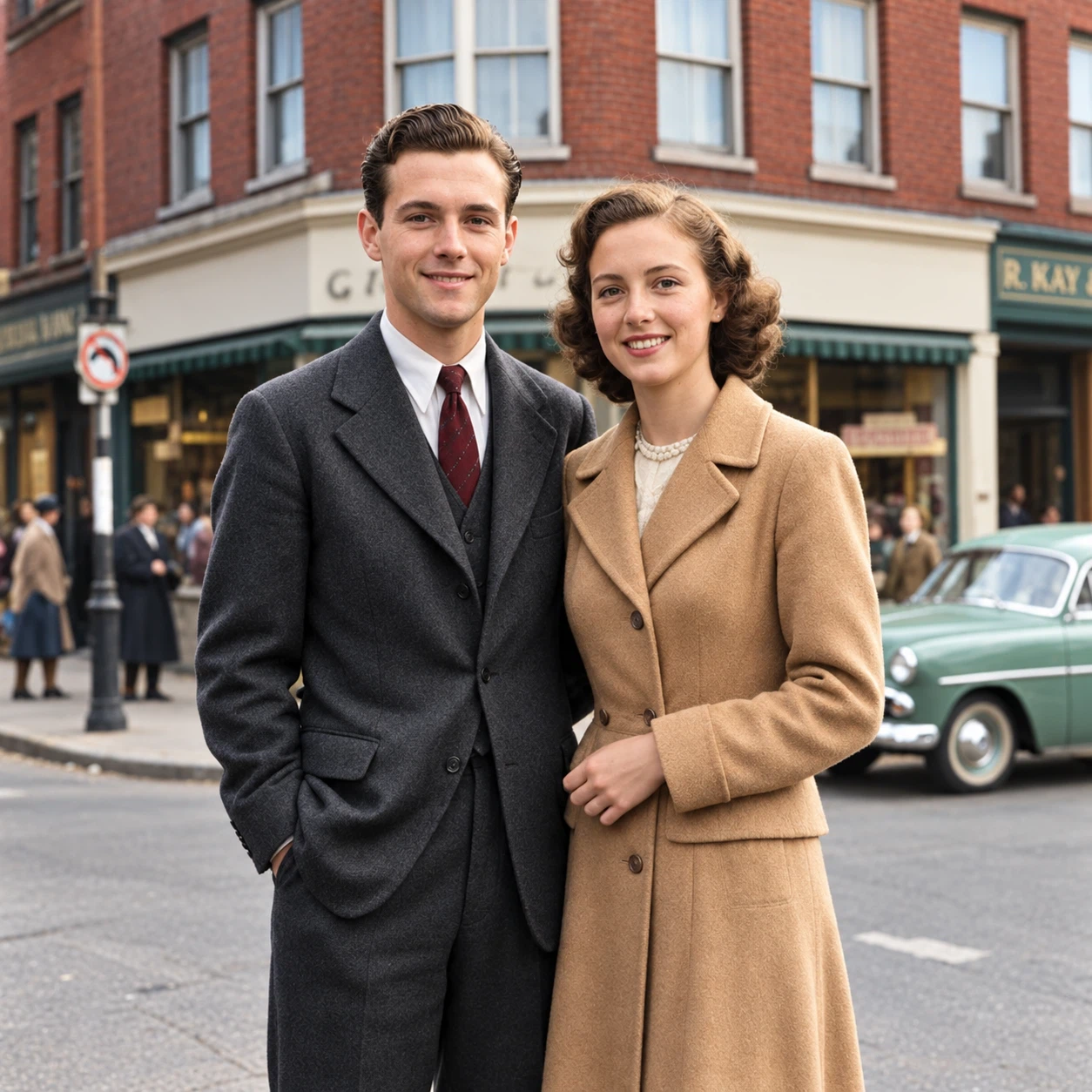
Restore and colorize this old photograph. Remove all scratches, dust and fading, sharpen details, and add natural, realistic colors: warm skin tones, a charcoal suit with a burgundy tie for the man, a camel wool coat for the woman, a mint green vintage car and red brick buildings. Keep faces, poses and composition unchanged.
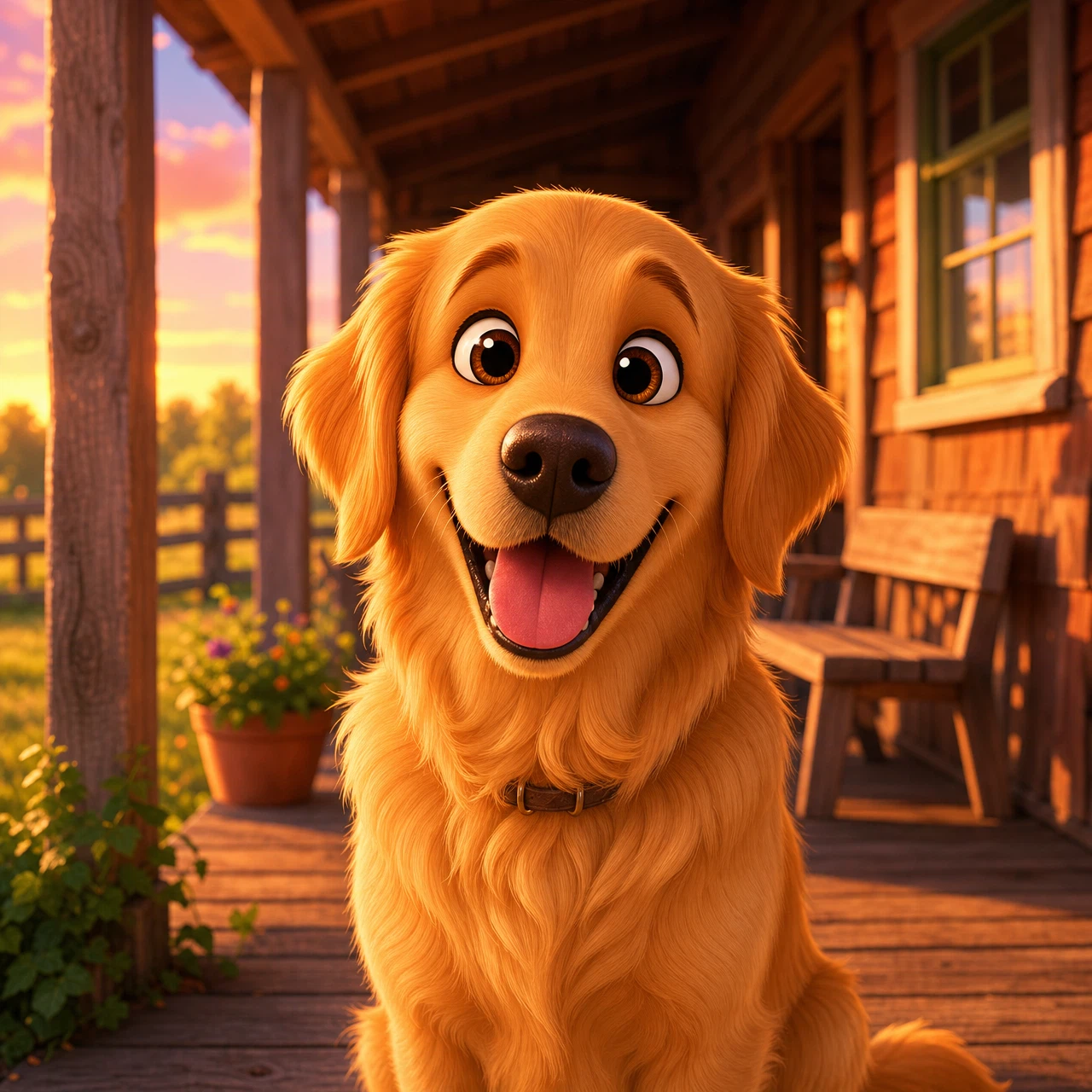
Transform this golden retriever into a charming 3D animated movie character: big expressive eyes, soft stylized fur, playful smile, same porch setting rendered in a colorful stylized 3D animation look with warm sunset lighting.
Modèles associés
/filters:quality(82)/media/images/1788941905586203566_DzViKczP.webp)
/filters:quality(82)/media/images/1788932339711919494_vrbhE9lL.webp)
/filters:quality(82)/media/images/1788941885532951956_ciRgxR5Q.webp)
/filters:quality(82)/media/images/1788932462559654416_SrQZ8hrB.webp)
/filters:quality(82)/media/images/1782721508918099909_oCMW3dT2.webp)
/filters:quality(82)/media/images/1788959825046368453_DvENW6gp.webp)
README
OpenAI GPT Image 2 Edit
OpenAI GPT Image 2 Edit transforms one or more reference images using natural-language instructions. Upload your image, describe the changes you want, and the model generates a polished edited result with strong prompt alignment and production-ready quality.
- Need to generate a new image from scratch instead? Try OpenAI GPT Image 2 Text-to-Image.
New: GPT Image 2.5 is available. The next generation adds two tiers, Flare (fast, balanced) and Sunburst (extra fidelity on intricate detail), five quality levels, and a lower default price of $0.039 per 1k image. Same request format, so switching is a model-ID change: GPT Image 2.5 Flare Edit · GPT Image 2.5 Sunburst Edit.
Why Choose This?
-
Natural-language image editing Edit images by simply describing the changes you want in plain language — no manual masking or complex editing workflow required.
-
Works with reference images Use one or more input images as the visual source for edits, transformations, or style adjustments.
-
Flexible aspect ratios Generate edited outputs in square, portrait, or landscape formats for different publishing and design needs.
-
Production-ready API Access the model through a ready-to-use REST inference API for easy integration into apps, tools, and creative pipelines.
-
Fast and affordable Get high-quality image edits with simple usage-based pricing and no cold-start friction.
Parameters
| Parameter | Required | Description |
|---|---|---|
| images | Yes | Reference images to edit (up to 16) |
| prompt | Yes | Text description of the desired edit |
| aspect_ratio | No | Aspect ratio: 1:1, 3:2, 2:3, 3:4, 4:3, 4:5, 5:4, 9:16, 16:9, 21:9. Auto-detected from input image if not specified. |
| resolution | No | Output resolution: 1k (default), 2k, or 4k. |
| quality | No | Image quality: low, medium (default), or high. |
How to Use
- Upload reference images — add up to 16 images you want to edit.
- Write your prompt — clearly describe the changes, style adjustments, or composition edits you want.
- Choose aspect ratio (optional) — use
1:1for square,2:3or9:16for portrait,3:2or16:9for landscape, etc. Auto-detected from input image if not specified. - Submit — run the model and download your edited image.
Example Prompt
Turn this product photo into a premium studio advertisement with soft cinematic lighting, a clean beige background, subtle shadows, realistic reflections, and luxury brand aesthetics
Pricing
Pricing varies by quality and resolution.
Prices below include one input image. Each additional input image adds $0.012.
| Quality | 1k | 2k | 4k |
|---|---|---|---|
| low | $0.02 | $0.03 | $0.04 |
| medium | $0.07 | $0.11 | $0.19 |
| high | $0.23 | $0.41 | $0.73 |
Best Use Cases
- Product photo enhancement — Upgrade basic product shots into premium marketing visuals.
- Creative retouching — Change backgrounds, lighting, styling, or composition with natural-language instructions.
- Marketing adaptation — Rework existing brand assets into new campaign visuals without recreating them from scratch.
- Social media content — Quickly edit images into platform-ready formats for posts, ads, and promos.
- Design iteration — Explore multiple visual directions from the same base image with different prompts.
- E-commerce optimization — Improve product presentation for listings, hero banners, and promotional creatives.
Pro Tips
- Be specific about what should stay unchanged and what should be modified.
- Mention visual style clearly, such as photorealistic, luxury editorial, minimal, cinematic, or flat lay.
- Describe lighting, background, framing, and mood for more controllable results.
- Use concise but precise prompts instead of overly vague instructions like “make it better.”
- Try multiple aspect ratios when adapting the same edit for different placements.
- If using multiple reference images, make sure they are visually clear and relevant to the intended output.
Notes
- Both
imagesandpromptare required fields. - Supported aspect ratios are
1:1,3:2,2:3,3:4,4:3,4:5,5:4,9:16,16:9, and21:9. Auto-detected from input image if not specified. - This model is intended for image editing based on reference images and natural-language instructions.
Related Models
-
OpenAI GPT Image 2 Text-to-Image — Generate new images directly from natural-language prompts.
-
OpenAI GPT Image 2.5 Flare Edit — Next generation, fast and balanced tier with five quality levels.
-
OpenAI GPT Image 2.5 Sunburst Edit — Next generation, precision-focused tier for intricate detail.
Gpt Image 2 Edit API — Quick start
Grab a WaveSpeedAI API key, then call POST https://api.wavespeed.ai/api/v3/openai/gpt-image-2/edit with your input as JSON. The endpoint returns a prediction id. Start polling the result endpoint around every 2 seconds, increase the interval for long-running tasks, and stop on any terminal status. On completed, read output values from data.outputs. Examples for Gpt Image 2 Edit below.
HTTP example
set -euo pipefail

: "${WAVESPEED_API_KEY:?Set WAVESPEED_API_KEY}"

REQUEST_BODY=$(cat <<'JSON'
{
    "prompt": "A cinematic shot of a city at sunset, soft golden light",
    "images": [
        "https://interactive-examples.mdn.mozilla.net/media/cc0-images/painted-hand-298-332.jpg"
    ],
    "aspect_ratio": "1:1",
    "resolution": "1k",
    "quality": "medium",
    "output_format": "png"
}
JSON
)

# 1. Submit the prediction.
SUBMIT_RESPONSE=$(curl --silent --show-error --fail-with-body \
  -X POST "https://api.wavespeed.ai/api/v3/openai/gpt-image-2/edit" \
  -H "Content-Type: application/json" \
  -H "Authorization: Bearer $WAVESPEED_API_KEY" \
  -d "$REQUEST_BODY")

TASK=$(printf '%s' "$SUBMIT_RESPONSE" | jq 'if has("data") then .data else . end')
PREDICTION_ID=$(printf '%s' "$TASK" | jq -r '.id')
if [ -z "$PREDICTION_ID" ] || [ "$PREDICTION_ID" = "null" ]; then
  printf 'Submission response did not contain a prediction id
' >&2
  exit 1
fi
RESULT_URL="https://api.wavespeed.ai/api/v3/predictions/$PREDICTION_ID/result"

# 2. Poll until the prediction finishes.
while true; do
  RESPONSE=$(curl --silent --show-error --fail-with-body "$RESULT_URL" \
    -H "Authorization: Bearer $WAVESPEED_API_KEY")
  RESULT=$(printf '%s' "$RESPONSE" | jq 'if has("data") then .data else . end')
  STATUS=$(printf '%s' "$RESULT" | jq -r '.status')
  case "$STATUS" in
    completed) printf '%s\n' "$RESULT" | jq '.outputs'; break ;;
    failed|cancelled|timeout|deleted) printf '%s\n' "$RESULT" | jq . >&2; exit 1 ;;
    *) sleep 2 ;;
  esac
done
Node.js example
const submitUrl = "https://api.wavespeed.ai/api/v3/openai/gpt-image-2/edit";
const apiKey = process.env.WAVESPEED_API_KEY;
if (!apiKey) throw new Error('Set WAVESPEED_API_KEY');

async function requestJson(url, options = {}) {
  const response = await fetch(url, options);
  if (!response.ok) throw new Error(await response.text());
  return response.json();
}

// 1. Submit the prediction.
const body = await requestJson(submitUrl, {
  method: "POST",
  headers: {
    "Authorization": `Bearer ${apiKey}`,
    "Content-Type": "application/json",
  },
  body: JSON.stringify({
        "prompt": "A cinematic shot of a city at sunset, soft golden light",
        "images": [
                "https://interactive-examples.mdn.mozilla.net/media/cc0-images/painted-hand-298-332.jpg"
        ],
        "aspect_ratio": "1:1",
        "resolution": "1k",
        "quality": "medium",
        "output_format": "png"
}),
});
const task = body.data ?? body;
if (!task.id) throw new Error("Submission response did not contain a prediction id");
const resultUrl = `https://api.wavespeed.ai/api/v3/predictions/${task.id}/result`;

// 2. Poll until the prediction finishes.
while (true) {
  const resultBody = await requestJson(resultUrl, {
    headers: { "Authorization": `Bearer ${apiKey}` },
  });
  const result = resultBody.data ?? resultBody;
  if (result.status === "completed") {
    console.log(result.outputs);
    break;
  }
  if (["failed", "cancelled", "timeout", "deleted"].includes(result.status)) throw new Error(JSON.stringify(result));
  await new Promise(resolve => setTimeout(resolve, 2000));
}
Python example
import json
import os
import time
from urllib.request import Request, urlopen

api_key = os.environ["WAVESPEED_API_KEY"]
headers = {"Authorization": f"Bearer {api_key}", "Content-Type": "application/json"}
payload = {
    "prompt": "A cinematic shot of a city at sunset, soft golden light",
    "images": [
        "https://interactive-examples.mdn.mozilla.net/media/cc0-images/painted-hand-298-332.jpg"
    ],
    "aspect_ratio": "1:1",
    "resolution": "1k",
    "quality": "medium",
    "output_format": "png"
}

def request_json(url, data=None):
    request = Request(url, data=data, headers=headers, method="POST" if data else "GET")
    with urlopen(request) as response:
        return json.load(response)

# 1. Submit the prediction.
body = request_json("https://api.wavespeed.ai/api/v3/openai/gpt-image-2/edit", json.dumps(payload).encode())
task = body.get("data", body)
if not task.get("id"):
    raise RuntimeError("Submission response did not contain a prediction id")
result_url = f"https://api.wavespeed.ai/api/v3/predictions/{task['id']}/result"

# 2. Poll until the prediction finishes.
while True:
    result_body = request_json(result_url)
    result = result_body.get("data", result_body)
    status = result.get("status")
    if status == "completed":
        print(result.get("outputs", []))
        break
    if status in {"failed", "cancelled", "timeout", "deleted"}:
        raise RuntimeError(result)
    time.sleep(2)
Gpt Image 2 Edit API — Frequently asked questions
What is the Gpt Image 2 Edit API?
Gpt Image 2 Edit is a OpenAI model for image editing, exposed as a REST API on WaveSpeedAI. OpenAI's GPT Image 2 Edit enables image editing from natural-language instructions with one or more reference images. Ready-to-use REST inference API, best performance, no coldstarts, affordable pricing. You can call it programmatically or try it from the playground above.
How do I call the Gpt Image 2 Edit API?
POST your input parameters to the model's REST endpoint (shown in the API tab of this playground) with your WaveSpeedAI API key in the Authorization header. Submission returns a prediction ID. Poll the result endpoint starting around every 2 seconds, increase the interval for long-running tasks, and stop on any terminal status. The playground generates Python, JavaScript, and cURL examples for submitting requests and polling results. Full request/response shape is documented at https://wavespeed.ai/docs/docs-api/openai/openai-gpt-image-2-edit.
How much does Gpt Image 2 Edit cost per run?
Gpt Image 2 Edit starts at $0.0665 per run. That figure is the base price — the final charge scales with the parameters you set in the form (output size, length, count, references, or whatever knobs this model exposes), so a higher-quality or larger output costs more than a minimal one. The exact cost for your current input is shown live next to the Generate button before you submit, and the actual per-call charge is recorded on the prediction afterwards.
What inputs does Gpt Image 2 Edit accept?
Key inputs: `prompt`, `images`, `aspect_ratio`, `resolution`, `enable_base64_output`, `enable_sync_mode`. The full JSON schema (types, defaults, allowed values) is rendered above the Generate button and mirrored in the API reference at https://wavespeed.ai/docs/docs-api/openai/openai-gpt-image-2-edit.
How long does Gpt Image 2 Edit take to generate?
Reported generation time on WaveSpeedAI is around 53 seconds per request. This is an estimate, not a latency guarantee; queue time and input settings can change the total wait. live status is visible in the prediction record.
Can I use Gpt Image 2 Edit outputs commercially?
Commercial usage rights depend on the model's license, set by its provider (OpenAI). Check the provider's applicable terms and WaveSpeedAI's Terms of Service before commercial use.
Plus de OpenAI
Tout voir- openai/gpt-6-astra/image-to-3dImage to 3d
- openai/gpt-6-astra/text-to-3dText to 3d
- openai/gpt-image-1.5/editImage to Image
- openai/gpt-image-1.5/text-to-imageText to Image
- openai/gpt-image-2.5-flare/editImage to Image
- openai/gpt-image-2.5-flare/text-to-imageText to Image
- openai/gpt-image-2.5-sunburst/editImage to Image
- openai/gpt-image-2.5-sunburst/text-to-imageText to Image
Plus de modèles Image to Image
Tout voir- bytedance/seedream-v5.0-pro/editImage to Image
- bytedance/seedream-v4.5/editImage to Image
- google/nano-banana-pro/editImage to Image
- alibaba/wan-2.7/image-editImage to Image
- google/nano-banana-2/editImage to Image
- alibaba/qwen-image-3.0/editImage to Image
- alibaba/wan-2.7/image-edit-proImage to Image
- alibaba/qwen-image-3.0-pro/editImage to Image