GPT Image 2.6 Sunburst Edit transforms one or more reference images using natural-language instructions, with a focus on precision, visual fidelity, and consistent detail across iterative edits for polished creative work, brand assets, product imagery, and production workflows. Ready-to-use REST inference API, best performance, no coldstarts, affordable pricing.
Bereit

$0.0585pro Durchlauf·~17 / $1
BeispieleAlle anzeigen

Transform only the interior of the open piano into a miniature illuminated city built between the strings, with tiny buildings, glowing windows, bridges, and narrow streets integrated into the instrument.Preserve the man, piano exterior, pose, hall, and lighting.
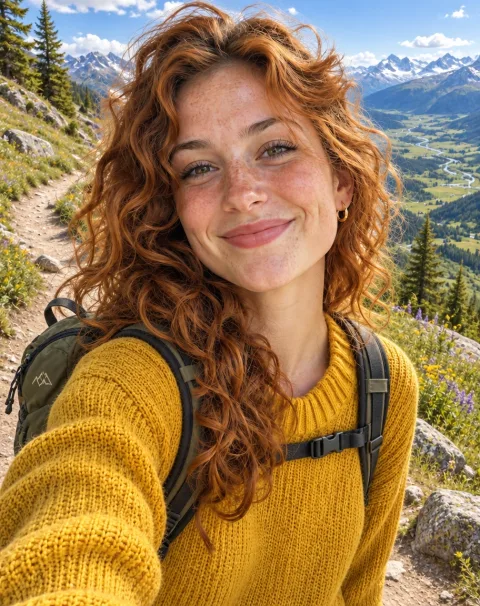
The same woman hiking on a sunny mountain trail with a small backpack, wide alpine valley behind her; keep her face, curly auburn hair, freckles, mustard yellow sweater and gold hoop earrings exactly the same

Place the open watch movement from this photo on a dark walnut desk next to a leather notebook, same lighting style; keep every gear and jewel of the movement exactly as it is
Ähnliche Modelle





README
OpenAI GPT Image 2.6 Sunburst Edit
OpenAI GPT Image 2.6 Sunburst Edit transforms one or more reference images using natural-language instructions. Sunburst is designed for detailed visual work and image editing.
- Need to generate a new image from scratch instead? Try OpenAI GPT Image 2.6 Sunburst Text-to-Image.
- Need faster turnaround? Try OpenAI GPT Image 2.6 Flare Edit.
Why Choose This?
-
Natural-language image editing Edit images by describing the changes you want in plain language; add a mask or a markup layer when the change must land in an exact place.
-
Works with reference images Use up to 16 input images as the visual source for edits, transformations, or style adjustments.
-
Quality and complexity controls
qualitysets the rendering detail you pay for;complexitysets how much the model plans the layout before drawing, at no extra cost. -
Up to 4K output and flexible aspect ratios Square, portrait, landscape, and panoramic outputs at
1k,2k, or4k. -
Production-ready API Access the model through a ready-to-use REST inference API for fast integration into applications and workflows.
Parameters
| Parameter | Required | Description |
|---|---|---|
| prompt | Yes | Text description of the desired edit. |
| images | Yes | Reference images to edit . |
| mask_image | No | Mask for the first image: white marks the area to edit, black the area to keep. Resized to the first image automatically. |
| markup_image | No | Transparent PNG of circles, arrows, or notes drawn over the first image to show where and how to edit it. Use either mask_image or markup_image. |
| aspect_ratio | No | Aspect ratio: 1:1, 3:2, 2:3, 3:4, 4:3, 4:5, 5:4, 9:16, 16:9, 21:9, 2:1, 1:2, 3:1, 1:3, 9:21. Auto-detected from the first input image if not specified. |
| resolution | No | Output resolution: 1k (default), 2k, or 4k. |
| quality | No | Quality tier: low, medium (default), high, xhigh, or max. Higher tiers allocate more rendering detail and cost more. |
| complexity | No | Planning before drawing: low, medium, or high (default). Adjust this for simple or detailed, multi-element prompts; the price is the same. |
| output_format | No | png (default), jpeg, or webp. |
How to Use
- Upload reference images — add images you want to edit.
- Write your prompt — clearly describe the changes, style adjustments, or composition edits you want.
- Pick quality and resolution (optional) —
medium/1kis the default; raisequalityfor more detail orresolutionfor larger output. - Lower complexity for simple requests (optional) —
highis the default; trylowormediumfor short, simple prompts. - Choose aspect ratio (optional) — auto-detected from the first input image if not specified.
- Submit — run the model and download your edited image.
Pricing
Pricing varies by quality and resolution, plus $0.015 for each input image and $0.015 for a mask_image or markup_image. Prices below include one input image.
| Quality | 1k | 2k | 4k |
|---|---|---|---|
| low | $0.045 | $0.075 | $0.115 |
| medium | $0.065 | $0.115 | $0.195 |
| high | $0.075 | $0.135 | $0.225 |
| xhigh | $0.125 | $0.225 | $0.395 |
| max | $0.265 | $0.485 | $0.865 |
complexity and the choice of PNG, JPEG, or WebP do not add separate charges.
Notes
- Both
imagesandpromptare required fields. mask_imageandmarkup_imageapply to the first input image; use one or the other.- A markup image should contain only annotations on a transparent PNG background and match the first input image's dimensions.
- The output aspect ratio follows the first image unless
aspect_ratiois set. - Resolution is a size tier; actual width and height depend on the aspect ratio.
Related Models
- OpenAI GPT Image 2.6 Sunburst Text-to-Image — Generate new images directly from natural-language prompts.
- OpenAI GPT Image 2.6 Flare Edit — The Flare tier of the same model.
- OpenAI GPT Image 2.5 Sunburst Edit — The previous generation.
Gpt Image 2.6 Sunburst Edit API — Quick start
Grab a WaveSpeedAI API key, then call POST https://api.wavespeed.ai/api/v3/openai/gpt-image-2.6-sunburst/edit with your input as JSON. The endpoint returns a prediction id. Start polling the result endpoint around every 2 seconds, increase the interval for long-running tasks, and stop on any terminal status. On completed, read output values from data.outputs. Examples for Gpt Image 2.6 Sunburst Edit below.
HTTP example
set -euo pipefail

: "${WAVESPEED_API_KEY:?Set WAVESPEED_API_KEY}"

REQUEST_BODY=$(cat <<'JSON'
{
    "prompt": "A cinematic shot of a city at sunset, soft golden light",
    "images": [
        "https://interactive-examples.mdn.mozilla.net/media/cc0-images/painted-hand-298-332.jpg"
    ],
    "aspect_ratio": "1:1",
    "resolution": "1k",
    "quality": "medium",
    "complexity": "high",
    "output_format": "png",
    "frame_count": 9,
    "frame_duration_ms": 200
}
JSON
)

# 1. Submit the prediction.
SUBMIT_RESPONSE=$(curl --silent --show-error --fail-with-body \
  -X POST "https://api.wavespeed.ai/api/v3/openai/gpt-image-2.6-sunburst/edit" \
  -H "Content-Type: application/json" \
  -H "Authorization: Bearer $WAVESPEED_API_KEY" \
  -d "$REQUEST_BODY")

TASK=$(printf '%s' "$SUBMIT_RESPONSE" | jq 'if has("data") then .data else . end')
PREDICTION_ID=$(printf '%s' "$TASK" | jq -r '.id')
if [ -z "$PREDICTION_ID" ] || [ "$PREDICTION_ID" = "null" ]; then
  printf 'Submission response did not contain a prediction id
' >&2
  exit 1
fi
RESULT_URL="https://api.wavespeed.ai/api/v3/predictions/$PREDICTION_ID/result"

# 2. Poll until the prediction finishes.
while true; do
  RESPONSE=$(curl --silent --show-error --fail-with-body "$RESULT_URL" \
    -H "Authorization: Bearer $WAVESPEED_API_KEY")
  RESULT=$(printf '%s' "$RESPONSE" | jq 'if has("data") then .data else . end')
  STATUS=$(printf '%s' "$RESULT" | jq -r '.status')
  case "$STATUS" in
    completed) printf '%s\n' "$RESULT" | jq '.outputs'; break ;;
    failed|cancelled|timeout|deleted) printf '%s\n' "$RESULT" | jq . >&2; exit 1 ;;
    *) sleep 2 ;;
  esac
done
Node.js example
const submitUrl = "https://api.wavespeed.ai/api/v3/openai/gpt-image-2.6-sunburst/edit";
const apiKey = process.env.WAVESPEED_API_KEY;
if (!apiKey) throw new Error('Set WAVESPEED_API_KEY');

async function requestJson(url, options = {}) {
  const response = await fetch(url, options);
  if (!response.ok) throw new Error(await response.text());
  return response.json();
}

// 1. Submit the prediction.
const body = await requestJson(submitUrl, {
  method: "POST",
  headers: {
    "Authorization": `Bearer ${apiKey}`,
    "Content-Type": "application/json",
  },
  body: JSON.stringify({
        "prompt": "A cinematic shot of a city at sunset, soft golden light",
        "images": [
                "https://interactive-examples.mdn.mozilla.net/media/cc0-images/painted-hand-298-332.jpg"
        ],
        "aspect_ratio": "1:1",
        "resolution": "1k",
        "quality": "medium",
        "complexity": "high",
        "output_format": "png",
        "frame_count": 9,
        "frame_duration_ms": 200
}),
});
const task = body.data ?? body;
if (!task.id) throw new Error("Submission response did not contain a prediction id");
const resultUrl = `https://api.wavespeed.ai/api/v3/predictions/${task.id}/result`;

// 2. Poll until the prediction finishes.
while (true) {
  const resultBody = await requestJson(resultUrl, {
    headers: { "Authorization": `Bearer ${apiKey}` },
  });
  const result = resultBody.data ?? resultBody;
  if (result.status === "completed") {
    console.log(result.outputs);
    break;
  }
  if (["failed", "cancelled", "timeout", "deleted"].includes(result.status)) throw new Error(JSON.stringify(result));
  await new Promise(resolve => setTimeout(resolve, 2000));
}
Python example
import json
import os
import time
from urllib.request import Request, urlopen

api_key = os.environ["WAVESPEED_API_KEY"]
headers = {"Authorization": f"Bearer {api_key}", "Content-Type": "application/json"}
payload = {
    "prompt": "A cinematic shot of a city at sunset, soft golden light",
    "images": [
        "https://interactive-examples.mdn.mozilla.net/media/cc0-images/painted-hand-298-332.jpg"
    ],
    "aspect_ratio": "1:1",
    "resolution": "1k",
    "quality": "medium",
    "complexity": "high",
    "output_format": "png",
    "frame_count": 9,
    "frame_duration_ms": 200
}

def request_json(url, data=None):
    request = Request(url, data=data, headers=headers, method="POST" if data else "GET")
    with urlopen(request) as response:
        return json.load(response)

# 1. Submit the prediction.
body = request_json("https://api.wavespeed.ai/api/v3/openai/gpt-image-2.6-sunburst/edit", json.dumps(payload).encode())
task = body.get("data", body)
if not task.get("id"):
    raise RuntimeError("Submission response did not contain a prediction id")
result_url = f"https://api.wavespeed.ai/api/v3/predictions/{task['id']}/result"

# 2. Poll until the prediction finishes.
while True:
    result_body = request_json(result_url)
    result = result_body.get("data", result_body)
    status = result.get("status")
    if status == "completed":
        print(result.get("outputs", []))
        break
    if status in {"failed", "cancelled", "timeout", "deleted"}:
        raise RuntimeError(result)
    time.sleep(2)
Gpt Image 2.6 Sunburst Edit API — Frequently asked questions
What is the Gpt Image 2.6 Sunburst Edit API?
Gpt Image 2.6 Sunburst Edit is a OpenAI model for image editing, exposed as a REST API on WaveSpeedAI. GPT Image 2.6 Sunburst Edit transforms one or more reference images using natural-language instructions, with a focus on precision, visual fidelity, and consistent detail across iterative edits for polished creative work, brand assets, product imagery, and production workflows. Ready-to-use REST inference API, best performance, no coldstarts, affordable pricing. You can call it programmatically or try it from the playground above.
How do I call the Gpt Image 2.6 Sunburst Edit API?
POST your input parameters to the model's REST endpoint (shown in the API tab of this playground) with your WaveSpeedAI API key in the Authorization header. Submission returns a prediction ID. Poll the result endpoint starting around every 2 seconds, increase the interval for long-running tasks, and stop on any terminal status. The playground generates Python, JavaScript, and cURL examples for submitting requests and polling results. Full request/response shape is documented at https://wavespeed.ai/docs/docs-api/openai/openai-gpt-image-2.6-sunburst-edit.
How much does Gpt Image 2.6 Sunburst Edit cost per run or per second?
Gpt Image 2.6 Sunburst Edit starts at $0.0585 per run or per second. That figure is the base price — the final charge scales with the parameters you set in the form (output size, length, count, references, or whatever knobs this model exposes), so a higher-quality or larger output costs more than a minimal one. The exact cost for your current input is shown live next to the Generate button before you submit, and the actual per-call charge is recorded on the prediction afterwards.
What inputs does Gpt Image 2.6 Sunburst Edit accept?
Key inputs: `prompt`, `images`, `aspect_ratio`, `resolution`, `complexity`, `frame_count`. The full JSON schema (types, defaults, allowed values) is rendered above the Generate button and mirrored in the API reference at https://wavespeed.ai/docs/docs-api/openai/openai-gpt-image-2.6-sunburst-edit.
How long does Gpt Image 2.6 Sunburst Edit take to generate?
Reported generation time on WaveSpeedAI is around 53 seconds per request. This is an estimate, not a latency guarantee; queue time and input settings can change the total wait. live status is visible in the prediction record.
Can I use Gpt Image 2.6 Sunburst Edit outputs commercially?
Commercial usage rights depend on the model's license, set by its provider (OpenAI). Check the provider's applicable terms and WaveSpeedAI's Terms of Service before commercial use.
Mehr von OpenAI
Alle anzeigen- openai/gpt-image-1.5/editImage Editing
- openai/gpt-image-1.5/text-to-imageText to Image
- openai/gpt-image-2.5-flare/editImage Editing
- openai/gpt-image-2.5-flare/text-to-imageText to Image
- openai/gpt-image-2.5-sunburst/editImage Editing
- openai/gpt-image-2.5-sunburst/text-to-imageText to Image
- openai/gpt-image-2.6-flare/editImage Editing
- openai/gpt-image-2.6-flare/text-to-imageText to Image
Weitere Image Editing-Modelle
Alle anzeigen- bytedance/seedream-v5.0-pro/editImage Editing
- google/nano-banana-pro/editImage Editing
- google/nano-banana-2.1/editImage Editing
- bytedance/seedream-v4.5/editImage Editing
- alibaba/wan-2.7/image-editImage Editing
- openai/gpt-image-2.5-sunburst/editImage Editing
- bytedance/seedream-v5.5/editImage Editing
- google/nano-banana-2/editImage Editing