
GPT-5.6 Usage Limits for ChatGPT and Codex
GPT-5.6 usage limits guide for ChatGPT plans, Codex access, API rate limits, fallback, and rollout constraints.

Dora here. I opened the limit sheet before I opened the model picker. That is usually where the real work starts.
GPT-5.6 usage limits are not one number. They change by surface, plan, model, task size, context, tool use, credits, and whether the work runs as ChatGPT, ChatGPT Work, Codex, or API traffic. If someone says “I have GPT-5.6,” I still ask the next question: where, on which plan, and under which usage pool?
This note is the version I would give an internal team before they start filing support tickets against the wrong limit.
GPT-5.6 Availability by Surface
ChatGPT plans, Codex, API, and Work surfaces
The first split is surface.
ChatGPT chat usage, Codex usage, ChatGPT Work usage, and OpenAI API usage are related, but they are not the same counter. That is the part people miss. Then the banner appears mid-task and everyone starts guessing.
OpenAI’s current GPT-5.6 model guidance says the gpt-5.6 alias routes to gpt-5.6-sol, while gpt-5.6-terra is positioned for lower-cost strong performance and gpt-5.6-luna for efficient, high-volume workloads. It also says API Pro behavior is not a separate “Sol Pro” model slug. For the API, Pro mode is enabled with reasoning.mode: "pro" on the selected GPT-5.6 model.
That matters for documentation. I would not write “switch to GPT-5.6 Sol Pro” as if it were always a separate model. I would write: use Sol, and if the API workflow needs Pro mode, verify reasoning.mode: "pro" support in the current API docs.
Codex is its own place to check. Codex is included across ChatGPT plans, including Free and Go, but usage limits vary by plan. It also says Codex, ChatGPT Work, ChatGPT for Excel, and Workspace Agents draw from the same agentic usage and credit pool when available on a plan.
That is the sentence I would put in the admin note. One pool. Multiple surfaces. Different burn rates.
Free/Go/Plus/Pro differences to verify
I would not publish plan-specific advice without checking the live plan page that day.
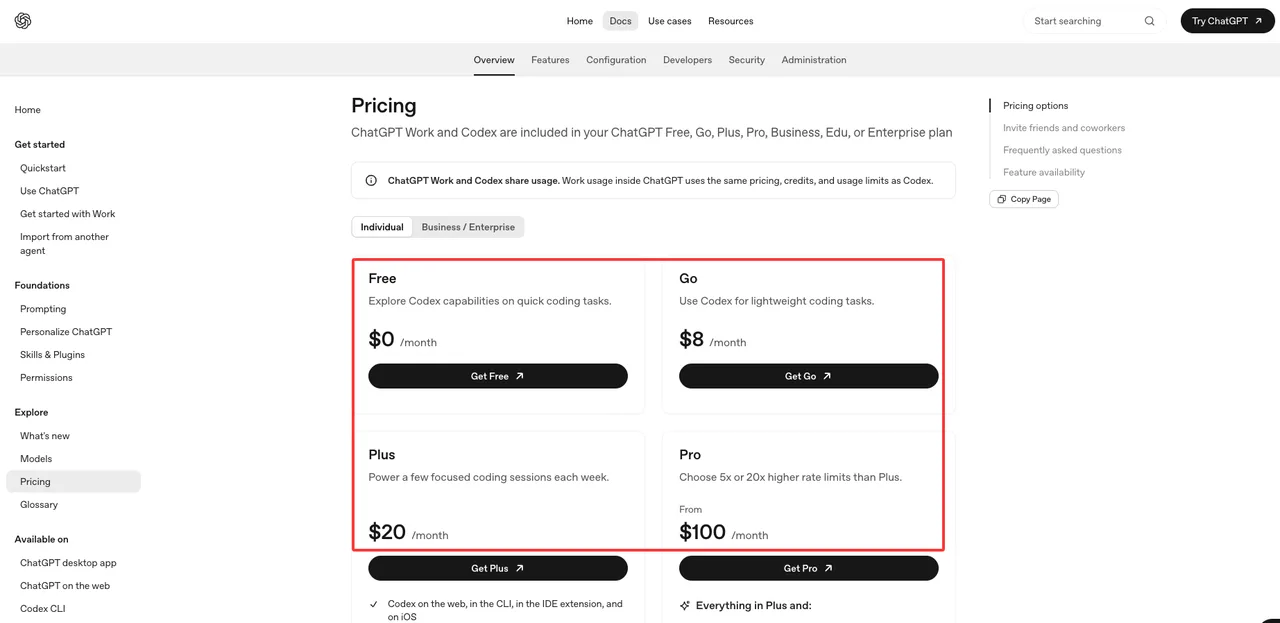
The current Codex pricing page lists Free, Go, Plus, Pro, Business, Edu, Enterprise, and API-key paths. Free is framed for quick coding tasks. Go is framed for lightweight coding tasks. Plus includes Codex on web, CLI, IDE extension, and iOS, plus the GPT-5.6 family. Pro offers 5x or 20x higher Codex usage than Plus.
That is the high-confidence part.
The lower-confidence part is the exact cap a specific user sees. Even when OpenAI publishes ranges, the user’s actual experience can still depend on rollout, region, workspace settings, app surface, credits, and task shape. I paused here because this is where support docs usually go wrong. They copy a table. The table changes. Then the support team owns the cleanup.
For a public article, I would say this:
- Free and Go users should verify whether GPT-5.6 ChatGPT, Work, and Codex access appear in their account, not only on a marketing page.
- Plus users should verify GPT-5.6 model availability and remaining Codex credits in the usage dashboard.
- Pro users should verify whether they are on 5x or 20x usage and whether any feature is still in limited rollout.
- Business, Enterprise, and Edu users should check workspace policy, admin controls, flexible pricing, and role-based access.
That is not hedging. That is how the product actually behaves.
API and Codex Limit Checks
Rate limits, usage banners, credits, and org settings
For API work, I start in the dashboard. Not in ChatGPT.
OpenAI’s API rate limits guide says rate limits are defined at the organization and project level, not the individual user level. It also says limits vary by model, some model families share limits, and organizations have monthly usage limits in addition to request and token limits.
So an API team should check:
- organization rate limits
- project rate limits
- model-specific RPM, TPM, RPD, TPD, and related counters
- monthly spend limits
- shared-limit groups
- long-context limits where relevant
- response headers such as remaining requests and remaining tokens
- dashboard usage by project and key
This is where OpenAI API limits differ from ChatGPT plan limits. The API does not care that a user has ChatGPT Plus or Pro. It cares about the API organization, project, model, usage tier, payment history, and configured spend cap.
Codex is different. Codex users should look at the Codex usage dashboard, the in-product limit banner, and /status where available. The current Codex docs say larger codebases, long-running tasks, extended sessions, model choice, context, reasoning, tools, retrieval, and caching can all change how quickly usage is consumed.
Prompt length alone is not a reliable estimate. Found the pattern on the third try.
What differs between ChatGPT usage and API limits
ChatGPT usage is plan- and feature-based. API usage is org- and project-based.
That one sentence prevents a lot of bad internal documentation.
ChatGPT and Codex limits usually show up as user-facing banners, usage dashboards, credits, resets, or upgrade/add-credit options. The unit is often simplified for the user. Codex may talk about credits or included usage. ChatGPT may show a feature-specific banner. Work may share the same agentic pool as Codex.
API limits show up as rate-limit errors, response headers, usage dashboards, project spend, and billing controls. The units are more technical: tokens per minute, requests per minute, images per minute, queued Batch tokens, and monthly spend.
Here is the working distinction I would keep in the team runbook:
| Surface | What to Check | Who Usually Owns It |
|---|---|---|
| ChatGPT | Plan, model picker, feature banner, message/reset notice | Team lead or support |
| ChatGPT Work | Rollout status, plan eligibility, shared agentic usage | Workspace admin |
| Codex | Usage dashboard, credits, limit banner, model/task size | Engineering lead |
| API | Org/project limits, headers, spend cap, model availability | Platform engineering |
| Business/Edu/Enterprise | RBAC, workspace settings, flexible pricing, compliance logs | Admin/IT/security |
I would keep the table short. Longer than this and nobody reads it during an outage.
Fallback Planning
When to route to Terra, Luna, or older models
The fallback rule should be written before the limit is exhausted.
OpenAI’s API models page lists GPT-5.6 Sol, Terra, and Luna with different positioning and pricing. Sol is the flagship model. Terra balances intelligence and cost. Luna is the lower-cost, high-volume option.
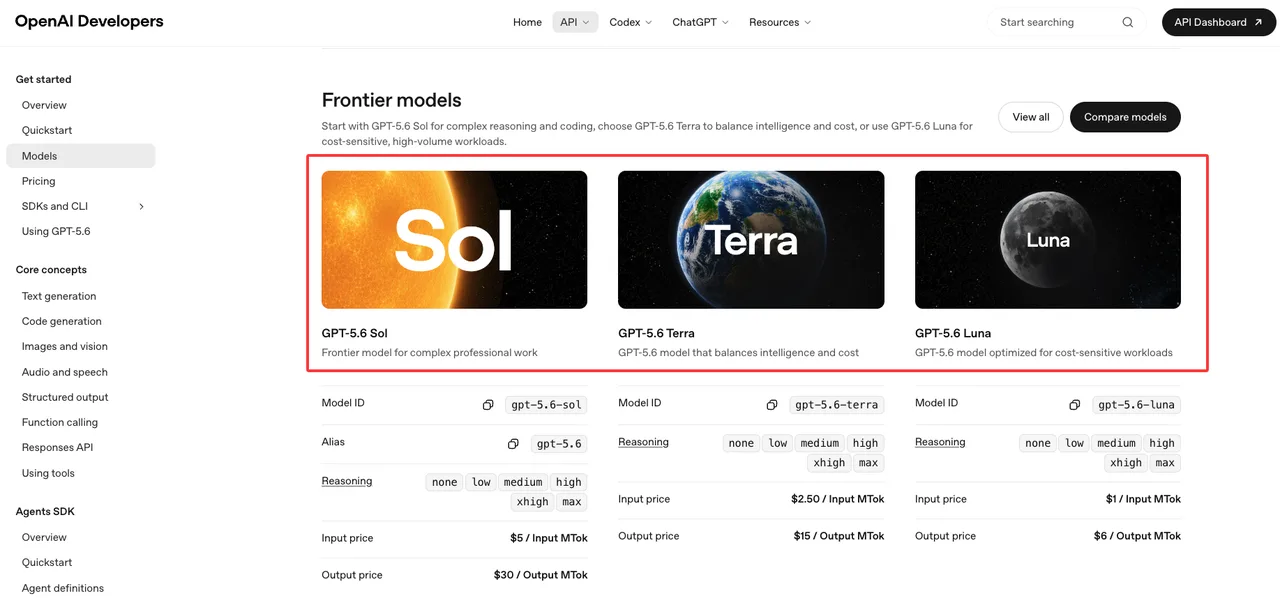
That gives teams a clean routing ladder.
Use Sol for complex reasoning, coding, review-heavy work, difficult research, and tasks where one bad answer costs more than a slower or more expensive run.
Use Terra for the default middle lane. Internal tools, ordinary analysis, structured writing, moderate coding, and support workflows often belong here after testing.
Use Luna for high-volume, lower-risk work. Classification, transformation, short drafts, repetitive internal summaries, and first-pass routing can often start there.
Older models still have a place. If a workflow is stable on GPT-5.5 or GPT-5.4, I would not migrate it just because the picker changed. Run the same task set, compare quality, latency, token use, and refusal behavior, then move. Good enough is still a valid production state.
Speed is not the goal. Not breaking flow is.
Handling exhausted limits during active workflows
Write the exhausted-limit path in plain language.
If Codex hits a limit during an active turn, OpenAI’s Codex docs say the agent can continue that turn, subject to fair-use limits. After that, the user may need to add credits, use a reset, upgrade, switch models, use an API key for local tasks, or wait for the limit to reset.
That should become a runbook, not a Slack debate.
For active workflows, I would use this order:
- Let the current turn finish if the product allows it.
- Save the working state, branch, files, logs, and test output.
- Switch routine follow-up work to Terra, Luna, or an older tested model.
- Move automation or CI-style tasks to an API key if that is approved.
- Add credits only when the remaining work has a clear owner and budget.
- Escalate to the workspace admin if the limit is caused by policy, RBAC, or shared workspace settings.
Do not ask users to “just try again later” without telling them what state to preserve. That is how long-running coding work gets lost.
FAQ

Who owns usage-limit communication for internal users?
Product owns the user-facing policy. Engineering owns the technical truth. Support owns the wording that users actually see. Admins own workspace settings.
For GPT-5.6 limits, I would put one person in charge of the source-of-truth page, but not one person in charge of all decisions. The owner should collect current plan notes, dashboard screenshots, known banners, API limit behavior, and fallback rules.
If the company uses GPT-5.6 Codex heavily, engineering should review the page whenever Codex pricing, credits, or model routing changes. If the company uses GPT-5.6 ChatGPT for nontechnical users, support should own the plain-language version.
What banner or dashboard change should trigger support docs?
Any banner that changes user action should trigger a doc update.
Examples: “limit reached,” “credits available,” “upgrade required,” “reset available,” “model unavailable,” “feature not available on this plan,” “workspace admin disabled this,” or “API rate limit exceeded.”
The same applies to dashboard changes. If the Codex usage dashboard changes units, adds credits, hides a reset, or separates local and cloud usage differently, update the support doc. If the API dashboard changes project-level limits or shared model groups, update the developer runbook.
This conclusion has an expiration date. Models update fast.
How should teams record plan-specific exceptions?
Keep a small exception log.
Each row should include the date, plan, workspace type, user role, surface, model, observed banner, dashboard state, support action, and source link. Screenshots help, but they should not replace text notes. Search cannot read a screenshot when someone is debugging three weeks later.
For GPT-5.6 usage limits, the exception log should separate confirmed facts from account-specific observations. “Plus includes GPT-5.6 family on the Codex pricing page” is a source-backed statement. “Our contractor account did not see Work on mobile on July 13” is an account observation.
Both are useful. They are not the same thing.
That is the whole limit story: check the surface, check the plan, check the pool, check the dashboard, then pick the fallback model. Anything more confident than that is probably guessing.
Previous posts:
/filters:quality(82)/media/images/6cd1ca63-9e7e-493b-8a68-97bad82fb7b4.webp)
/filters:quality(82)/media/images/567077af-c3bd-4701-ba96-1b981a515d79.webp)
/filters:quality(82)/media/images/1773962750383987480_n3hqzHRZ.webp)
/filters:quality(82)/media/images/1ecd59e5-56e4-434d-ae06-c414860b29b8.webp)
/filters:quality(82)/media/images/b38eb9e7-de41-4a05-8e79-5e280c4a0c36.webp)
/filters:quality(82)/media/images/c347367a-a007-4466-b8f7-d37f5fb52819.webp)