
Claude canvas-design Posters with Real Photos and Japanese Text: A Practical Guide
How to make photo posters with Claude's canvas-design skill: generate the photo with WaveSpeed, add Japanese (CJK) fonts the skill lacks, set vertical text properly, and check the result. Three finished posters with their prompts.
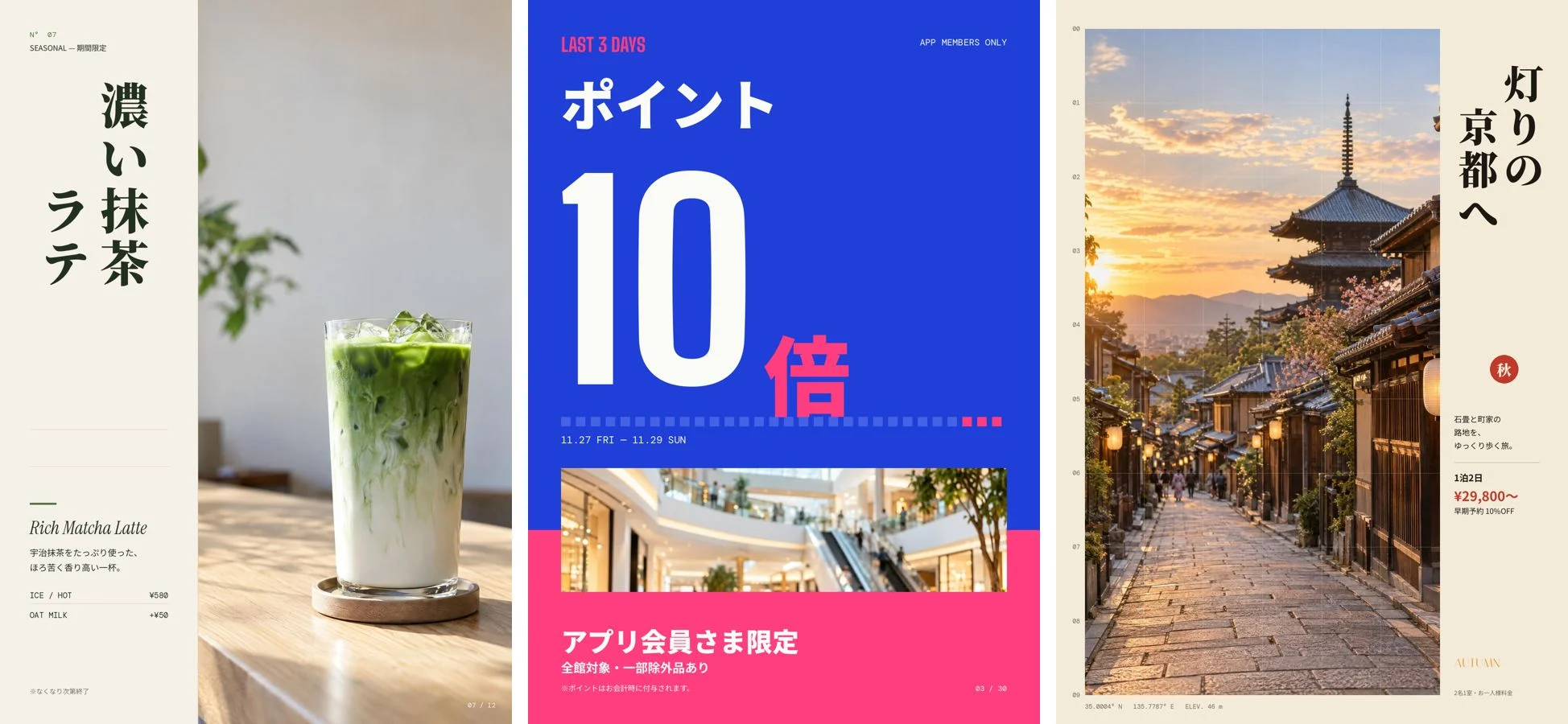
Anthropic’s canvas-design skill for Claude is having a moment: people post posters that look like a designer made them, produced from a one-line request. Unlike an image model, which paints the whole poster as pixels, canvas-design has Claude compose the layout and the type in code. Text comes out crisp and spelled correctly, and margins and alignment are exact.
Two things are missing as soon as you need a real flyer for a cafe, a sale or a trip: the skill cannot make photos, and its bundled fonts have no Japanese, Chinese or Korean glyphs. This guide fills both gaps: generate the photo with WaveSpeed, add a CJK font, and let canvas-design lay it out. The three posters below were made exactly this way.
What canvas-design is
canvas-design ships in Anthropic’s official anthropics/skills repository (about 199,000 GitHub stars in November 2026) under the Apache-2.0 licence. It works in two steps:
- Write a design philosophy. From your request, Claude names an aesthetic movement (say, “Quiet Steam”) and describes its space, colour, type and rhythm in four to six paragraphs of Markdown.
- Express it on a canvas. Claude then draws the poster as a PNG or PDF, usually in Python, following that philosophy and keeping words to a minimum.
In Claude Code, install it with:
/plugin marketplace add anthropics/skills
/plugin install example-skills@anthropic-agent-skills
Then ask: “Use the canvas-design skill to make a poster for a seasonal matcha latte.”
Why image models alone make weak posters
- Broken text. Image models draw letters as pictures. Long copy, and Japanese in particular, comes out with invented characters.
- No edits. Changing one price or date means regenerating the whole image.
- Not print-ready. Exact A4 proportions, bleed and margins are hard to control.
canvas-design sets type with real fonts, which fixes all three. It just cannot draw the photo.
The two gaps, and how to fill them
Photos
canvas-design draws shapes, colour fields and type. A poster built around a drink, a store or a street needs a photo, so generate it with WaveSpeed first.
CJK fonts
The skill’s canvas-fonts folder holds Latin typefaces only: Big Shoulders, DM Mono, Instrument Serif, Outfit, Work Sans and others. Japanese drawn with them turns into empty boxes (“tofu”) or falls back to a random system font. These free Google Fonts (SIL Open Font License, commercial use allowed) cover most needs:
| Use | Font |
|---|---|
| Bold headlines (sales, notices, hiring) | Noto Sans JP Black |
| Elegant or vertical headlines (cafes, ryokan, festivals) | Noto Serif JP Black |
| Body copy, prices, fine print | Noto Sans JP Regular |
| Playful headlines | Dela Gothic One |
| Soft, friendly headlines | Zen Maru Gothic |
Step by step
1. Generate the photo on WaveSpeed
Install the WaveSpeed skill so Claude can generate images itself:
npx skills add WaveSpeedAI/agent-skillsOr use the CLI directly (npm i -g wavespeed, then wavespeed login):
wavespeed generate image "Professional photo of an iced matcha latte in a tall clear glass, light wooden cafe counter, soft morning window light, plenty of empty space above the glass, no text, no logos, no people" -m gpt-image-2.5 --aspect-ratio 3:4 --downloadTwo rules for poster photos: ask for no text or logos (type comes later, from fonts), and ask for empty space where the headline goes. The photos here were generated with GPT Image 2.5 at 3:4.
2. Add the font
Download Noto Sans JP and Noto Serif JP from Google Fonts into the working folder and tell Claude which file to use for Japanese.
3. Ask canvas-design for the layout
Use the canvas-design skill to make an A4 portrait poster for a seasonal cafe drink.
- Photo: photos/cafe.jpg, large on the right
- Headline: 濃い抹茶ラテ, vertical, fonts/NotoSerifJP-Black.ttf
- Body: 宇治抹茶をたっぷり使った、ほろ苦く香り高い一杯。
- Prices: ICE / HOT ¥580, OAT MILK +¥50
- Note: ※なくなり次第終了
Draw all Japanese with the Noto fonts in fonts/, then look at the rendered image and check that no character is missing.
4. Check before you print
- Missing glyphs. Latin fonts may lack ¥ or 〜; draw lines that contain them with the Japanese font.
- Line-break rules (kinsoku). No 。、ー at the start of a line, no opening bracket at the end.
- Vertical text. Punctuation and the long-vowel mark ー must use their vertical forms.
- Facts. Dates, weekdays and prices. Weekdays are a classic AI mistake.
Three philosophies, three posters
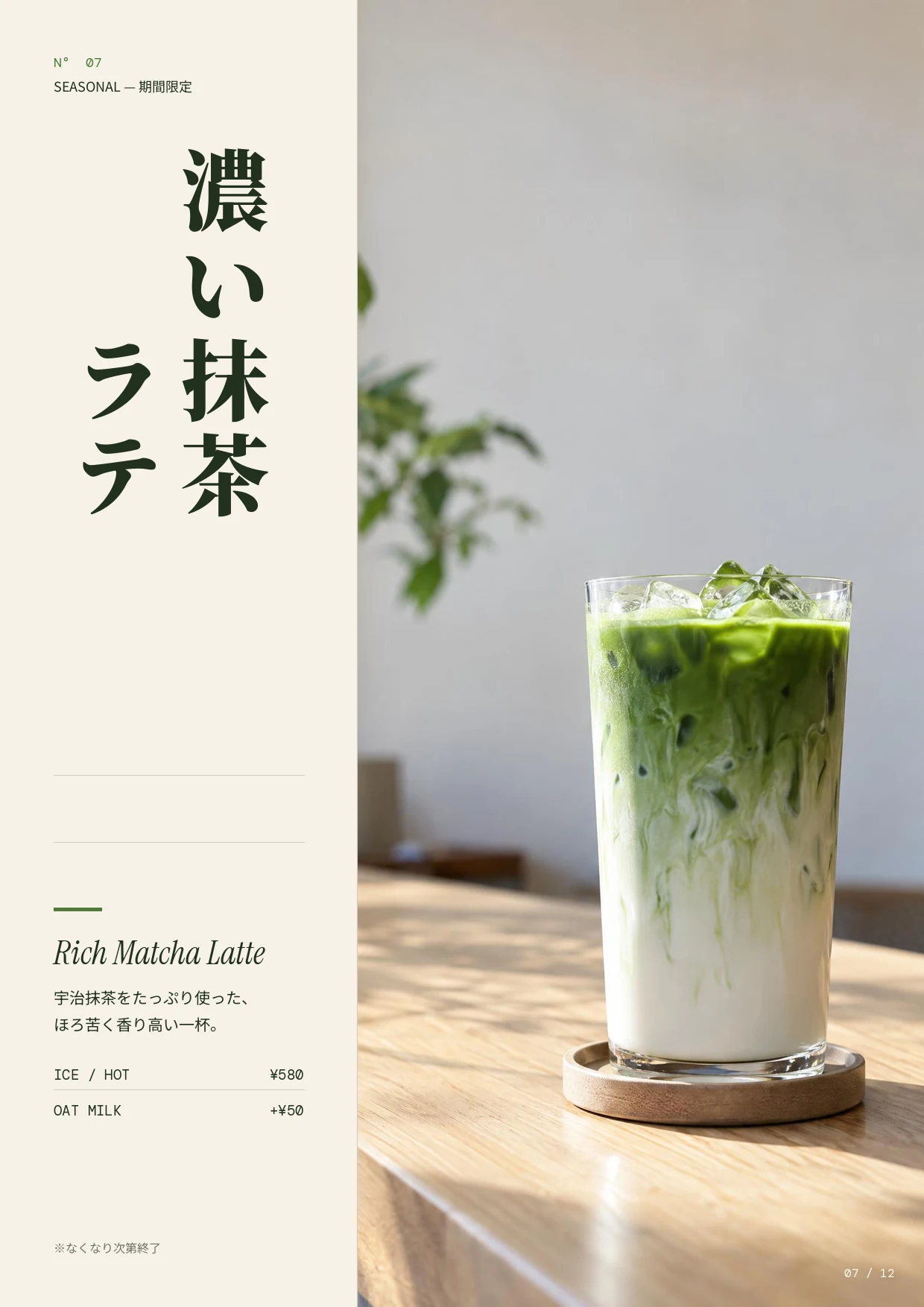
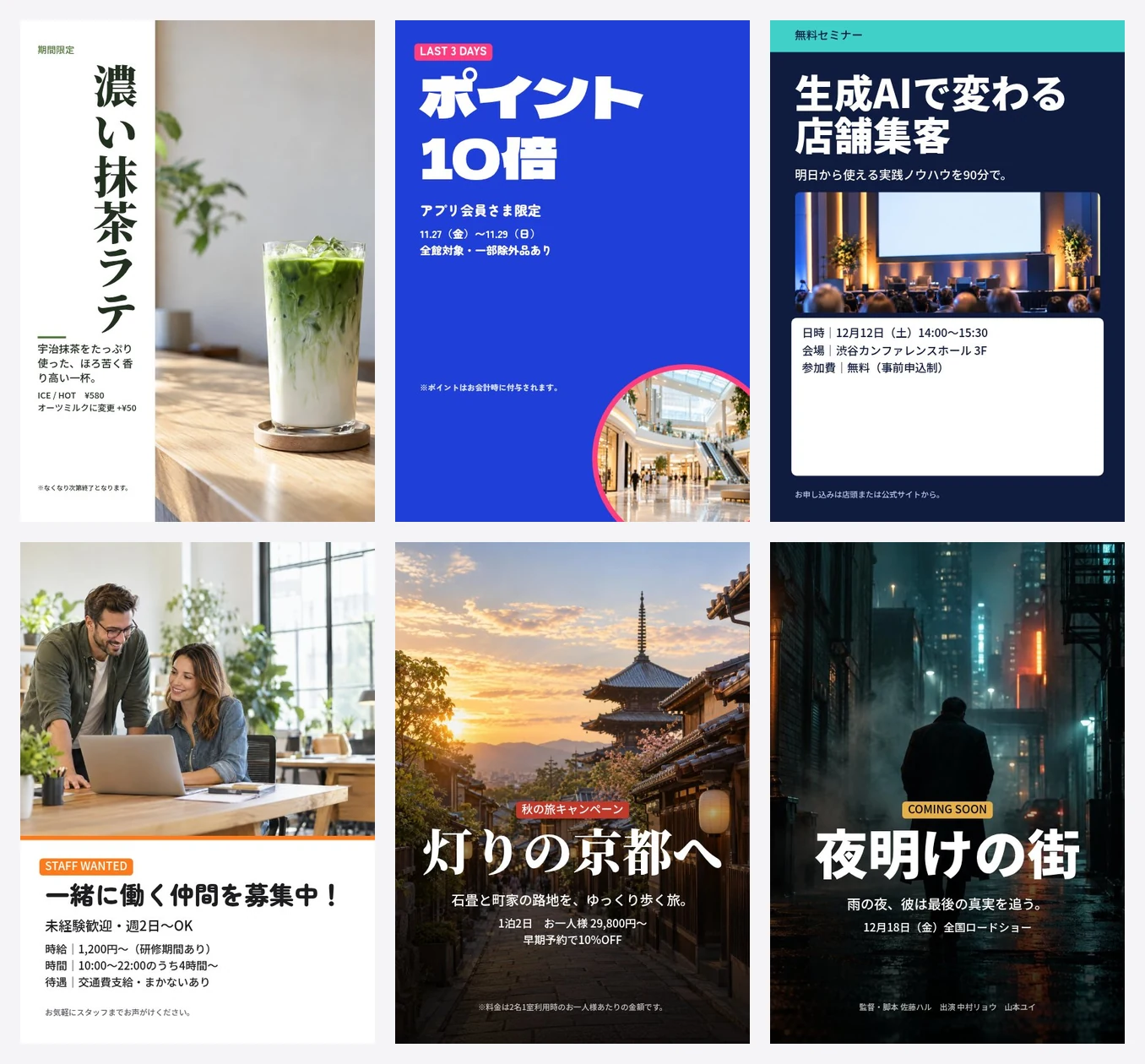
Quiet Steam (cafe, seasonal drink)
A single object held in a large, warm silence. The clearing is the work; the type stands in its own column like a hanging scroll.
The matcha photo fills the right side; a narrow paper-coloured column on the left carries the vertical headline in Noto Serif JP, with Instrument Serif for the English line and DM Mono for prices.
Chromatic Pulse (sale, 10x points)
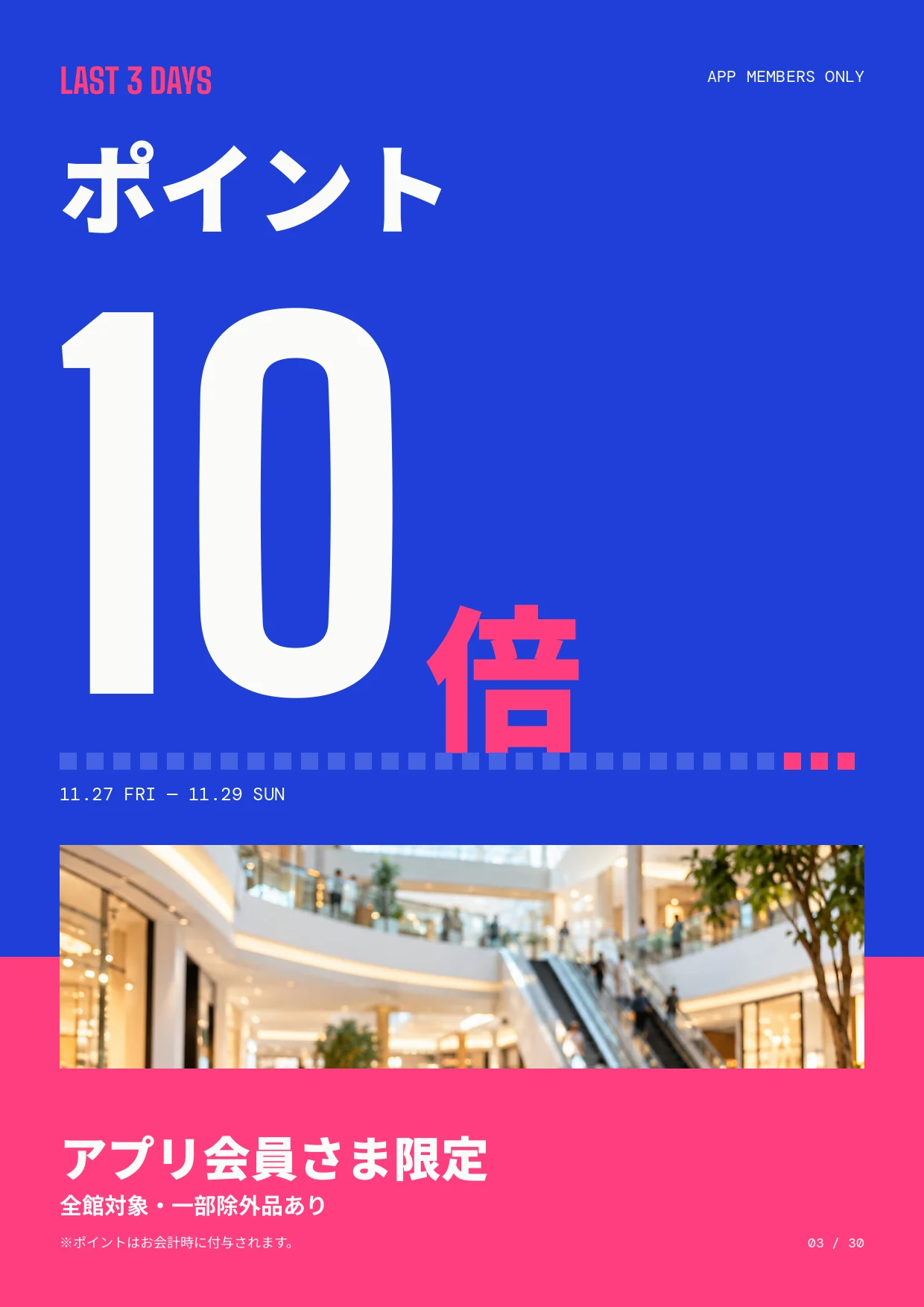
Colour as a signal felt from across a hall. Two saturated fields meet at a hard edge, and the meeting is the message.
Electric blue and hot pink, a monumental “10” in Big Shoulders, Japanese in Noto Sans JP Black. The mall photo is cropped to a band so the number stays the hero, and a row of squares counts down the remaining days.
Lantern Cartography (travel, autumn in Kyoto)
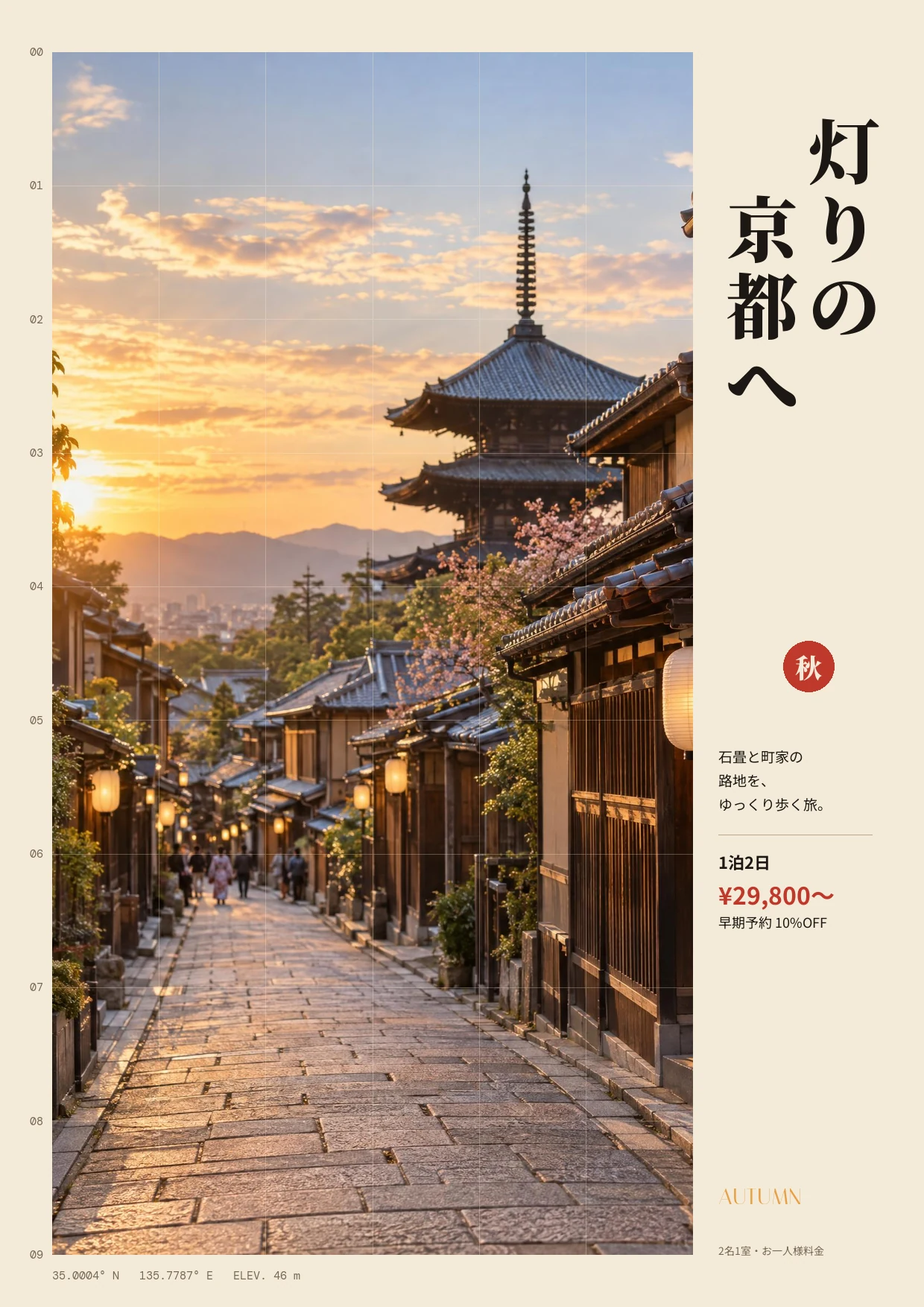
A feeling of place mapped the way a surveyor maps terrain. The photograph is the territory; a fine grid and marginal scales sit over it like a scholar’s notes.
A faint coordinate grid and latitude/longitude sit over the Kyoto street; the vertical headline 灯りの京都へ stands at the edge like a signpost, with a vermilion 秋 seal as the single accent.
Vertical Japanese text that looks right
Asked for vertical text, Claude sometimes just stacks horizontal characters. Spell out the rules in the request:
- Shift 、 and 。 to the upper right; rotate ー and brackets 90 degrees.
- Columns run right to left; balance their lengths so no column holds a single character.
- A serif (mincho) face for the vertical headline and a sans (gothic) face for horizontal notes gives a classic Japanese look.
No code? Use the free poster maker
For the same kind of poster without Claude or a terminal, try the browser-based free poster maker. Pick cafe, sale, event, hiring, travel or movie, type your text, add a photo and press Shuffle to cycle layouts. It bundles Noto Sans JP, Noto Serif JP, Dela Gothic One and Zen Maru Gothic, supports vertical Japanese and exports print-ready A4 PDFs. No sign-up, and photos never leave your browser.
FAQ
Is canvas-design free?
The skill is free and open source (Apache-2.0). You need Claude (Claude Code or the Claude apps) to run it; generating photos on WaveSpeed is billed per image.
Why does my Japanese text show as boxes?
The bundled fonts are Latin only. Put a Japanese font such as Noto Sans JP in the working folder and tell Claude to use that file.
Can the image model draw the Japanese text instead?
It can, but generating the photo without text and setting the type with fonts is more accurate and much easier to edit. If you do want text inside the image, pick a model that is strong at text, such as the GPT Image family.
Is the output good enough to print?
Ask for A4 at 2480×3508 px (300 dpi) or a PDF. The free poster maker also exports A4 PDFs.
Summary
canvas-design gives you precise type and layout. For posters with photos and Japanese text, add three things: a photo generated on WaveSpeed, a CJK font, and a final check of line breaks, vertical forms and dates. Start by generating one photo on WaveSpeed.
Related Articles

kie.ai Problems in 2026: Tasks Stuck at 99%, Credits Deducted, Errors After Top-Up, Refunds and Support
Lovart Problems in 2026: Credits That Reset, Hard Cancellations, Slow Unlimited Mode and Refunds
Is muapi Legit? muapi Review 2026: Company, Billing, Refund Policy and User Reports
Pollo AI Credits and Refunds in 2026: Why Credits Run Out, When They Expire, and How to Get a Refund
fal.ai Concurrency Limit Explained: Why Requests Queue and How to Get More Than 40