
Nano Banana 2 API Guide for Image Workflows
Nano Banana 2 API guide for builders evaluating Gemini API image generation, editing, cost, batch workflows, and production fallback.
I keep one column in my model registry called “production-ready.” Most image models do not get that box checked on the first pass. The Nano Banana 2 API is different enough to test seriously, but not different enough to skip the boring checks.
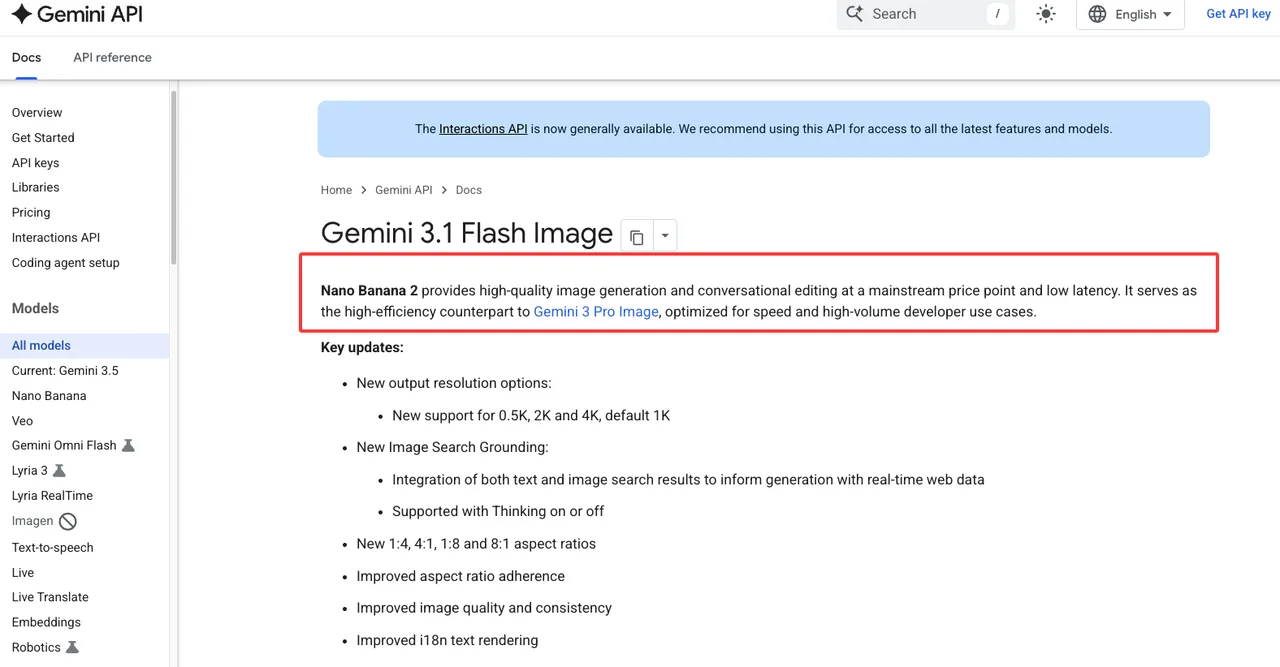
As of this draft, Google’s Nano Banana image generation docs identify Nano Banana 2 as Gemini 3.1 Flash Image, with API examples using gemini-3.1-flash-image. Good. That proves the model is visible in the Gemini API docs. It does not prove your quota, billing state, UI access, customer rights workflow, or fallback plan.
That is the work.
What Nano Banana 2 API Means for Builders

Nano Banana 2 sits in the part of the image stack where I usually want one thing: a general model that can handle enough everyday cases without turning every prompt into a hand-tuned art project.
Google positions Gemini 3.1 Flash Image as the balanced model in the Nano Banana family. The same docs separate it from Nano Banana 2 Lite, Nano Banana Pro, and the older Gemini 2.5 Flash Image. I would treat Google Nano Banana 2 as the default candidate for high-volume image generation and editing, not automatically as the final model for every asset class.
The production question is simple: can it become a dependable node in a real image workflow?
My first pass would not be “does it make pretty images.” That is too soft. I would test whether it survives:
| Workflow stage | What I would verify |
|---|---|
| Prompt intake | Can product, brand, and safety constraints be represented cleanly? |
| Image generation | Does the output pass first-review thresholds often enough? |
| Editing | Can the model change one thing without damaging three others? |
| Subject consistency | Can it preserve people, products, objects, or visual systems across runs? |
| Batch work | Can failures be retried, reviewed, and routed without manual babysitting? |
| Launch control | Can model ID, cost, quota, and region be verified on publish day? |
That table is where the decision lives. Not in a launch headline.
Gemini 3.1 Flash Image and Gemini API access
For builders, the current confirmed anchor is the Gemini 3.1 Flash Image model card. It lists gemini-3.1-flash-image as the model code and frames Nano Banana 2 as a high-efficiency image model for low-latency, high-volume developer use cases.
The image-generation docs show text-to-image, text-and-image-to-image, REST, Python, and JavaScript examples. They also show conversational editing through the Interactions API. That matters because image workflows are rarely single-shot. A support banner needs resizing. A product image needs one prop removed. A localization image needs the same layout with different text.
One fewer switch. Sounds small. Adds up fast.
There are also real capability notes worth testing: 1K, 2K, and 4K outputs, a smaller 0.5K option for Gemini 3.1 Flash Image, improved text rendering, Google Search grounding, Google Image Search grounding, thinking mode, and multiple reference-image handling. I would not paste those into sales copy without testing them against your own prompts. I would paste them into an eval plan.
Google AI Studio vs production API workflows
Google AI Studio is useful for prompt discovery. It lets teams try models, adjust run settings, and move from prompt experiments toward Gemini API code. That is the right place for early prompt shaping.
It is not where I would validate production behavior.
In AI Studio, I care about three things: can the team see the model, can non-engineers compare prompt variants, and can we produce a starter request shape. After that, I move the test into the API path.
Production needs logs, retries, async handling, asset IDs, review status, and a record of which model created which image. “The prompt worked in the UI” is useful, but it is not enough. I want to know whether the same prompt family works across messy customer inputs, whether edits preserve the subject, and whether failures leave a trace that another system can act on.
Speed is useful. Traceability is what keeps the workflow from collapsing later.
Production Image Workflows to Evaluate
For an AI image API, I start with the jobs that create operational pressure. A hero image is not pressure. A weekly batch of 800 marketplace thumbnails is pressure. So is a customer-facing editor where users expect a change to apply without changing the subject’s face.
Nano Banana 2 should be evaluated against actual workflow classes, not abstract “quality.”
Generation, editing, subject consistency, and batch jobs
The first test set should include generation prompts, editing prompts, and reference-based prompts. Keep them separate. A model can be strong at pure generation and still unreliable when asked to preserve a subject through edits.
For generation, I would use prompts from real product surfaces: ad variants, category banners, product mockups, tutorial illustrations, social cards, marketplace images, and internal concept boards. The output should be judged against acceptance criteria, not taste alone.
For editing, the test should include controlled changes:
- remove an object
- change background
- preserve product shape
- localize text
- change aspect ratio
- adjust lighting
- keep the same person or object recognizable
For subject consistency, I would test reference images in small batches. The docs say Gemini 3 image models can mix up to 14 reference images, with model-specific limits for objects, characters, and style references. That is useful, but the only number that matters in your product is how often the identity stays within tolerance.
Batch jobs need a different mindset. If your product has overnight catalog generation, campaign prebuilds, or offline QA sweeps, batch is where cost and queue design enter the conversation.
I paused here. Batch is not only a cheaper way to run work. It changes how you review work. You need job IDs, input manifests, output manifests, failed-row handling, and a way to replay a subset after prompt changes.
Output QA, review queues, and fallback model routing
The first production mistake is letting image output go straight from model to customer. I do not care how good the demo looks. Put a review gate in the middle.
A useful QA record should store model ID, prompt version, input asset IDs, reference image IDs, output resolution, safety status, reviewer decision, failure category, retry count, and fallback route if one was used.
For review queues, I would split failures into categories: prompt miss, text rendering issue, subject drift, brand mismatch, policy block, low visual quality, wrong format, and unknown. Unknown is not a trash bin. If it grows, your eval taxonomy is too weak.
Fallback routing should not be dramatic. If Gemini 3.1 Flash Image fails a brand-consistency gate, route to Nano Banana Pro or a different image model that performs better on that asset class. If a model hits quota or region constraints, route to a known backup. If a prompt repeatedly fails, stop retrying and send it to review.
Async completion should also be part of the workflow design. A production image job needs a clear state machine: queued, running, completed, failed, retrying, reviewing, accepted, rejected. Without that, the team ends up polling dashboards and asking where the missing assets went. I have done that. It is not a system. It is a spreadsheet with anxiety.
Good infrastructure makes you forget it is there. Bad infrastructure makes every image feel like a one-off exception.
Cost and Access Checks Before Launch
Do not freeze cost assumptions inside the article, the product spec, or the customer contract. Pricing changes. Model availability changes. Quotas change. UI access changes.
This conclusion has an expiration date. Models update fast.
Pricing page, quota, rate limits, and model ID verification
Before launch, verify four separate things. Do not merge them.
| Check | Source of truth |
|---|---|
| Model ID | Gemini model card and image-generation docs |
| Release status | Gemini API release notes |
| Pricing | Gemini Developer API pricing page |
| Rate limits and active quotas | Rate limits docs plus your AI Studio project view |
| Region access | Official regions page plus your account/project behavior |
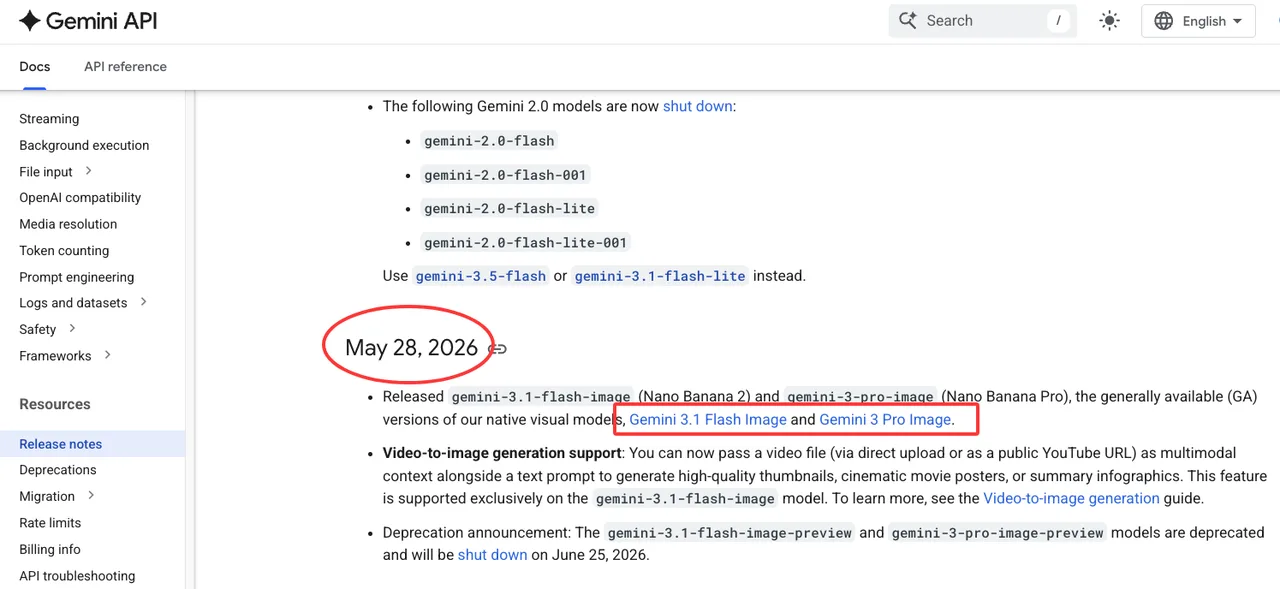
The current Gemini API release notes show gemini-3.1-flash-image and gemini-3-pro-image as GA image models on May 28, 2026, after the earlier Nano Banana 2 preview. That is the kind of source I would use for publish-day model status.
The Gemini Developer API pricing page currently has a dedicated Gemini 3.1 Flash Image section. I would link the page, not copy a fixed price table into a long-lived article. The moment a price changes, the copied table becomes a liability.
For quota, the Gemini API rate limits docs say limits vary by model and usage tier, rate limits are per project, and active limits can be viewed in AI Studio. That last part matters. A docs page can tell you the system shape. Your project view tells you what you actually have.
Region is the same story. A public availability page can tell you where the service is intended to operate. Your launch project tells you whether your team, account, billing setup, and deployment path can actually use it.
When to keep Nano Banana Pro or another image model in fallback
Keep Nano Banana Pro in fallback when your workflow is less about volume and more about precision: complex brand work, high-stakes localization, polished campaign assets, or outputs where world knowledge and detailed creative control matter more than throughput.
Keep another model in fallback when the risk is operational: quota pressure, regional availability, price movement, latency variance, or a specific failure mode in your test set. Fallback is not an insult to the primary model. It is how production systems stay boring.
My starting rule would be simple. Use Gemini 3.1 Flash Image for balanced production image work. Use Nano Banana 2 Lite for cheaper draft variants only if your QA numbers hold. Route precision-heavy work to Nano Banana Pro. Route quota or region issues to a pre-approved backup provider. Send policy or rights uncertainty to human review, not another model.
The last part is non-negotiable.
FAQ
What source should prove the model ID on publish day?
Use the official Gemini model card, the Gemini image-generation docs, and the Gemini API release notes. A media article, social post, or visible UI label in Google AI Studio can support context, but it should not be the only proof for a production article or launch note.
For this draft, the model ID I would verify is gemini-3.1-flash-image. On publish day, check it again. That is not paranoia. That is normal API hygiene.
How should teams document generated image rights for customers?
Document the full chain: uploaded asset rights, customer consent for reference images, prompt version, model ID, output ID, reviewer decision, usage policy status, and whether the asset contains AI provenance signals such as SynthID.
I would not tell customers “you own everything” unless legal has approved that exact sentence for the exact workflow. Better record the basis for use: who uploaded the source image, what rights were confirmed, what model generated the result, what policy checks ran, and what human review happened before delivery.
Boring recordkeeping wins later.
What release note should trigger prompt regression testing?
Any release note that changes model status, model ID, image resolution, aspect-ratio support, grounding behavior, reference-image behavior, text rendering, safety behavior, preview shutdown, or GA migration should trigger prompt regression testing.
For image workflows, I would rerun at least three sets: golden prompts, customer-like messy prompts, and past failure cases. The Nano Banana 2 API belongs in production only after it passes those tests with your prompts, your assets, and your review gates.
That is all I can confirm. The rest needs a publish-day check.
Previous posts:
Related Articles
/filters:quality(82)/media/images/1791535252286714222_v4jvJT2a.webp)
ModelsLab Review 2027: One API for Media Models?
/filters:quality(82)/media/images/1791451065663755033_qNqAKS1a.webp)
Best AI Video Background Removal Tools in 2027
/filters:quality(82)/media/images/1791359984291066138_tW5eOX6f.webp)
Best Comfy Cloud Alternatives in 2027
/filters:quality(82)/media/images/1773962750383987480_n3hqzHRZ.webp)
Qwen Image 2.1 vs Qwen Image 3.0: What Changes and When to Upgrade
What's Next for Wan Video Generation, and What It Means for Creators
/filters:quality(82)/media/images/1791271002496939282_TBLU3cmv.webp)