
Krea 2 Turbo API Guide for Fast Image Workflows
Krea 2 Turbo API guide for builders evaluating access, speed, cost, hosted availability, and production fallback for image workflows.

I checked the API row before I checked the model card. That order matters. For Krea 2 Turbo, a Hugging Face checkpoint tells me there are open weights. It does not tell me whether I can safely ship a production image generation API behind it tomorrow morning.
For an AI product team, the useful question is narrower: can this model path support fast image generation, predictable billing, review workflows, and production fallback without turning every launch into a manual exception? That is what this guide covers. No ComfyUI walkthrough. No LoRA file structure. No local quantization notes. Different article.
As of July 7, 2026, Krea’s own developer docs show public API access for a Krea 2 Medium Turbo endpoint, with auth, request schema, job states, and per-generation pricing. That is the evidence I would use. The open-weight release is supporting context, not API proof.
What Krea 2 Turbo Means for API Builders
Fast inference positioning and production use cases
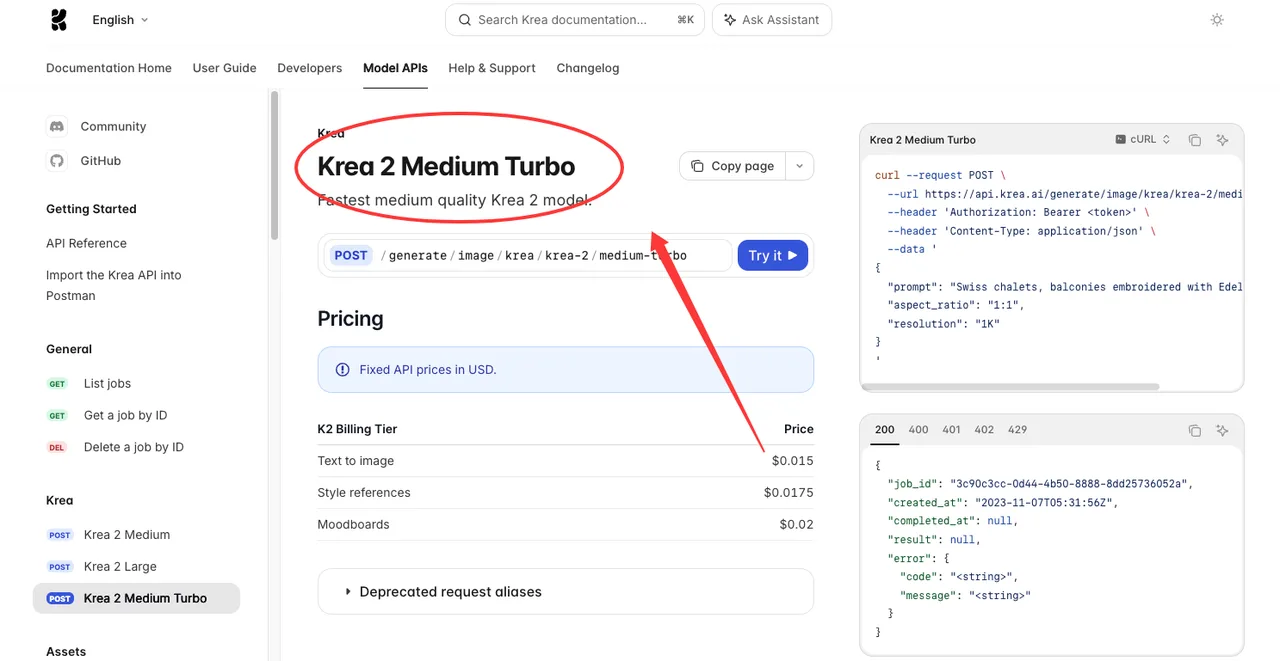
For builders, Krea 2 Turbo is mainly a speed-and-iteration candidate. Krea’s API reference describes the hosted Medium Turbo endpoint as the fastest medium-quality Krea 2 model, exposed at POST /generate/image/krea/krea-2/medium-turbo in the Krea 2 Medium Turbo API reference.
The positioning is clear enough: use it when the workflow values throughput and creative iteration more than the last few points of fidelity. That usually means ad concepting, product image drafts, social variants, mood exploration, and internal creative tools where users generate many candidates before picking one.
I would not start by asking whether Turbo is “best.” Too vague. I would ask whether it reduces re-entry moments in the product. If a designer or marketer needs ten variants before lunch, waiting less between variants changes how they work. Speed is not the goal. Not breaking flow is.
The API shape also matters. The endpoint accepts a prompt, aspect ratio, 1K resolution, optional seed, style references, moodboards, creativity, and K2 slider values such as intensity, complexity, and movement. That gives a product team enough control to expose a simple UI first, then add advanced controls later.
Hosted access, open weights, and API availability checks
There are three separate evidence tracks.
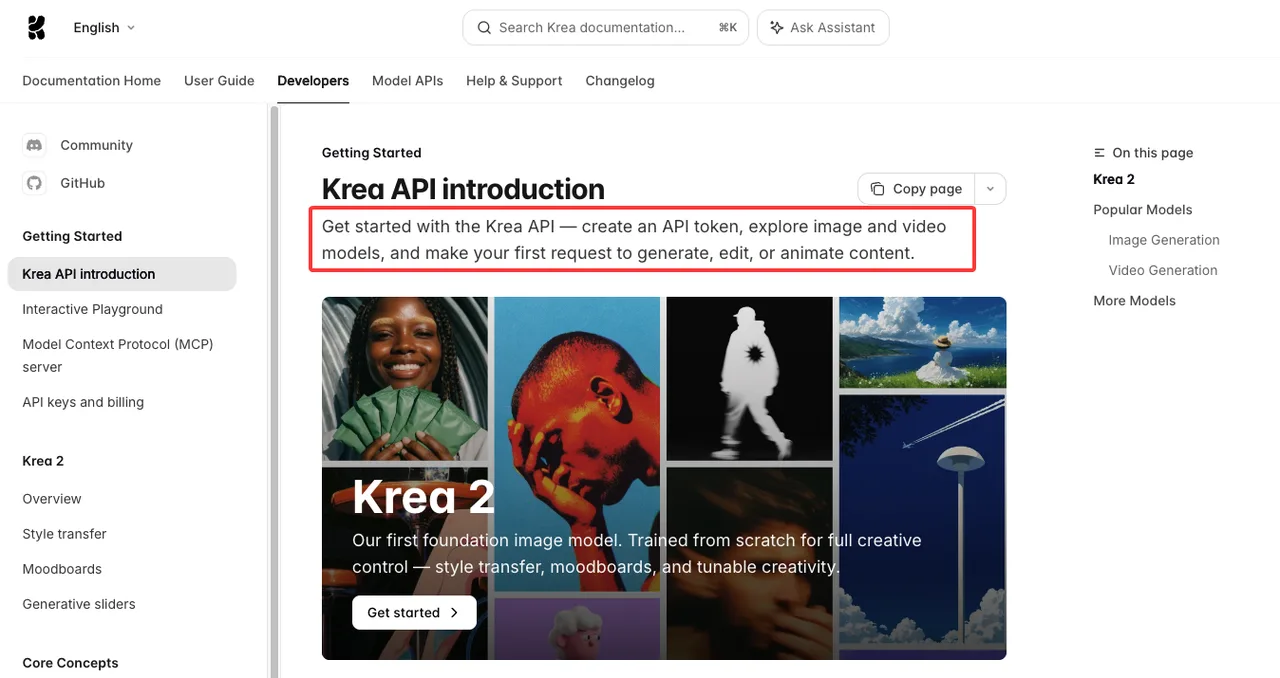
The hosted API track is the one that matters for production SaaS access. Krea’s Krea API introduction says developers can create an API token, browse image and video models, and make requests through simple REST endpoints. The public API reference then lists the Medium Turbo endpoint directly.
The open-weight track is different. Krea’s Krea 2 API overview says the open-source release includes Krea 2 RAW and an 8-step distilled Turbo checkpoint, with Hugging Face, GitHub, and technical report links. Useful. But a model card does not prove hosted API availability, uptime, billing, or workspace permissions.
The legal track is also different. Krea’s open-source Community License governs downloaded RAW and Turbo weights. Hosted API use is not the same legal surface. The Krea docs say hosted Krea 2 API calls are governed by standard API terms, so legal review should verify the current hosted terms before launch. I paused here. This is where teams tend to mix two documents and call it done.
Production Access Checklist
Availability, pricing, rate limits, and model versioning
Before putting Turbo behind a product feature, I would check four things on publish day.
First: public API availability. The strongest source is the specific API reference page for the endpoint, not the homepage, not the gallery, not Hugging Face. For this topic, that means the Medium Turbo endpoint page and the broader Krea 2 API docs.
Second: pricing. Krea’s Medium Turbo API reference lists fixed USD prices: text-to-image at $0.015, style references at $0.0175, and moodboards at $0.02 per completed generation. Treat those as date-sensitive. Krea’s API keys and billing docs also separate API billing from normal app usage, which matters if your finance model currently assumes subscription compute units.
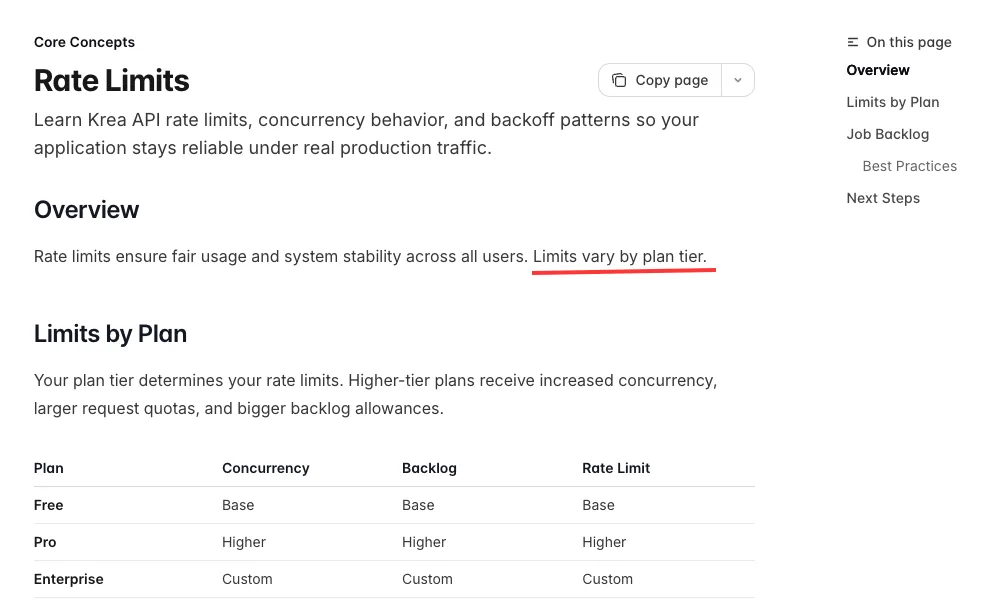
Third: rate limits. Krea’s rate limits docs do not publish one universal numeric cap. They say limits vary by plan tier, with higher tiers receiving more concurrency, larger quotas, and bigger backlog allowances; Enterprise is custom. That means no one should hard-code a public “X requests per minute” claim unless Krea exposes it for the specific workspace.
Fourth: model versioning and endpoint stability. I would store the exact route, request schema, supported aspect ratios, resolution, pricing, and fallback model in a model registry. Not in a React component. Not in a prompt template. Not in a random worker. Found the pattern on the third try: the registry is where model launches either stay controlled or turn into folklore.
Latency, output quality, review workflow, and fallback planning
Krea’s public API marketing page lists example model timings, but I would still benchmark inside my own workload. Marketing numbers rarely match your production path once prompts, style refs, moderation, queueing, webhooks, storage, retries, and review steps are included.
The hosted API uses async jobs. Krea’s job lifecycle docs list states such as backlogged, queued, scheduled, processing, sampling, completed, failed, and cancelled. They also state failed and cancelled jobs are not billed. For production, that means the app should track job state directly instead of assuming every submitted request becomes a usable asset.
The review workflow needs its own lane. For ad and product image generation, I would mark outputs as “draft,” run policy and brand checks, then promote selected assets into the product library. If the output goes directly to a customer, Turbo needs stronger guardrails: prompt filters, brand safety rules, manual review for high-risk categories, and retention decisions.
Fallback planning should be boring. Choose one speed fallback and one quality fallback. If Turbo is backlogged, fails, or misses a brand requirement, route to another model with known cost and quality behavior. If the output quality issue is systematic, roll the feature back to a non-Turbo default until the eval set passes again.
When Krea 2 Turbo Fits a Product Workflow

Ads, product images, design iteration, and high-frequency generation
Turbo fits when the user needs many acceptable candidates quickly.
For ad teams, that means first-pass concepts, background options, style directions, and campaign variants. For ecommerce teams, it means product scene exploration, category imagery, and fast internal review before a higher-fidelity pass. For design tools, it means “show me ten directions” rather than “give me the final hero image.”
The fit is strongest when the product already expects curation. A user generates, compares, rejects, regenerates, and selects. The model’s job is not to be perfect on the first output. The model’s job is to keep the loop moving.
Krea AI also gives teams a useful hosted-access path: API tokens, bearer auth, webhooks, asset handling, and model-specific endpoints live in the same developer surface. That is cleaner than stitching together one model for drafts, another for references, and a third service for job state. Having many tools is not the problem. Having to manage your tools is.
When not to use Turbo as the default model
Do not make Turbo the default when the output is high-stakes, final-delivery, or hard to review.
I would be careful with legal-sensitive ads, regulated product claims, celebrity likeness, children’s products, medical contexts, political content, and anything where brand accuracy matters more than speed. I would also avoid it as the only model when the user needs exact text rendering, strict product geometry, or photorealistic final assets without a review pass.
Turbo is also not the right default if the team cannot tolerate queue behavior. Krea’s rate-limit docs say excess jobs can move into backlog instead of being rejected. That is nice for batch stability, but it still affects product experience. If your UI promises instant output, backlog is a product bug even when the API is behaving as designed.
Krea 2 pricing should be part of the routing decision. A cheap fast draft can become expensive if the product encourages uncontrolled regeneration. Put budget caps at workspace, user, and feature levels. Track cost per accepted asset, not just cost per generated image.
FAQ
What source proves public API availability on publish day?
Use the Krea API docs page for the exact endpoint. For this article, the strongest source is the Krea 2 Medium Turbo API reference showing the POST endpoint, bearer auth, request body, pricing, and response schema.
The Hugging Face model card proves open-weight availability. It does not prove hosted Krea 2 API availability, Krea 2 pricing, rate limits, workspace permissions, or production support.
Who should approve launch if hosted access is still changing?
The approval group should include the product owner, backend or platform lead, finance owner for API spend, and someone responsible for legal or policy review. If the workflow touches customer uploads, brand assets, or regulated content, add security and compliance.
I would not let a growth team launch on speed alone. Fast outputs are useful. Fast outputs with unclear terms, unclear rate limits, or no rollback path are just a future incident written in friendlier language.
When should a team delay rollout despite fast outputs?
Delay rollout if the API page changed recently and the team has not re-run integration tests. Delay if pricing is not confirmed for the workspace. Delay if rate-limit behavior has not been tested at expected traffic. Delay if review workflow, asset retention, and production fallback are still unresolved.
Also delay if the eval set only checks pretty images. Pretty is not enough. For a production image generation API, the eval set should include bad prompts, brand constraints, reference-heavy inputs, queue pressure, failed jobs, cancelled jobs, and cost per accepted asset.
Conclusion
Krea 2 Turbo is interesting because it sits at the point where speed, hosted access, and product iteration meet. That makes it useful for AI product teams, but only if the access layer is treated like production infrastructure.
The safe path is simple: verify the hosted endpoint, confirm current pricing, check workspace rate limits, separate open-weight licensing from API terms, benchmark your own latency, and keep production fallback ready.
That’s it. Fast models are useful. Verified access is what makes them shippable.
Previous posts:
/filters:quality(82)/media/images/c347367a-a007-4466-b8f7-d37f5fb52819.webp)
/filters:quality(82)/media/images/cd4db796-7728-45fb-8267-6813ed28e173.webp)
/filters:quality(82)/media/images/1791535252286714222_v4jvJT2a.webp)
/filters:quality(82)/media/images/1791451065663755033_qNqAKS1a.webp)
/filters:quality(82)/media/images/1791359984291066138_tW5eOX6f.webp)
/filters:quality(82)/media/images/1773962750383987480_n3hqzHRZ.webp)